Welcome to the Onshape forum! Ask questions and join in the discussions about everything Onshape.
First time visiting? Here are some places to start:- Looking for a certain topic? Check out the categories filter or use Search (upper right).
- Need support? Ask a question to our Community Support category.
- Please submit support tickets for bugs but you can request improvements in the Product Feedback category.
- Be respectful, on topic and if you see a problem, Flag it.
If you would like to contact our Community Manager personally, feel free to send a private message or an email.
How to get non 45° chamfer dims to show dist x angle

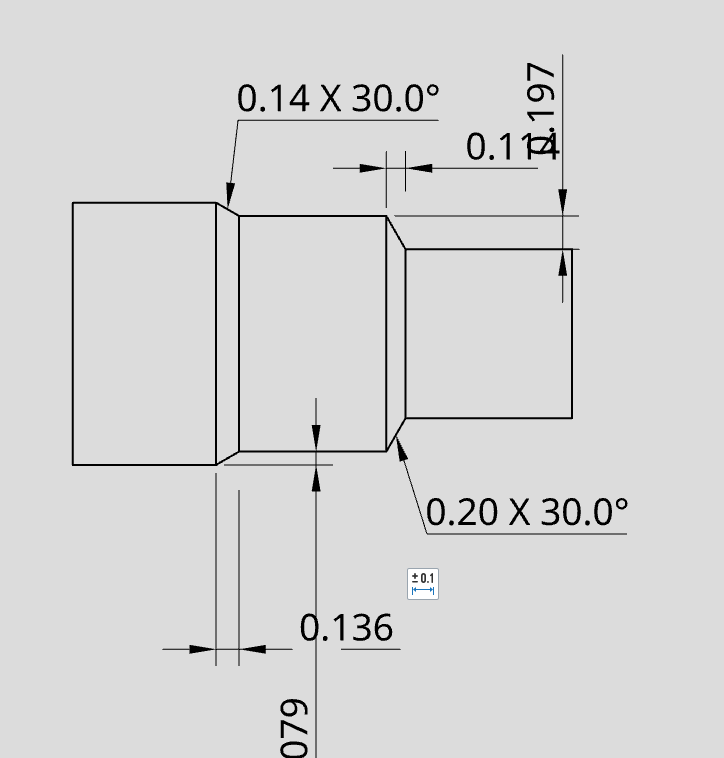
Ok. I'm not OS drawing expert for sure. Most of my work is modeling only. But this has me perplexed. How do I dimensions a chamfer in this situation with dist x angle WHEN its not 45°. The two chamfers that show 30° were created when the chamfer was at 45. then I went and changed the chamfer to 30 and 60 and tried to add a new chamfer dimensions and it just does this crazy double dimension thing now. Do I need to do all chamfers at 45 then dimension them and then change them to what I want and then finally updtate the drawing?
Tagged:
0
Answers
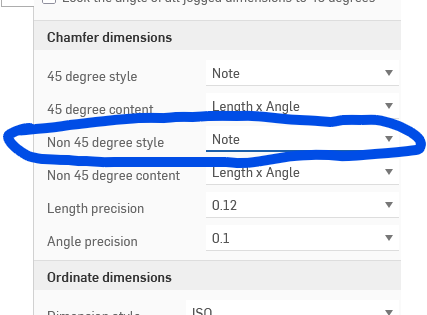
Nevermind I answered my own question.