Welcome to the Onshape forum! Ask questions and join in the discussions about everything Onshape.
First time visiting? Here are some places to start:- Looking for a certain topic? Check out the categories filter or use Search (upper right).
- Need support? Ask a question to our Community Support category.
- Please submit support tickets for bugs but you can request improvements in the Product Feedback category.
- Be respectful, on topic and if you see a problem, Flag it.
If you would like to contact our Community Manager personally, feel free to send a private message or an email.
Help with featurescript subtraction

I think my code's probably super messy, so sorry.
So, I'm trying to make a featurescript that will make holes in the end of square tubes. I got it to make a sketch with a circle, and Extrude it through all, but when I run the subtraction, it doesn't work. Do ya'll know why?
this is my intended result, if it helps.
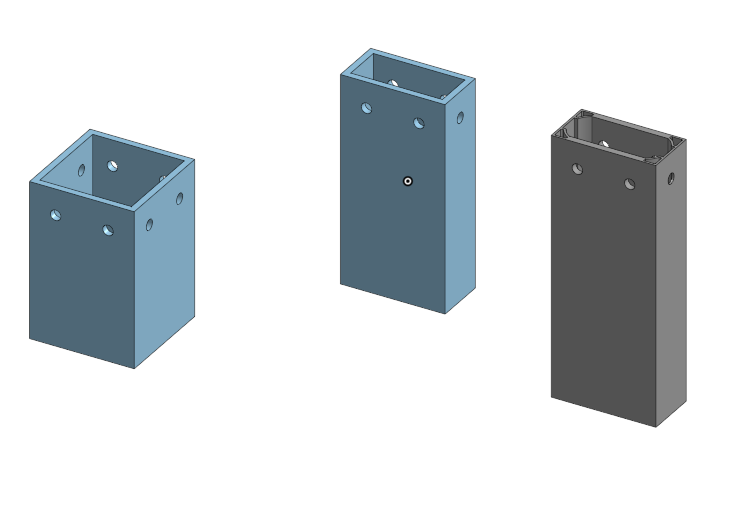
If you can help, thank you!
Comments
-
I suspect that your issue is the queries that you're passing ito the boolean:
"tools" : qCreatedBy(id + "extrude" + i), → All entities created by (id + "extrude" + i). Bodies, Faces, Verticies, Edges, etc. Note that I'd recommend changing this code to qCreatedBy(id + ("extrude" ~ i)). Id's can get brittle, and I've found that concatenated pattern to work well.
"targets" : evaluateQuery(context, qOwnerBody(qUnion(faces))), —> This seems like a backwards way to get what you're looking for. Why not just pass the part in as a parameter?
As a quick fix/test, I'd do the following:
- Filter your tools down so it's just getting bodies. You can do this by adding an EntityType.BODY and or BodyType.Solid to your query, or by wrapping an additional Entity/Body type filter around your tools query.
- Add debug entities for both your tools and targets. Are they showing up as you'd expect?
0 -
I did the first thing, but it didn't fix it.
What do you mean by a debug entity?
0 -
I'd look into the featurescript classes at learn.onshape.com. I'd also look at how you're getting entities with qCreatedBy - when you type it out, tooltips pop up and could help you get the query you're actually looking for. addDebugEntities is a way of highlighting certain entities which is really helpful when debugging a feature (and occasionally, to make feature operation more intuitive to the user).
0 -
Fixed it.
Here's what I put for the Boolean
opBoolean(context, id + "boolean1", {
"tools" : qCreatedBy(id + ("extrude" ~ i), EntityType.BODY),
"targets" : qOwnerBody(face),
"operationType" : BooleanOperationType.SUBTRACTION
});1 -
Alright! I'm back for more!
I basically completely redid it, and my code is much cleaner and more optimized, but it's giving me an error and in the featurescript panel its says "@opExtrude: CANNOT_RESOLVE_ENTITIES".
I'm not sure what's up here. I think it has something to do with my sketch, maybe, but I'm not sure.
0 -
annotation { "Feature Type Name" : "Tube Plug", "Feature Type Description" : "Makes Holes in a tube for a tube plug" }
export const myFeature = defineFeature(function(context is Context, id is Id, definition is map)
    precondition
    {
        annotation { "Name" : "Tube Ends", "Filter" : EntityType.FACE } // Parameter "Tube Ends", filter for Faces
        definition.tubeEnds is Query;
    }
    {
        var i = 0;

        for (var face in evaluateQuery(context, definition.tubeEnds))
        {
            const allEdges = qAdjacent(face, AdjacencyType.EDGE, EntityType.EDGE);

            const edges = [qLargest(allEdges), qLargest(qSubtraction(allEdges, qParallelEdges(allEdges, qLargest(allEdges))))];

            for (var edge in edges)
            {
                var holeFace = qSubtraction(qAdjacent(edge, AdjacencyType.EDGE, EntityType.FACE), face);
                var sketchPlane = evPlane(context, { "face" : holeFace });
                var sketchId = id + ("sketch" ~ i);

                var sketch = newSketchOnPlane(context, sketchId, {
                        "sketchPlane" : sketchPlane
                    });

                skCircle(sketch, "circle1", {
                            "center" : vector(0, 0) * inch,
                            "radius" : .105 * inch
                        });

                skSolve(sketch);

                opExtrude(context, id + ("extrude" ~ i), {
                            "entities" : qSketchRegion(sketchId),
                            "direction" : -sketchPlane.normal,
                            "endBound" : BoundingType.THROUGH_ALL
                        });

                opBoolean(context, id + ("boolean" ~ i), {
                            "tools" : qCreatedBy(id + ("extrude" ~ i), EntityType.BODY),
                            "targets" : qOwnerBody(face),
                            "operationType" : BooleanOperationType.SUBTRACTION
                        });

                i += 1;
            }
        }
    });
Senior Director, Technical Services, EMEA1 -
I know this is a quick example and not particularly performance bound, but isn't it better to say:
const endFaces = evaluateQuery(context, definition.tubeEnds;

for (var face in endFaces)
{…
You do something similar with the inner loop.
Simon Gatrall | Product Development, Engineering, Design, Onshape | Ex- IDEO, PCH, Unagi, Carbon | LinkedIn
0 -
@S1mon the evaluateQuery is only evaluated once to produce an array so it should make no difference.
The biggest performance hit here is doing multiple opBoolean's - they should be all collected with some clever id grouping and done once at the end.
Senior Director, Technical Services, EMEA0 -
That worked! Many thanks!
0 -
Alright, I've now almost finished.
I want it to put the holes in the end of the tube no matter the orientation. I can't manage to get it to always put the holes in the right spot though. It sometimes just doesn't make them and it sometimes makes half of them. I think it maybe has something to do with the way I oriented the planes. I have the z axis set to the normal of the plane and the x axis to the edge between the sketch plane and the tube end. Is there a better way to define this?
Sorry for the bother.
0



