Welcome to the Onshape forum! Ask questions and join in the discussions about everything Onshape.
First time visiting? Here are some places to start:- Looking for a certain topic? Check out the categories filter or use Search (upper right).
- Need support? Ask a question to our Community Support category.
- Please submit support tickets for bugs but you can request improvements in the Product Feedback category.
- Be respectful, on topic and if you see a problem, Flag it.
If you would like to contact our Community Manager personally, feel free to send a private message or an email.
Custom Feature: Tangent Fill

FeatureScript link
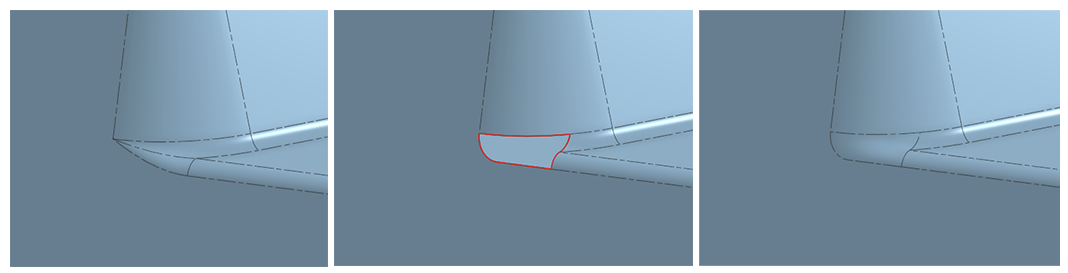
I've been using SolidWorks a lot lately (not by choice) and one of the features I found that is nice is the Tangent option in the Filled Surface feature for when you're filling in patches in places where fillets leave sharp pinch points.
Now, while the native Onshape Fill already does this, it's a PITA having to click on each dropdown to select Tangent. So here it is, folks. That's all this does. It defaults every edge continuity to tangent. I did throw in a select Open Loop edges option for the extra lazy folks like me.
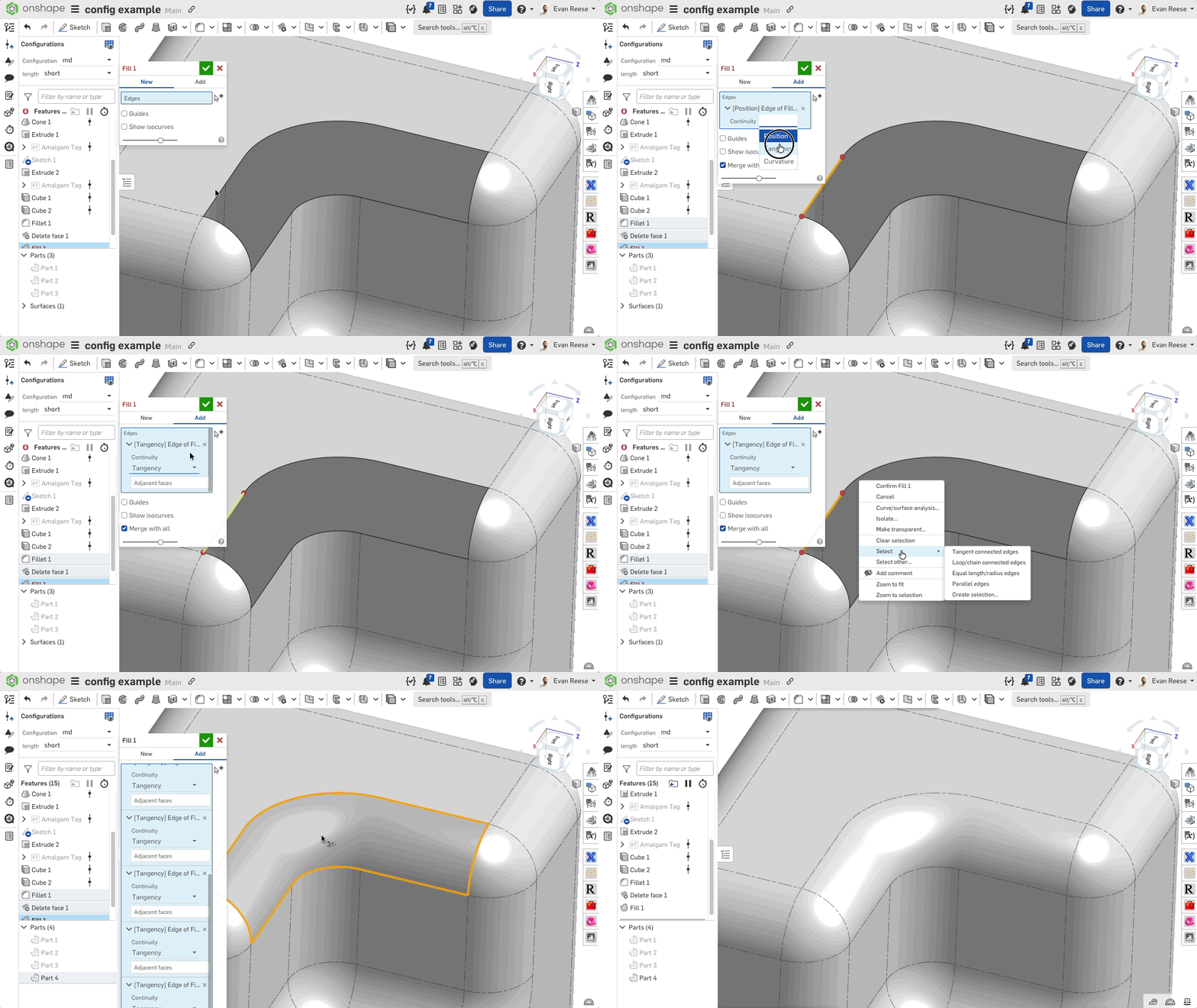
On the off chance that no else has built this yet, just look at how many clicks I've saved you! In the example below, using regular Fill, it takes 12 clicks, while Tangent Fill needs only 1 click. I just gave you 15 seconds of your life back. Or else, let me know if this already exists, so I can delete this post (or the equivalent of that) and I can forget about this script I hastily put together.
Ramon Yip | glassboard.com
Comments
-
-
If, after you make the first selection in Fill, you set the continuity to Tangent, all subsequent selections will also be tangent. This does not work with create selection though, so very useful and cool feature!
Senior Director, Technical Services, EMEA1 -
That's odd. I made it public before posting. Try again now.
Another thing is you can't access FeatureScript tabs while on mobile.
Ramon Yip | glassboard.com
0 -
-
That's an interesting way to do those corners. Is this something that you regularly "need" to do? or is it just preferred? And for what type of objects is this being applied to? Curious about the real world use cases that prompted this.
Maybe you could probably create an "auto fix" feature where it does all that sketching/extruding/deleting for you and then applies the tangent fill feature all in one go. I've not created any scripts though. Just thinking out loud.
0 -
It's commonly done in industrial design for aesthetic reasons. It's a direct application of this:
You're right that all of the steps could be automated, but generally speaking the blend tends to be pretty custom. I just automated the one pain point I saw in Onshape, compared to SW. It'd be cool to automate the whole workflow, though.
Ramon Yip | glassboard.com
0 -
My condolences on the Solidworks projects.
Thanks for sharing the feature! Your feature isn't exactly the same as mine, and fills a somewhat different need, but I wrote a feature called Cap Surface, that kind does this, but for all open holes in a part at once, which doesn't offer as much control as yours. Mine gives continuity options, but it applies to all edges at once.
It works with create selection as long as you made the first one and set it to tangent first, and make sure you're not trying to select "adjacent faces" with create selection.
 1
1 -
You know, I have Cap Surface added, but I've mainly been using it as its Rhino counterpart (cap planar faces), but thanks for the reminder. Cap Surface would condense patching all of the holes into one feature if you had multiple holes, which is awesome.
Regarding the selection order, huh, that's interesting. I probably wouldn't have written this if I knew the trick. You just have to click things in the right order.
Also, weirdly, if you use the Create selection pop-up, then it resets your continuity selection.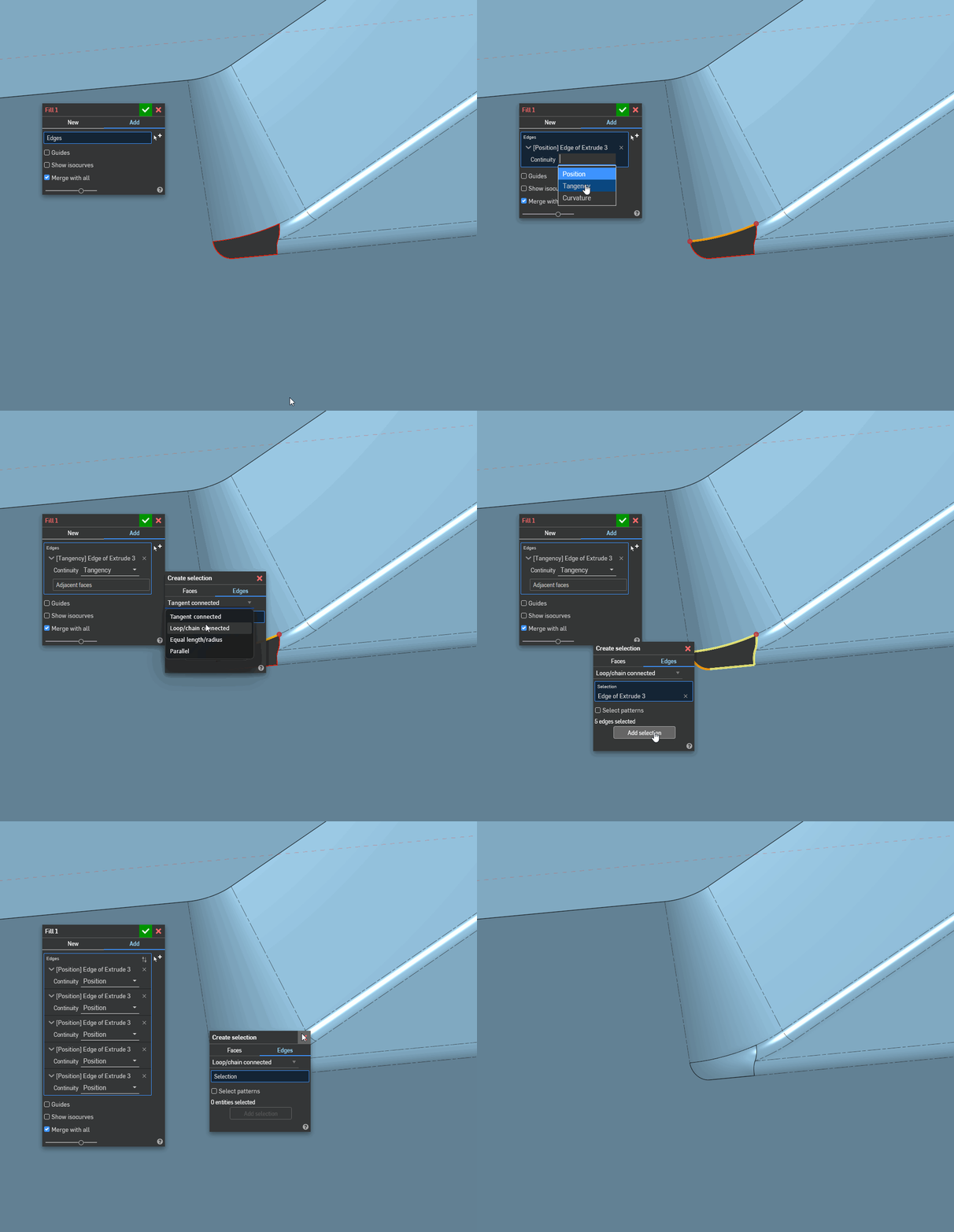
Ramon Yip | glassboard.com
0 -
whaaa?! Now that's a new one for me. I guess I avoid the Create Selection window and didn't notice, but it turns out Neil and I are both right.
0 -
wow that is weird inconsistency…. button and right click do different things when the selection set is passed back to the feature. sounds like something the onshape team would want to know about.
0 -
What I really really want is something where I can hit a keyboard command to cycle through the continuity options (G0, G1, G2, G3) for all the inputs for bridging curve, loft, boundary surface, fill, etc… and then individually cycle edges if needed. 9/10 times this is how things work in the real world. Most things want to be the same continuity, and zero, one or a few need to be changed to G0 or maybe G1.
Simon Gatrall | Product Development, Engineering, Design, Onshape | Ex- IDEO, PCH, Unagi, Carbon | LinkedIn
0 -
Someone's been using Plasticity a bunch. I'd love it if we had to option to just tab between continuity options. It gets really click-heavy with the current IU.
Also agreed, there's plenty of times where I need everything to G1 except for one edge that's G0. I wonder if there's some happy medium to be had because I don't suppose we're getting a Plasticity-type UI sometime soon.
I had the thought in my head of separating the query parameters to allow for the selection of G0 and G1 edges separately.
Edit: I went ahead and implemented a rudimentary version of that. @S1mon any thoughts on this? basically, you select your G1 edges (through open loop or individually) and then any edges that are selected in the G0 box override the G1 selection. I added a debug/edge visualizing tool as well, as it's hard to tell in SW which edge has which continuity sometimes. Even if you don't end up using it, I might find a use for it for those edges cases. It's not the keyboard command edge toggle, but I think (?) it's still more efficient.
Link to feature: Fill G0/G1Ramon Yip | glassboard.com
2