Welcome to the Onshape forum! Ask questions and join in the discussions about everything Onshape.
First time visiting? Here are some places to start:- Looking for a certain topic? Check out the categories filter or use Search (upper right).
- Need support? Ask a question to our Community Support category.
- Please submit support tickets for bugs but you can request improvements in the Product Feedback category.
- Be respectful, on topic and if you see a problem, Flag it.
If you would like to contact our Community Manager personally, feel free to send a private message or an email.
How can I fix the connections in a bar linkage of a robotic arm assembly exported as an URDF?

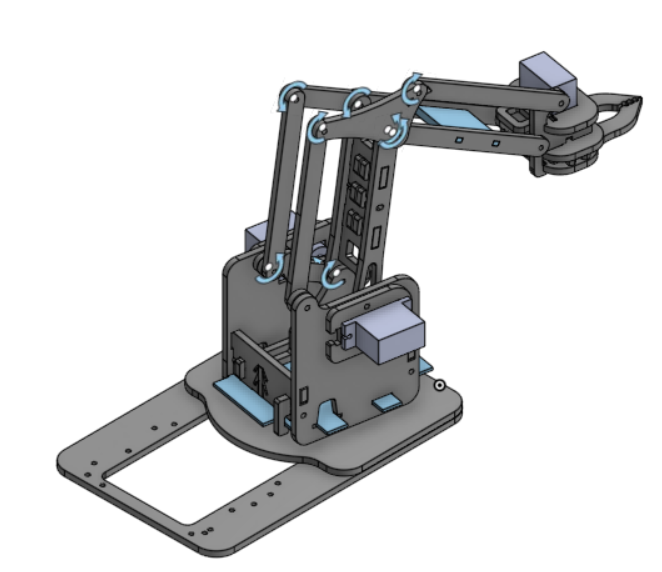
Hello, I'm a college student with a robotic project for educational purposes and I'm trying to make a functional URDF file that moves the same way my assembly does, however after I export it as an URDF I see some issues between the revolute mates between the bars in the arm assembly.
Since the bars need a revolute mate in each end they depend on two joints which is something impossible in a URDF due to the parent-child link relationship in a joint. With this in mind, I am assuming Onshape creates placeholder links called 'loop_closure_link' that were made with the only purpose of closing the loop of the bar linkage.
The problem is that when I upload the exported folder to an urdf visualizer, some of the links are disconnected and the joint sliders break the assembly.
Can someone help me fix this?
The following document includes all the parts from the assembly in the first folder, they come from the product called MeArm:
Answers
-
Could be as simple as changing some of the revolutes to cylindrical.
I think thats the right way round…
Engineering textbook: https://hwh.stephenteacher.com/txtbook.html0 -
Hi thanks for your response, but wouldn't that only make a prismatic joint in addition to the revolute joint in an urdf? I believe that is how Onshape exports a cylindrical mate into an urdf joint
0
