Welcome to the Onshape forum! Ask questions and join in the discussions about everything Onshape.
First time visiting? Here are some places to start:- Looking for a certain topic? Check out the categories filter or use Search (upper right).
- Need support? Ask a question to our Community Support category.
- Please submit support tickets for bugs but you can request improvements in the Product Feedback category.
- Be respectful, on topic and if you see a problem, Flag it.
If you would like to contact our Community Manager personally, feel free to send a private message or an email.
Any efficient ways to make a cutlist from a cabinet drawing?

Im trying to guage the possibilities of using OnShape for woodworking.
One of the functions im missing is the ability to select all my parts, and put the dimensions in a list or a table.
Is there any featurescripts that can do this? I've seen the "frame" workflow, but that seems very inconvenient when you've allready drawn a cabinet.
No way to do this with something thats allready made?
Made the document you're all going to ask for anyways. It's just a box, but thats what i need i for :)
https://cad.onshape.com/documents/02f4c8fee228a6529f6c68f1/w/36a0f69b5a96fd83c233a528/e/f29ef0b5b2262cdaebc4bd7e
Answers
-
You probably don't need to gauge the possibility. There are companies using it and relying on it for production.
1 -
Can confirm that 6 years later, we are still using Onshape and creating 100% of our kitchens with Onshape. We're continuing to generate more and more information solely from the model, and are implementing more integrations with tools like Onshape's API. We've also had conversations with other cabinet manufacturers and have convinced them to make the switch to Onshape. So in terms of feasibility, it's doable. There is some work involved, but we have embraced Onshape as our primary CAD system and have found great success with it.
Quick tips:
- Configurations will be your best friend
- While none of our 150+ custom features are public, there are some on the forum that might help get you started. @MichaelPascoe's Cutlist + might give you a good idea about different ways to create a cut list.
- Onshape is very customizable, much more than even seasoned FeatureScript developers realize. See more at my LiveWorx panel: Customize Your CAD with FeatureScript.
Keep in mind, we're a highly custom cabinet manufacturer, so chances are you probably don't need to invest as much time as we did to get a solution up and running. If you have further questions, feel free to reach out.
Applications Developer at Premier Custom Built
chadstoltzfus@premiercb.com3 -
Use the custom feature "Stock Size" in your Parts Studio. Insert the parts into an assembly and you will find the part dimensions in the Title 1 column of the BOM. Your box has only three unique parts- a better workflow would be to insert multiple instances of the parts as needed and mate them correctly in the assembly. https://cad.onshape.com/documents/3593aa8fd07a18d2106641a6/w/d5fa0b0cf83c1cd6f75c0f93/e/41cfb6a794413cc7f42bf1c6
-1 -
.
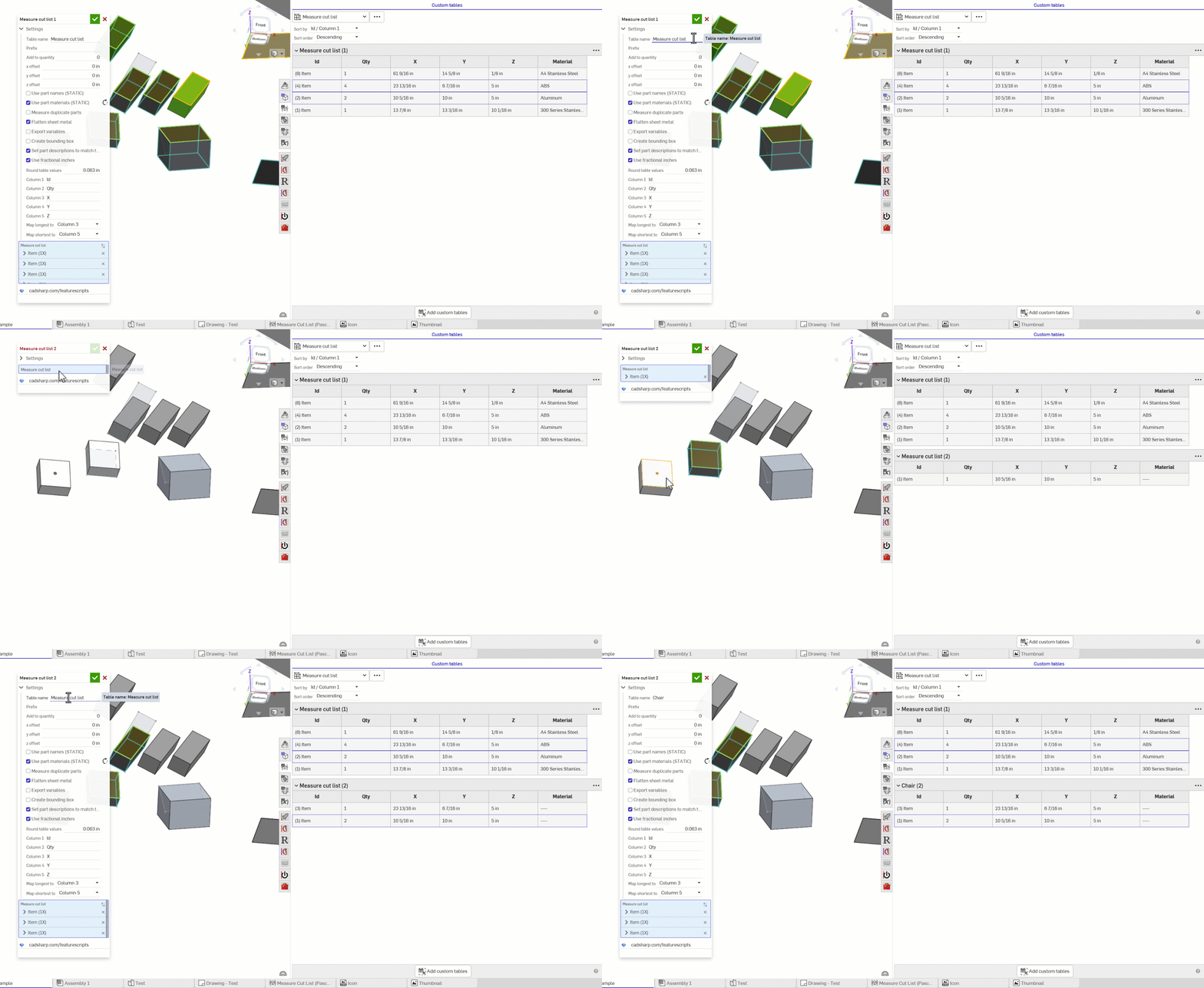
@chadstoltzfus Cutlist+ is for frames. Measure Cut List is for generic use with things like cabinets. I should probably merge them into one feature. Measure Cut List will also name the parts so that you can have them show up in the bom list with sizes, or you can keep them in the part studio and use the custom table it produces to view the cut list.
.
RENDERCAD
rendercad.ai - Photorealistic product rendering.
▚▞▚▞▚▞▚▞▚
________________________________________________________________________2 -
I wasn't satisfied with the existing options for creating cutting list and laying out Onshape files on to boards, so I built my own tool called Cutlist Studio. Maybe it's useful to you! You can export a GLTF model from onshape, and i'll map the model onto boards and creates a print-ready cutlist. Would love some feedback on it if it's of use!
5 -
Registered for the forums here just to say thank you. This tool is incredible and, so far "just works™" with the simple models I've thrown at it.
It's so good I'm actually afraid it's going to disappear.
Huge time saver for me as a hobbyist.
1 -
Matt this is AMAZING. It is really simple and intuitive, it really feels like you knew exactly what you (and us) were struggling with and solved it straight from the user perspective.
We love free stuff, but it would be nice to add a donate button so we can properly say thank you.1 -
Very nice, very helpful, thanks. I am experiencing an issue with it for my current project though, JFYI. Nothing that will really impact things for me since I only needed the function for estimating what plywood panels to buy. But just for you own personal knowledge and bug-fixing. For some reason, on two of the panels in my project your tool is not pulling the dimensions correctly. The panels are both exactly 14.5 x 38 x .75 in OnShape, but when imported to your tool it somehow interprets them as 14 5/8th x 38 1/4 x 3/4. I have attached the model for your reference. Again, not anything I am needing you to fix since I can work around it, just letting you know that a glitch/bug was found. Also, again, thank you so much. This tool will save me a lot of time as my previous workflow involved jumping into TinkerCAD and manually "calculating" (via trial and error) what size panels worked best with my required panels.
0



