Welcome to the Onshape forum! Ask questions and join in the discussions about everything Onshape.
First time visiting? Here are some places to start:- Looking for a certain topic? Check out the categories filter or use Search (upper right).
- Need support? Ask a question to our Community Support category.
- Please submit support tickets for bugs but you can request improvements in the Product Feedback category.
- Be respectful, on topic and if you see a problem, Flag it.
If you would like to contact our Community Manager personally, feel free to send a private message or an email.
Struggling with extruding a cube
 jason_ryan337
Member Posts: 72 ✭
jason_ryan337
Member Posts: 72 ✭
Hi all,
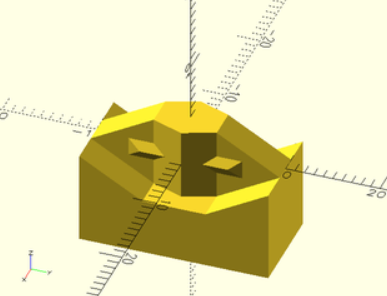
I'm trying to code a feature script to replicate the SCAD BOSL2 joiner component (link). I've been able to create the object manually (link), but for the life of me, I cannot get anything to extrude in my feature script. I've recruited a couple of AI's as well who've been the opposite of helpful, lol.
I have tried to simplify the geometry to a four pointed rectangular feature to try and just get something to extrude, but it keeps failing to generate. Any help would be truly appreciated.
https://cad.onshape.com/documents/880276dfd0551b289c861d1f/w/9cc45a96d7a87ec1d9960240/e/4dc1dde8de5b5be1b1e3f6b8
Comments
Why do you need to create a custom feature if you can model and configure it?
Hi Neil. I just thought the community would enjoy being able to use them as they print well and are outstanding at closing gaps.
Absolutely, but just share your excellent model 😀
For this kind of thing it's an easier lift to draw a configurable part studio like you have and use the custom Point Derive feature to greeble your geometry into other documents rather than trying to code up a full custom feature from scratch to accomplish the goal. Sometimes I'll use a method I like to call two-point-derives-in-a-trenchcoat to pseudo make custom features that are easy to model and hard to program.
Derek Van Allen | Engineering Consultant | MeddlerNow that the "native" derive allows multiple instances and placement on mate connectors you don't even need the point derive.
That said a "generic" method for both adding and removing material in one step would be nice. Like the "form tools" but for "regular" geometry.
@eric_pesty I've been leaning on the integrated Boolean operations with Point Derive but the dream is to wrap multiple operations into one feature exactly like the form tools. It's in my development backlog to do that exact feature but I'm holding off on it until more library types are supported which I know is coming at some point.
Derek Van Allen | Engineering Consultant | MeddlerHi all! Thank you all so much for the comments!
For some reason, I did not get any notifications :-(. So I did manage to get the tool designed and looks great except there is one problem. I cannot seem to join/boolean my created parts onto the pre-existing male and female bodies that are intended to become a snap fit.
I have the working code below and highlighted two sections with lots of "!!!!!" to show where I'm stuck trying to boolean new parts to pre-existing parts. I have burnt up a weeks worth of credits on claude.ai and exhausted gpt-5 with no resolution.
EDIT: It should be noted that the object joiner_clear does overlap with the femaleBody. I have tried cutting it out (which works perfect) and then to merge it, but it still does not work…
FWIW and probably not useful, but I kept and commented out the several failed attempts in the txt file.
I am really looking forward to sharing this file to the community, and you continued support is greatly appreciated!
(link)
Hi again. Any ideas why i cannot boolean add to a pre-existing solid. I tied to connect to two parts, maleBody and femaleBody, but neither seem to work. Thanks!
https://cad.onshape.com/documents/880276dfd0551b289c861d1f/w/9cc45a96d7a87ec1d9960240/e/6fb6e61632b3afd93ac8bc61
Solved finally…. Needed to add one line to the boolean operations: "targetsAndToolsNeedGrouping" : true
https://forum.onshape.com/discussion/8908/opboolean-unions
Hopefully with some fine tuning, I can post this solution!
Finally finished and published in spite of several of my requests for help not getting submitted onto this forum. TBH not even sure why I am bothering to follow up.
https://cad.onshape.com/documents/880276dfd0551b289c861d1f/w/9cc45a96d7a87ec1d9960240/e/d706fb59a0ff1cd5caeb291f