Welcome to the Onshape forum! Ask questions and join in the discussions about everything Onshape.
First time visiting? Here are some places to start:- Looking for a certain topic? Check out the categories filter or use Search (upper right).
- Need support? Ask a question to our Community Support category.
- Please submit support tickets for bugs but you can request improvements in the Product Feedback category.
- Be respectful, on topic and if you see a problem, Flag it.
If you would like to contact our Community Manager personally, feel free to send a private message or an email.
Help with correcting my fs please
 Aly_k
Member Posts: 17 ✭
Aly_k
Member Posts: 17 ✭
Can someone please assist in helping me correct my fs code.
FeatureScript 2815;
import(path : "onshape/std/common.fs", version : "2815.0");
import(path : "onshape/std/table.fs", version : "2815.0");
annotation { "Feature Type Name" : "Custom Part Table from Config Table" }
export const customPartTable = defineFeature(function(context is Context, id is Id, definition is map)
{
// Name of your configuration table in Onshape
const configTableName = "PARTS"; // Update this if your table is named differently
// MANDATORY PRECONDITION: Must check that the configuration table exists before fetching data.
precondition(hasConfigurationTable(context, configTableName), "Configuration table '" ~ configTableName ~ "' must exist in the Part Studio.");

// Get all row names from the configuration table
var rowNames = getConfigurationRowNames(context, configTableName);

if (size(rowNames) == 0)
{
    // Table is empty, no rows to display
    return;
}

// Collect all parts (rows) and all unique column names (keys)
var allKeys = {};
var PARTS = [];

for (var rowName in rowNames)
{
    // Fetch the parameters for the current row
    var part = getConfigurationParameters(context, configTableName, rowName);

    // Include the row name as the 'Name' column if the row doesn't specify one
    if (!hasKey(part, "Name")) {
        part = part + { "Name": rowName };
    }

    // Collect all unique keys for column definitions
    for (var key in part)
    {
        allKeys[key] = true;
    }
    PARTS = append(PARTS, part);
}

// --- Column Generation Logic (Ensures consistent, predictable column order) ---

// Define a preferred order for important columns to ensure consistency
const PREFERRED_KEYS = ["Name", "Desc", "Material", "Length", "Diameter", "Width", "Height"];

var columns = [];
var processedKeys = {}; // Keep track of keys we've already added

// 1. Add preferred keys that exist in the data
for (var i = 0; i < size(PREFERRED_KEYS); i++)
{
    var key = PREFERRED_KEYS[i];
    if (hasKey(allKeys, key))
    {
        columns = append(columns, tableColumn(key));
        processedKeys[key] = true;
    }
}

// 2. Collect remaining unique keys
var remainingKeys = [];
for (var key in allKeys)
{
    if (!hasKey(processedKeys, key))
    {
        remainingKeys = append(remainingKeys, key);
    }
}

// 3. Sort the remaining keys alphabetically for deterministic ordering
remainingKeys = sort(remainingKeys, comparator());

// 4. Append the sorted remaining keys
for (var key in remainingKeys)
{
    columns = append(columns, tableColumn(remainingKeys[key]));
}

// --- End Column Generation Logic ---

// Build table rows dynamically using the collected PARTS data
var rows = [];
for (var part in PARTS)
{
    var row = [];
    // Iterate through the determined, ordered columns
    for (var col in columns)
    {
        var colName = columns[col].name;
        if (hasKey(part, colName))
            row = append(row, part[colName]);
        else
            row = append(row, "—"); // Empty if part does not have this property
    }
    rows = append(rows, row);
}

// Create the custom table
table(id + "PartTable", {
    "columns": columns,
    "rows": rows
});
});
I don't seem to understand what I am doing wrong these are the errors I am getting.
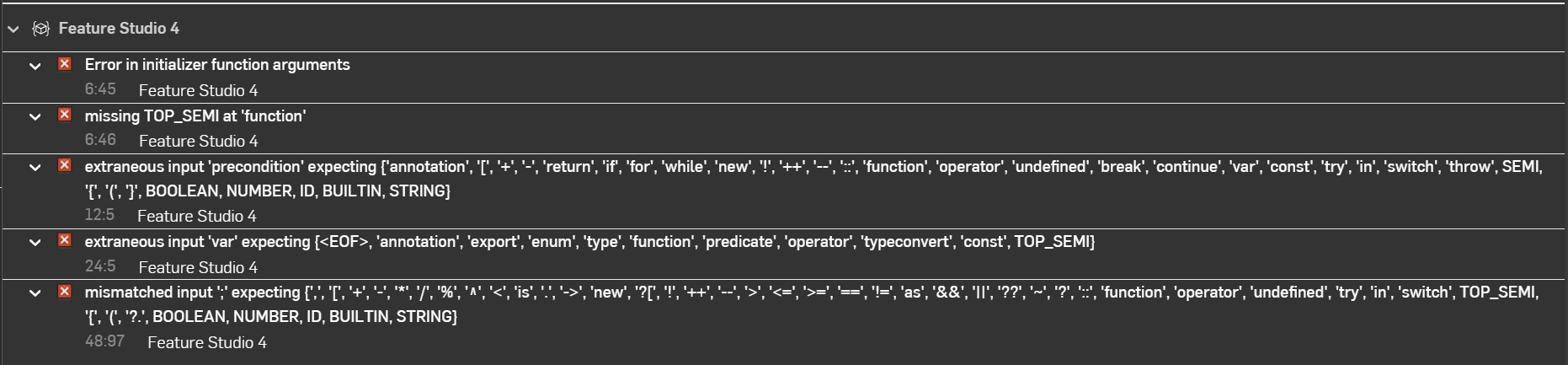
this fs will be used to reference certain things from a configuration table and turn that info into a custom table for me so I can insert that table into a drawing.
Comments
one thing:
i += 1
then there's something wrong with the precondition definition. But i haven't programmed tables before so i'm not sure what.
BUT if you add
precondition{} before the function block, and comment out the existing precondition line,
There are still a bunch of functions that aren't recognised…
ahh I see thank you!