Welcome to the Onshape forum! Ask questions and join in the discussions about everything Onshape.
First time visiting? Here are some places to start:- Looking for a certain topic? Check out the categories filter or use Search (upper right).
- Need support? Ask a question to our Community Support category.
- Please submit support tickets for bugs but you can request improvements in the Product Feedback category.
- Be respectful, on topic and if you see a problem, Flag it.
If you would like to contact our Community Manager personally, feel free to send a private message or an email.
Custom Feature: Amalgam Tag and Amalgamate
 Derek_Van_Allen_BD
Member Posts: 816 PRO
Derek_Van_Allen_BD
Member Posts: 816 PRO
Are you like me and use Point Derive for everything? The ability to draw a part studio in one document and copy and paste functional geometry all over a different document is a huge force multiplier for quickly and precisely generating complex parts that adhere to centralized standards and document control schemes. For awhile I would tell people that they don't need a new custom featurescript for an operation, they just need a clever tool studio and Point Derive. There are 2 big downsides to Point Derive, however, and a relatively recent addition to the Onshape standard tools solves both. The first issue with Point Derive is that even though it allows for all the boolean operations right in the feature, sometimes I want to do additive and subtractive operations in the same feature. The other issue is that searching for my Point Derive tool documents in a shared workspace with my coworkers is like finding a needle in a haystack and I wish there were a way to just type in the name of the thing I'm looking for into the feature itself and have my tool geometry populate.
The Sheet Metal Form feature solves both of these problems. With the Form feature you can pre-determine a union body and a subtraction body for forming geometry and place complex details all over your sheet metal parts, adding and subtracting in the same step. It also carries with it the ability to start typing into the fields and filter to the relevant form studios due to a recent update. So I bootlegged the sheet metal feature to get it to work on non-sheet metal parts.
Introducing two new features: Amalgam Tag and Amalgamate
Amalgam Tag works in much the same way as the existing Tag feature, but I've stripped back some of the sheet metal specific functions in it to operate more generically as well as allowing the user to paint multiple bodies for subtraction or union operations. (Sheet Metal limits you to one each for largely logical reasons) You can even tag parts for an Insert→ New operation if you have objects that you want to place into locations in your downstream studios and don't want to merge them with either a union or a subtraction operation.
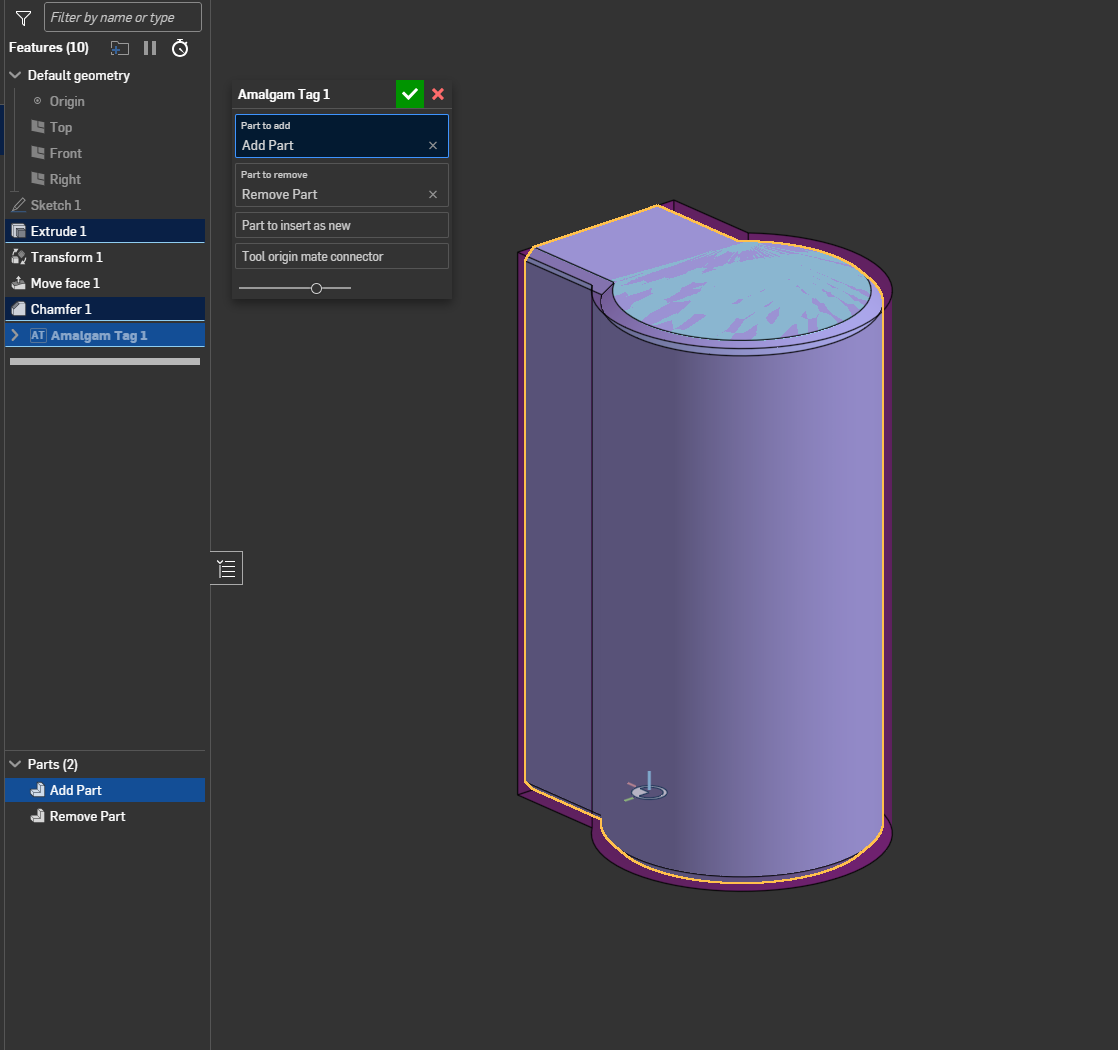
Amalgamate works in much the same way as the Point Derive or Form features work. You select seed locations to do your business with and the feature will draw new instances of geometry at your selected locations oriented by mate connector and then the script will execute the boolean operations you defined on each of the seed bodies at each of the locations. Different scopes are allowed for the union and subtraction operations for cases where you want to add material to one body but remove material from a different body.
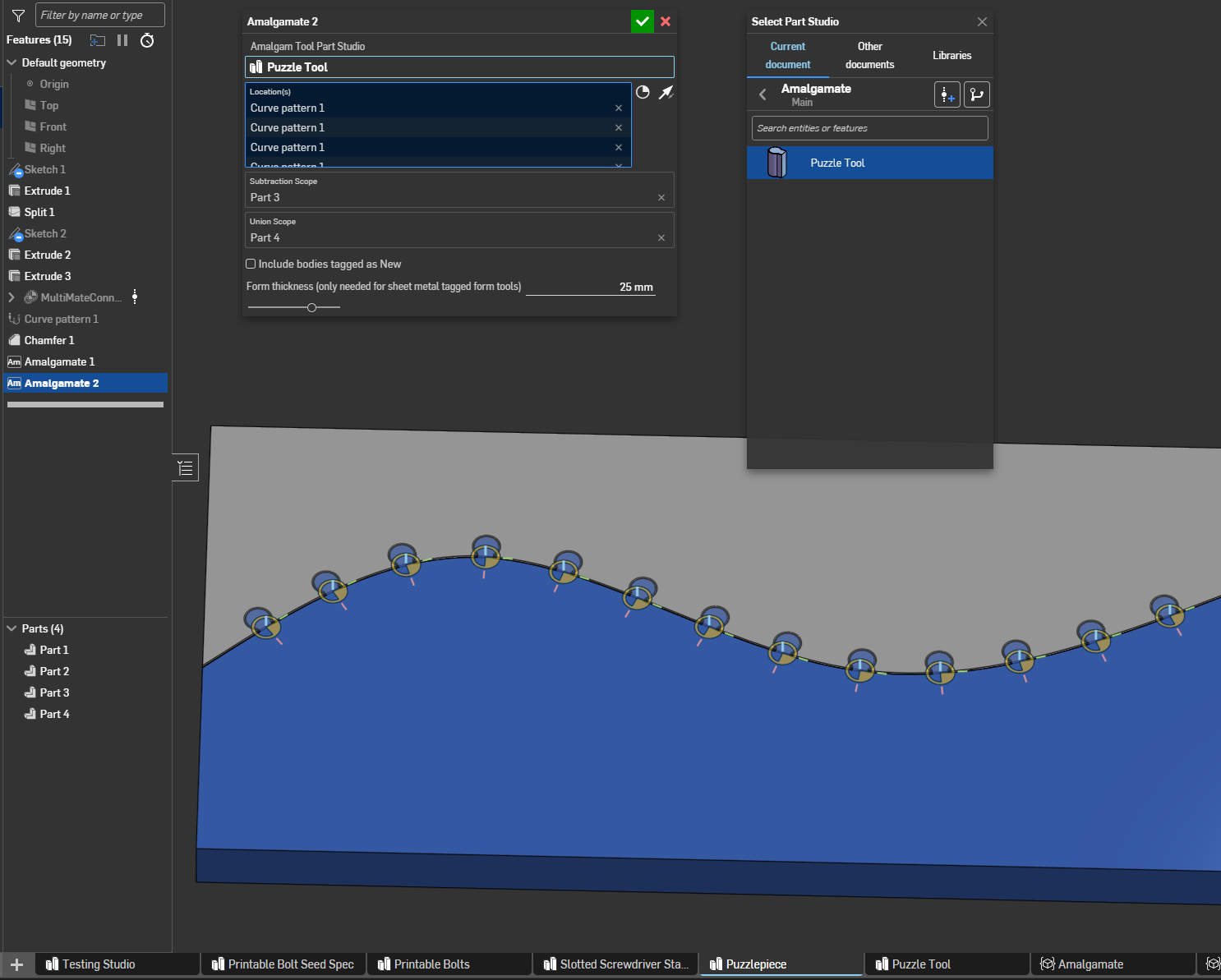
Like puzzle piece or dovetail geometry. I'm adding material to the blue side and subtracting it from the gray side. These examples might not seem like the flashiest of case studies but they're simple tests to prove the concept. Your tool studios can be as complicated or configurable as you like (within general reason). The reason I got into developing this tool was that I wasn't satisfied with the existing featurescripts that generate printable threads and didn't want to maintain yet another branch of a custom feature, nor figure out how to generate modified Whitworth thread profiles with my preferred clearances in two incompatible featurescripts. So instead of trying to script it, I just built a configurable studio using whatever features worked best on an individual basis to generate my seed geometry and now I've got the ability to greeble it everywhere I need it.
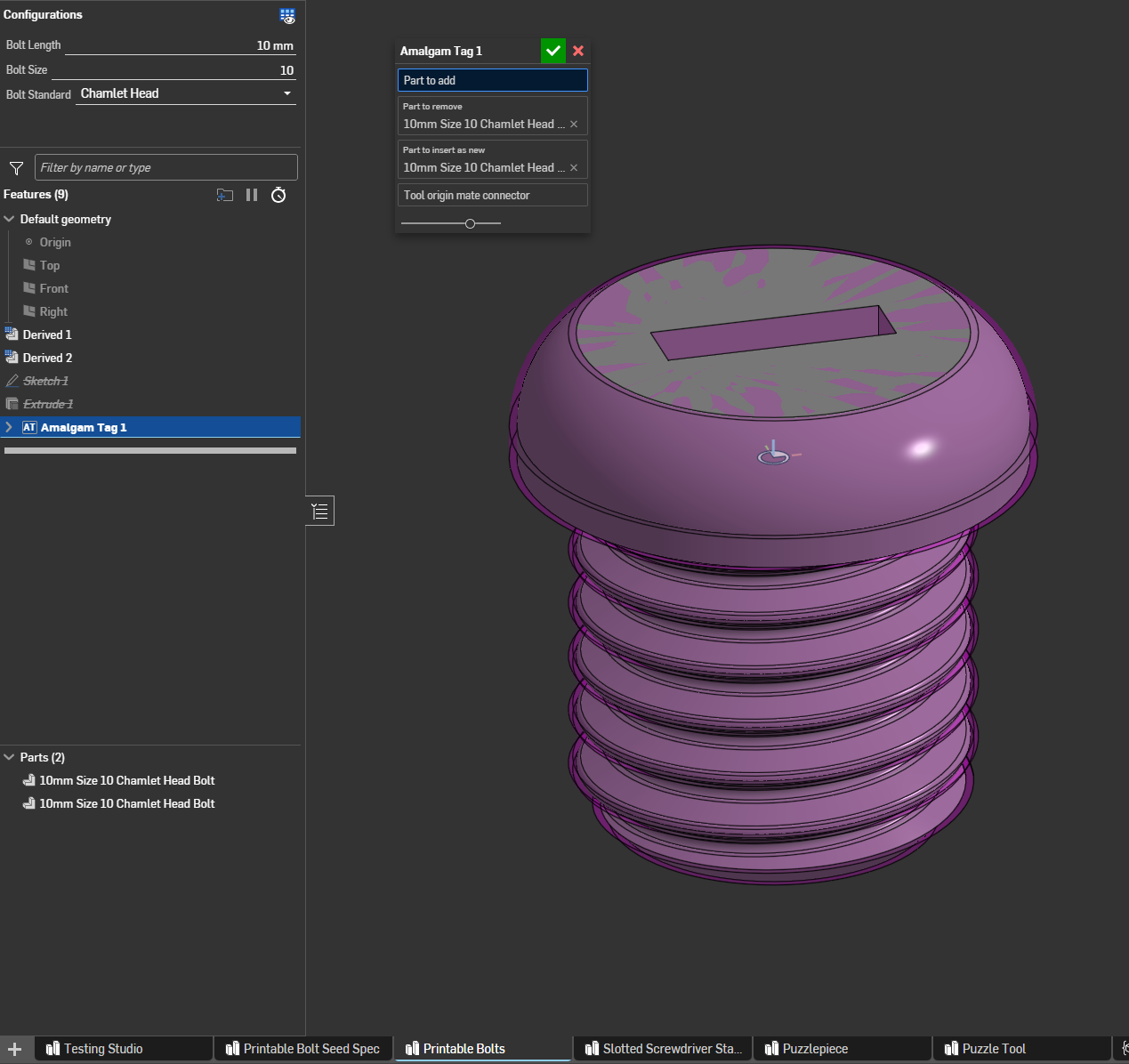

Now it's super easy to insert your printed 10mm Size 8 Chamlet Head Bolts. I'll follow up with some examples of the library being built but I need to debug some Form tools library validation stuff I broke in the last update.
Comments
That looks really useful!
I genuinely think that this script can serve as a viable replacement for a large portion of custom features I've seen people make which ultimately amount to "draw this geometry in these places and do this flavor of Boolean to the bodies they're touching"
Lot easier to draw a configured studio that behaves the way you want than to try to code all of the operations that build the tool geometry.
Derek Van Allen | Engineering Consultant | MeddlerSeems like an awesome feature!
Nice!
RENDERCAD
rendercad.ai - Photorealistic product rendering.
▚▞▚▞▚▞▚▞▚
________________________________________________________________________
Okay turns out the native forms libraries will never validate parts unless the formedUtils come from the genuine formedUtils region of France. Even if I wholesale copy and paste the original formedUtils code into my custom features the library won't validate. That's a shame. @lana blink twice if there's an API hook that I can use on a folder to force it to update as a sheet metal forms library without checking if the part studios within are valid sheet metal forms.
Derek Van Allen | Engineering Consultant | Meddler@Derek_Van_Allen_BD This looks really cool! Can't wait to try it out on a project
The Onsherpa | Reach peak Onshape productivity
www.theonsherpa.com
Gonna try to implement support for multiple seed mate connectors in amalgam studios ala Point Derive and Frames too at some point. Would be EXTRA cool to do contextual stuff with the configurations too like Sheet Metal Form does with thickness. I'll have to see if there's a generic way to pass that info amalgamate that doesn't rely on sheet metal attributes.
Derek Van Allen | Engineering Consultant | Meddler@Derek_Van_Allen_BD This add on looks amazing and I agree that it could probably replace several of the custom features I've made or used. I am not sure how to start building a database of parts. Do I copy your file and start adding?
Is there any chance you might consider to make a YouTube video to highlight some of it powerful (and simple) uses and how best to implement and grow a library? If you might not be up for it, maybe @EvanReese might consider to do a profile on it inside of his growing channel?
I would greatly appreciate it, and I'm sure lots of other people would as well. God bless!
Sorry another question. Can you please explain how the painting works and how to do it? The example in the file doesn't show how you paint it. I don't know how the script knows what to remove and what to add. Thank you!
@jason_ryan337 Let me start by sprucing up the feature tree with some of @jelte_steur_info's notes first before I make my youtube debut. In the meantime if you read up on the Sheet Metal Form feature's tutorials this feature works in 90% the same way because it's a direct descendant of that feature. It turns out I jumped the gun with the library capability so you can't actually validate a library of amalgam features until Onshape's devs offer support for more flavors of library than just Form or Frame.
Essentially you're pre-labeling your tool bodies as positive, negative, or new with Amalgam Tag and then when Amalgamate runs you're only defining the target bodies for those operations.
Derek Van Allen | Engineering Consultant | MeddlerIn related news, I just pushed an update to Poly-Mate Connectors that saves your selection of mate connectors as a query variable. Combining that feature with this one lets you quickly seed and generate complex and robust geometry in far fewer steps than before.
Derek Van Allen | Engineering Consultant | MeddlerThanks again. I've added the three feature scripts. If you have the patience for a little hand holding, I would appreciate it. I have 3 or 4 different parts that each are used in many of my documents to use for adding/subtracting material. Can you please let me know the best way to get them in position to use with the tag and amalgamate features? Should I create a "MyTools" document and import them into it as separate documents? From there do I use the tag/paint method to determine what is subtracted and what is added back?
Thanks!
Hi again. Still playing around with the FS. One thing I work on a lot are meshes and it doesn't seem that amalgamate plays well with meshes. It would be great if you could consider this. Since it won't let me even select the meshes, I can't seem to even use the FS to place groups of components. Even if boolean operations are not possible, being able to select and place objects using the tags would be great. Thanks, Jason
@jason_ryan337 meant to get back to this earlier but had a few other projects come up. Here's a document and a couple example gifs of usage to show intended workflow for you and anyone else browsing this thread later:
First you draw a standalone part studio that contains geometry you wish to replicate in other documents. For this example I took a cabinet hinge from McMaster Carr and drew the standard cut geometry that applies to those hinges everywhere they're used. I then tagged the hinge bodies as new for insertion and all the subtractive tool bodies which turns them transparent pink to let you know they're not supposed to be real part geometry. No union tools tagged because we're only doing cuts on the bodies we're applying this amalgam to.
Then in your downstream documents you just need to select the tagged amalgam tool studio and whatever configuration you wanted to pull from it and specify your boolean merge scopes for subtractive and additive operations and whether you're including the insertion parts, grab your location points, and let the tool do the magic.
Derek Van Allen | Engineering Consultant | MeddlerThat is really helpful! Thank you!
This is a great FS. Working on an architectural (conventional North American stick-built construction using dimensional wood lumber, batt insulation etc) project. Used it for inserting electrical boxes AND making the hole in the wall finish material in one feature. Very slick.
@romeograham one of our team members realized that we're always drawing our cabinet access panels the same way every time but people keep needing to ask about the paint clearances, so they're now redrawing a single standardized studio to amalgam that just does the whole door in one op for you.
It really might be the most useful thing I put out this year.
Derek Van Allen | Engineering Consultant | MeddlerHi again @Derek_Van_Allen_BD. I just wanted to thank you again for this addon, it is absolutely brilliant! I;m sure you are already super busy, but I would like to recommend an additional feature for it. Could you please consider to add an option to scale the item that that is plugged into the add on. If possible it would be helpful to allow scaling as uniform in x,y,z or uniform in x,y only, or maybe you just allow custom scaling for x,y,z so it could be 1.2, 1.2, 0,8 or whatever. Thanks again for your contribution to the community!
This workflow also reminds me of the the workflow in Sketchup where you insert components - say windows or doors - and they cut the hole in the wall automatically for you. Just like Amalgam - the "cut the hole" properties are baked into the window. In some future fantasy time, this will work in Assemblies (right Onshape devs?).
This is already possible if you add a transform to your feature tree in your tag studios and plug a scale value into a configuration variable, which will let you scale about a specific vertex or scale differently in X,Y, and Z.
@romeograham between Lefty Flip, Amalgamate, and Poly-Mates I'm finding myself working in a lot more of a mixed bag of bottom up design and top down design but an assembly version of Amalgamate would be awesome for those people that haven't thrown away their BOM based shackles like I have.
Derek Van Allen | Engineering Consultant | MeddlerWOW! I had no idea about configuration variables. Those in combination with your add-on is literally amazing!
@jason_ryan337 yeah I need to set aside some time to make some more complicated demo samples to show off the power of the tool and probably make a video showing those off and how the studios were set up because it's not obvious at first glance how powerful a tool this can be. It's a pipe threading feature, a dovetail feature, a tab and slot feature for frame geometry, custom keyway cutter for machining - whatever you can model in one studio that you want to copy and paste into other studios without walking through the same steps a second time.
Derek Van Allen | Engineering Consultant | MeddlerIt really is a fantastic feature and workflow enabler!
The Onsherpa | Reach peak Onshape productivity
www.theonsherpa.com
I would certainly enjoying learning more about the powerful features for sure!
Just can't get enough of how useful this add-in is. Thank you so much for sharing this creative and useful tool, I am using it all over! Adding logos, adding, snaps, dowels, locking dowels, screw holes, etc. It is awesome. I still can't wait to learn more about it. I feel like there is a whole 'nother layer to it with respect to the thread creator, but maybe that is more uses of the configuration parameters. Love it!
This is a perfect example of where this feature shines. I know there are snap hook custom features people have made for Onshape but if their geometry isn't exactly right for your application you'd have to dig into their code and wrap your brain around it before modifying it - and that's assuming they programmed it any kind of reasonable. The other beauty is that any improvements to Onshape as a whole make this tool better by extension so if the developers ever add more functionality to configuration parameters like they did recently with conditional visibility, I don't need to update anything with Amalgamate in order for people to make use of the new functionality.
Derek Van Allen | Engineering Consultant | Meddler@Derek_Van_Allen_BD I'm finally working on something where this is the perfect feature. So far it's everything I hoped it would be (no surprise), except I'm struggling to get the parts labeled "New" to show up. Here's an example of my setup. Thoughts? https://cad.onshape.com/documents/ab99d635a52764b813873717/w/fdc159c39ec87979dd22b873/e/1328d84796152f9bf8cc3cca
The Onsherpa | Reach peak Onshape productivity
www.theonsherpa.com
You're not gonna believe it but…
Derek Van Allen | Engineering Consultant | MeddlerThe Onsherpa | Reach peak Onshape productivity
www.theonsherpa.com
While we wait for @EvanReese to make that public, I've got a new update pushed. You can save names to your Amalgam Tags now and they'll populate the downstream Amalgamates with the naming convention you specified for the imports. Makes it easier to sort your documents when you've got a stack of 100 Amalgamates and it's impossible to tell what's going to what.
Derek Van Allen | Engineering Consultant | Meddler