Welcome to the Onshape forum! Ask questions and join in the discussions about everything Onshape.
First time visiting? Here are some places to start:- Looking for a certain topic? Check out the categories filter or use Search (upper right).
- Need support? Ask a question to our Community Support category.
- Please submit support tickets for bugs but you can request improvements in the Product Feedback category.
- Be respectful, on topic and if you see a problem, Flag it.
If you would like to contact our Community Manager personally, feel free to send a private message or an email.
Boolean Union operation to preserve holes from both tools
 herb_peyerl
Member Posts: 7 ✭
herb_peyerl
Member Posts: 7 ✭
My first time trying this. I have two parts which are essentially flat plates (made from 3D scans of a transmission face and a transfer case face). I initially tried to insert both parts into an assembly and revolute mate them on a common center hole. But my CAM slicer didn't see them as a manifold so wouldn't slice them.
I created a new part studio and created two derived parts from two part studios, transformed them into the correct positions, and then tried a boolean operation to turn them into a manifold (is that the correct terminology?).
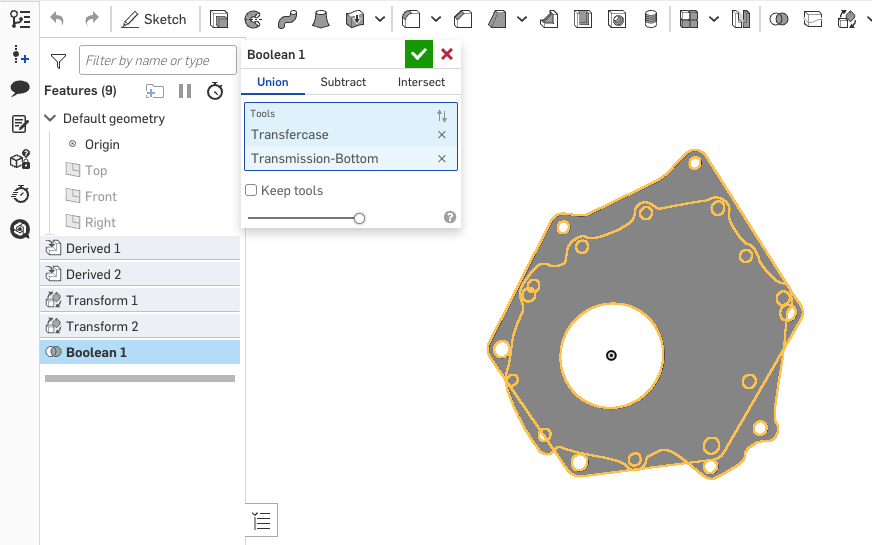
My issue is that each part has its own mounting holes but where those mounting holes overlap the other part, they don't "punch through" the union part.
This attached screenshot hopefully conveys what I'm trying to do better than my words. You can see there are a bunch of holes from one part (the transmission face) that are not 'punching through' the second part (the transfer case).
I'm not sure what the correct approach is here. Is there a better way to accomplish this?
https://cad.onshape.com/documents/c88dd5902177f7feed39f389/w/27a2acd17e76029555517906/e/9984bd4fe4fb076459b151f2?renderMode=0&uiState=694aa35fd6a19783f3db40a9
Best Answer
-
robert_scott_jr_
Member Posts: 748 ✭✭✭
Hello Herb. After the transforms, create a sketch on either exposed face of the two parts, a parallel plane or a mate connector. Using the Use tool, capture all the holes you need. After the Boolean, use the sketch to extrude (remove) the holes in the part created by the Boolean. - Scotty
1
Answers
Assuming I understand your question correctly it looks like you want to do a union of part A and B but want to selectively keep or remove little bits of A or B in the combination of the two. Textbook job for a custom feature like my Better Than Boolean feature. It doesn't currently work on cells generated by surfaces but solids it should have no problem with.
Derek Van Allen | Engineering Consultant | MeddlerHello Herb. After the transforms, create a sketch on either exposed face of the two parts, a parallel plane or a mate connector. Using the Use tool, capture all the holes you need. After the Boolean, use the sketch to extrude (remove) the holes in the part created by the Boolean. - Scotty
Thanks. I briefly tried to bring in the BTB feature but it was a new rabbit hole I hadn't gone down before and then @robert_scott_jr_ provided a simple answer that worked well.
Thanks! That was so simple and 'just worked'. That's a technique that will help with another little project I was having trouble with.