Welcome to the Onshape forum! Ask questions and join in the discussions about everything Onshape.
First time visiting? Here are some places to start:- Looking for a certain topic? Check out the categories filter or use Search (upper right).
- Need support? Ask a question to our Community Support category.
- Please submit support tickets for bugs but you can request improvements in the Product Feedback category.
- Be respectful, on topic and if you see a problem, Flag it.
If you would like to contact our Community Manager personally, feel free to send a private message or an email.
Selective splitting
 ProApe
Member Posts: 226 ✭✭
ProApe
Member Posts: 226 ✭✭
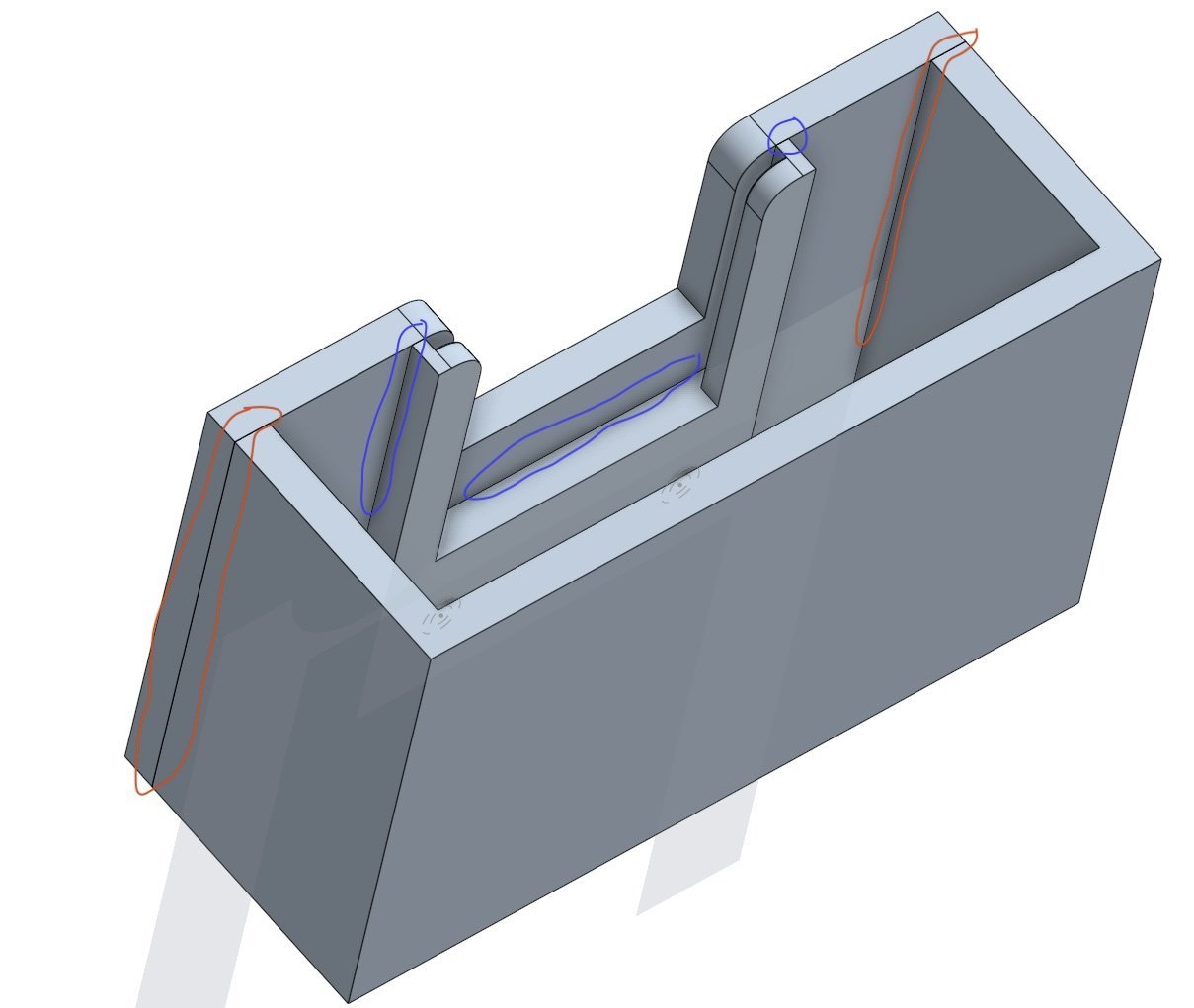
Hello,
I want to design a holder for digitising slides; the iPhone will serve as a light source behind the slide (as seen working in a video) and there will be a removable slide holder in front of the iPhone, removable to accommodate the different thicknesses of the slide frames.
I first designed the part to which the slide holder is attached using two screws as a whole, and then splitter it afterwards. The problem with this is that not only is the slide holder separated from the frame, but also the front plate.
How can I split it so that only the slide holder is separated?
In the attached screenshot, splitting should be done at the blue markings and not at the red markings.
Another question: how can I use a constructed slide holder to construct others that are suitable for thicker frames?
The only option I have found is to duplicate the whole part studio and delete everything else, or possibly export the slide holder as .stl, then enlarge the space for the slides and export again.
Kind regards
ProApe
https://cad.onshape.com/documents/944574cda2fbcfe06af0a424/w/106c39db381eab5d4fce28b7/e/fea56193cd116de26d7f806b?renderMode=0&uiState=696803163d2de750b855c271
Comments
You could create a surface to split with. Then make sure you select "Trim to face bounaries."
As for the second question, maybe configure your part, so you can select different configurations to export.
Unfortunately, creating a surface to split with exceeds my knowledge of Onshape.
But I have just found a solution: I split the slide holder, which also separates the front plate. Then I add the front plate back to the rest of the frame using a boolean operation, and it works.
You sorta already know how to make a surface. In this case it's just another extrude. I made a copy of your document and duplicated Part Studio 2. Just above split 3 is a new sketch and a new extrude and a new split. The method may come in handy. - Scotty
Document
Thank you for your work but the front plate is still splitted from the rest of the frame!
https://cad.onshape.com/documents/47e7b4ebe2829bb86940bc11/w/dc91facabe494089d3e7a15b/e/900a56ed855a8e168bec1c00
Du könntest einen Klotz im Inneren erzeugen und dann eine bool'sche Opearation mit Überschneidung anwenden, um einen separaten Diahalter zu bekommen.
https://cad.onshape.com/documents/20e06b031fc6c325155a6d3b/w/25130bda3ac53740f6ce0130/e/155fccf3a562fc500c890872?configuration=thickness%3D0.001%2Bmeter&renderMode=0&uiState=696a17666ceb04d49a12374a
Danke für die Lösung, aber ich frage mich, ob die die ich gefunden hatte: splitten, und die Frontplatte über eine boolean Operation wieder mit dem Rest des Rahmens verbinden, wobei der Diahalter als eigenes Teil übrig bleibt, genau das das ich anstrebe, nicht die einfachste ist!
Naja, wenn Du die einfachste Lösung gesucht hättest, wärest Du zu dieser Stelle (Bild) zurückgegangen, an der der Dia-Halter noch einzeln war, und hättest bei den darauffolgenden Schritten (Extrusionen, etc.) nicht die "Hinzufügen" Option benutzt. Dann wäre er einzeln geblieben, und die erneute Trennung nicht erforderlich gewesen.
Dann hättest Du bei Extrude 18 mit der richtigen Auswahl bereits einen einzelnen Dia-Halter gehabt:
Ich habe den Eindruck, dass Du von einem Direct-Modeller CAD kommst, kann das sein? Das ist nichts schlimmes, nur Deine Strategie sieht danach aus. Wenn Du etwas mehr in die Parametrik reingekommen bist, werden diese Dinge ziemlich naheliegende Lösungen haben. ;0)
Du baust derzeit eine Änderung auf die vorige. Es ist aber (fast) immer sinnvoll, zu der Stelle zurückzugehen, an der ein Teil, das man ändern will, ursprünglich entstanden ist und die Änderungem quasi im Augenblick der Entstehung vorzunehmen. Es ist wie eine Zeitreise, in der man seine Eltern als Teenager trifft. Das macht die Sache aber robuster und übersichtlicher. Der Feature-Baum wäre vielleicht noch 1/3 so lang, und hätte vermutlich keine einzige boole'sche Operation.