Welcome to the Onshape forum! Ask questions and join in the discussions about everything Onshape.
First time visiting? Here are some places to start:- Looking for a certain topic? Check out the categories filter or use Search (upper right).
- Need support? Ask a question to our Community Support category.
- Please submit support tickets for bugs but you can request improvements in the Product Feedback category.
- Be respectful, on topic and if you see a problem, Flag it.
If you would like to contact our Community Manager personally, feel free to send a private message or an email.
Sweep orientation/align Problem
 giannos_petris
Member Posts: 8 ✭
giannos_petris
Member Posts: 8 ✭
Hello there,
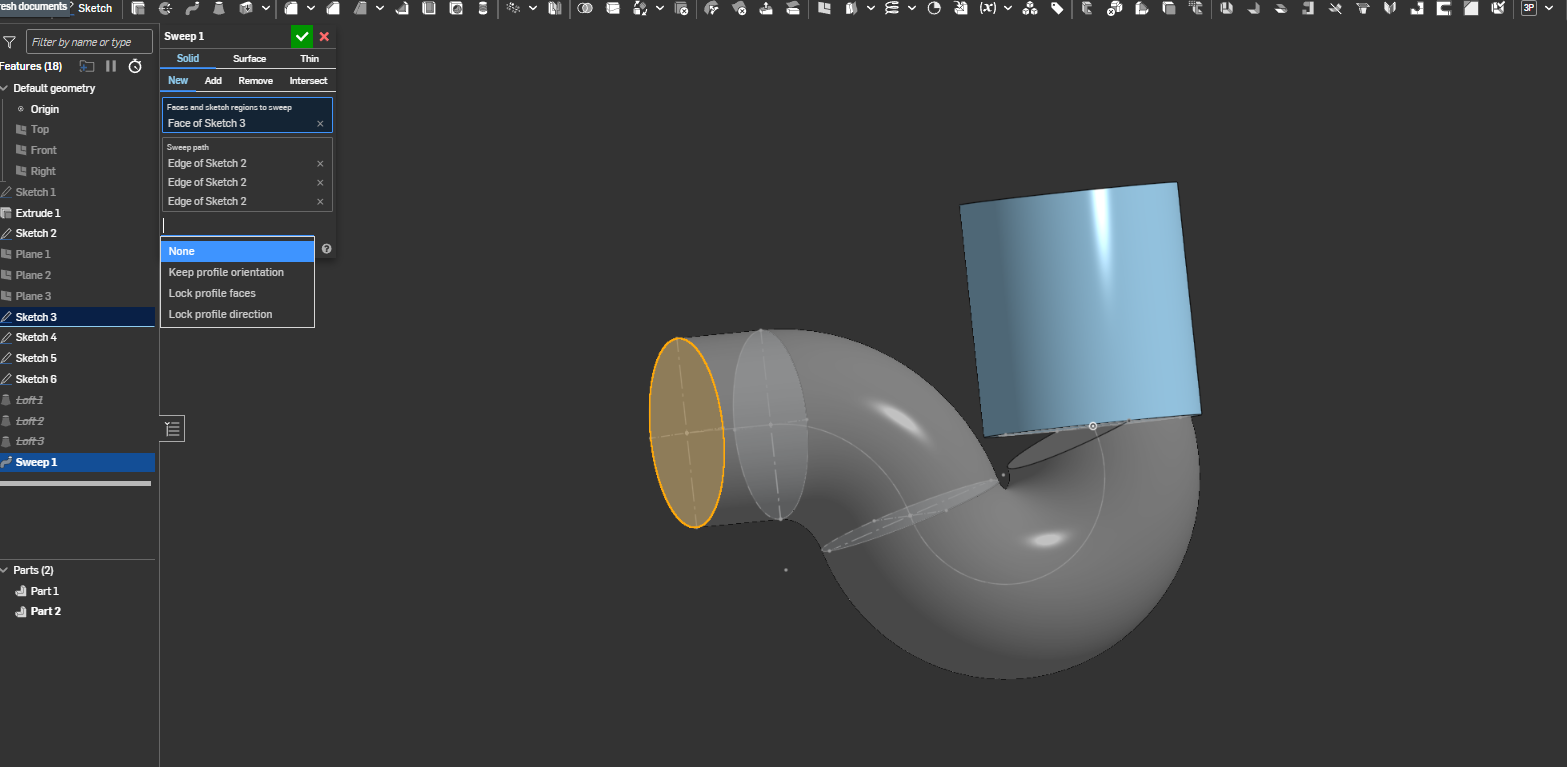
I am facing a problem trying to sweep a profile. I could probably make the path sketch a bit different using tangency or adding a straight line where the path meets the existing part (blue) but since this is an exercise i dont want to come up with a different result. I already did it with 3 different loft's (and the shown sketches where i also tried connections) but that doesnt seem like the way its supposed to be designed. How could i made the end of the pipe mee the existing part in an alligned way and make it perpendicullar to it so the meet perfectly? The Lock profile faces + lock profile direction do not seem to help although i might be doing something wrong. Thanks for your time :)
Best Answer
-
 CADNurd
Member Posts: 70 ✭✭
CADNurd
Member Posts: 70 ✭✭
@giannos_petris - Being all one solid part at the end - as your drawing depicts - makes things much easier. Now it doesn't matter how the grey and blue parts connect since it's all going to be booleaned together at the end anyway. Just model it first without any of the internal hollow structure and boolean it together. Then model the negative, internal space as a solid and boolean-subtract that from the first part.
Unemployed Onshaper - operating on European time. More of me here ➤ https://linktr.ee/Liam.G
1
Answers
I can't tell exactly what you goal is, but I just made the sweep path include the next pend in the pipe to connect with the fitting. I don't think that make that type of p-trap at Home Depot.
https://cad.onshape.com/documents/4a29e4181dfbb893d92c6d09/w/6f5efd802986ad58825c963c/e/aaa76bac79d61da023765383
The thing is that the end of the swept path should not be tangent to the blue part's direction.
Thanks for your help.
Not sure if you figured it out yet, but just looking at your image, it looks to me like the end of your sweep is not tangent with the central axis of your blue cylinder. It seems to be tangent to some other random line which would, if it existed, look like the yellow one I have created below . . .
Solution: Create a central axis construction line, if none exists, and make the end of your sweep tangent to it.
Unemployed Onshaper - operating on European time. More of me here ➤ https://linktr.ee/Liam.G
This seems to be the obvious solution.this is the actual view of the exercise. the instructor while in solidworks has a selection of "align with end faces" and "merge with end faces". I guess this is how it is supposed to be made but without the automation inside the sweep command solidworks offers.
Thank you.
@giannos_petris - Being all one solid part at the end - as your drawing depicts - makes things much easier. Now it doesn't matter how the grey and blue parts connect since it's all going to be booleaned together at the end anyway. Just model it first without any of the internal hollow structure and boolean it together. Then model the negative, internal space as a solid and boolean-subtract that from the first part.
Unemployed Onshaper - operating on European time. More of me here ➤ https://linktr.ee/Liam.G
Here is a plan that a person might try to make that.
1.1 add fillets
2. Sweep solid new part
3.Revolve include open area… add to 2
4.Sweep solid… add to2&3
5. mirror part 1… add to 2,3,4.
6. sweep remove
7. sweep remove
8. add fillets
Forgive my crayon drawing quality I'm using a temporary mouse as my other one died RIP..