Welcome to the Onshape forum! Ask questions and join in the discussions about everything Onshape.
First time visiting? Here are some places to start:- Looking for a certain topic? Check out the categories filter or use Search (upper right).
- Need support? Ask a question to our Community Support category.
- Please submit support tickets for bugs but you can request improvements in the Product Feedback category.
- Be respectful, on topic and if you see a problem, Flag it.
If you would like to contact our Community Manager personally, feel free to send a private message or an email.
I cant put a line in the middle of a square
 tony_rossi327
Member Posts: 1 ✭
tony_rossi327
Member Posts: 1 ✭
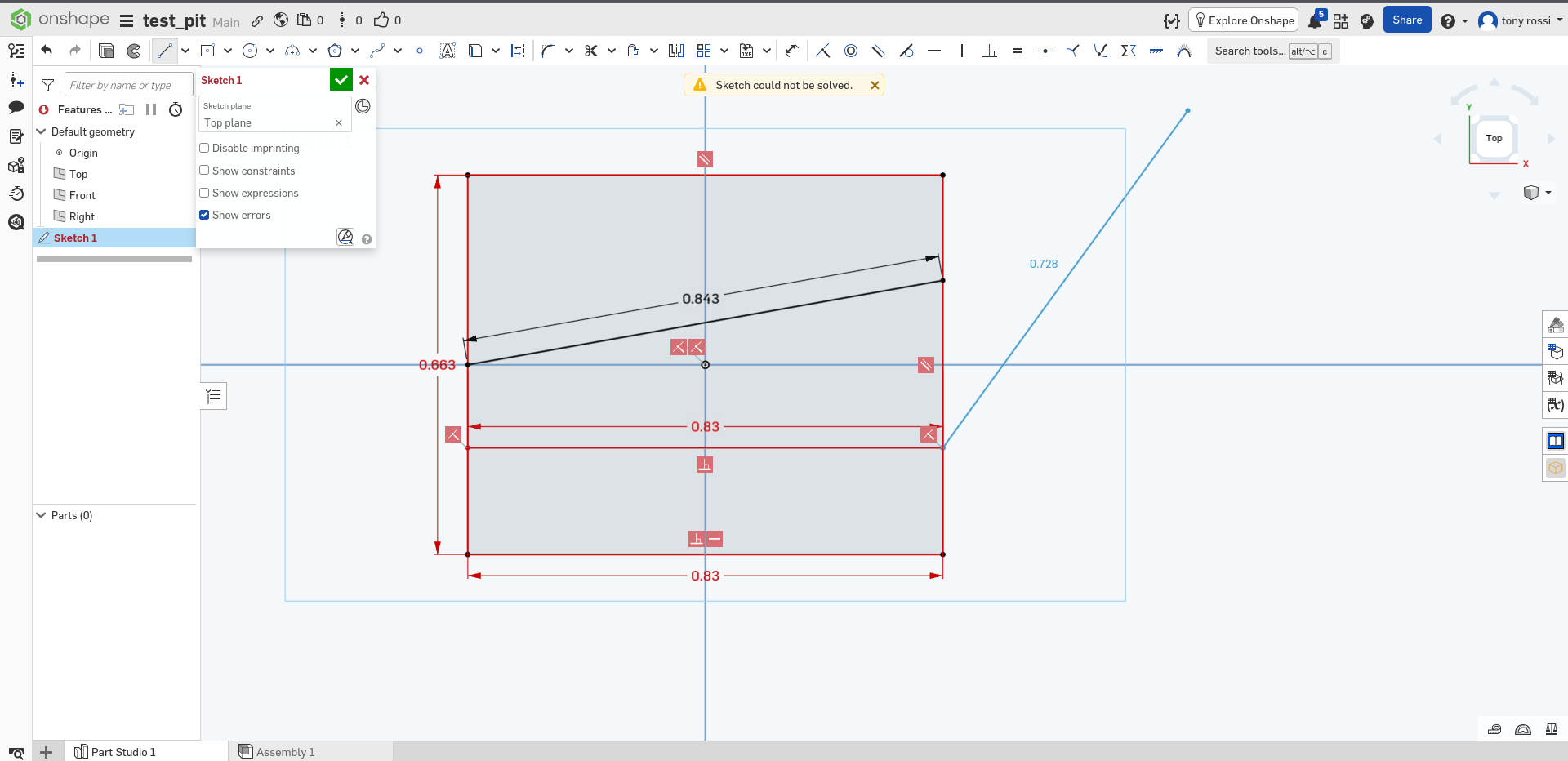
if i make a simple sketch and i put a line perpendicular inside of it, it gets over constrained. I have no idea what i done to make a sketch break itself by default, i hope this is user error and not a onshape bug. It automatically adds a dimension, and if i remove it its not over constrained however if i add it back it doesn't break. Im not adding any extra dimensions or any constraints that im aware of. (refer to screenshot)
Tagged:
0
Answers
The horizontal line inside your box does not need a dimension as it should be constrained to the two vertical lines. The fact that it has a dimension means it's overconstrined the sketch as you could now tell onshape two different things which can't both be true. Just don't add a dim to the inside line.
What is happening is when you draw the line, and click the left mouse button on the second endpoint of the line (ending the line), it adds a dimension automatically. If you press Enter key at that point, it will accept the dimension. That will over-constrain the sketch.
Instead, after you click the left mouse button on the second endpoint of the line, press the escape key instead of the enter key. That will keep the line, but cancel the automatic dimension. Then it will all work fine.
If you forgot to do that while creating the line, just left click on the dimension and then press the delete key on your keyboard.
When I'm sketching in general, I often hit the escape key no matter the shape, and then manually go back and add my own dimensions. Just personal preference, but I often find that I want the dimensions on different things than what OS assumes.