Welcome to the Onshape forum! Ask questions and join in the discussions about everything Onshape.
First time visiting? Here are some places to start:- Looking for a certain topic? Check out the categories filter or use Search (upper right).
- Need support? Ask a question to our Community Support category.
- Please submit support tickets for bugs but you can request improvements in the Product Feedback category.
- Be respectful, on topic and if you see a problem, Flag it.
If you would like to contact our Community Manager personally, feel free to send a private message or an email.
How can I add a draft angle to this complex shape?
 stephanie_lewis010
Member Posts: 6 ✭
stephanie_lewis010
Member Posts: 6 ✭
Hi, I'm very, very new to CAD. I'm a chocolate maker trying to design my own tools for vacuum formed chocolate molds.
Right now, I'm struggling to add draft angles to my shapes. I finally figured out how to import the image, trace it and extrude it, but following the advice from the AI (to copy the sketch, enlarge it and then use the loft tool to combine them) isn't working for me because I don't know how to "move" the second sketch.
Size is not hugely important because I can mess with the dimensions later in my slicing software, but I'm ultimately planning to print it at 11 mm thick. I need a fairly obvious draft angle to get my molds to release. The success that I had so far was with a 7 degree draft angle. I can't get my current shape to extrude any greater than a 3 degree angle (and I spent about eleven million years 3D printing them, only to have them stick in the mold.
Thank you for any help you may be able to offer. (These are destined to be white chocolate filled with cereal milk ganache and lucky charms marshmallows).
Best Answers
-
 jelte_steur_info
Member Posts: 650 PRO
jelte_steur_info
Member Posts: 650 PRO
what AI advised you that? did you use the onshape ai adviser that is built in? that may give you more accurate advise.
did you try the 'draft' checkmark in the extrude feature? it's not working on your sketch though because it's created from one spline and it doesn't know how to deal with the sharp valleys in the clouds.
So in this example, the cloud valleys are left sharp by using a bunch of separate splines in the clouds connected to true arcs for the rainbow.
then extrude with a draft, and you can possibly apply a fillet afterwards.:
https://cad.onshape.com/documents/52fbfcce9f79c7643c939789/w/4fbe03a7a59b8061e63e55aa/e/444077152161c0241939b674?renderMode=0&tangentEdgeStyle=1&uiState=69943aa682fd95f351ec2bc01 -
 CADNurd
Member Posts: 78 ✭✭
CADNurd
Member Posts: 78 ✭✭
You'll most likely need to simplify and/or smooth-out your sketch a bit. Onshape should really give better failure information here TBH.
Google Gemini sums up the issue fairly well -
Unemployed Onshaper - Operating on European time - More of me here ➤➤ https://linktr.ee/Liam.G
0 -
SMURFCAD
Member Posts: 12 ✭
I was able to get this with 7 deg draft by:
-Eliminating excess spline points and smoothing the curves.
-Reducing the height to 8mm
The taller the extrusion the less draft you can add (without getting into complicated modeling.)
I'm assuming you want fillets too.
the clouds get a little pointy from draft. You can fix this by tweaking the curves with larger radii.
-S
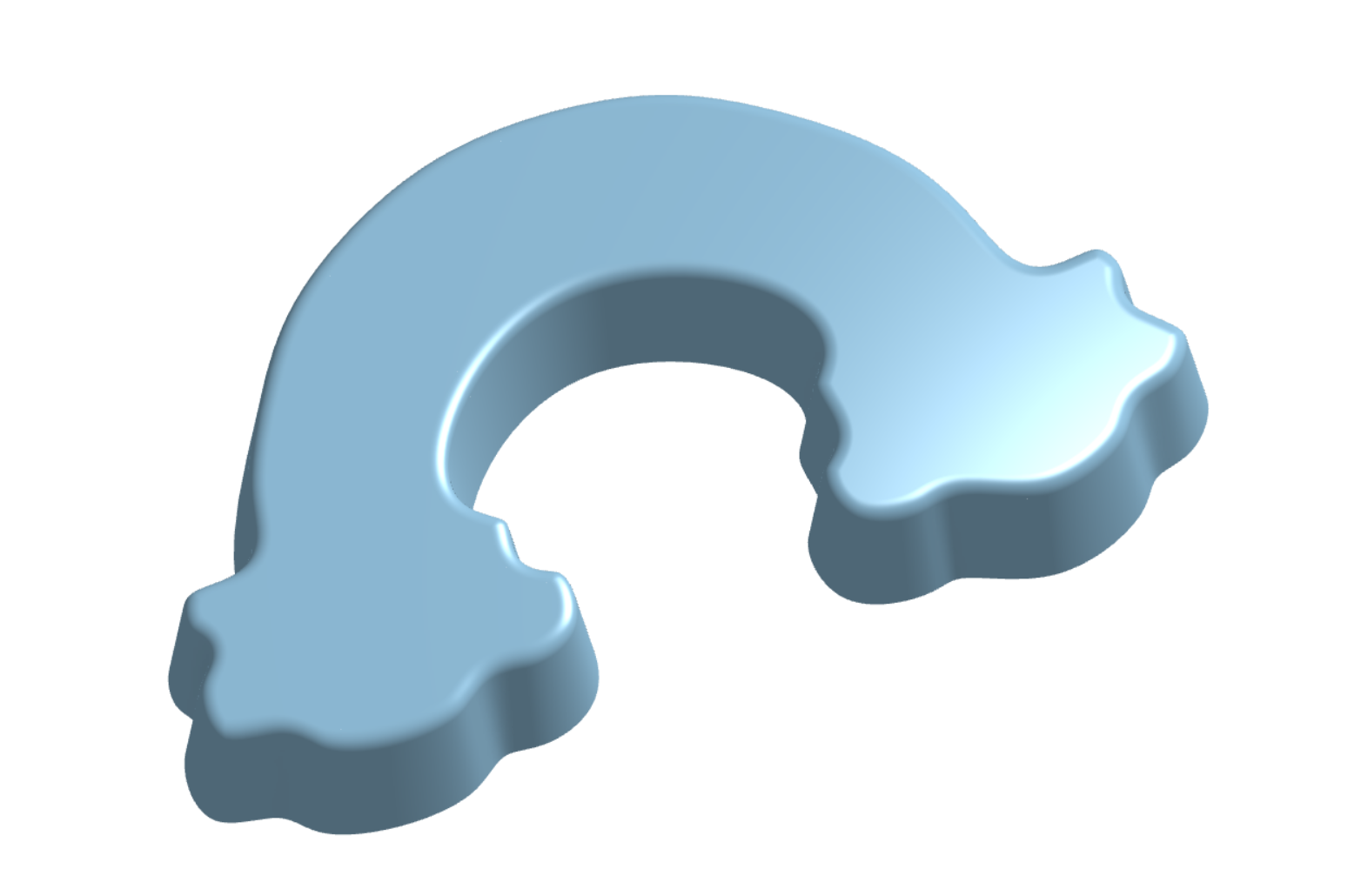
First time sharing a link on this forum. Let me know if it doesn't work.
0
Answers
what AI advised you that? did you use the onshape ai adviser that is built in? that may give you more accurate advise.
did you try the 'draft' checkmark in the extrude feature? it's not working on your sketch though because it's created from one spline and it doesn't know how to deal with the sharp valleys in the clouds.
So in this example, the cloud valleys are left sharp by using a bunch of separate splines in the clouds connected to true arcs for the rainbow.
then extrude with a draft, and you can possibly apply a fillet afterwards.:
https://cad.onshape.com/documents/52fbfcce9f79c7643c939789/w/4fbe03a7a59b8061e63e55aa/e/444077152161c0241939b674?renderMode=0&tangentEdgeStyle=1&uiState=69943aa682fd95f351ec2bc0
You'll most likely need to simplify and/or smooth-out your sketch a bit. Onshape should really give better failure information here TBH.
Google Gemini sums up the issue fairly well - https://share.google/aimode/TQqHZtiCzRp6qezH4
Unemployed Onshaper - Operating on European time - More of me here ➤➤ https://linktr.ee/Liam.G
I was able to get this with 7 deg draft by:
-Eliminating excess spline points and smoothing the curves.
-Reducing the height to 8mm
The taller the extrusion the less draft you can add (without getting into complicated modeling.)
I'm assuming you want fillets too.
the clouds get a little pointy from draft. You can fix this by tweaking the curves with larger radii.
-S
https://cad.onshape.com/documents/f6469eef95ffc94df3cfad19/w/ee7f26d944b4db5749e17a46/e/d3f74cc4430d97d1ab17aa66?renderMode=1&uiState=6994d364a182456c7fa5856a
First time sharing a link on this forum. Let me know if it doesn't work.
Thank you all very much for your help and your willingness to share your knowledge. I was using the "in-program" AI to try to help myself, but I think my lack of familiarity with the program was complicating my ability to understand what it was asking me to do.
I owe you guys some chocolate!
-Steph
Shawn, thank you for your help. Your link posted, but it says I don't have permission to view the file.
Sent you a DM.
-S
Not sure where my other post went…one more try.
Here's a link: https://cad.onshape.com/documents/f6469eef95ffc94df3cfad19/w/ee7f26d944b4db5749e17a46/e/d3f74cc4430d97d1ab17aa66
-S