Welcome to the Onshape forum! Ask questions and join in the discussions about everything Onshape.
First time visiting? Here are some places to start:- Looking for a certain topic? Check out the categories filter or use Search (upper right).
- Need support? Ask a question to our Community Support category.
- Please submit support tickets for bugs but you can request improvements in the Product Feedback category.
- Be respectful, on topic and if you see a problem, Flag it.
If you would like to contact our Community Manager personally, feel free to send a private message or an email.
Can custom tables work like Cutlist?
 EvanReese
Member, Mentor Posts: 2,836 PRO
EvanReese
Member, Mentor Posts: 2,836 PRO
I'm making a custom table that is created by a custom feature that is similar to Cutlist. The tables it produces are associated with parts in the part studio. However, when I go to insert it into the drawing, unlike Cutlist tables, which are inserted by choosing the composite part they create, it seems like I can only insert the custom table by clicking the whole part studio, and it will bring in all tables from that studio, even ones from parts not in the drawing. Is this a limitation of custom tables or is there a way to set it up to work like Cutlist Tables when inserting? Here's what it looks like when choosing a composite part to insert a cutlist.
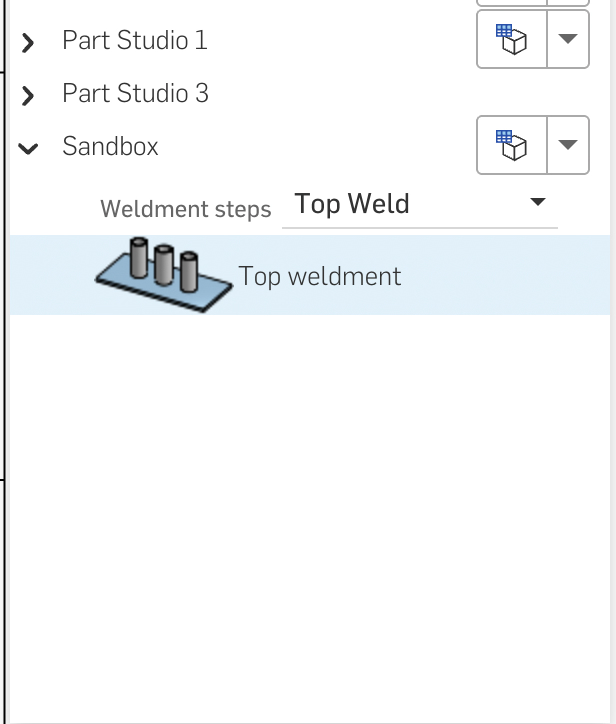
And here's what it looks like inserting a table (can only pick part studios, not composites)
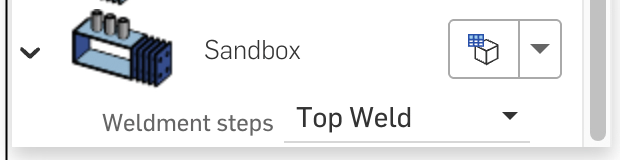
Answers
@ilya_baran @lana thoughts here?
The Onsherpa | Reach peak Onshape productivity
www.theonsherpa.com
If this ends up being a real limitation, you could always just insert it as a Cutlist table so that it does stay with the composite part.
Learn more about the Gospel of Christ ( Here )
CADSharp - We make custom features and integrated Onshape apps! Learn How to FeatureScript Here 🔴
Clever thought. I'll keep it in the back pocket.
The Onsherpa | Reach peak Onshape productivity
www.theonsherpa.com
I see the overload for table() which includes entities is what Cutlist uses, which makes me think this is doable, but I'm still not getting the same effect yet. I mostly just want to know if I'm barking up the right tree here or if it's not currently possible.
The Onsherpa | Reach peak Onshape productivity
www.theonsherpa.com
I think cutlists are treated as special by the drawings side of things — that's why general custom tables don't allow part selection.
Here is a table feature you could use as a reference @EvanReese. Table Feature
Not sure this is from a recent update, but cutlist tables no longer carry through derived parts. I believe they use to, but I could be wrong.
Learn more about the Gospel of Christ ( Here )
CADSharp - We make custom features and integrated Onshape apps! Learn How to FeatureScript Here 🔴
It takes a little reverse engineering of the cultist table formatting but I have been able to put together cutlist-formatted attributes in custom features to be able to use the the drawing cutlist callouts and table for non-cutlist use. You can make any custom columns too which is extra useful for special case callouts.
Sorry I can’t share any examples!
@wille_j why didn't you just use the table feature that can already do this? Just curious. Sounds like you did a lot of work for an already existing feature.
.
Learn more about the Gospel of Christ ( Here )
CADSharp - We make custom features and integrated Onshape apps! Learn How to FeatureScript Here 🔴
I needed company specific data to automatically annotate as part of a larger scope feature. The feature made all the modeling as well as all cultist table data needed for drawing balloons based on that modeling in one feature.
I’m sorry that I can’t be more specific :)
@MichaelPascoe there are some features I've got in my catalog that are declared as the wrong thing on purpose to trick parts of the rest of the product into behaving the way I want it to. Sometimes ya need a hacksaw.
Derek Van Allen | Engineering Consultant | Meddler