Welcome to the Onshape forum! Ask questions and join in the discussions about everything Onshape.
First time visiting? Here are some places to start:- Looking for a certain topic? Check out the categories filter or use Search (upper right).
- Need support? Ask a question to our Community Support category.
- Please submit support tickets for bugs but you can request improvements in the Product Feedback category.
- Be respectful, on topic and if you see a problem, Flag it.
If you would like to contact our Community Manager personally, feel free to send a private message or an email.
Improvements to Onshape - February 20, 2026
 mlaflecheCAD
Member, Onshape Employees, Developers Posts: 198
mlaflecheCAD
Member, Onshape Employees, Developers Posts: 198 
CAD
MODEL-BASED DEFINITION
In this initial release, MBD is available in Onshape Part studios. We look forward to adding more features and additional capabilities in the coming releases.
For more information, you can view our help documentation. Additional documentation, including Onshape Learning Center content on MBD is coming soon.
MBD - STEP AP242 EXPORT
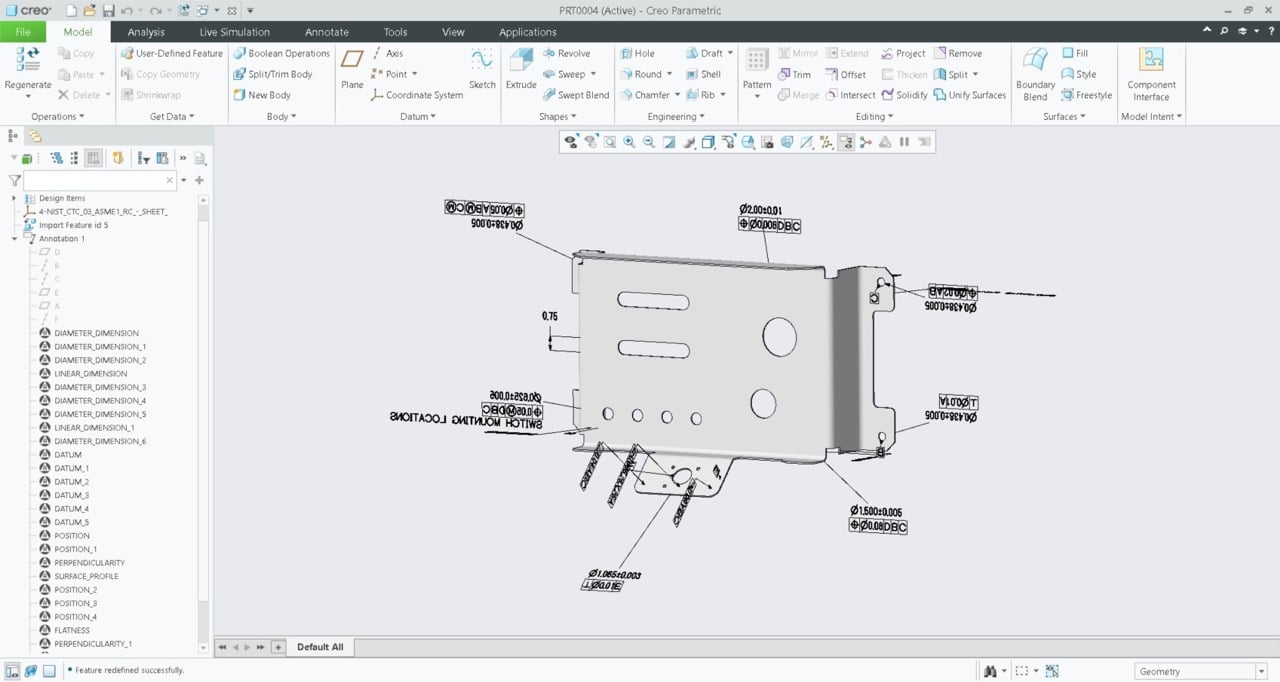
In addition to Onshape sharing and Publication capabilities for downstream stakeholders, Onshape MBD also supports exporting as STEP AP242. The AP242 format can include 3D PMI data for direct read into inspection software and tools, CMM programming, and more. 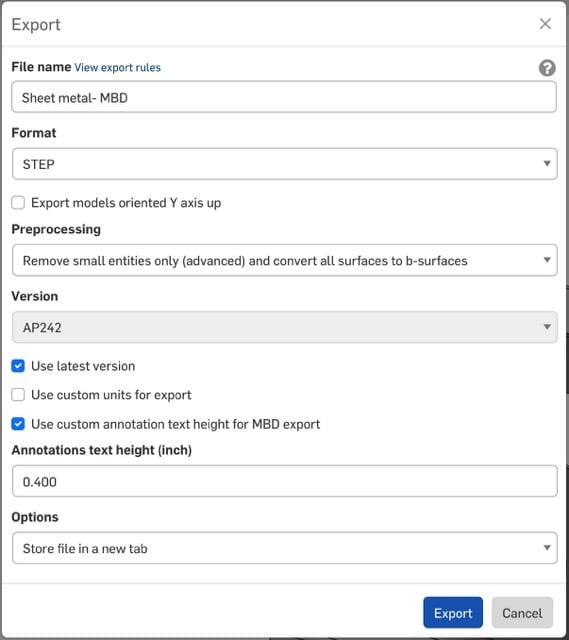
Below shows an example file, exported from Onshape, which has been imported into Creo while retaining all defined 3D PMI.
TWIST AND SCALE FOR SWEEP
OFFSET PLANES BY CURVES
REPLICATE ASSEMBLY SECTION-VIEW IN IN-CONTEXT PART STUDIO
Now when choosing to edit in context from an assembly with an active section view, the display of the section will be carried over to the Part Studio for In-context modeling. Likewise, when using the Go to assembly button from the active context, the orientation, zoom level, and display will be preserved when returning to the assembly. These enhancements are part of Onshape's ongoing improvements to the In-context modeling experience in Onshape.CONFIGURATION PANEL SEARCH FILTERS
DRAWINGS
A SHAFT FIT TOLERANCE NO LONGER REQUIRES A HOLE TOLERANCE
ADMINISTRATION
TRANSFER APPLICATION OWNERSHIP
Administrators can now transfer ownership of custom applications to other users, Companies, or Enterprises. This improvement simplifies application management when team members change roles or leave, ensuring continuity and control over custom-built integrations without recreating them from scratch.
RENDER STUDIO
CAMERA PANEL
EMISSIVE VOLUMES
CAM STUDIO
IMPROVED CUTTING SELECTION ARROWS
Onshape CAM Studio introduces enhanced selection arrows for contouring operations to improve user experience and programming confidence. The update adds a new cutting side arrow that works alongside the existing cutting direction arrow, automatically adjusting for climb or conventional milling modes. When users change the tool hand from right to left or vice versa, both direction arrows automatically update to maintain accuracy while reflecting the correct cutting side. These improvements provide clearer visual feedback and give users greater confidence when programming CAM operations.
EDUCATION ENTERPRISE
SUPPORT FOR SCHEDULED ASSIGNMENTS
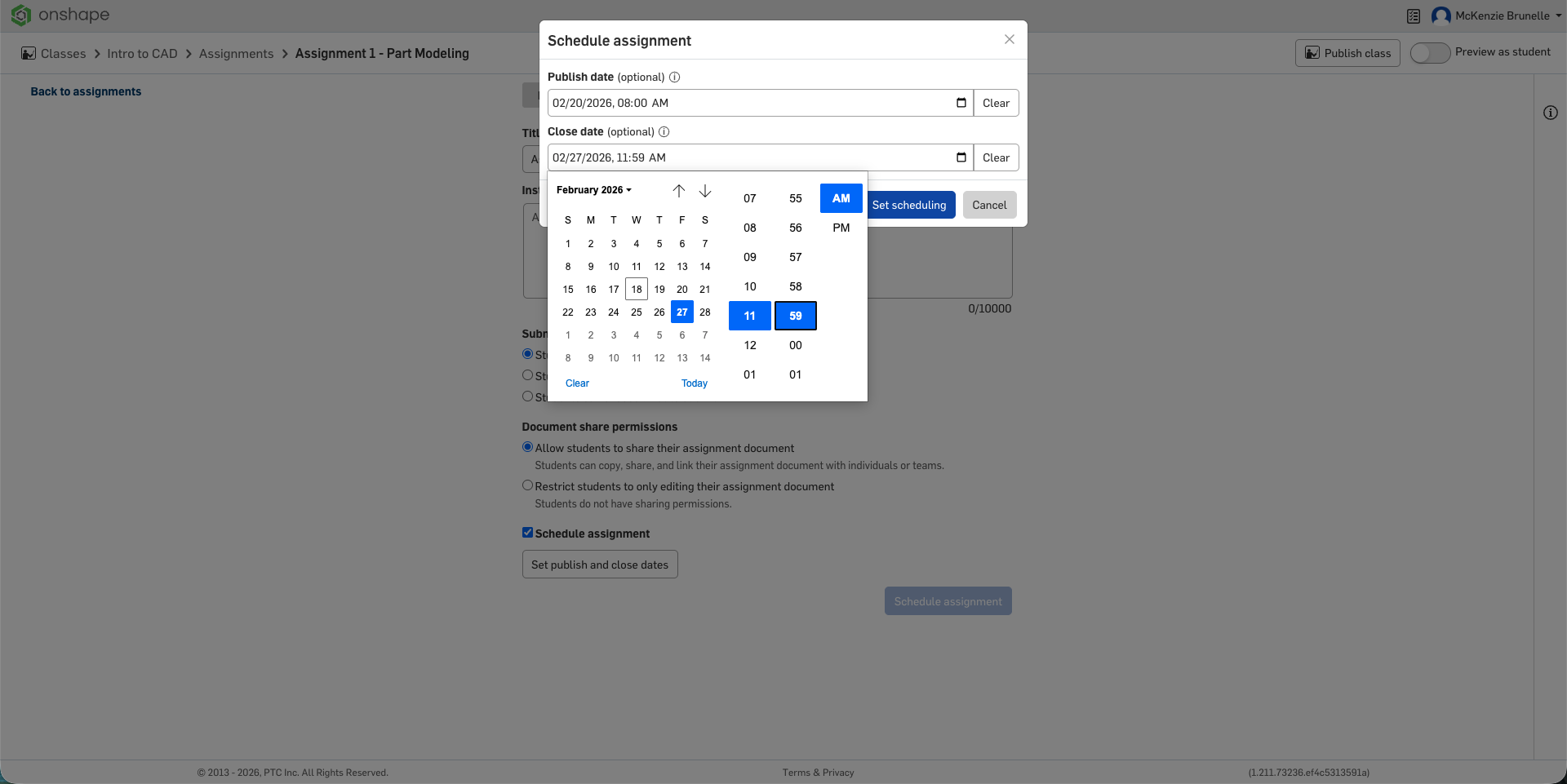
Educators can now schedule assignments in advance. On the assignment details page, educators can opt into scheduling to set a publish and/or close date. When the publish date and time are reached, the assignment will go live and move to an “In progress” state. Likewise, they can provide a date for when the assignment will be set to a “Closed” state. When the assignment is moved to a “Closed” state, students will no longer be able to submit from their assignments list.
Comments
What an update! MBD Is finally here - Can't wait to dive in an start adding it to custom features.
Experts in Onshape Automation - Custom Features and Integrated Applications
😍 This is a big deal!
Somewhere in an office in Boston the word Tweep was uttered one last, and hopefully final time. With a sigh of relief a product manager moves a card out of the Derek column on a dashboard and marks it complete.
…two more cards slide in next weekDerek Van Allen | Engineering Consultant | MeddlerIncredible! MBD is just incredible!! Finally! 🤗
My question is, was it in the pipeline before or was Tweep the inspiration for it?
Ramon Yip | glassboard.com
Sweet! MDB is here!
Will we be able to push these tolerances into drawing views?
I don't have any direct public commentary from the Onshape team that would suggest that I have had that kind of influence on their development cycles, but I choose to believe that the Derek dashboard is a real thing until confirmed otherwise.
Derek Van Allen | Engineering Consultant | Meddler@john_mcclary We completely forgot. 😁
Yes, we are hard at work on it. And we will continue to keep extending drawing consumption in really helpful ways.
Can confirm - its pretty easy to use MBD in a custom feature.
Experts in Onshape Automation - Custom Features and Integrated Applications
Awesome, that would be killer!
Oh wow, MBD… This changes everything!
Now, I must convince my employer to go there. Lead, follow or get the **** out of the way!
I was not expecting to see MBD so soon. Amazing. And at all levels! Other CAD packages don't magically add functionality this powerful for free on a given Friday.
Apparently it was literally on my bingo card.
It looks like we can retire @Derek_Van_Allen_BD 's Tweep.
Section views for in context make is so much more useful.
Great update!
Simon Gatrall | Product Development, Engineering, Design, Onshape | Ex- IDEO, PCH, Unagi, Carbon | LinkedIn
@Derek_Van_Allen_BD I can say that my bingo card is much bigger and 3 dimensional. We have much more to do on the MBD front and we'll be watching your feedback as we go. We're not perfect, but we will be listening.
MBD and in-model tolerances is probably the biggest obstacle to people switching to Onshape that I've heard. Here's hoping it's all gas, no brakes now.
Amazing MBD implementation. Can't wait to have the option to use that info in drawings. If I am not mistaken, that will make drawing creation a breeze.
The whole release is incredible.
Interested in the development of CAM, starting to feel like there might be something big hiding in a future release that would make it a real competitor to the current systems.
Amazing update! MBD and Onshape are a perfect fit! Can't wait to stop making 2D drawings.
Derek dashboard confirmed. My coworkers will be devastated to hear that.
To be serious for a second you guys kill it every month with new functionality and it's exciting to be on a platform that has the ability to extend that functionality beyond the base package if you're a willing and capable user. Giving power users the tools to make a better product and being willing to integrate those improvements back to the core is one of the smartest moves the Onshape team made with the software.
And I, for one, am excited to see all the new fun ways to misuse the MBD infrastructure for other meme features.Derek Van Allen | Engineering Consultant | Meddleris there a way to disable MDB? I very rarely make drawings or define tolerances, and I'm not a huge fan of having a big tolerance options button next to every dimension.
Another amazing release alongside modeling and quality of life improvements. I'm stoked!
MBD!! 😱
oo, an official way to tweep XD
.
Learn more about the Gospel of Christ ( Here )
CADSharp - We make custom features and integrated Onshape apps! Learn How to FeatureScript Here 🔴
Hmm…
The tolerance button on sketch dimensions isn't showing up on new dimensions anymore! Maybe something turned out a bit broken?
That will only show up for "appropriate" dimensions. eg those for which operations like extrude, revolve will create faces (that can be inspected). see below in this sketch, the single line cannot be made tolerant, all the other dims have been
And yes, there are situations where a sketch could end up creating, after certain operations, an "inspectable" face. We also offer the dimension tool in the panel toolbar to add such dims.
There is another feature added: tolerance options in chamfer
https://greasyfork.org/en/scripts/565664-onshape-auto-login
Extrude, Revolve, Fillet, Chamfer and Hole all have tolerant options!
I think something's off (newly created document with another sketch created earlier that does have the tolerance options):
Ticket submitted…
I've answered @eric_pesty in the ticket. We don't have tolerant dimension abilities on just length dimensions on a singular edge, which would be a singular face. For semantic reasons on ensuring that we are passing down clean data to inspection systems , we only map length dimensions to two faces, or in sketches - edges that would "beget" faces in prismatic operations.
Perhaps an easier way to think about it. For length dimensions, how would you measure that with your calipers/micrometers. Yes, then dimension it the same way. Put on your inspectors hat, and we'll also improve this scenario within reason. We're not perfect yet, and you'll see that too. But we will improve.
The dimensions have to be a line-to-line or face to face dimension - not a singluar edge or face
Principal Technical Services Engineer, Onshape
jjohnson@ptc.com
Ah ok, now I get it!
I never realized the auto-dim on a rectangle was creating edge to edge dimensions instead of just dimensioning the length of the side (which tends to be the default when doing it manually as it it's just one click)!
Pretty sure I'm not going to be the only one confused as to why I'm not getting the option when adding a dimension to the side of a rectangle so a hint of some sort would be helpful!
EDIT: Friday afternoon brain strikes again!
Awesome update though! The configuration sorting is going to be helpful for sorting through more complicated models too.
RIP tweep. Was cool for a brief moment. Nice update again. Excited for MBD and what's to follow with that. I dislike 2d drawings. Now who's gonna teach/transition guys to not need need 2D drawings. ha.
Tweep may be dead, but every new low level function that gets new abilities is a new opportunity for another stronger meme feature borne from it.
Derek Van Allen | Engineering Consultant | Meddler