Welcome to the Onshape forum! Ask questions and join in the discussions about everything Onshape.
First time visiting? Here are some places to start:- Looking for a certain topic? Check out the categories filter or use Search (upper right).
- Need support? Ask a question to our Community Support category.
- Please submit support tickets for bugs but you can request improvements in the Product Feedback category.
- Be respectful, on topic and if you see a problem, Flag it.
If you would like to contact our Community Manager personally, feel free to send a private message or an email.
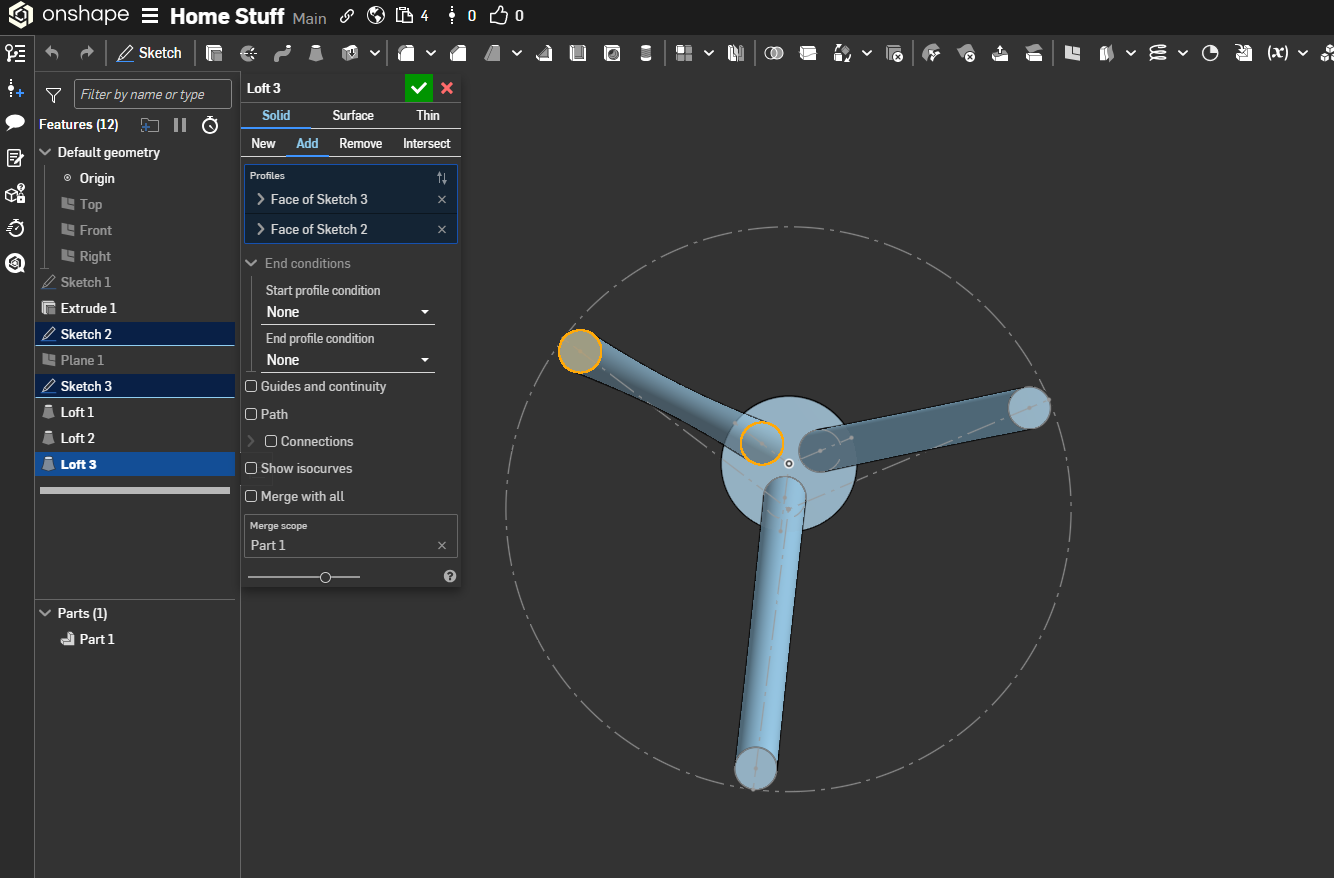
Hey, no matter what I try, the third loft keeps coming out conical instead of straight. Any ideas?
 mario_culumovic
Member Posts: 4 ✭
mario_culumovic
Member Posts: 4 ✭
0
Best Answers
-
 martin_kopplow
Member Posts: 1,254 PRO
martin_kopplow
Member Posts: 1,254 PRO
Yepp, the top and bottom cirles of that one are twisted. You need to give the feature someting to orient by. Try two half circles instead. That will open the opportunity for you to align them.
0 -
 CADNurd
Member Posts: 78 ✭✭
CADNurd
Member Posts: 78 ✭✭
Have to say - all those small circles look a bit too circular for my liking. Ideally, they would be perpendicular/normal-to the loft direction, which would make them look elliptical.
Unemployed Onshaper - Operating on European time - More of me here ➤➤ https://linktr.ee/Liam.G
0 -
 NeilCooke
Moderator, Onshape Employees Posts: 5,973
NeilCooke
Moderator, Onshape Employees Posts: 5,973 
Sweep one, pattern the others.
Senior Director, Technical Services, EMEA3
Answers
Yepp, the top and bottom cirles of that one are twisted. You need to give the feature someting to orient by. Try two half circles instead. That will open the opportunity for you to align them.
Have to say - all those small circles look a bit too circular for my liking. Ideally, they would be perpendicular/normal-to the loft direction, which would make them look elliptical.
Unemployed Onshaper - Operating on European time - More of me here ➤➤ https://linktr.ee/Liam.G
Sweep one, pattern the others.
I appreciate the help—patterning the rest of the elements resolved the issue.