Welcome to the Onshape forum! Ask questions and join in the discussions about everything Onshape.
First time visiting? Here are some places to start:- Looking for a certain topic? Check out the categories filter or use Search (upper right).
- Need support? Ask a question to our Community Support category.
- Please submit support tickets for bugs but you can request improvements in the Product Feedback category.
- Be respectful, on topic and if you see a problem, Flag it.
If you would like to contact our Community Manager personally, feel free to send a private message or an email.
Custom Feature: OnlyTabs - A premium sheet metal tab and slot feature
 Derek_Van_Allen_BD
Member Posts: 811 PRO
Derek_Van_Allen_BD
Member Posts: 811 PRO
A long time ago in the distant year of late 2024 our sheet metal obsessed production company was evaluating our CAD options and found ourselves checking out Onshape as an alternative to our old licenses of Solidworks. There were two main barriers in the way of our adoption, support for sheet metal cones, and a sheet metal tab and slot feature. Cone support came very quickly after we began our evaluation which gave us the confidence to switch, and featurescript had partial solutions for the tab and slot support already that we could make some use of for some projects. The problem is none of the other public facing scripts support sheet metal geometry, let alone curved sheet metal geometry where you want tabs to smoothly roll along edges of your parts. And forget about cones, those were brand new at the time. So I reached out to @Caden_Armstrong to help build a sheet metal tab and slot script that covers more of our use cases and support rolled geometry on active sheet metal parts because at the time I was brand new to Onshape and knew barely anything about featurescript. I could generate the slots pretty easily with a thicken operation, but the thing I really needed was help with was a feature that generated the tabs.
Through a full year of iteration since then OnlyTabs has become a full featured tab and slot feature that supports all major surface types that sheet metal supports.
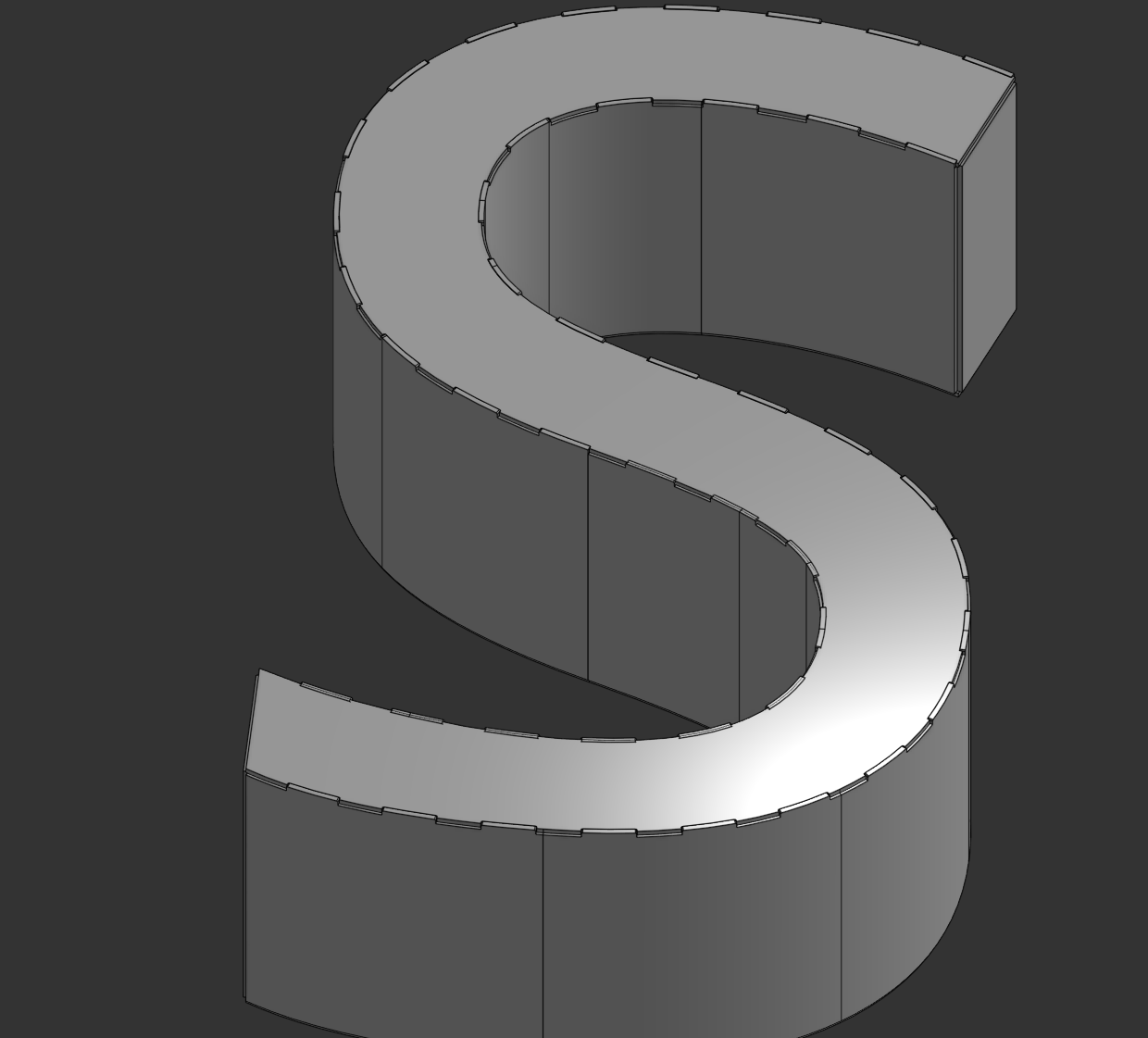
As long as Onshape treats the surface as a main sheet metal face (no bend faces at the moment) it will allow you to tabs extending from the edges you select. The only prerequisite is that the edge needs not to be part of a rip or bend joint to start with. You don't even necessarily have to specify a slot scope on your parts if you want to draw only the tabs. There are numerous spacing options available for tab placement whether you're looking to drive by a strict number, or best fit spacing, or strict spacing from one end of your path to the other. It even supports tabs spanning across multiple edges in a chain all at once.
Slot clearances are accounted for, chamfer depths for the tips of the tabs, offset spacing from the ends of the chain if you want to maintain an equal pitch but set 1" in from that side and .5" in from that other side.
I even included a randomizer to make it impossible for your fabricators to install panels backwards.
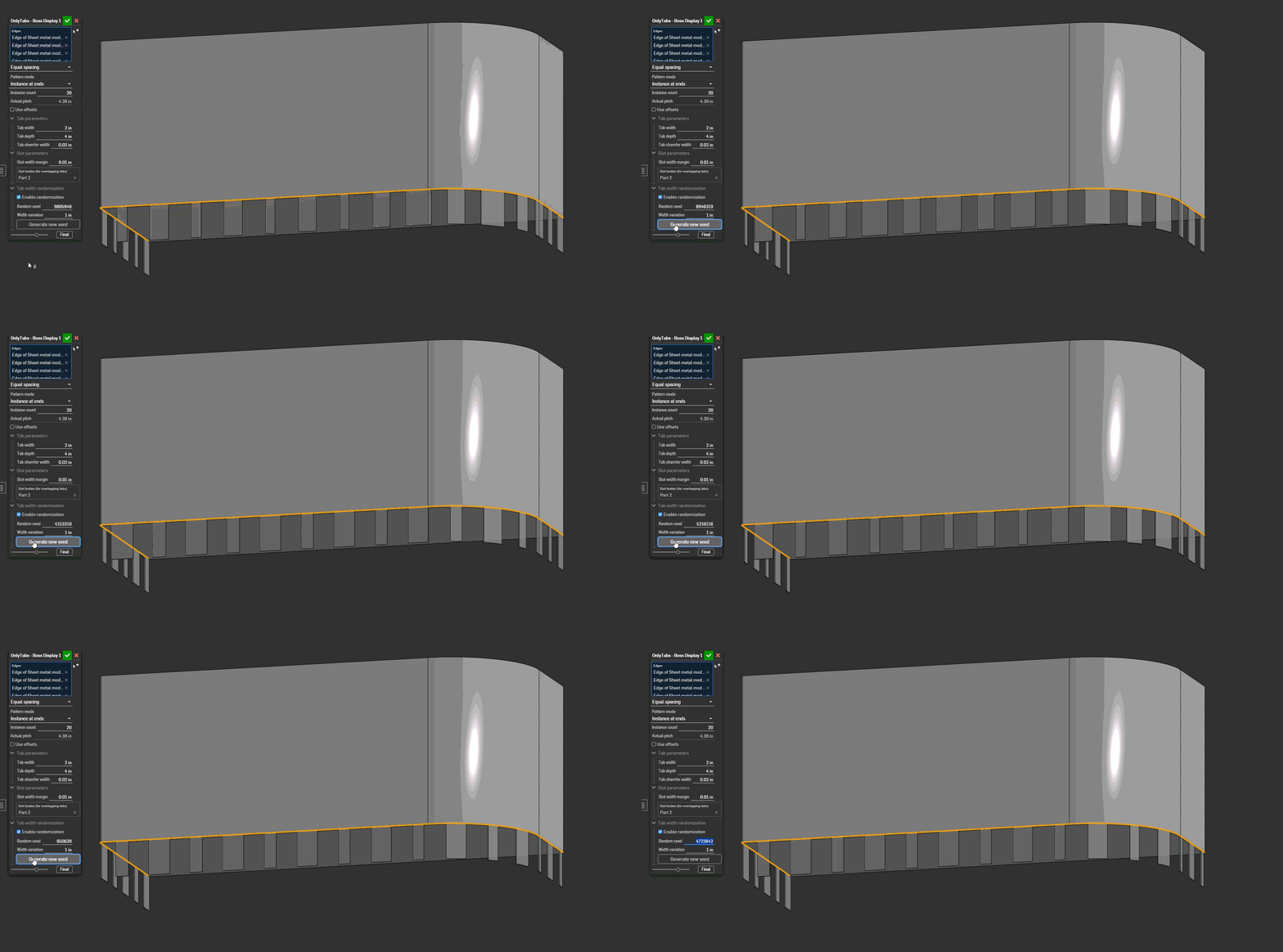
The working principle of the current iteration of this feature uses as much native sheet metal functionality as possible, both because I tried everything else first and ran into impenetrable bugs, and because performance in previous iterations was not worth publishing publicly. This version however, has pretty dang good performance for a custom sheet metal feature.
I don't think I'll ever actually send out a tab and slot joint with 200 randomized tabs and slots, but it's comforting to know that I can, should the need arise.
Subscribe to my OnlyTabs.
Comments
Special thanks again to @Caden_Armstrong for the original iteration of this feature and getting me into featurescript development in the first place, although very little of that original implementation remains I have to give credit where it's due. Also special thanks to @lougallo for the help diagnosing the black box of sheet metal attributes during the many many refactoring attempts made in the last few months to get this to the place it is today.
Derek Van Allen | Engineering Consultant | MeddlerDid you considered some alternative feature naming, like TabsHUB?
Many other alternative names were suggested by people I work with. The welders had some really colorful ones. This is the one safe for publishing
Derek Van Allen | Engineering Consultant | MeddlerOnlyTabs seems misleading if it also does slots.
Congrats on the effort. I always enjoy seeing my initial features get expanded on and turned into absolute powerhouses of automation - and seeing my clients turn into FeatureScript experts themselves.
Experts in Onshape Automation - Custom Features and Integrated Applications
At first the justification was the early builds only did the tab generation, but now my justification is our sheet metal studios feature trees end up being one sheet metal convert, a couple move faces, and 90% this feature. For some builds it's all you need.
Derek Van Allen | Engineering Consultant | Meddler@Derek_Van_Allen_BD Thank you for taking time and effort to learn peculiarities of Onshape SM implementation. Very nicely done!
@lana now that I sort of know my way around the sheet metal functions it'll hopefully be the first of several features. I'll try not to lock up too much Onshape support time debugging them unless they're really really cool.
Derek Van Allen | Engineering Consultant | MeddlerOh I suppose this isn't clear from the demo docs I chose, but your tabs can make slots in the middle of sheets as well. Most of my projects and use case will be edge alignment but you can use this for parts alignment in the middle of a sheet too.
And on a similar note the slot body doesn't have to be sheet metal - it can be frames or other solid parts. You'll just find that the slots won't go all the way through your slot body unless the tabs go all the way through the slot body.
This is 50% because this is how you should be doing your tabs on frames for manufacturing and structural reasons anyway, but 90% because I'm cheating with the slotting logic being handled by the sheet metal engine handler to ignore the need to check for wall thickness for the slotting operations in general runtime.
V19 - Updated the script because I goofed the implementation of the RNG. It's actually random now.
Derek Van Allen | Engineering Consultant | Meddler@Derek_Van_Allen_BD Thanks so much for digging into the Sheet Metal stuff so hard and sharing it with the community! You've been quite prolific and everyone is better for it.
The Onsherpa | Reach peak Onshape productivity
www.theonsherpa.com
@EvanReese got a few more in the pipe too. I'm just getting started.
Derek Van Allen | Engineering Consultant | MeddlerNow that @Derek_Van_Allen_BD knows all about sheet metal he might be able to get feature patterns to work on flats (i.e. across bends) 😉
It doesn't come up often for me but being limited to sketch patterns is seriously painful when it does!
@eric_pesty It's not next in line but it's pretty damn close to the front of the line. Got a lot of wiggly wavy wacky arm flaily parts that need to have hole pitches run the border at a consistent pitch. It's one of those operations that's not difficult but when we schedule a drafter to do it, it's a spend-their-whole-workday-punchin-holes type affair.
Derek Van Allen | Engineering Consultant | MeddlerHa!
I was kind of joking but now I'm curious/excited!
Really though, that's one of these things that really should be in the "core" functionality and implemented by Onshape.
There's a number of scripts I work on that that could describe but that's the beauty of having access to featurescript is that rather than waiting for an improvement that might be on the roadmap or might not be I can just make my tweaks and feed the examples back to the devs and say not just "I'd like this improvement to the product" but "I'd like this improvement to the product and also here's exactly how you might go about making this improvement to the product"
Derek Van Allen | Engineering Consultant | MeddlerAmazing work. This has helped me so much especially as the bulk of the sheet metal I work with is folded. A feature I missed coming over from SW too.
I would usually add a tolerance around the whole tab. Not such an issue on the edge of a sheet/corner but tabs in the centre of the material would be tough to assemble potentially. Is this something that could be added? This seems like a very deep end jumping off point for me to have a look into tweaking myself in featurescript… so with maximum appreciation,
I just though I'd ask!
I consciously chose to omit this particular clearance for architectural reasons in previous iterations of the script but the current version might be able to get away with it. The way the clearances work is by thickening the sheet metal definition face and doing a move face offset of that resulting tool body. It'll be simple enough to apply that operation to the cap faces of that thickened tool, but it will cost some performance on non-planar parts.
Derek Van Allen | Engineering Consultant | MeddlerI see. Perhaps I will have a play when I have a moment. For now it's not too much bother to manually move a few faces. It's certainly a lot quicker than drawing everything out manually. Thanks for the contribution ☺️
V20 Update: Added thickness clearance this morning. Also renamed width margin to width clearance for clarity. Turns out it can actually be used to fix bug cases where the sheet metal surfaces are fighting over collision space so it was worth implementing even if there were performance hits. Though I'm not actually seeing any performance hit in my testing so it looks like we get to get away with it.
Out of curiosity do you ever use those corner treatments that Solidworks lets you have for the inside edges of the slots generated by their implementation of tab and slot? I personally don't see the point in 2/3 of the options they let you draw and don't like how aggressive their mouse ear clearance is. It's also a thing that I know laser software can compensate for so if I'm having to do it at the CAD level I'm using the wrong software or vendor.
Derek Van Allen | Engineering Consultant | MeddlerThank you @Derek_Van_Allen_BD , amzing work and functions just as required!
I rarely use the corner treatments too, sometimes on thicker material with narrow slots (our vendor lets us push the boundaries a bit here) and maybe if parts were going CNC plasma. My work is mostyly quick and dirty prototyping so usually nothing a kiss with a grinder can't solve! Where I do need it I would just copy/paste a sketch on the flat pattern, but it's rare.
Already in use so thanks again!
@Derek_Van_Allen_BD Thank you for developing this amazing feature. I started to test it out on several examples and I wonder if I can use it in standard tube profile frames this feature as shown. It is a "frame on frame" tab and slot. This is super helpful for frames assembly and weldments, especially that nowadays these standard tubes are usually cut using a rotary laser machine.
I have been trying to use OnlyTab to execute this feature on this 2mm thickness standard square tube but it seems to give me an error, not sure if I am doing something wrong, Thank you in advance.
.
At this point in time the feature is only designed to work on sheet metal bodies and not frames, due to the unique architecture of how sheet metal works in Onshape it was necessary to specialize the workflow and focus on that first. Frame tab and slot is 100% a feature I am interested in writing, though, and will follow up when that implementation is ready.
Derek Van Allen | Engineering Consultant | Meddler@ash_serour there is this other custom feature you might be able to use for the time being that might get you by but there's a lot about the implementation that doesn't work for my needs that I will be approaching in a different way when I do my version of the frame feature.
Derek Van Allen | Engineering Consultant | MeddlerHey @Derek_Van_Allen_BD just reconfirming this. Did the recent rework to Move Face break funcitonality for OnlyTabs? What's the fix for it?
Ramon Yip | glassboard.com
Move Face should play nicely with OnlyTabs as of the recent update but if you have a broken case you'd like to share with me I can help diagnose.
Derek Van Allen | Engineering Consultant | MeddlerYeah, I just tried it again and I'm not sure what the deal with Move Face is. It's leaving these weird tangent faces that seem to break OnlyTabs. I tried it on a separate part studio and it works, so I'm not 100% what the voodoo magic behind it is.
Link to doc: https://cad.onshape.com/documents/8b337f412ad76d2daab01d99/w/4797c1ddcb0ab81bbb89ae8f/e/610e32cc74039646a5cdce07
Ramon Yip | glassboard.com
It seems to work if you Move Face all of the edge faces of that part, but I definitely have test cases that should have covered moving a single edge for tab and slot. Time to roll back to older sheet metal versions and investigate.
Derek Van Allen | Engineering Consultant | MeddlerOkay I've discovered that adding thickness clearance to the slot generation does fix the problem as well. That means there's something in the logic of sheet metal generation that doesn't like surfaces from the same master definition touching when doing a sheet metal rebuild if there are shared joints across the rest of the object. I'll have to think about how to architect around that without forcefully adding minimum clearance values for the user.
Derek Van Allen | Engineering Consultant | MeddlerAh interesting. So it doesn't like when I expect perfection and don't account for totally reasonable real-world clearance needs?
Ramon Yip | glassboard.com
Only if you're tabbing a single joint. If you use reasonable real world half-lap joint geometry on all of the sides of the panels to remove all the rip associations and not rely on your welders to try to float panels together on an infinitely thin knife's edge of geometry then OnlyTabs has no problems delivering your most unreasonable zero tolerance geometry needs.
Derek Van Allen | Engineering Consultant | Meddler