Welcome to the Onshape forum! Ask questions and join in the discussions about everything Onshape.
First time visiting? Here are some places to start:- Looking for a certain topic? Check out the categories filter or use Search (upper right).
- Need support? Ask a question to our Community Support category.
- Please submit support tickets for bugs but you can request improvements in the Product Feedback category.
- Be respectful, on topic and if you see a problem, Flag it.
If you would like to contact our Community Manager personally, feel free to send a private message or an email.
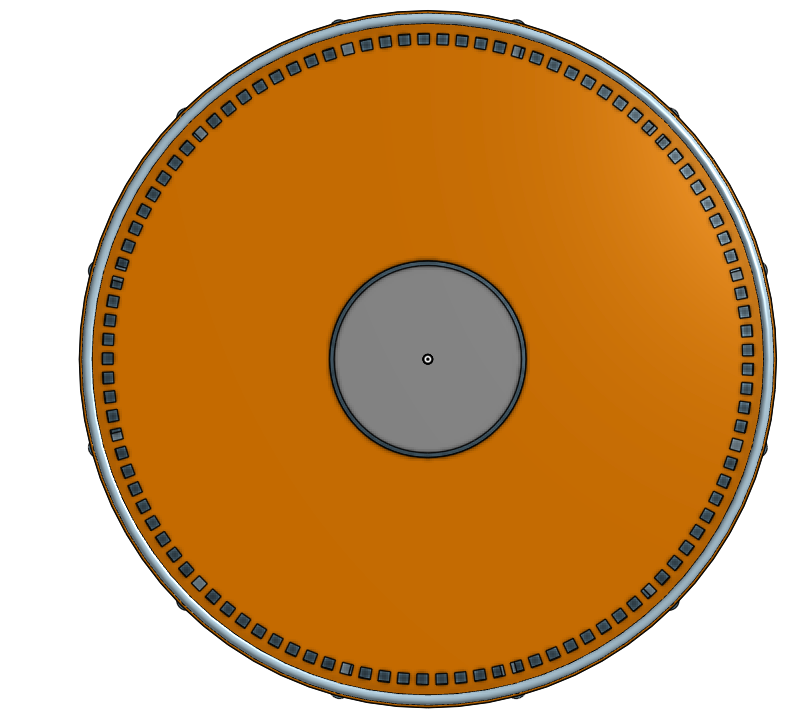
copy features inward radially.
 colin_king506
Member Posts: 53 ✭✭
colin_king506
Member Posts: 53 ✭✭
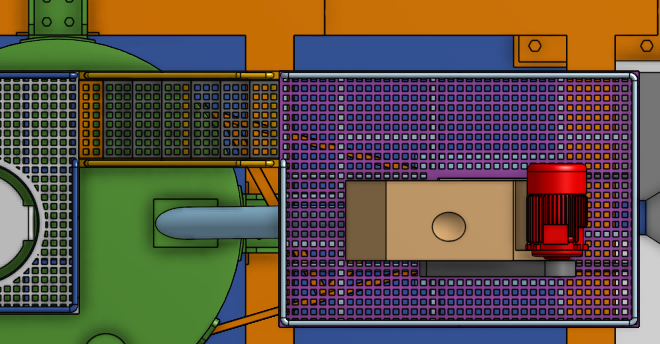
My goal is to copy the shown features inward radially to form a grid pattern similar to open grid pattern used on industrial walkway. BTW, this 1/87.
Thank you in advance for your assistance in this matter.
Have done this linearly
0
Answers
You could do this with an iterating circular feature pattern which would take some time to set up.
Or you could do it much faster with @EvanReese's Speaker Pattern feature.
.
RENDERCAD
rendercad.ai - Photorealistic product rendering.
▚▞▚▞▚▞▚▞▚
________________________________________________________________________
The Speaker Pattern feature is for round holes. I need to do it with square holes. Is there a video that goes step-by-step tutorial?
I drew the basic shape (on a existing 'disk' [circular with thickness]), extruded it (removed), Then did a Circular pattern by feature.
Interesting, the "main" in the speaker pattern allows selecting your own body but the last "version" doesn't seem to have that option yet!
I wonder if @EvanReese forgot to create a new version or if it's not quite ready for primetime?
I think this will help.
https://learn.onshape.com/learn/course/advanced-part-design/advanced-features/exercise-vent?page=1
In the meantime, here's a way to do this manually:
https://cad.onshape.com/documents/51fe6c780915193df1d4115c/w/770c6e82ad081367eee19aa6/e/29c46b5648abe5d3af3e2962
Here are some videos on the general idea of using patterns of sketches and variables to achieve these things (this is part one of two):
oops, funny I checked the code to see if that was available before posting, but didn't actually use the feature. 😶
RENDERCAD
rendercad.ai - Photorealistic product rendering.
▚▞▚▞▚▞▚▞▚
________________________________________________________________________
I got by just doing plain linear.
That looks quite different from what you were originally asking.
If this is all you needed, I would recommend looking at the "fill pattern" FS as it can automatically eliminate cuts that go over the "edges"…
https://cad.onshape.com/documents/57361ad4e4b00e5012c3857c/v/e2b54c2409bbaaf196a9fcc9/e/14aa44d127806651b248b9c6
https://cad.onshape.com/documents/51fe6c780915193df1d4115c/w/770c6e82ad081367eee19aa6/e/b645085004adb9d4bf7ebc53?renderMode=0&tangentEdgeStyle=1&uiState=69a0cf78c4881d979eb06b8f
It seems not needed now, but @eric_pesty thanks for pointing that out. I versioned again. I've not touched that code in years, but meant to at least ship the latest.
The Onsherpa | Reach peak Onshape productivity
www.theonsherpa.com