Welcome to the Onshape forum! Ask questions and join in the discussions about everything Onshape.
First time visiting? Here are some places to start:- Looking for a certain topic? Check out the categories filter or use Search (upper right).
- Need support? Ask a question to our Community Support category.
- Please submit support tickets for bugs but you can request improvements in the Product Feedback category.
- Be respectful, on topic and if you see a problem, Flag it.
If you would like to contact our Community Manager personally, feel free to send a private message or an email.
Sheet Metal Cutout Tab
 brandon_nason
Member Posts: 7 ✭✭
brandon_nason
Member Posts: 7 ✭✭
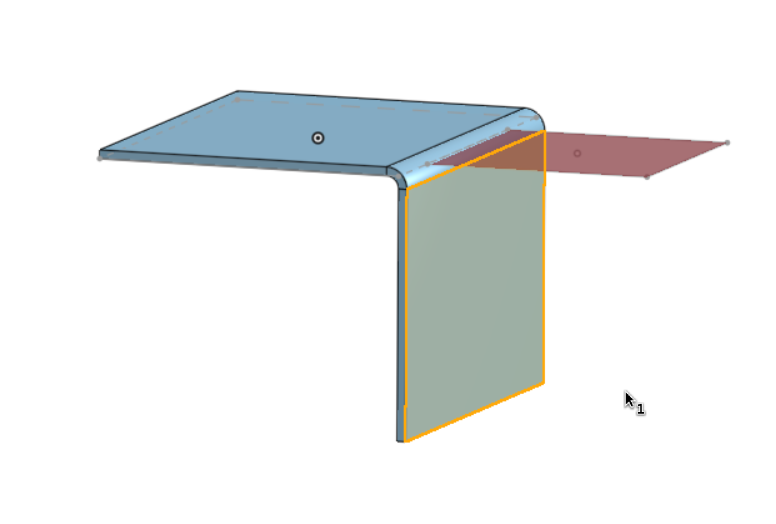
Is it possible to "pull" a tab out of a flange? I want the red highlighted sketch to become a tab where it's material is cut out of the yellow outlined flange. I need to use flange instead of a bend because I want onshape to calculate the amount of material I need and bend will "shrink" the outline of the original sketch afaik Example document here:
Tagged:
0
Answers
https://cad.onshape.com/documents/b12015a93a9db9c1be4fc77b/w/410c13e304ba4005cada30b9/e/5bde0aebbf25fd24922c62a7?renderMode=0&rightPanel=sheetMetalPanel&uiState=69a83c869a94fc1d9e99ccf6
Maybe one could also craete two flanges left and right of the tab and connect them, but that might make the interference check more difficult. .
I've done this from an existing bend region by doing flat pattern extrudes. First a subtract, then an add. Kinda want to turn automatic relief cuts into a standalone featurescript though so that I don't have to spend any mental energy thinking about individual hole proximity to bend, and just have the script insert this detail near all the geometry that would be close enough to a bend to deform.
Derek Van Allen | Engineering Consultant | Meddler