Welcome to the Onshape forum! Ask questions and join in the discussions about everything Onshape.
First time visiting? Here are some places to start:- Looking for a certain topic? Check out the categories filter or use Search (upper right).
- Need support? Ask a question to our Community Support category.
- Please submit support tickets for bugs but you can request improvements in the Product Feedback category.
- Be respectful, on topic and if you see a problem, Flag it.
If you would like to contact our Community Manager personally, feel free to send a private message or an email.
Unlinking Dependent Parts from Source?
 brandon_nichols678
Member Posts: 22 ✭✭
brandon_nichols678
Member Posts: 22 ✭✭
Greetings!
Noob here has channel strut 'frame factory' document, able to generate flat and box strut frames in many configurations.
Composite-part frames may them be used in target documents like shelving, shop tables, etc.
But once past initial design development, I'd be surprised if OnShape doesn't provide the ability to easily disconnect 'manufactured' parts from the source and utilize them independently in target documents, so they stand alone without dependency.
Something like snapshotting & exporting a unique parts configuration.
Problem is, I can't figure out how to easily do it?
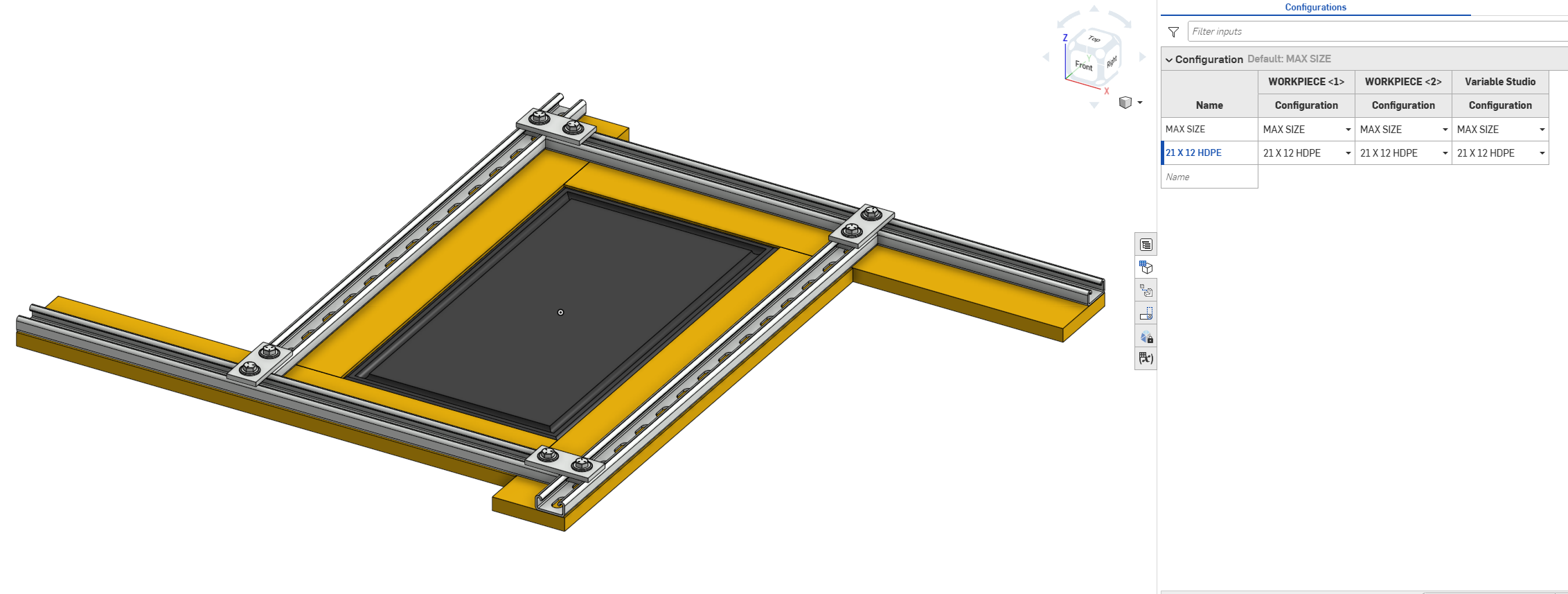
Target document is here, need to disconnect both steel struts and wooden plates.
Brandon W. Nichols, PE
Seattle, Washington
Comments
I'm not quite sure what you are asking for when you mean by "disconnect"… Can you elaborate on what you are trying to achieve?
Objective is a stand-alone product document, say for a shelf (or a tool, like in the example shown) independent of the frame document that generated the framing parts. Gotta run right now, hope that helps, thanks @eric_pesty
It seems to me you are already there no? The example above is effectively "independent" of the framing document already (by referencing a version).
As a general note, Onshape's database and versioning approach means references are "stable" so there is no need to "break" dependencies (unlike certain other CAD software that you couldn't trust…). You can just insert something from another document (or even from a version of the same doc) and will never change on you (unless you manually update the reference).
Or if mean not having the "plates" in the same assembly as the frame you could just select the plates and "move to new sub-assembly"?
When you say "snapshot and export", it kind of sounds like you might be looking for the release workflow? You could release the different frame configurations (you will need to give them a part number for that) and then you would have a clear "line in the sand" version to reference.
A bit of context on your overall intended process would help because it looks like you are making your life harder than you need to. You say you have created "frame factory" document but it doesn't look like you are using a pre-made frame assembly from that "factory" document (in the example document you linked above) and instead you are building a new frame assembly again (fairly inefficiently as well with way more mates than you need, inserting a reference sketch with the required offsets and mating to that would likely be a much more streamlined way to achieve your goal). I see in the linked document (where the strut pieces come from) that you have a "flat frame assy" so why aren't you using it in this document?
Thanks @eric_pesty for your feedback, the context is tooling design packages at major manufacturing company. Briefly for now, the idea is to sever dependencies, such that the tooling package can be archived and referenced later for operations and maintenance groups, often long after the original tooling design team has moved on. There are a number of reasons to eliminate dependencies even in the OnShape world I'm sure, among them a designer or team taking a public source document private.
So I noodled out the process, but have some salmon to barbecue tonight, so I'll be brief for now and expand probably later this weekend:
• OnShape native-generated parts (like the strut and plates in my cutting board jig): simply duplicate the tab in the reference document, and move duplicated tab to the target working document. Then simply replace instances, of the linked part in the working document with the now local part.
• However with imported parts (like the nuts and bolts) the imported part tab cannot be simply duplicated. Seems like the best option is to duplicate the part-using assembly and move it to the target document as above, then re-download the imported parts and replace instances as before.
Anyway that's all I have time for for now, I'm definitely going to expand on this and memorialize the process for future reference.
thanks again for your help and have a great weekend
Hmm…
There are a couple different ways to look at this depending on the "handoff" process. The most future proof option would likely be to just export the top level to a STEP file for the customer to hold on to.
Note that you can delete (or make private or whatever) the source document after having inserted a linked document and the target doc is going to be fine. Nothing is going to break but obviously you won't be able to "open linked document" and make changes there… This can be an issue for an "editable" part but really shouldn't matter for an imported item. If the original document was configurable you would still be able to change configuration.
Having a project entirely within a document can be an option but is going to require some work unless planned from the beginning. If you are going to have similar work like this, I would setup a template document with everything you need in it and do a "copy workspace" for a new project.
For moving things, much better than duplicating and THEN moving, you can move to the target doc first, then do a "restore" to bring them back in the source document. This way you don't need to re-attach the links in the target (just do an "update to latest version" and click on the option where it says "source document has moved" (or something like this).
See this for an illustration of pretty much this workflow:
Enjoy the BBQ!