Welcome to the Onshape forum! Ask questions and join in the discussions about everything Onshape.
First time visiting? Here are some places to start:- Looking for a certain topic? Check out the categories filter or use Search (upper right).
- Need support? Ask a question to our Community Support category.
- Please submit support tickets for bugs but you can request improvements in the Product Feedback category.
- Be respectful, on topic and if you see a problem, Flag it.
If you would like to contact our Community Manager personally, feel free to send a private message or an email.
How can I define this width to be more than 0.29 without the entire sketch messing up?
 daniel_rodríguez_rivero
Member Posts: 13 ✭
daniel_rodríguez_rivero
Member Posts: 13 ✭
in General
Hello.
I have the following sketch, which is an old one I'm updating to add an extra tab.
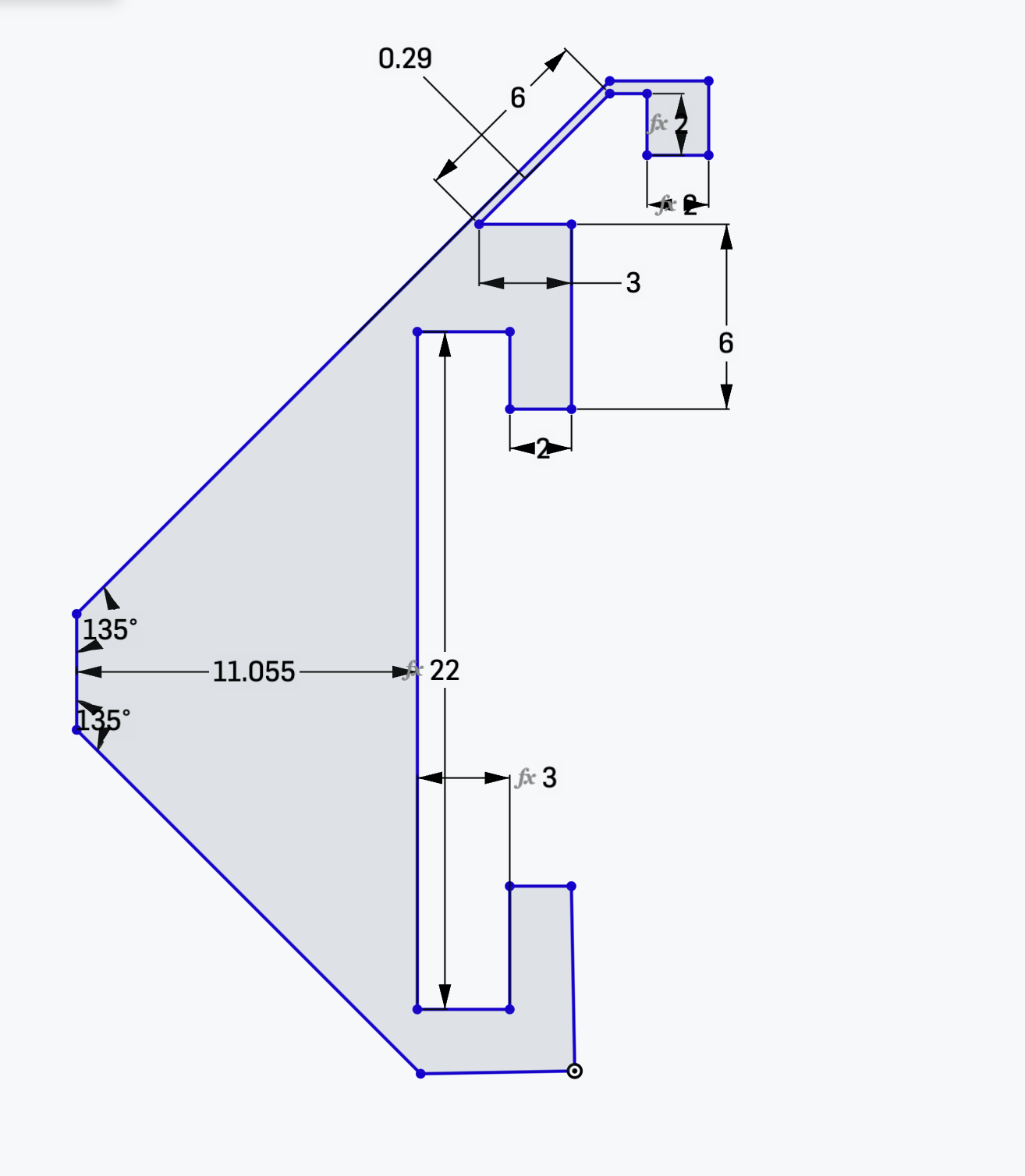
That 0.29 is something I want to define to be bigger, but if I do, the entire thing gets messed up. I don't know what other restrictions I can add to make it work as it should.
Here is the project: https://cad.onshape.com/documents/5a2f8b4592e085fac2650d1c/w/4922f296e9f395fe2d6bcc02/e/983e89b062ae036b28a51d67?configuration=List_oMw3jz3ZSYvjDQ%3Dgrueso&renderMode=0&uiState=69c01a37ca290310bdfb2f03
0
Comments
For starters, your lines are all blue which means the sketch is not fully constrained. I would start by fully constraining then work from there.
-S
you must learn and use constraints to develop relationships in your sketch and control what is allowed to move and how.
Watch this video (at 0.7x speed or lower) a few times - https://www.youtube.com/watch?v=6STIrs0U8y4
Unemployed Onshaper - Operating on European time - More of me here ➤➤ https://linktr.ee/Liam.G
I'm not a pro at any of this, and not at a computer to test it, but maybe try deleting the 6" dimension before changing the 0.29"?
Or draw a new parallel line at the needed offset, then delete the original and use the trim tool to shorten the connected lines at either end.
Understanding constraints is the ultimate solution. Which is something I still often struggle with.