Welcome to the Onshape forum! Ask questions and join in the discussions about everything Onshape.
First time visiting? Here are some places to start:- Looking for a certain topic? Check out the categories filter or use Search (upper right).
- Need support? Ask a question to our Community Support category.
- Please submit support tickets for bugs but you can request improvements in the Product Feedback category.
- Be respectful, on topic and if you see a problem, Flag it.
If you would like to contact our Community Manager personally, feel free to send a private message or an email.
PLEASE explain "externally disambiguated" / "transient" / "robust" / "tracked" / "unstable" ID's etc

It has been years and we still don't have foundational knowledge of how featurescript operates.
From what I can see in the forums most of us dev's have been wasting hours upon hours guessing and testing.
This post and others are "weak-sauce" at best. We all know about:
-"forEachEntity"
-"makeRobustQuery"
etc, etc and may have some idea on how to use them effectively but no solid understanding on exactly what's happening.
And please for the love of all that is good NO METAPHORS OR ANAOGIES! just tell us exactly what is happening.
If I have to decode one more post that starts with "Look at this way", "Imagine it like this", "It's sort of like", "I always picture it like this" then I'm lighting my PC on fire.
We're big boys we can handle the complexity without cryptic stories and riddles.
Best Answers
-
This Onshape Live presentation had ( a very simplified ) explanation of how queries work inside Onshape. For each topology created by an operation there is a record of its dependencies allowing us to identify this topology. When downstream references this topology, query (an encoding) of this record is generated. Query evaluation is a patten matching of the query with current state of history. One of the first matches is operation id. If we introduce an unstable component into ids of some operations, it means that results of those operations will all be considered when evaluating a query generated for one of them. E.g. If we have a set of operation ids fId0,op0, fId1.*id0.op, fid1.*id1.op, fid1.*id2.op .. , when evaluating a query for topology created by e.g. fid1.*id1.op , we'll consider all fid1.*.op operations. This way reference is stable to order and number of input selections. If the dependencies are not enough to disambiguate results of these operations, external disambiguation is used. At the time of query evaluation external reference replaces the unstable component. I hope this gives you a mental model for the future. This is not going to give you a complete clarity without knowing the way each operation handles its history records. I don't think we are going to expose those details any time soon.
All of that is supposed to work in theory, but sequence of opSplit where results of previous step are passed into the next does not. I can't say that there is a theoretical reason why it could not, but so far we've fallen short of getting there. I'll add your example to an issue we have for addressing this scenario.
In meantime If instead of split you could use opThicken to create the skins and opBoolean subtraction to reduce the original body, this should give you a more stable behavior. Sorry about the hassle.
1 -
@Derek_Van_Allen_BD I think they mean use "opThicken" to create the individual skins then shape them with "opSplit" and in doing so we'd have more reliable solid body ID's for each skin downstream.
I was rather thinking of opReplaceFace for side faces. You can use qCapEntity query with thicken to find the original face and its offset.
0 -
@christopher_dziuba Have you seen these videos from @Alex_Kempen? It's project-based, not focused only on fundamentals, but valuable for sure. https://www.youtube.com/@TheVenomousFire /videos
1 -
Thanks for the tag @EvanReese! I had some free time today, so I went ahead and threw together a video on Queries and Ids specifically. Hopefully this hits the level of detail desired without being too over-the-top technically. I'm also happy to answer any additional questions and/or give additional explanation as needed.
Onshape FeatureScript Queries and Ids Deep DiveSoftware Developer at Epic Systems
FRC Design Mentor - Team 1306 BadgerBots4 -
Upon revisiting documentation and experimenting I better understand entity referencing via queries and external disambiguation. I'll summarise what I've learnt in words I understand in case anyone finds it useful (Please @lana & @Lindsay_Early correct any mistakes I make if you like I'm sure I missed some things):
Queries
1. Each entity in a PS (part studio) has a "transient ID" which can change if an operation is performed, even if that operation doesn't modify that entity. A feature can have multiple operations and between each one the "transient ID" of the entities can shift. You are discouraged as a user from attempting to predict how a "transient ID" will change between operations to track entities with their specific "transient ID"s.2. "transient ID"s can change and shift between operations for reasons that are complex and unnecessary to know for good featurescript writing.
3. "Queries" are used to reference entities in featurescript. A "query" is a type who's structure is defined in the std public onshape source code in the "query.fs" tab. A "query" is literally a question structured such that onshapes library functions can use it to ask the context what the "transient ID"s of entities are at any time between operations.
4. The question a "query" asks does not change between operations. This means before and after an operation the same "query" may refer to different entities since in both instances it is asking the same question but in a different context.
5. The process of a function passing a query to the context to receive "transient ID"s is know as evaluation. "evaluateQuery" is a function that does this, it returns an array who's elements are queries that contain the "transient ID" of each evaluated entity at that time. All functions that need to refer to entities in the onshape library use queries and never "transient ID"s which is why the elements of array returned by "evaluateQuery" are of type "query" making it easier to use in loops where the individual queries can be used as inputs in operations (a type of function).
6. "queries" constructed in code are complex questions, that can be evaluated at any point between operations. An "evaluated query" (a query that looks like this → { queryType : TRANSIENT , transientId : IB }) asks only what entity has that specific "transient ID" right now and should be used by function immediately or else the entity referenced may be different. This means if you're looping (iterating) through the array from "evaluateQuery" but each loop has an operation that changes the "transient ID" of the intended entities, the code will fail. You must instead ensure each loop has a "query" carefully constructed to evaluate to the intended entity in each loop.
Operations
1. The variable "id" which is present within a feature definition is an array of strings of type "ID" with 1 element; a string unique to every instance of a feature in a context. An array of type "ID" can have new string elements appended to it (called "components") with the "+" operator unlike with ordinary arrays, which makes it easy to construct a new ID by appending strings. Operations in a feature will ask for an "ID", each one must be unique to identify the operations performed by that feature and must be assigned in the order specified in onshape standard library documentation.Note: that "transient ID"s, "ID"s & "identityTransform" are all completely different things:
-Constructed "ID"s are assigned to operations only and can be used by "queries" to reference the entities made by them.
- "transient ID"s are assigned by the context to individual entities and used only by the context.
-"identityTransform" is a function that returns a "transform" that does nothing.Entities
1. Standard Library Documentation query section starts by explaining how entities are defined in a context and presents enums that are used by functions that return "queries" that use those enums to refer to entities. It's important to note that "bodies" may contain "entities". Up till now I have used the word entity to refer to anything that could exist within a PS. This is not the way onshape uses the word.2. Anything you see in the bottom left corner of a PS on your screen under "parts" or "surfaces" etc, etc is a "body" with a "bodyType" not an "entity". "entityType" only identifies parts of a body or all of one body. The reason "entityType.BODY" exists is because some "body"s don't contain vertices, edges or faces such as mate connectors.
Constructing Queries
1. Standard Library Documentation query section is worth reading to understand how to construct a query that evaluates to entities based on their topology ("state-based") however explains very little on how to refer to entities based on when they were made ("historical"). "qCreatedBy" is the only "historical" "query" function in this section as it refers back in time to entities made by an operation with a specific "ID". Likely this is because a "state-based" query will return just an empty query but "historical" queries will throw an error if their specific entity was deleted.2. "state-based" and "historical" queries can be constructed together to create more and more complex queries
The following points address very useful "historical" query constructing functions.
3. The function "startTracking" takes a "query" & returns a "query" that evaluates to all entities created that depend directly on that 1st "query".
4. The function "makeRobustQuery" takes a "query" & returns a "query" that evaluates to the entities evaluated by the 1st query at the time the 2nd query was constructed.
Down Stream Stability
1. When an operation both uses a query to make new entities and there's a chance that the "ID" passed to it has a "component" that could change without the query passed in changing the entities it evaluates to then this "component" is known as "unstable". If this ever happens any feature that used the new entity made by that operation will either reference a different entity or nothing at all because it was using the operation ID to reference that entity. This happens frequently when the operation is performed in a loop where a loop iterator variable is used as the "ID component".2. An "unstable" "component" can be marked as "unstable" with the "unstableIdComponent" function. All it does is put an asterisk (*) at the biggening of the string of the "component". The constructed "ID" as a whole can then be associated with the entities made by the operation with "setExternalDisambiguation". This tells the context to adjust the the operation ID linked to the created entities whenever the feature definition changes.
3




Answers
-
To be honest I wish there were more first party documentation of featurescript period. I think I've found a sum total of 3 official tutorials in my browsing of the Onshape site and they all stop at what I would consider to be very barebones level features. My whole world revolves around sheet metal and frames too, which has been an uphill climb discovering all of the quirks of both of those feature sets and how they work.
3 -
Hello! Please check out the training course I made a couple years ago. It starts with basics and gets into more advanced FeatureScript topics.
1 -
This document has some simple illustrations :
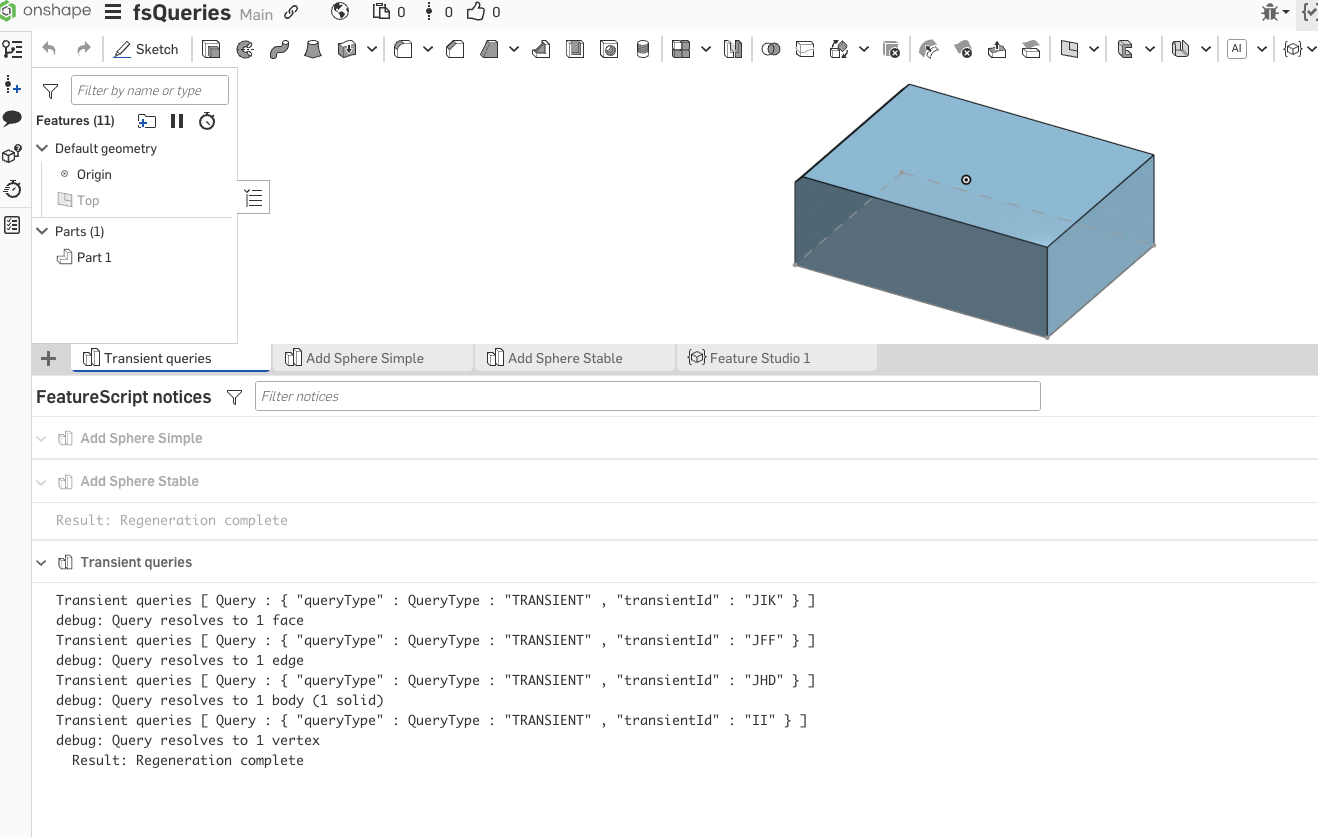
Transient queries are simple handles (transientId field is the important one) which we use to identify topology in current state. They are transient because as soon as something changes, the handles might also change.
Spheres simple and spheres stable illustrate use of forEachEntity ( which is a convenient wrapper for unstable component and external disambiguation) . In simple case red sphere "jumps" if we delete first vertex, in stable case it does not.
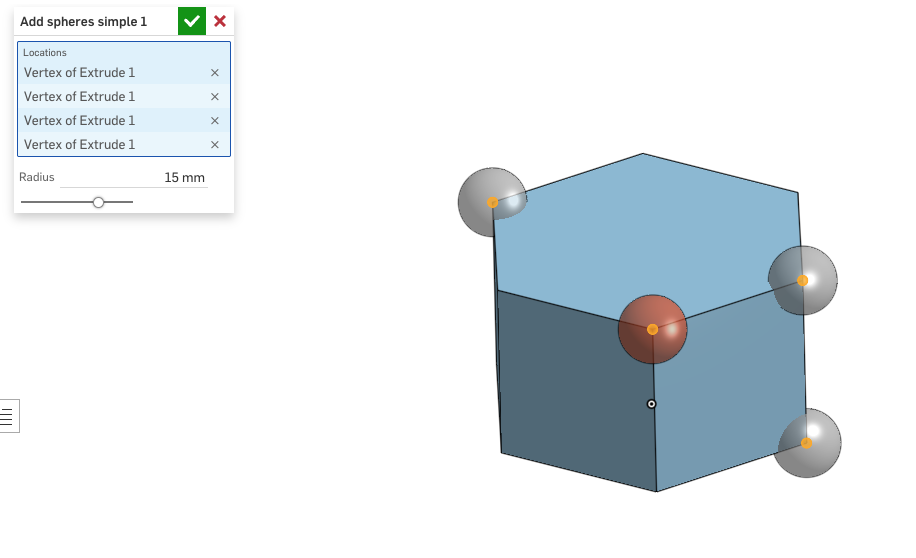
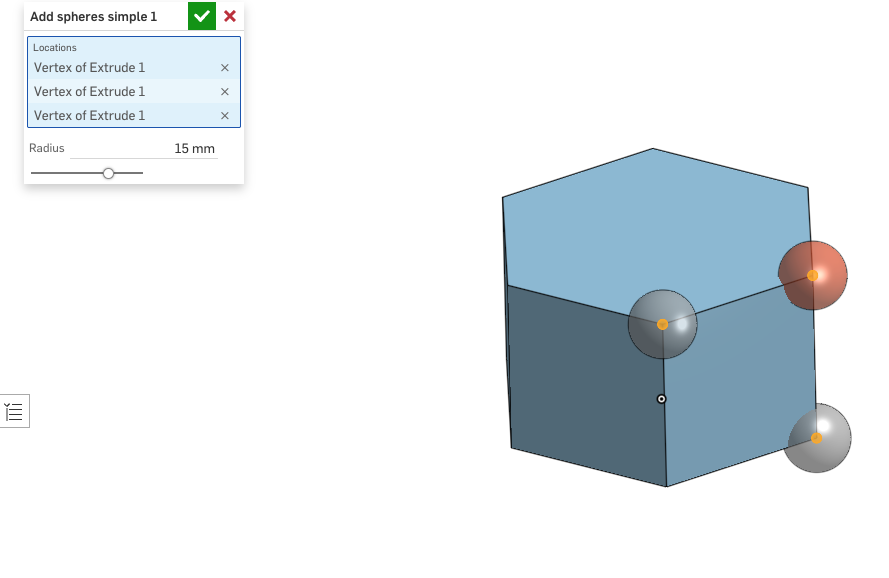
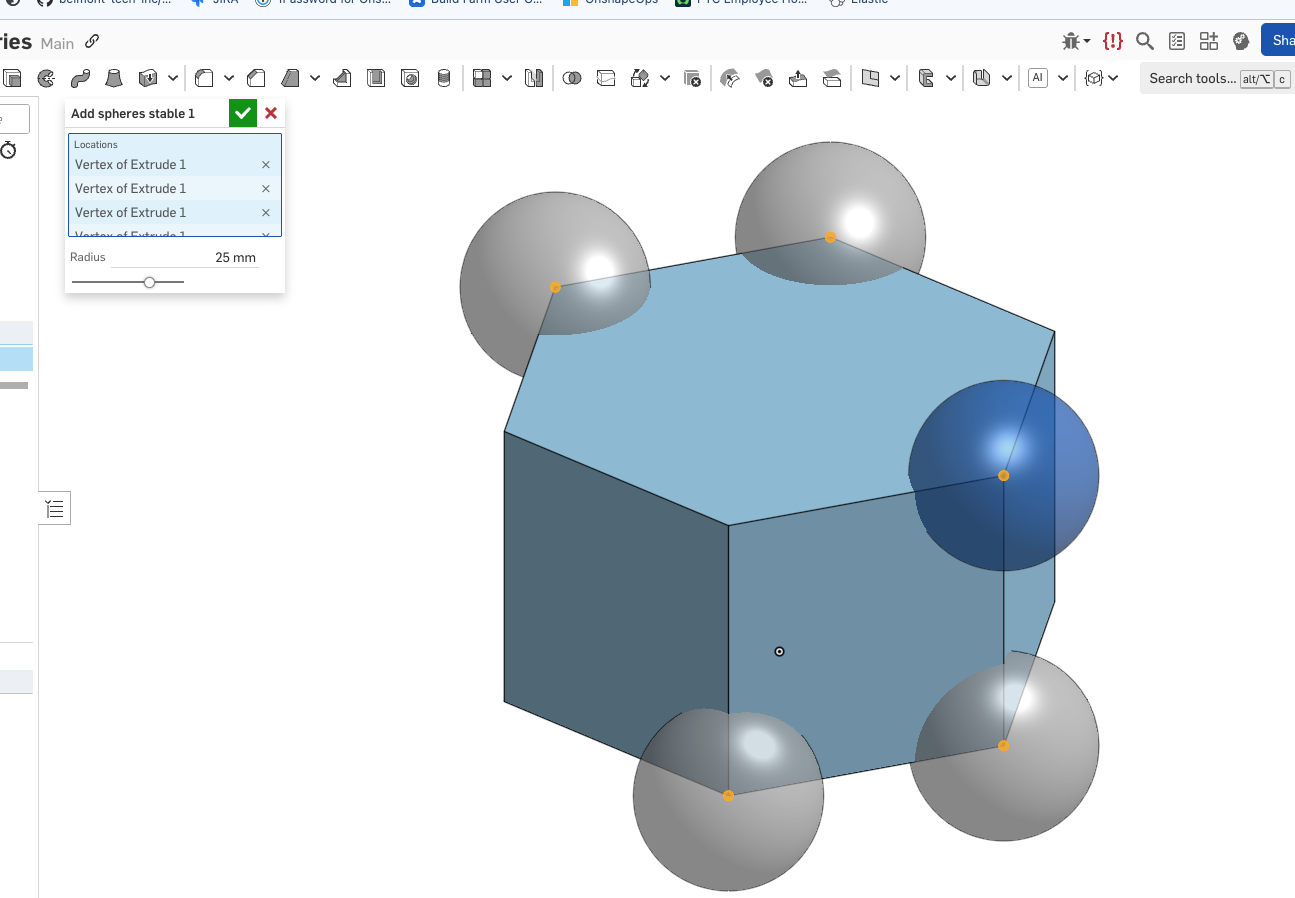
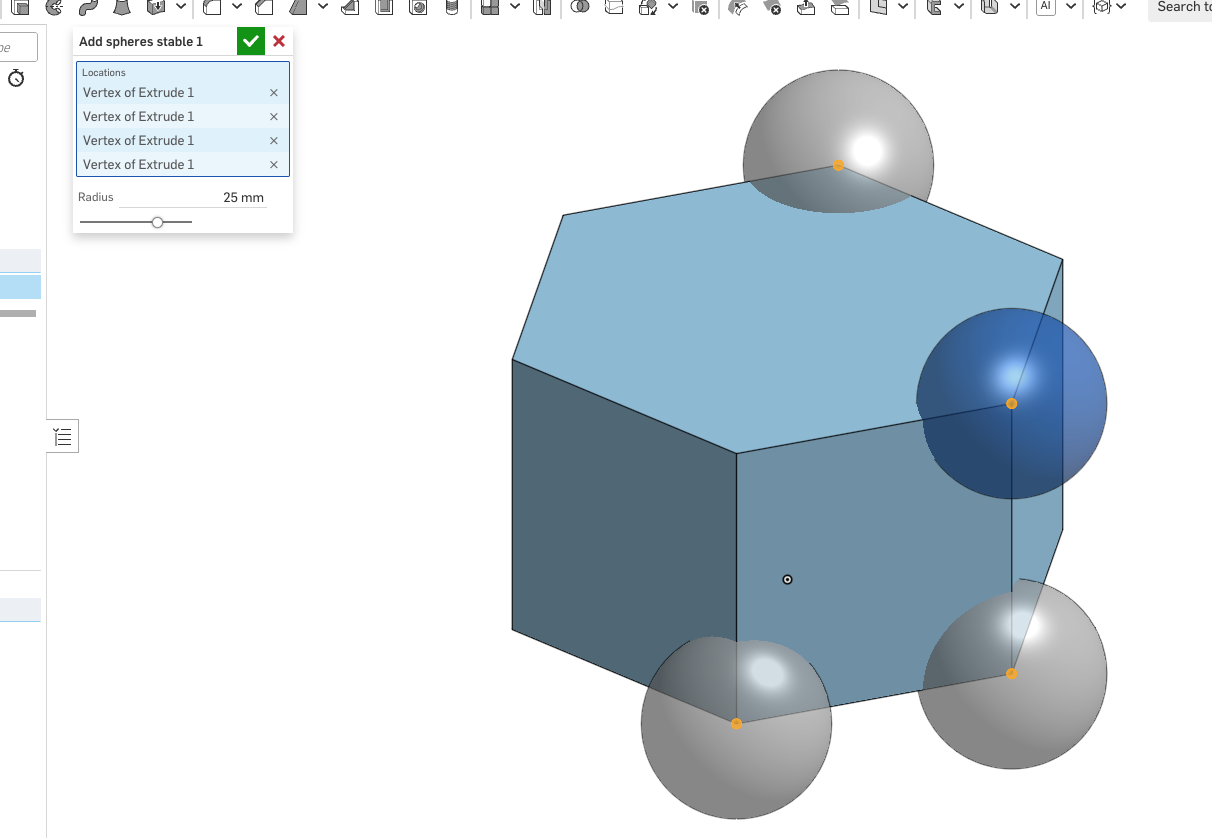
I know - this is short of explaining what is happening internally, but that is a much longer story - I'll come to it later.
2 -
0
-
@lana I linked to an explanation of "forEachEntity" and said we have some idea of how to use it effectively. But here's the problem I am now working on a script that has a nested "forEachEntity" loop and I'm getting bizarre behaviour. When I select a downstream entity it now automatically selects multiple sometimes. Without fundamental knowledge of what is happening I can't fix this:
https://cad.onshape.com/documents/02e253006c3b752eb13303a7/v/4dcf3ee7787edd58af4658d0/e/e71817feee96d860dd0d7d58I appreciate the attempt though but I'm wanting is all-encompassing.
0 -
@Lindsay_Early There's an extra period in the link
https://learn.onshape.com/courses/featurescript-fundamentals
0 -
@christopher_dziuba I took only a brief look at your feature.I see nothing wrong with your code. If you could point out the problem entities, I'll try to figure out what is going on.
2 -
Sorry about that. I fixed the original link in my comment now. Period is removed and it works.
2 -
@Lindsay_Early thanks for following up and I did have a look at your coarse. Although I think it's invaluable for new comers that is very much not what I am asking for. Also the fact that it's a designed for beginners, comes of as an insult to me, although I'm sure it's not meant that way.
@lana Thanks for looking at my code! That's exactly my problem everything seems fine and then this happens:
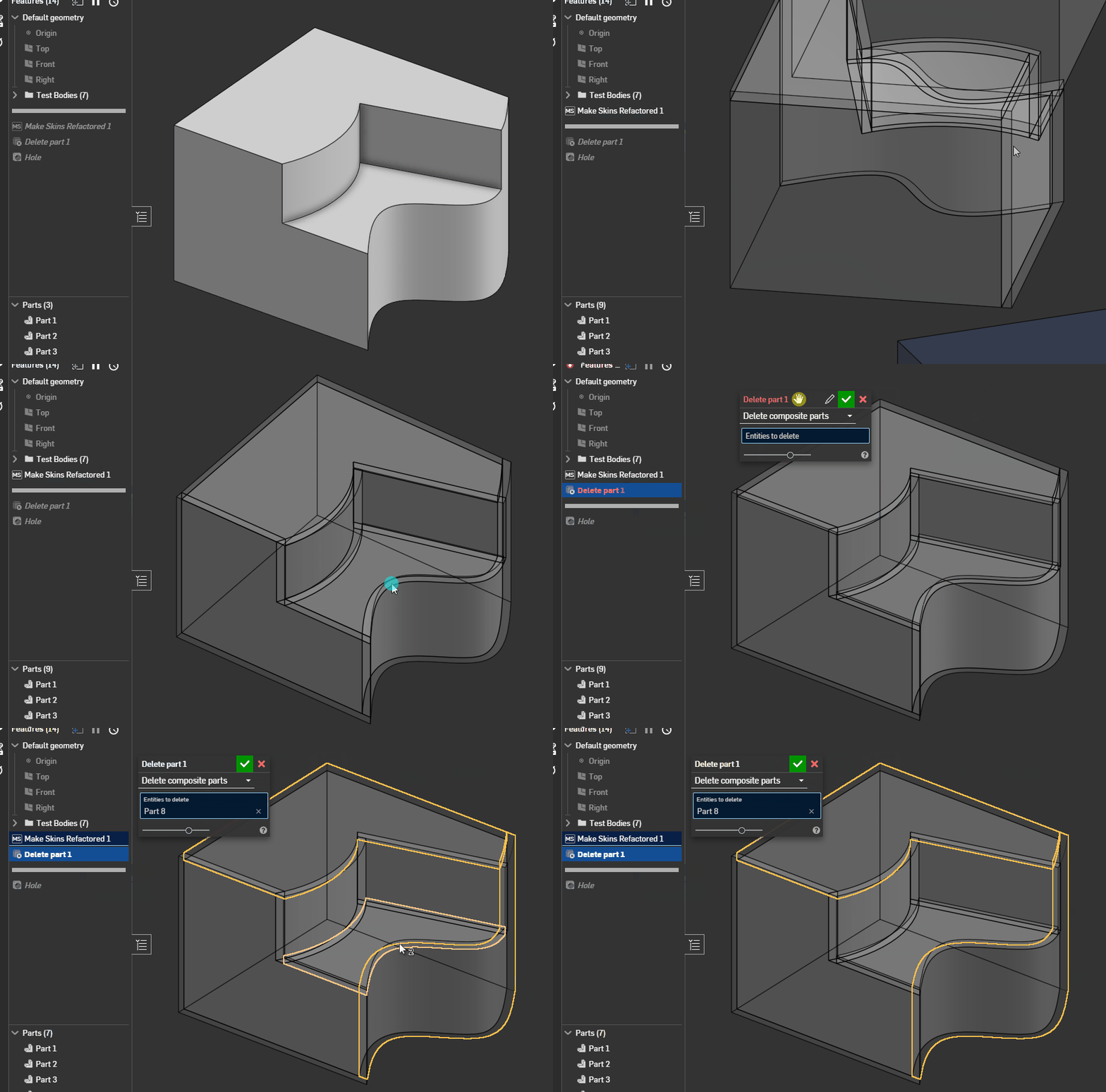
For some damn reason selecting one of the resulting parts force selects multiple parts sometimes! On top of that the skins are still not robust to upstream changes. In other words if I modify which faces are skins anything that referenced those skins either switches what skin was selected or completely breaks! All I want is robust selection after making skin and it's impossible without fundamental knowledge of how ID's are handled in the background.
0 -
This Onshape Live presentation had ( a very simplified ) explanation of how queries work inside Onshape. For each topology created by an operation there is a record of its dependencies allowing us to identify this topology. When downstream references this topology, query (an encoding) of this record is generated. Query evaluation is a patten matching of the query with current state of history. One of the first matches is operation id. If we introduce an unstable component into ids of some operations, it means that results of those operations will all be considered when evaluating a query generated for one of them. E.g. If we have a set of operation ids fId0,op0, fId1.*id0.op, fid1.*id1.op, fid1.*id2.op .. , when evaluating a query for topology created by e.g. fid1.*id1.op , we'll consider all fid1.*.op operations. This way reference is stable to order and number of input selections. If the dependencies are not enough to disambiguate results of these operations, external disambiguation is used. At the time of query evaluation external reference replaces the unstable component. I hope this gives you a mental model for the future. This is not going to give you a complete clarity without knowing the way each operation handles its history records. I don't think we are going to expose those details any time soon.
All of that is supposed to work in theory, but sequence of opSplit where results of previous step are passed into the next does not. I can't say that there is a theoretical reason why it could not, but so far we've fallen short of getting there. I'll add your example to an issue we have for addressing this scenario.
In meantime If instead of split you could use opThicken to create the skins and opBoolean subtraction to reduce the original body, this should give you a more stable behavior. Sorry about the hassle.
1 -
@lana opThicken isn't a viable replacement for this feature unfortunately because it'll lead to issues with corner geometry where there are non-90-degree angles between faces.
0 -
@lana an absolute perfect answer thank you! So it looks like there is a fuzzy line between what we can know and what we're allowed to know about the exact functioning of ID's. But at least now I may have enough to play with.
@Derek_Van_Allen_BD I think they mean use "opThicken" to create the individual skins then shape them with "opSplit" and in doing so we'd have more reliable solid body ID's for each skin downstream.
0 -
@Derek_Van_Allen_BD I think they mean use "opThicken" to create the individual skins then shape them with "opSplit" and in doing so we'd have more reliable solid body ID's for each skin downstream.
I was rather thinking of opReplaceFace for side faces. You can use qCapEntity query with thicken to find the original face and its offset.
0 -
@Lindsay_Early Your course was helpful to me, but I agree with the poster here that more content is needed. There used to be a video series from Kevin O'Toole that I got a lot of value out of, but it seems to be gone. . Is this available anywhere or was it replaced? FS has changed some since then, but I think it would still be valuable to people. His was the first time I understood hierarchical Ids and a lot of other fundamentals.
0 -
@christopher_dziuba Have you seen these videos from @Alex_Kempen? It's project-based, not focused only on fundamentals, but valuable for sure. https://www.youtube.com/@TheVenomousFire /videos
1 -
@lana Although that does sound more efficient I don't think it's feasible, or it least it would be very difficult and potentially slower since we'd have to match each "non Cap Face" of the thicken body to each individual adjacent face of the original thickened face.
0 -
@EvanReese No I haven't seen that content yet but I'll give it a wirl. Any new tool in my pocket is worth it's weight in gold
0 -
Thanks for the tag @EvanReese! I had some free time today, so I went ahead and threw together a video on Queries and Ids specifically. Hopefully this hits the level of detail desired without being too over-the-top technically. I'm also happy to answer any additional questions and/or give additional explanation as needed.
Onshape FeatureScript Queries and Ids Deep DiveSoftware Developer at Epic Systems
FRC Design Mentor - Team 1306 BadgerBots4 -
Alex! thanks for the video. I listened in the car and it was helpful, but need to watch it for real.
0 -
@Alex_Kempen and excellent video I can't believe it took me all this time to notice it. my condolences on the MX master 3 Keyboard. I had one for a while and it's hardware is fantastic, software is pathetic at best.
Definitely learnt a couple things I didn't already know, especially being able to search the std library using the standard output search bar. I've literally gone through each tab and spamming CTRL+F on each one to find use cases.0 -
Upon revisiting documentation and experimenting I better understand entity referencing via queries and external disambiguation. I'll summarise what I've learnt in words I understand in case anyone finds it useful (Please @lana & @Lindsay_Early correct any mistakes I make if you like I'm sure I missed some things):
Queries
1. Each entity in a PS (part studio) has a "transient ID" which can change if an operation is performed, even if that operation doesn't modify that entity. A feature can have multiple operations and between each one the "transient ID" of the entities can shift. You are discouraged as a user from attempting to predict how a "transient ID" will change between operations to track entities with their specific "transient ID"s.2. "transient ID"s can change and shift between operations for reasons that are complex and unnecessary to know for good featurescript writing.
3. "Queries" are used to reference entities in featurescript. A "query" is a type who's structure is defined in the std public onshape source code in the "query.fs" tab. A "query" is literally a question structured such that onshapes library functions can use it to ask the context what the "transient ID"s of entities are at any time between operations.
4. The question a "query" asks does not change between operations. This means before and after an operation the same "query" may refer to different entities since in both instances it is asking the same question but in a different context.
5. The process of a function passing a query to the context to receive "transient ID"s is know as evaluation. "evaluateQuery" is a function that does this, it returns an array who's elements are queries that contain the "transient ID" of each evaluated entity at that time. All functions that need to refer to entities in the onshape library use queries and never "transient ID"s which is why the elements of array returned by "evaluateQuery" are of type "query" making it easier to use in loops where the individual queries can be used as inputs in operations (a type of function).
6. "queries" constructed in code are complex questions, that can be evaluated at any point between operations. An "evaluated query" (a query that looks like this → { queryType : TRANSIENT , transientId : IB }) asks only what entity has that specific "transient ID" right now and should be used by function immediately or else the entity referenced may be different. This means if you're looping (iterating) through the array from "evaluateQuery" but each loop has an operation that changes the "transient ID" of the intended entities, the code will fail. You must instead ensure each loop has a "query" carefully constructed to evaluate to the intended entity in each loop.
Operations
1. The variable "id" which is present within a feature definition is an array of strings of type "ID" with 1 element; a string unique to every instance of a feature in a context. An array of type "ID" can have new string elements appended to it (called "components") with the "+" operator unlike with ordinary arrays, which makes it easy to construct a new ID by appending strings. Operations in a feature will ask for an "ID", each one must be unique to identify the operations performed by that feature and must be assigned in the order specified in onshape standard library documentation.Note: that "transient ID"s, "ID"s & "identityTransform" are all completely different things:
-Constructed "ID"s are assigned to operations only and can be used by "queries" to reference the entities made by them.
- "transient ID"s are assigned by the context to individual entities and used only by the context.
-"identityTransform" is a function that returns a "transform" that does nothing.Entities
1. Standard Library Documentation query section starts by explaining how entities are defined in a context and presents enums that are used by functions that return "queries" that use those enums to refer to entities. It's important to note that "bodies" may contain "entities". Up till now I have used the word entity to refer to anything that could exist within a PS. This is not the way onshape uses the word.2. Anything you see in the bottom left corner of a PS on your screen under "parts" or "surfaces" etc, etc is a "body" with a "bodyType" not an "entity". "entityType" only identifies parts of a body or all of one body. The reason "entityType.BODY" exists is because some "body"s don't contain vertices, edges or faces such as mate connectors.
Constructing Queries
1. Standard Library Documentation query section is worth reading to understand how to construct a query that evaluates to entities based on their topology ("state-based") however explains very little on how to refer to entities based on when they were made ("historical"). "qCreatedBy" is the only "historical" "query" function in this section as it refers back in time to entities made by an operation with a specific "ID". Likely this is because a "state-based" query will return just an empty query but "historical" queries will throw an error if their specific entity was deleted.2. "state-based" and "historical" queries can be constructed together to create more and more complex queries
The following points address very useful "historical" query constructing functions.
3. The function "startTracking" takes a "query" & returns a "query" that evaluates to all entities created that depend directly on that 1st "query".
4. The function "makeRobustQuery" takes a "query" & returns a "query" that evaluates to the entities evaluated by the 1st query at the time the 2nd query was constructed.
Down Stream Stability
1. When an operation both uses a query to make new entities and there's a chance that the "ID" passed to it has a "component" that could change without the query passed in changing the entities it evaluates to then this "component" is known as "unstable". If this ever happens any feature that used the new entity made by that operation will either reference a different entity or nothing at all because it was using the operation ID to reference that entity. This happens frequently when the operation is performed in a loop where a loop iterator variable is used as the "ID component".2. An "unstable" "component" can be marked as "unstable" with the "unstableIdComponent" function. All it does is put an asterisk (*) at the biggening of the string of the "component". The constructed "ID" as a whole can then be associated with the entities made by the operation with "setExternalDisambiguation". This tells the context to adjust the the operation ID linked to the created entities whenever the feature definition changes.
3 -
@christopher_dziuba This writeup should be in the standard docs. Great summary! I'm sure I'll be referring back to it at some point.
1 -
Interesting part is what the actual process of "historical" query resolution is. It looks like the id hierarchy represents some sequence of trees and every tree node can be queried by its path - the sequence of id components, where the first component is always a feature id root, guaranted to be unique within part studio scope. Then if id component is set unstable the lookup will match it regardless, and if external disambiguation is set for it then the identity will be derived from the associated query. Can't be sure if that is a full picture, or even correct one, but it resonates with my common sense and answers to not just "what" but also "how"
2 -
Given your contributions that means a lot! Just hope I got everything right.
0 -
I know right? robustQuery in a nut shell:
-evaluates the input query to get the transient ID
-gets the ID of the last operation used
-puts them into a query that says "At the time of this Operation ID what was the entity with this transient ID?"But I noticed this isn't quiet accurate since I'm working on something where solid bodies could be split after being made robust and when I evaluate the query it returns the split bodies which is nice but harder to understand what's happening under the hood.
0 -
I’m in no way an experts this, or how it really works in the system. But something that might be worth mentioning, that made some of this ”unstable-ness” click for me; is that FeatureScript is a wrapper.
In short, high level computation happens in FeatureScript. While a lot of the actual computations happen in lower level C(?) code. Meaning only what Onshape is actually making visible in the wrapper is accessible. So any time an op-function is called, lower lever computations happen, then results in lower level can be reassessed. Sometimes not super straightforward how/what happens in the lower level code. But mostly for the day to day things, you don’t really need low level - that’s why code is structured hierarchical. Same thing as Fortran vs machine code.
Please correct me if there’s errors in my basic understanding :)
0 -
I mean that's probably right :P If it helps you write better FS then hell does it even matter if its perfectly accurate?
0 -
@christopher_dziuba That is correct - I spotted no mistakes. Thank you for that explanation - I hope it'll help some other users. The aside about Id, TransientId and identityTransform made me chuckle , but you are spot on. When we overload terms in code or in documentation we end up confusing the users.
@Konst_Sh At the high level - that is exactly the process of historical query evaluation.
2