Welcome to the Onshape forum! Ask questions and join in the discussions about everything Onshape.
First time visiting? Here are some places to start:- Looking for a certain topic? Check out the categories filter or use Search (upper right).
- Need support? Ask a question to our Community Support category.
- Please submit support tickets for bugs but you can request improvements in the Product Feedback category.
- Be respectful, on topic and if you see a problem, Flag it.
If you would like to contact our Community Manager personally, feel free to send a private message or an email.
How can i extrude a simple logo on a sketch?

What kind of format must it be? I have tried DXF, DWG, SVG, PNG, nothing seems to work.
Answers
-
DXF or DWG should work.
First, you will need to upload your DXF/DWG into your document
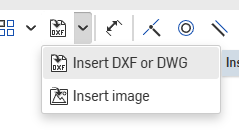
Then you will need to be in a part studio, create a sketch, then choose "insert DXF" and select your DXF/DWG
Now you will need to clean up the imported sketch, making sure all lines and edges are connected. This is going to take the most about of skill and may be where you are getting stuck right?
Here the square and circle will extrude because they are shaded. But the square on the right won't
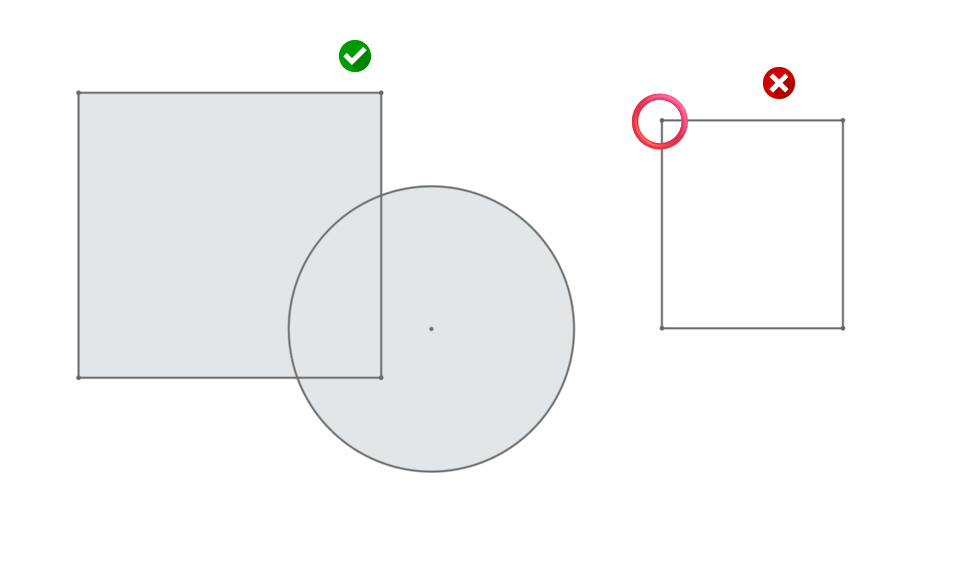
If we zoom all the way in on the area with the red circle you can see it isn't touching, so it isn't a closed shape. (think back to MSPAINT and the bucket fill tool 😉)
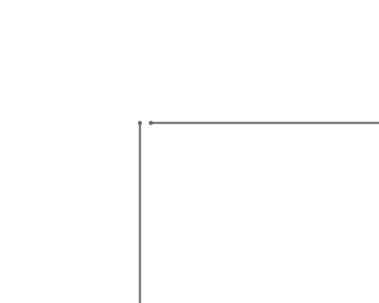
You should see a grey shaded area in your sketch, so you know it is 'closed'. That closed area will be what is extrudable.
2
