Improvements to Onshape - June 5, 2026


CAD
SPECIFY LENGTH OF ROUTING CURVE
Onshape has introduced a new feature for routing curves that allows users to specify a desired length for spline curves used in products such as hoses. This manufacturing-focused enhancement automatically adjusts the curve length to match the specified value, eliminating the need for complex calculations or manual adjustments. The feature is particularly useful for designing products that need to meet specific length requirements for manufacturing or purchasing purposes. See the Routing Curve topic in the Help Documentation for more information.
PERSISTENT MEASURE
Measurement visualization has been enhanced to remain visible on screen and update in real time during interaction, providing a clearer, more consistent view without requiring rebuilds.
SWEEP, TWIST, & SCALE FOR PROFILES NOT COINCIDENT TO PATH
Onshape now supports twist and scale for sweep profiles that are not coincident to the sweep path. This enhancement opens up new design possibilities and gives users more creative freedom when incorporating complex sweep operations into their CAD models.
IGNORE FAULTY PARTS
You can now right-click and ignore faulty parts to move them from an error to a warning state, allowing releases to proceed while maintaining clear visual indicators across Part Studios, assemblies, and drawings.
DRAWINGS
ARC LENGTH DIMENSION
Arc length dimensions present a new way to define curved geometry in your drawings in Onshape.
ATTACH COMMENT TO SKETCH DIMENSIONS
This release introduces the ability to tag comments directly to sketch dimensions. This makes it easier to communicate your thoughts and ideas with the rest of your team by allowing you to target specific dimensions.
AXIS AUXILIARY VIEWS
Onshape has released a new feature that allows users to create auxiliary views along a cylindrical axis, in addition to previous options. This enhancement enables engineers to capture manufacturing details at non-orthogonal angles by selecting a circular edge to use its axis as the direction for the auxiliary view. This new capability is particularly valuable for complex compound angled geometry, reducing the need for multiple projection and auxiliary views to capture relevant information. See the Auxiliary View topic in the Help documentation for more information.
HOLE AND SHAFT FIT TOLERANCE STANDARD SELECTION
Onshape now allows you to specify a standard different from the drawing standard when defining hole or shaft fit tolerances. This enables users to filter tolerances regardless of standard for their specific manufacturing needs.
REPLICATE CHAMFER DIMENSION
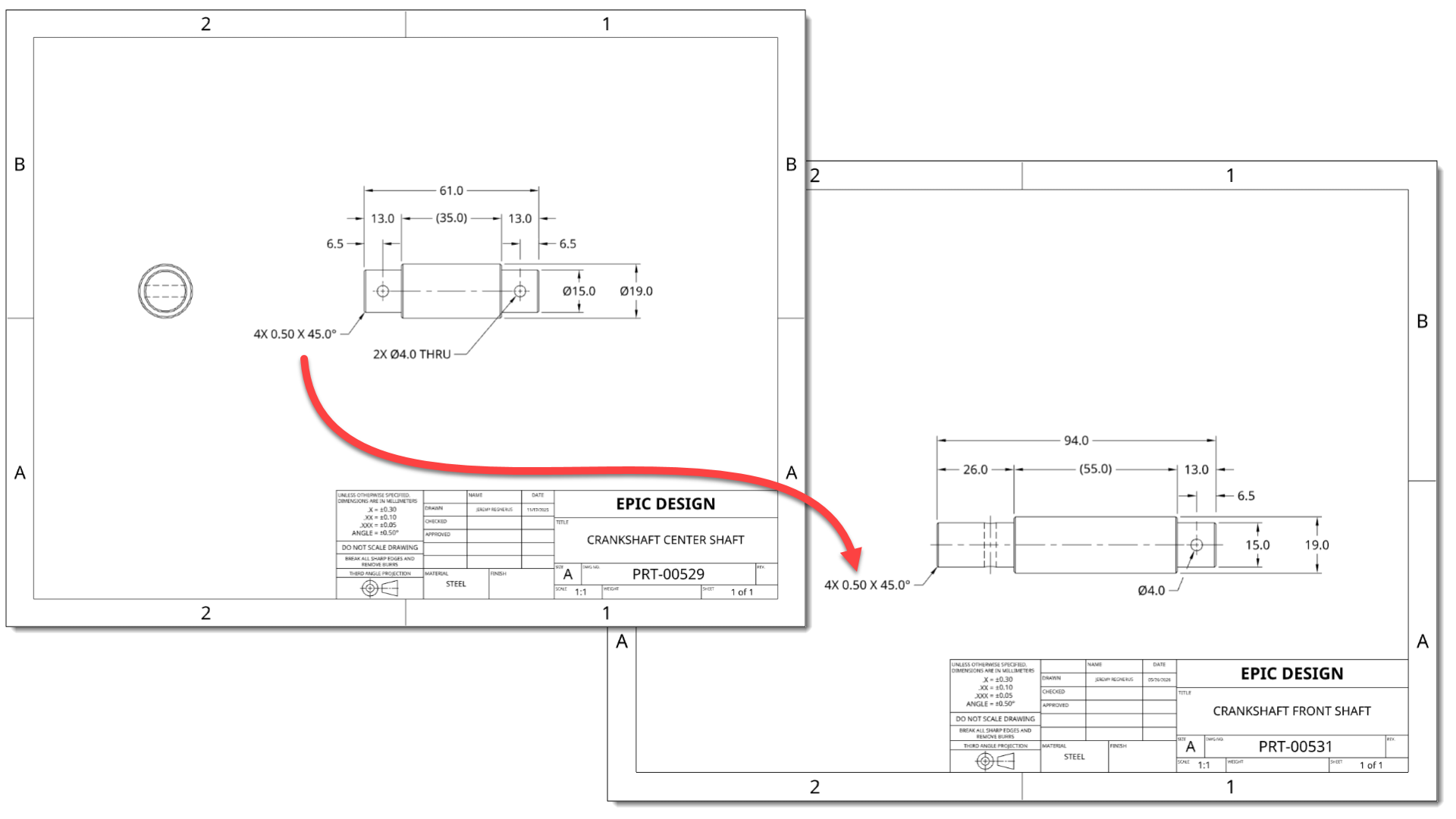
Replicate Annotations (Beta) now supports replicating chamfer annotations.
RENDER STUDIO
REPLACE REFERENCE
Render Studio now lets you replace references for top-level Part Studios, assemblies, or parts, while preserving your scene structure and automatically updating all associated data for faster configuration-based rendering.
ENTERPRISE
FOLDER AND PROJECT FILTERING
Onshape Enterprise users will now find a filter in the Documents view for folders and projects. This makes it easier to find the documents you want to work on and enables you to focus on the specific task at hand.
MOBILE
ROUTING CURVE TOOL IN iOS AND ANDROID
Routing curves for developing 3D paths, routes, and curves are now built into the mobile Onshape app. A triad manipulator is also available to edit the positions of each point on the path.
SHOW AND RESET SCALE IN AR VIEW
AR View now shows a scale factor above the model during pinching gestures, with the option to reset to full scale.
Please take a moment to try out these new features and improvements, and leave your comments below. For a detailed list of all the changes in this update, please see the changelog.
Remember: The updates listed here are now live for all users when creating new documents. Over the next few days, these features will also be available in documents created before this update. Mobile app interface updates are available via the Apple App Store or Google Play Store and are released in the days following the update.
Comments
-
-
-
Arc length dimensions in drawings, routing curve length, and tweep parity is a good haul for the month.
6 -
Routing Curve length is going to be a game changer for some of my clients! Add a minimum bend radius next and we're golden.
5 -
Nice updates. Routing curve length is a welcomed addition.
I think there was a missed opportunity with the measure tool. When will we see dual dimensions? It's been a long time request that is a daily frustration for us since we work in both mm and inches continuously.
2 -
-
Routing curve length should open up some new workflows! Persistent measure is also useful.
Comments on sketch dimensions seems nice but it still doesn't show that the comment exists unless the comment panel is active… So basically nobody will know there is a comment on there…Comment bubbles should at least show on mouse over for them to be useful for documenting the design! I would argue that comment bubbles in general should always be visible by default (with maybe an option to turn them off per session and/or filter what is shown). Comments in Onshape are great but they are way too easy to ignore! (same with the document notes!)
4 -
Comments on sketch dimensions seems nice but it still doesn't show that the comment exists unless the comment panel is active… So basically nobody will know there is a comment on there…
@eric_pesty We have a bug investigating this.
1 -
Some nice core updates with this one and at least one of our teams specific asks. Good work with this one Onshape! Arc length dimension, Axis Auxiliary View, and Persistent Measure as my MVP's 🙌
0 -
Interesting, if it's a bug it must have been there for a long time. I don't remember comment bubbles ever showing unless the comments pane is open…
0 -
Comments that show up in the sketch view would be amazing! Right now I have to do /*my text*/ and it is super annoying. Since our sketches are like our "Code" it would be great to comment on anything, just like MBD can now be added to anything
0 -
Very solid release. I love the creative thinking in these workflows, even for everyday things.
1 -
Yeah, something like what SolidWorks does would be cool. An annotation on a dimension would be nice since */text/* breaks being able to use the scroll wheel for increments.
Ramon Yip | glassboard.com
0 -
Great update, some really good time saving additions. Target Length in the routing curve is going to be so useful as is the Persistent Measure ability. They will save me a lot of time and fiddling about, thank you. Arc Length is also a great addition to drawings
0 -
ARC LENGTH DIMENSIONS!!!!! This is huge man
1 -
I'm also eagerly awaiting some form of this ability also.
0 -
Good work team Onshape!
Suprised it took so long to add arc dimensioning.
Wonder how long I'll be waiting on the possibility to add an angled / tilted ordinate dimension.0 -
Love the routing length upgrade. It'll come in handy when designing robotic cabling and then checking all positions to verify you won't yank the cable apart on a far reach.
2 thumbs up for ignore errors. Using open mesh data now won't blow your models up.
2 -
Great improvements to views and dimensions that I need regularly! 5 stars!
1 -
Great updates.
0 -
Nice release! Finally Arc Length! Had this open for years now! New 'Axis' auxiliary view type (along a hole axis) in drawings is nice to have, but dimensioning of isometric or in generally angled views still does not work properly. Maybe it would be good to get basic functionalities done first ;-)
2 -
SPECIFY LENGTH OF ROUTING CURVE
Will this also get incorporated in the cable script?
1 -
This is a solid set of updates. I have personally pushed for more drawing updates, and y'all are starting to deliver. Please add spell check to notes in drawings next!
0 -
Most probably, although it gets tougher when a cable runs through clips.
Senior Director, Technical Services, EMEA0 -
Great update for routing curve length, persistent measure, etc…
I noticed that the change log doesn't mention the routing curve length feature. Also there's no mention of any FeatureScript updates. Curious…[edit: Fixed. Thanks @lougallo ]
Simon Gatrall | Product Development, Engineering, Design, Onshape | Ex- IDEO, PCH, Unagi, Carbon | LinkedIn
0 -
Axis Auxiliary View,
Yes!!!
0 -
Apologies.. I was jumping around and misread the arc length dim update for this. One of my stories too so I have corrected this in the CL. There were no specific FS updates that we specifically targeted for this release.
Lou Gallo
Sr. Director of Product Definition. UX and Support2 -
3 week mark is here. Break out the @john_mcclary Bingo Cards! I saw an Onshape blog post on generative design, is this coming in this update???
3 -
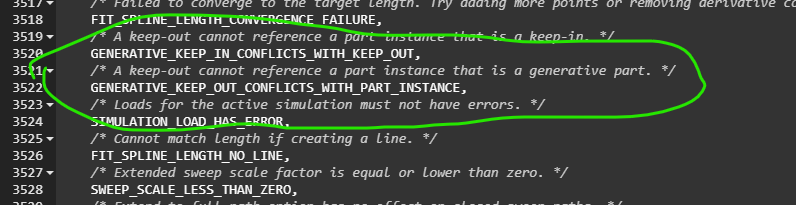
The errorstringenum file keeps whispering about it. It's gotta be soon.
 4
4