Welcome to the Onshape forum! Ask questions and join in the discussions about everything Onshape.
First time visiting? Here are some places to start:- Looking for a certain topic? Check out the categories filter or use Search (upper right).
- Need support? Ask a question to our Community Support category.
- Please submit support tickets for bugs but you can request improvements in the Product Feedback category.
- Be respectful, on topic and if you see a problem, Flag it.
If you would like to contact our Community Manager personally, feel free to send a private message or an email.
Assembly configuration list to pick different part studios or parts

Is there a way to make an assembly configuration list that picks different parts studios/parts. I'm trying to make an assembly list that will pull different sizes of custom nuts, each size is in its own part studio, so the assembly would have a pulldown with all the sizes and once selected Onshape pulls the part from the part studio into the assembly. I suppose I could put all the sizes into 1 part studio and use the part studio for the size and configure suppression but don't want to have too many configurations in 1 part studio.
Best Answer
-
The performance issues are when you have multiple parts in a part studio and only "some of them" need to be configured.
In this case a single nut model (built with variables etc) is likely going to give you better performance than getting a single part from multiple part studios…
A good option would be to create a "universal" model setup with configuration variables and then derive that in a separate studio to create a subset of configurations (deriving a version instead of the workspace is a good idea for performance reasons).
Here's an example of what I mean. I have a "master" model driven by a bunch of configuration variables that can be used to generate any nut sizes:
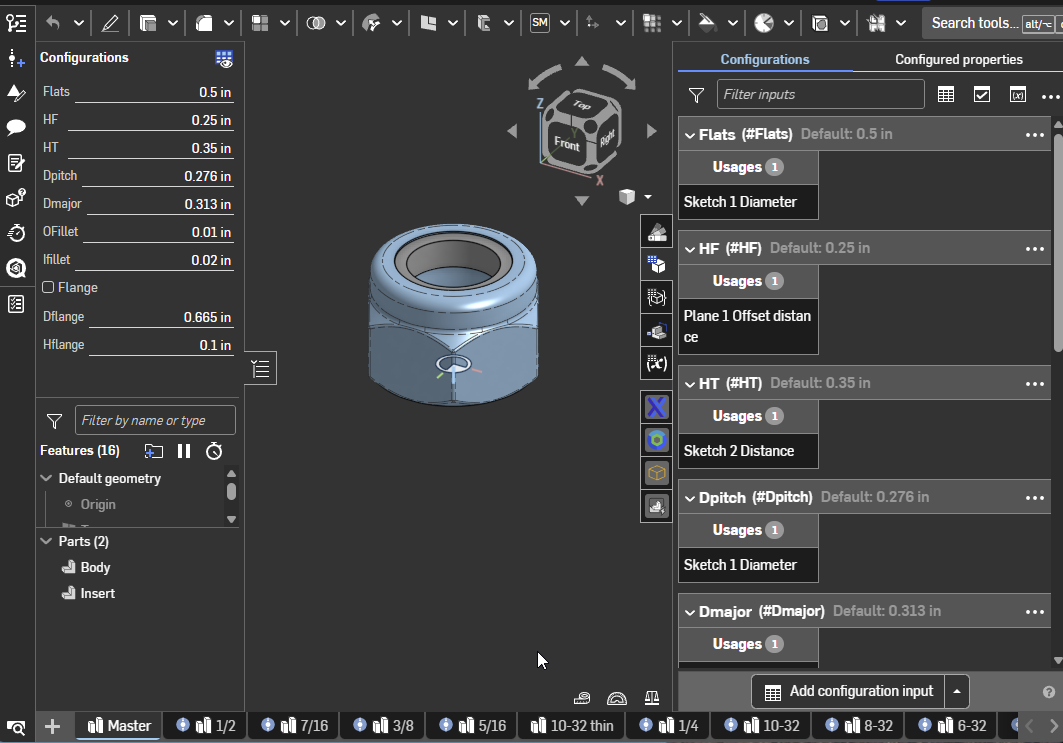
Then to keep things a bit more manageable I created one part studio for each size by deriving this in. Most of the configuration variables are "set" in the derive dialogue and just the relevant ones are configured: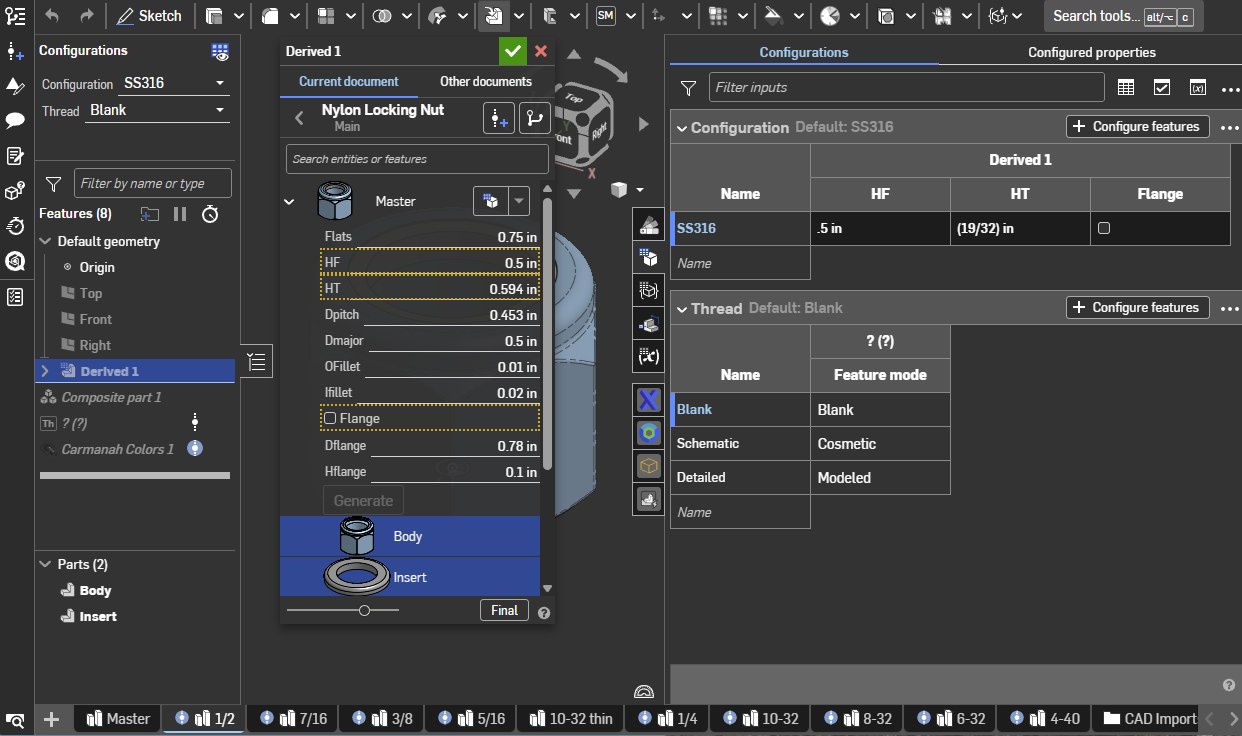
Note that I could have added a configuration input for size and configured the other values there. A side benefit of deriving like this is that because it is coming from the same original model, you can do a "replace" in an assembly to change the size and the mates don't break.
0

Answers
-
Configurations are super powerful when you learn how to use them effectively, so I'd really encourage looking at the help documentation or the learning center first.
If you already have parts modeled in different places, I wouldn't bother putting them all in one part studio. I'd suggest inserting all the sizes you want to use into the assembly, then configuring their suppression. You can go into the configuration menu and control which sizes are unsuppressed for each configuration, and you can also have multiple inputs. This may not always be the best way but it's simple and it works great for smaller assemblies.
Depending on your specific use, there may be better ways to approach this though (especially for lots of nuts or lots of configurations). Could you share some more details on how many nut sizes you have, the size of the assembly, and how many ways you want to configure it?
0 -
A trick you can use is to create a "dummy" assembly where you insert all your nuts and configure it. You will need to have a mate connector in the assembly that you can use to mate it to the top level (so the mates don't break when you change configuration) and then you can insert that and configure it in your top level.
You can set the assembly to "show components only" so that it doesn't show up in the BOM.
1 -
I know I can do it with suppressions and put all the parts in one assembly or part studio but that's a lot supressions, the nuts are just a test if this is possible, the number of configurations for each part can be 2 to 200 and number of parts will be around 5 to 50 and I want to make it expandable and versatile. Let's use a hex screws instead as an example, with all the different lengths, in an assembly I can pick the size of screw (each screw size is in it's own part studio), once I pick the size the length configuration is pulled from the part configuration. Say I picked an M6x1 screw size and all the lengths are place into the pulldown for M6x1, if I pick a M10x1.25 then all the lengths from the M10x1.25 part length configurations are in the pulldown and in the assembly I can add in nuts, washers, etc.. (expandable)
0 -
Why is each custom nut in its own part studio? One part per part studio is rarely good practice. It seems like that is one of the challenges that you're fighting. If parts which would be used in similar situations come from configurations of a single part studio, it would be a lot easier to manage.
Simon Gatrall | Product Development, Engineering, Design, Onshape | Ex- IDEO, PCH, Unagi, Carbon | LinkedIn
0 -
Mainly cause I was informed that configurations slow down performance and its best to keep it in separate files/part studios.
0 -
The performance issues are when you have multiple parts in a part studio and only "some of them" need to be configured.
In this case a single nut model (built with variables etc) is likely going to give you better performance than getting a single part from multiple part studios…
A good option would be to create a "universal" model setup with configuration variables and then derive that in a separate studio to create a subset of configurations (deriving a version instead of the workspace is a good idea for performance reasons).
Here's an example of what I mean. I have a "master" model driven by a bunch of configuration variables that can be used to generate any nut sizes:
Then to keep things a bit more manageable I created one part studio for each size by deriving this in. Most of the configuration variables are "set" in the derive dialogue and just the relevant ones are configured:
Note that I could have added a configuration input for size and configured the other values there. A side benefit of deriving like this is that because it is coming from the same original model, you can do a "replace" in an assembly to change the size and the mates don't break.
0
