Welcome to the Onshape forum! Ask questions and join in the discussions about everything Onshape.
First time visiting? Here are some places to start:- Looking for a certain topic? Check out the categories filter or use Search (upper right).
- Need support? Ask a question to our Community Support category.
- Please submit support tickets for bugs but you can request improvements in the Product Feedback category.
- Be respectful, on topic and if you see a problem, Flag it.
If you would like to contact our Community Manager personally, feel free to send a private message or an email.
Improvements to Onshape - May 4th, 2018

cody_armstrong
Moderator, Onshape Employees, Developers, csevp Posts: 228 
It's May already and we're here again with an exciting new update for you. We have a lot to cover, so let's dive in.
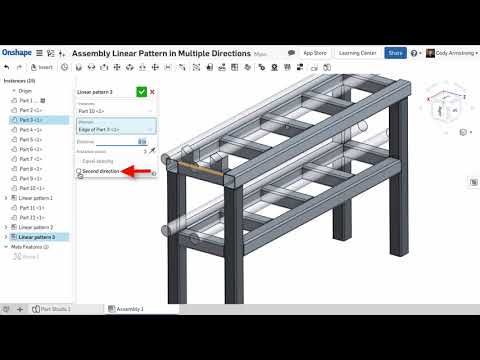
ASSEMBLY LINEAR PATTERN IN MULTIPLE DIRECTIONS
You can now create Assembly Linear Patterns in multiple directions in a single command.
 https://youtu.be/i9AwnnNM8Z8
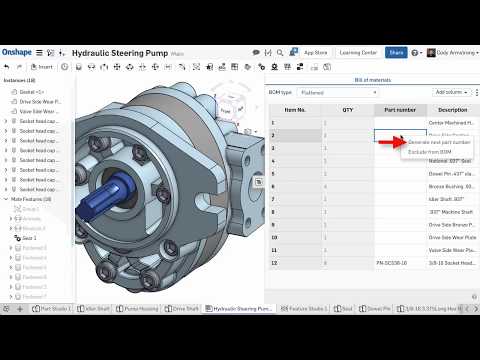
PART NUMBER GENERATOR IMPROVEMENTS
Onshape Professional users can now generate part numbers in the workspace properties dialog as well as in the Simultaneous Bill of Materials flyout. In the past, the ability to automatically generate part numbers was limited to the Release Candidate creation process.
 https://youtu.be/8noQViRlA8I
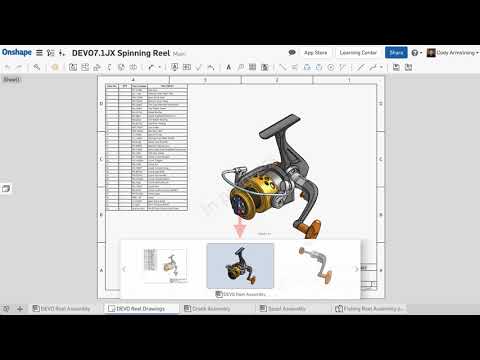
KEYBOARD SHORTCUT FOR SWITCHING BETWEEN RECENTLY OPENED TABS
There is a new keyboard shortcut for switching between recently opened tabs. Press ctrl + spacebar to view recently opened tabs, then press the spacebar again to cycle between the tabs. Let go of the ctrl key to open that tab.
 https://youtu.be/Rbdk1GI3I3o
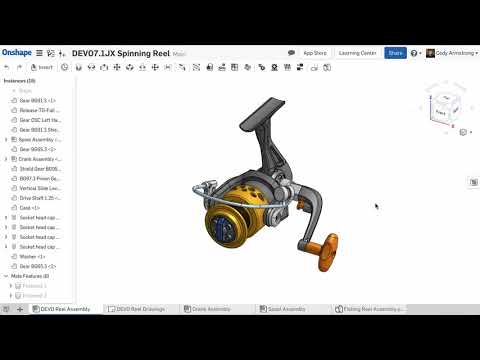
PROPERTY DISPLAY NAME
You will find a new option for "Display Name" when editing your company's properties. This allows you to change the way the property is displayed. For example, changing "Quantity" to be displayed as "QTY."
 https://youtu.be/iNXxgqY-mK8
GO TO ITEM IN LIST
If you right-click a part or subassembly that belongs to a nested subassembly, you will see a new option to "Go to item in list." This will expand out the subassembly and highlight your selection in the instance list.

CONFIGURATION NAME IN ASSEMBLY TOOLTIP
A tooltip with configuration details now appears when hovering over parts in the assembly instance list.

DRAWING WATERMARKS
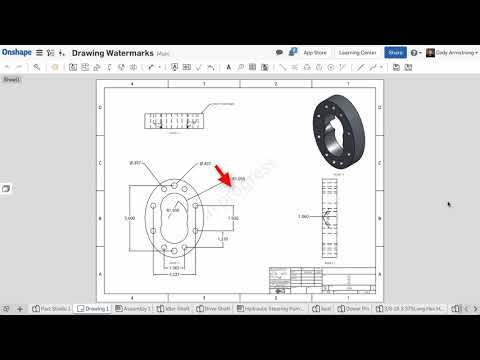
As a company owner or admin, you will find a new option under the Release Management settings to "Show watermark for unreleased drawings." This automatically adds a watermark to all drawings except drawings that are released.
 https://youtu.be/1NpyrQSlSFI
NOTES WITH MULTIPLE LEADERS
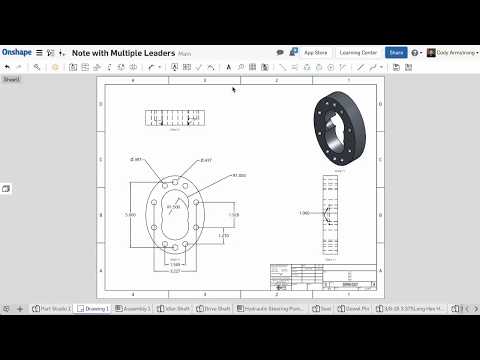
Notes in Onshape Drawings can now have multiple leaders. Simply right-click a Note with a leader and choose the option to "Add leader."
 https://youtu.be/ka9-jaMhpMg
INSERT SURFACES INTO DRAWINGS
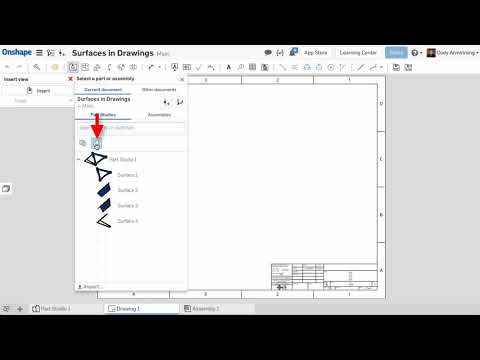
You can now insert surfaces into Drawings in Onshape. Surfaces will now appear as an option when inserting and you have a new filter in the insert dialog to make inserting only surfaces easy.
 https://youtu.be/1rRiSIyh19s
ADDITIONAL NOTE FORMATTING OPTIONS
You now have the option to insert numbered and bulleted lists in Notes in Onshape Drawings. There are also new options for specifying upper and lower case letters.

VIEW FEATURE DIALOGS WHEN SHARED WITH VIEW AND COPY PERMISSIONS
If a Document has been shared with you with view and copy permissions, you can now double-click a feature in the feature list and see the details of that feature. This can be helpful for many reasons. One example is now it is possible to review the features and steps of a public Document without creating a copy first. This also means it is now possible to see the parameters of a feature in a version. In the past, you would need to create a branch to do this.

ASSEMBLY LINEAR PATTERN IN MULTIPLE DIRECTIONS
You can now create Assembly Linear Patterns in multiple directions in a single command.
https://youtu.be/i9AwnnNM8Z8PART NUMBER GENERATOR IMPROVEMENTS
Onshape Professional users can now generate part numbers in the workspace properties dialog as well as in the Simultaneous Bill of Materials flyout. In the past, the ability to automatically generate part numbers was limited to the Release Candidate creation process.
https://youtu.be/8noQViRlA8IKEYBOARD SHORTCUT FOR SWITCHING BETWEEN RECENTLY OPENED TABS
There is a new keyboard shortcut for switching between recently opened tabs. Press ctrl + spacebar to view recently opened tabs, then press the spacebar again to cycle between the tabs. Let go of the ctrl key to open that tab.
https://youtu.be/Rbdk1GI3I3oPROPERTY DISPLAY NAME
You will find a new option for "Display Name" when editing your company's properties. This allows you to change the way the property is displayed. For example, changing "Quantity" to be displayed as "QTY."
https://youtu.be/iNXxgqY-mK8GO TO ITEM IN LIST
If you right-click a part or subassembly that belongs to a nested subassembly, you will see a new option to "Go to item in list." This will expand out the subassembly and highlight your selection in the instance list.
CONFIGURATION NAME IN ASSEMBLY TOOLTIP
A tooltip with configuration details now appears when hovering over parts in the assembly instance list.
DRAWING WATERMARKS
As a company owner or admin, you will find a new option under the Release Management settings to "Show watermark for unreleased drawings." This automatically adds a watermark to all drawings except drawings that are released.
https://youtu.be/1NpyrQSlSFINOTES WITH MULTIPLE LEADERS
Notes in Onshape Drawings can now have multiple leaders. Simply right-click a Note with a leader and choose the option to "Add leader."
https://youtu.be/ka9-jaMhpMgINSERT SURFACES INTO DRAWINGS
You can now insert surfaces into Drawings in Onshape. Surfaces will now appear as an option when inserting and you have a new filter in the insert dialog to make inserting only surfaces easy.
https://youtu.be/1rRiSIyh19sADDITIONAL NOTE FORMATTING OPTIONS
You now have the option to insert numbered and bulleted lists in Notes in Onshape Drawings. There are also new options for specifying upper and lower case letters.
VIEW FEATURE DIALOGS WHEN SHARED WITH VIEW AND COPY PERMISSIONS
If a Document has been shared with you with view and copy permissions, you can now double-click a feature in the feature list and see the details of that feature. This can be helpful for many reasons. One example is now it is possible to review the features and steps of a public Document without creating a copy first. This also means it is now possible to see the parameters of a feature in a version. In the past, you would need to create a branch to do this.
Please take a moment to try out these new features and improvements and leave your comments below. For a detailed list of all the changes in this update, please see the Onshape Changelog.
Remember: The updates listed here are now live for all users when creating new Documents and over the next few days these features will also be available in Documents created before the date of this update.
Remember: The updates listed here are now live for all users when creating new Documents and over the next few days these features will also be available in Documents created before the date of this update.
6
Comments
-
May the fourth be with you Onshape! Thank you for the updates!6
-
update lukes good.3
-
Nice work folks, thanks for the relentless updates.
Owen S.Business Systems and Configuration Controller
HWM-Water Ltd4 -
Great set of updates, thanks everyone!4
-
Very useful new features, thanks!

//rami3 -
Great to wake up to a new release. Lot's of little things needed to make work easier. Go to item in list is going to save me heaps of time clicking to expand subassemblies. Thanks!3
-
So many things to saber and enjoy5
-
View feature will make checking users documents on forums much easier!
So many good updates this week, good work!4 -
This is a good improvement, I was just checking back over an old version yesterday and couldn't get the details I wanted, now I will be able to.john_mcclary said:View feature will make checking users documents on forums much easier!
So many good updates this week, good work!2 -
It's transparent to everyone but the forum watchers. But its nice to see even that level of comitmit from the devs0
-
Nice improvements as always!!
PS: It seems that it is raining
Un saludo,
Eduardo Magdalena C2i Change 2 improve ☑ ¿Por qué no organizamos una reunión online?
Partner de PTC - Onshape Averigua a quién conocemos en común3 -
view features should cut down on copies and will be very handy for checking parameters in versions. Nice! thankswww.accuratepattern.com1
-
This is really useful. Thanks.KEYBOARD SHORTCUT FOR SWITCHING BETWEEN RECENTLY OPENED TABS
There is a new keyboard shortcut for switching between recently opened tabs. Press ctrl + spacebar to view recently opened tabs, then press the spacebar again to cycle between the tabs. Let go of the ctrl key to open that tab.2 -
Multiple leaders! Ahhh... it's the simple things in life that please us most 4
-
I do not know why but sometimes when I play the videos I hear the audio but the images are not displayed.It never happened before,
Has it happened to someone else?Un saludo,
Eduardo Magdalena C2i Change 2 improve ☑ ¿Por qué no organizamos una reunión online?
Partner de PTC - Onshape Averigua a quién conocemos en común3 -
I see exactly the same here also if I try to view the videos full screen the top left is obscured by a fixed picture as in the attached screenshot.emagdalenaC2C said:I do not know why but sometimes when I play the videos I hear the audio but the images are not displayed...
Windows 10 Pro Spring 2018Google Chrome is up to dateVersion 66.0.3359.139 (Official Build) (64-bit)
1 -
Seems There is a new missing improvement ;-)
Thanks to @john_hackington for pointing it
In the arrays feature (linear, circular and curve) if you select the Feature pattern option you will see a new checkbox "Apply per instance"
If you check the Apply per instance option all the instances are recalculate
And if it is unchecked it just copy the geometry
Here is the link to this document https://cad.onshape.com/documents/82b4f8320598247dfa2b9fea/w/e5613c929a82bb3271d7602e/e/385335c3237f50589d0218b0Un saludo,
Eduardo Magdalena C2i Change 2 improve ☑ ¿Por qué no organizamos una reunión online?
Partner de PTC - Onshape Averigua a quién conocemos en común4 -
-
I mean missing because there is not in the changelog
My fault... There isUn saludo,
Eduardo Magdalena C2i Change 2 improve ☑ ¿Por qué no organizamos una reunión online?
Partner de PTC - Onshape Averigua a quién conocemos en común0 -
and I'm glad that by default this option is disabledSolidWorks still keeps it enabled by default and in most cases is not necessaryUn saludo,
Eduardo Magdalena C2i Change 2 improve ☑ ¿Por qué no organizamos una reunión online?
Partner de PTC - Onshape Averigua a quién conocemos en común2 -
Good update. Fingers crossed for more sheetmetal updates in 3 weeks.0
-
Does the multileader work on Balloons as well?
I think the answer is no, as I couldn't get it to work but thought I'd ask in case I'd missed something.0 -
@emagdalenaC2CemagdalenaC2C said:I do not know why but sometimes when I play the videos I hear the audio but the images are not displayed.It never happened before,
Has it happened to someone else?
Try refreshing the page1 -
Yes, refreshing the page sometimes works... and sometimes it doesn'tUn saludo,
Eduardo Magdalena C2i Change 2 improve ☑ ¿Por qué no organizamos una reunión online?
Partner de PTC - Onshape Averigua a quién conocemos en común2 -
Multi-leader is currently for notes only. We have additional work to get them to work properly for other things like symbols, dimensions, and callouts.brucebartlett said:Does the multileader work on Balloons as well?
I think the answer is no, as I couldn't get it to work but thought I'd ask in case I'd missed something.Jake RamsleyDirector of Quality Engineering & Release Manager onshape.com1 -
We are looking into this.emagdalenaC2C said:Yes, refreshing the page sometimes works... and sometimes it doesn't1 -
Great improvements again! (-:1
-
Thanks for all the improvements. I'm enjoying the development of the Data Management.
Special thanks for...- Multiple leaders in drawings
- Viewing configuration details with a hover
- Assembly Pattern
- Drawing Watermarks (These are cool!)
- Go to item in list
- Quick toggle between tabs (CTR + space)
- List options in drawings
1 -
En este enlace podéis ver las Novedades de Onshape en español
 https://www.youtube.com/watch?v=4fCvwt0cQqc Un saludo,
Eduardo Magdalena C2i Change 2 improve ☑ ¿Por qué no organizamos una reunión online?
Partner de PTC - Onshape Averigua a quién conocemos en común3 -
Love the new features. Keeps getting better all the time. Keep up the great work.
Wish Onshape spent some time on the mobile / IOS side of things. Feels like it has been abandoned. No real change in the past year.
Others are now offering the ability to import, export and forward on files and drawings. Really basic stuff.3