Welcome to the Onshape forum! Ask questions and join in the discussions about everything Onshape.
First time visiting? Here are some places to start:- Looking for a certain topic? Check out the categories filter or use Search (upper right).
- Need support? Ask a question to our Community Support category.
- Please submit support tickets for bugs but you can request improvements in the Product Feedback category.
- Be respectful, on topic and if you see a problem, Flag it.
If you would like to contact our Community Manager personally, feel free to send a private message or an email.
Improvements to Onshape - March 22nd, 2019


CAD IMPROVEMENTS
SEARCH FOR A FEATURE
Certainly a heavily-requested improvement, we've now included a Feature search tool!The Feature Search can be activated at any time using the shortcut Alt+C (Windows) or Option+C (Mac).
The Feature Search also does some matching of terminology from other CAD tools. For example, searching for "boss" will propose some Onshape-equivalent options you may be looking for.

SWAP DRAWING SHEET FORMAT IN AN EXISTING ONSHAPE DRAWING
When changes are made to an Onshape drawing template (DWT), we now have an easy way to update the title block and border for existing, already created Onshape Drawings.CUSTOM PROPERTY SEARCH BY ANY PROPERTY
Searching from the documents list now allows filtering by custom properties that were created in a company. Simply select an appropriate item from the "Type" filter at the top, and then "Add criteria" for the property you wish to search on.
DRAWING PERFORMANCE: JOGGED ASSEMBLY SECTION CUTS
Building on performance improvements from the last release, jogged assembly section views have been improved. Users should expect to see faster view creation and update, particularly on complex views and assemblies with many parts.DRAWING CHAMFER DIMENSION
Onshape introduces a new dimension tool for calling out Chamfer features. Note that the Chamfer dimension tool must be selected explicitly from the list of dimension tools. The styles of 45-degree vs. non-45-degree Chamfers, along with the precisions of the dimensions can be controlled independently from the Drawing properties. Be sure to check out the Help Documentation for more info.
MORE ORDINATE DIMENSION IMPROVEMENTS
Additional improvements were made to ordinate dimensions in this release, to show a live preview of the location of the dimensions as you drag them.
DYNAMIC CURVATURE COMBS ON SKETCH DRAG
Where previously you have had the ability to display the curvature of sketch entities statically, with this release the curvature-comb display is now dynamic and updates in realtime on drag. This is especially useful when manipulating spline points.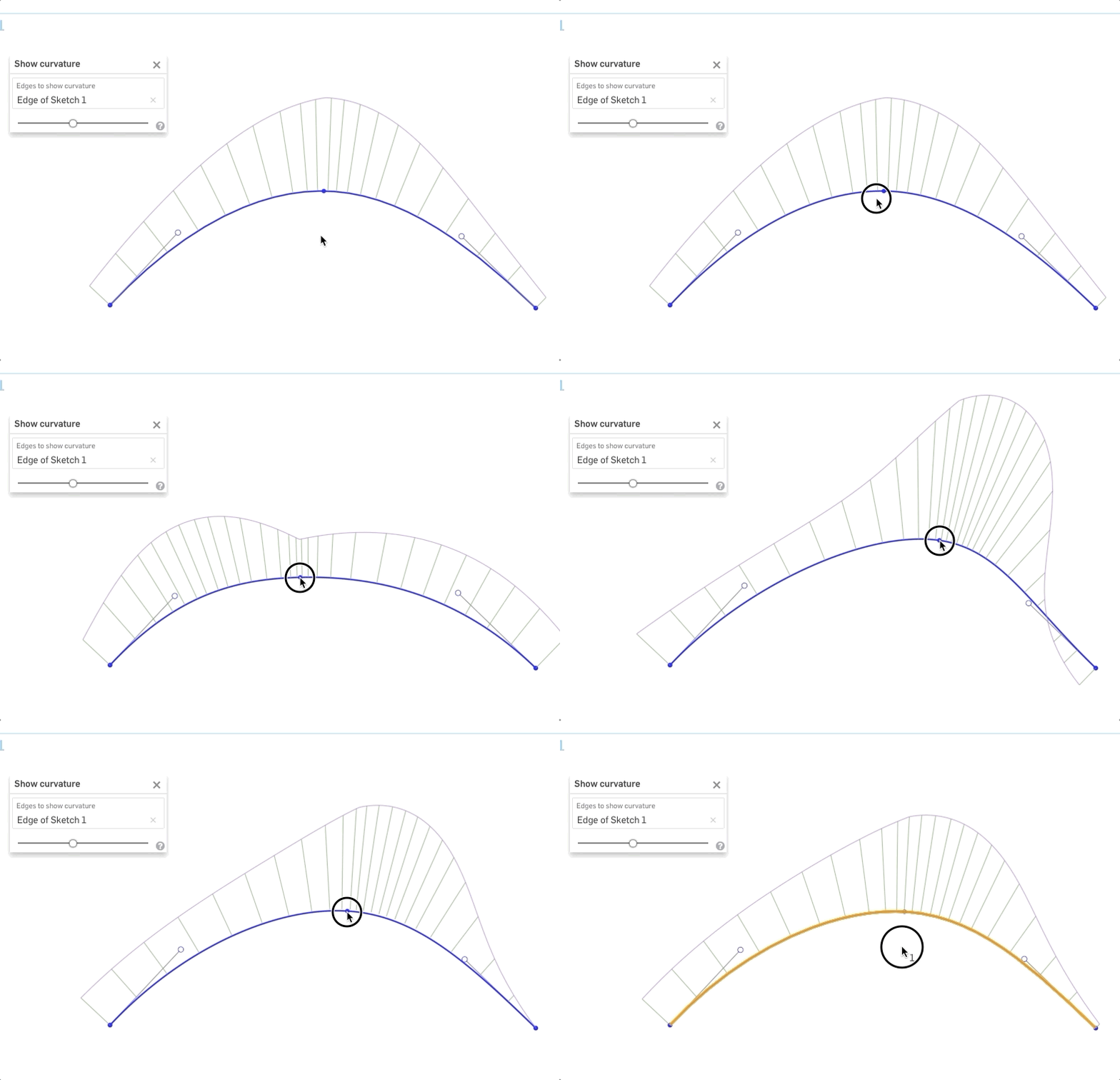
PARTIAL BOUNDARIES FOR SURFACE LOFT, FILL FEATURES
If the profiles or guide curves extends further than necessary, we can now select to trim them directly in the Loft feature (Surface). The Fill feature can similarly handle a partial boundary, trimming all excess automatically.iOS (MOBILE) IMPROVEMENTS
IMPROVED SELECTION WORKFLOWS IN ARRAY DIALOGS
It is now possible to select items to fill out array dialogs that require multiple selections (such as those used in Loft, Fill, Fillet, etc.). This improvement will greatly reduce the number of on-screen "taps" required to complete a feature, as the user will no longer have to "tap" the array field in the dialog each time before selecting the next piece of geometry.
DOCUMENTATION IMPROVEMENTS
SHARING ONSHAPE DOCUMENTS WITH NEW USERS
Onshape documents can easily be shared with anyone, even an individual that does not have an Onshape account. In our latest Tech Briefing we discuss best practices and avoiding pitfalls when sharing a document with a user that is new to Onshape. You can read the full tech briefing HERE.
USING PEM® FASTENERS
A few releases ago, we added PEM® Fasteners in Onshape Standard Content. Take a look at this new Tech Briefing on Using PEM® Fasteners in Onshape Assemblies.
SECURITY AND IT CHECKLIST
Onshape addresses many security concerns compared to Old CAD. In this Tech Briefing, we discuss many of the security features that are built into Onshape, and some best practices you can take to keep your data safe.
UPDATES TO MANY TECH BRIEFINGS
TRAINING IMPROVEMENTS
RELEASE MANAGEMENT INSTRUCTOR-LED TRAINING
We've introduced a live, instructor-led training course on Administering Release Management and User Workflows.
For more info, and to sign-up, Click Here.
Please take a moment to try out these new features and improvements and leave your comments below. For a detailed list of all the changes in this update, please see the changelog.
Remember: The updates listed here are now live for all users when creating new Documents and over the next few days these features will also be available in Documents created before the date of this update.
Comments
-
There are also a few FeatureScript improvements, mostly thanks to @Anton_Bovin:
1. evRaycast is now available to shoot rays at topology in the context.
2. opSplitByIsocline will now let you split part faces into regions by normal angle relative to a given direction. Can be useful for mold work and 3D printing.
3. Some bugfixes and improvements that let me write an experimental SuperDerive feature:
https://cad.onshape.com/documents/cfef86ed4f9635531599a973/v/0e8281b407ef15e08e1d2ade/e/305f5ce7d2fdb46e12881f6f
It's like derive, but adds an optional immediate boolean, multiple instances with implicit mate connectors, the ability to bring in variables from another part studio, and support for feature pattern apply-per-instance (if you want to pattern a derive with a varying configuration variable). Please keep in mind that overuse can lead to heavy part studios -- use assemblies for real instancing.
Have fun!Ilya Baran \ VP, Architecture and FeatureScript \ Onshape Inc9 -
Advanced search with custom properties... Love it!!
And thanks for this: Fixed issue with zip file translation with Spanish charactersUn saludo,
Eduardo Magdalena C2i Change 2 improve ☑ ¿Por qué no organizamos una reunión online?
Partner de PTC - Onshape Averigua a quién conocemos en común5 -
Really excited about updating drawing templates6
-
Search for a feature is great - helps us keep the toolbars simple; I love that if finds similar commands. And Dynamic curvature - we just discussed yesterday in our engineering meeting.... wait a minute, is Onshape listening in?!

Nice work team Onshape!www.accuratepattern.com5 -
Very nice!
Sheet format has been on my need list for a long time glad to check that one off the list
love what you did with chamfer callout, at first I was like, "Meh, we don't dimension in that style anyway" then you changed it to a dim with an angle! Now I can use it! sweet time saver
Also love your ordinate preview improvement, Ordinate jogs were always a pain in SW with the constant lock/unlock jog and a lot of messing about. I think Onshape now has a better Ordinate Dim system. Nicely done
Edit:
also the feature search will come in handy, can't tell you how many times I clicked mirror while looking for split, and vice versa.
Would be nice if it searched custom features (including those in-use in the part studio that are not linked to your toolbar)
IR: https://forum.onshape.com/discussion/11394/search-features-to-include-custom-feature-scripts/p1?new=15 -
I'm super happy with this release! I love the auto-trim in loft and fill, and the curvature vis improvement a lot. I'm excited to see surfacing get better and better. I also love the search feature function, but I really wish that it would also search for custom features. That would probably my number 1 use for a search function. I know the functionality is fresh out of the oven, and this will probably be in a future update. Great work everyone!4
-
Very happy with this update! Not having a chamfer callout was annoying and I am so glad to see that it was implemented the onshape way. Really hoping center of mass tool comes soon!4
-
Add your vote:Evan_Reese said:I really wish that it would also search for custom features. That would probably my number 1 use for a search function.
https://forum.onshape.com/discussion/comment/51635#Comment_51635
1 -
A great new release, Thankyou!! In drawings, the chamfer tool and sheet format updates will be put to use straight away, 2 things I have needed which have been a pain to work around, much appreciated to see them added in.5
-
Nice to see a needed iOS improvement!1
-
This is excellent! Great work Onshape team!
1 -
As always great update. I am crossing my fingers that we will see some new sheet metal feature improvements in the next update. Keep up the great work.2
-
I'm with Evan!! If the search function could even look into custom features would be amazing. Onshape is getting always better and better!Evan_Reese said:I'm super happy with this release! I love the auto-trim in loft and fill, and the curvature vis improvement a lot. I'm excited to see surfacing get better and better. I also love the search feature function, but I really wish that it would also search for custom features. That would probably my number 1 use for a search function. I know the functionality is fresh out of the oven, and this will probably be in a future update. Great work everyone!1 -
Yes, I agree with @Evan_Reese, search custom features in the users' toolbar would be very handy. It takes me a long time to find a feature I know is on my very bloated toolbar somewhere a search would make these super easy to find.0
-

//rami1 -
Thanks!
1. CLOUD LINE FOR REVISION
2. WEIGHT PORPERTY IN BOM
neeeeeeeeeeeeeeeeeeeeed it badly.
0 -
As a pro user you can add weight to your bom. Create a custom property under your company and you should be set1
-
Excellent...thanks for update!Thanks,
Effendi H.0 -
Excellent...thanks for update! I can export DXF from part studio with correct metric dimension, but for export DXF of flat pattern sheet metal there still have some issue : bending line was lost eventough I tick all the option export as DXF/Drawing
0 -
@Alfian_Fuadi
In draftsight the default setting is, bendinglines hidden, check the layers and make them show.0 -
@dick_van_der_vaart is correct, the content is still there but the layers are hidden in the exported DXF/DWG file. We have a bug fix to make it so that bend center line and bend tangent layers are shown by default if you have chosen them in the export dialog.0
-
Thanks for this update!
One thing though: It would be nice if we could add prefixes or comments to the chamfer dimensioning tool. Like "Typ." or "4x", if the same chamfer is apparent multiple places on the same view.
Keep up the good work!4 -
SWAP DRAWING SHEET FORMAT IN AN EXISTING ONSHAPE DRAWING
Very nice! 1
1 -
Now this is good !@bradley_sauln Changing the configuration of a Part Studio used to be an event captured in the Document history. Now the configuration input values are part of the URL, allowing you to explicitly share a specific configuration setup by sending another user the URL of what you are seeing.
Owen S.
Business Systems and Configuration Controller
HWM-Water Ltd0 -
@owen_sparks
That was in the las releasePER-USER CONFIGURATIONS
https://forum.onshape.com/discussion/11239/improvements-to-onshape-march-1st-2019/p1
Un saludo,
Eduardo Magdalena C2i Change 2 improve ☑ ¿Por qué no organizamos una reunión online?
Partner de PTC - Onshape Averigua a quién conocemos en común0 -
@bradley_sauln Changing the configuration of a Part Studio used to be an event captured in the document history. Now the configuration input values are part of the URL, allowing you to explicitly share a specific configuration setup by sending another user the URL of what you are seeing.Is there a possibility to auto-update the URL displayed in the browser address bar when changing configurations, rather than just generating a URL with the configuration when sharing a link.1
-
emagdalenaC2i said:@owen_sparks
That was in the las releasePER-USER CONFIGURATIONS
https://forum.onshape.com/discussion/11239/improvements-to-onshape-march-1st-2019/p1Thanks. I'd not thought though implications on seeing the initial release.Cheers,Owen S.Business Systems and Configuration Controller
HWM-Water Ltd0 -
Hi MBartlett21,MBartlett21 said:@bradley_sauln Changing the configuration of a Part Studio used to be an event captured in the document history. Now the configuration input values are part of the URL, allowing you to explicitly share a specific configuration setup by sending another user the URL of what you are seeing.Is there a possibility to auto-update the URL displayed in the browser address bar when changing configurations, rather than just generating a URL with the configuration when sharing a link.
This is something we've looked into and considered. Unfortunately we found a bunch of unintended consequences of live-updating the URL that didn't make us comfortable with shipping it. We will continue looking into how to make sharing and pointing users to a specific part as easy as possible.Jake RamsleyDirector of Quality Engineering & Release Manager onshape.com1 -
Chamfer annotation.....
Thanks.3 -
Nice to see new mobile improvements listed in here too.1