Topographinator (Update)

MichaelPascoe
Member Posts: 2,956 PRO
 Topographinator
Link
https://cad.onshape.com/documents/af87f92a8aacda9b29d58899/w/895817513a38f6bc735f701b/e/4782d8b17fc1f4ca112070c4Created by:
Michael Pascoe, Cache River Mill.
Description:
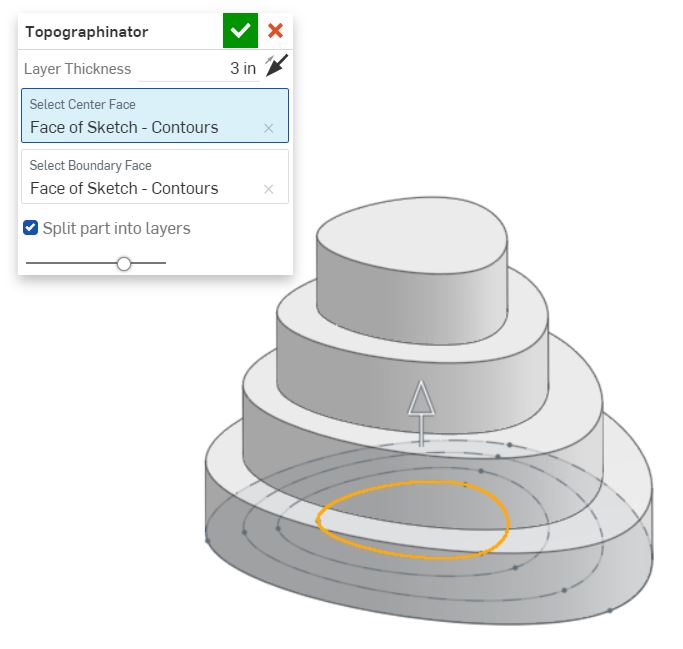
This custom feature extrudes your
sketch into multiple layers.
Prerequisites:
A single sketch containing 3 or more fully enclosed shapes.
Notes:
The order that you draw the faces will
be the order that they are extruded.
Choose the layer thickness.
Select a center face.
Select the outer face as a boundary.
Application:
This feature is most useful when you need to stack multiple layers of plywood to create the base for a glass top river table.

▚▞▚▞▚▞▚▞▚
10
Comments
-
@Evan_Reese
Still learning the basics of featurescript. Any coding suggestions you have would be great!
This is my personal account.
▚▞▚▞▚▞▚▞▚1 -
Neat idea!1
-
woooow! this is cool. There are a lot of more qualified folks here to give input, but one bit of feedback off the top of my head is to use opDeleteBodies to get rid of the splitting planes at the end. Before you do that though, I'd double-check whether you even need opPlane (which produces a user-visible, user-selectable plane like the plane feature) for all of those planes, or if simple planes could work (which are just a map consisting of an origin, x axis, and normal direction).
You could also use "MaxNumberOfPicks" : 1 for the query parameters. If it's set to 1 it will auto-advance once a selection is made, so you can just click. click. done.
A next-step in my mind is finding ways to automate the sketch creation somehow. Here's an example of an approach you might take (but using featurescript)0 -

Senior Director, Technical Services, EMEA5 -
Thank you @Evan_Reese , I like each of those ideas.Evan_Reese said:woooow! this is cool. There are a lot of more qualified folks here to give input, but one bit of feedback off the top of my head is to use opDeleteBodies to get rid of the splitting planes at the end. Before you do that though, I'd double-check whether you even need opPlane (which produces a user-visible, user-selectable plane like the plane feature) for all of those planes, or if simple planes could work (which are just a map consisting of an origin, x axis, and normal direction).
You could also use "MaxNumberOfPicks" : 1 for the query parameters. If it's set to 1 it will auto-advance once a selection is made, so you can just click. click. done.
A next-step in my mind is finding ways to automate the sketch creation somehow. Here's an example of an approach you might take (but using featurescript)
I have now incorporated the opDeleteBodies, and the "MaxNumberOfPicks" : 1. The planes gave me a lot of trouble yesterday, I decided to keep it like this for now.
▚▞▚▞▚▞▚▞▚0 -
▚▞▚▞▚▞▚▞▚1 -
This is so cool, thanks for sharing! Can we talk about the name though? Bravo.
 0
0 -
Change the best part about this feature?? @Aaron_Magnin
Yes, we can talk about the name. It is derived from Phineas & Ferb.
▚▞▚▞▚▞▚▞▚1 -
-
This feature got my gears turning during a drive, so when I got back I played around with a way to simplify the Manual Layers selections. Right now, it relies on creation order, since that drives the order each face shows up in an evaluated query. I used a loop to just radiate the selection out from the center face, so now you can do it with just one selection (the center face) and creation order doesn't matter. Feel free to copy/paste this code directly, just take it as inspiration, or ignore it completely.
https://cad.onshape.com/documents/bcce8c3417a55687b55aca94/w/351327f0355ee49ec59055fb/e/54527ec5915c0633eb6f1ff22 -
-
Update (9-26-2020)
Auto Layer Updates
- Supports more shapes than previous versions.
- Center size is now adjustable.
- Center point guide allows you to choose the center of your extrude. Previously, if the selected shape's edge did not have a clear line of sight to the centroid of of the shape, the feature would fail. Now, you can choose a center point that has a clear line of sight to the edges of your shape.
- Auto Layer is now the first tab you see.
Manual Layer Updates (Special thanks to @Evan_Reese for this one.)
- Selection will now carry over to the next tab if you change tabs within the feature.
- Only one input is required instead of two.
- Shapes no longer extrude in the order that they were drawn. This is a good thing.
- Supports more shapes than previous versions.

▚▞▚▞▚▞▚▞▚6 -
This is pretty cool keep it up0
-
This feature is getting so cool!0
-