Welcome to the Onshape forum! Ask questions and join in the discussions about everything Onshape.
First time visiting? Here are some places to start:- Looking for a certain topic? Check out the categories filter or use Search (upper right).
- Need support? Ask a question to our Community Support category.
- Please submit support tickets for bugs but you can request improvements in the Product Feedback category.
- Be respectful, on topic and if you see a problem, Flag it.
If you would like to contact our Community Manager personally, feel free to send a private message or an email.
Improvements to Onshape - December 10th, 2020

Lindsay_Early
Member, Onshape Employees, Developers Posts: 26 
Onshape has now implemented its new logo site wide.
Although our logo may have changed, you’ll notice no changes when using Onshape itself – except the new features and improvements our development team delivers every three weeks!
Let’s take a look at the latest release:
PDF TRANSPARENCY
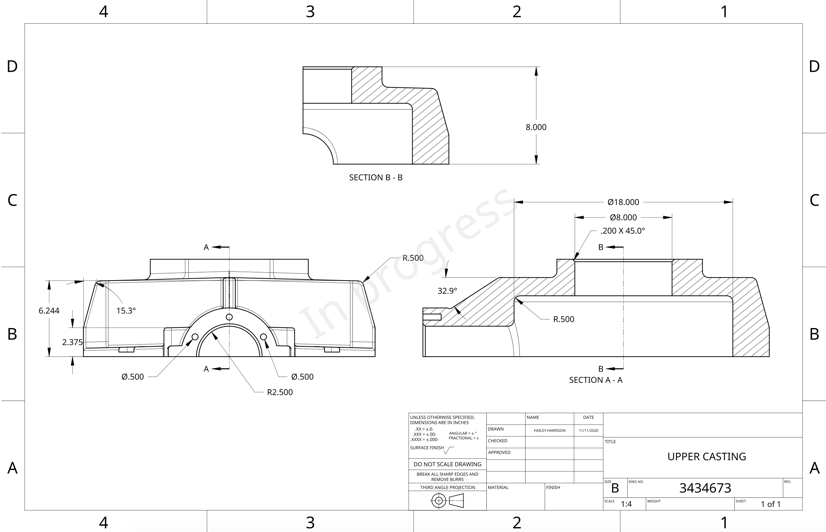
PDF Transparency is now supported so watermarks will no longer block the visibility of dimensions and other notes when drawings are exported to PDF.

DRAWING USER INTERFACE

Remember: The updates listed here are now live for all users when creating new Documents and over the next few days these features will also be available in Documents created before the date of this update.
Although our logo may have changed, you’ll notice no changes when using Onshape itself – except the new features and improvements our development team delivers every three weeks!
Let’s take a look at the latest release:
CAD IMPROVEMENTS
CREATING VARIABLES ON THE FLY
Now you can create variables on the fly when editing a sketch or feature.
PDF TRANSPARENCY
PDF Transparency is now supported so watermarks will no longer block the visibility of dimensions and other notes when drawings are exported to PDF.MOBILE IMPROVEMENTS
ANDROID ARRAY PARAMETERS
Android devices can now handle array parameters to reduce the number of taps needed to complete features like Loft.
UI IMPROVEMENTS
HISTORY
Restoring in History now shows you more information about which point in history was used.DRAWING USER INTERFACE
Drawing View properties and BOM Properties now show more detailed information about the referenced model including the workspace/revision/version Name, Part Number, Revision, and State.

JAPANESE LOCALIZATION
The User Interface can now display Japanese. Go to My Account > Preferences > Display Language to change for individual users.LEARNING CENTER IMPROVEMENTS
TECHNICAL BRIEFINGS
There is a new Tech Briefing on creating High Performing Assemblies. It includes information on general mating, Group vs. Fastened, and other techniques to make more robust and high performing assemblies.ENTERPRISE IMPROVEMENTS
ENTERPRISE USER INTERFACE
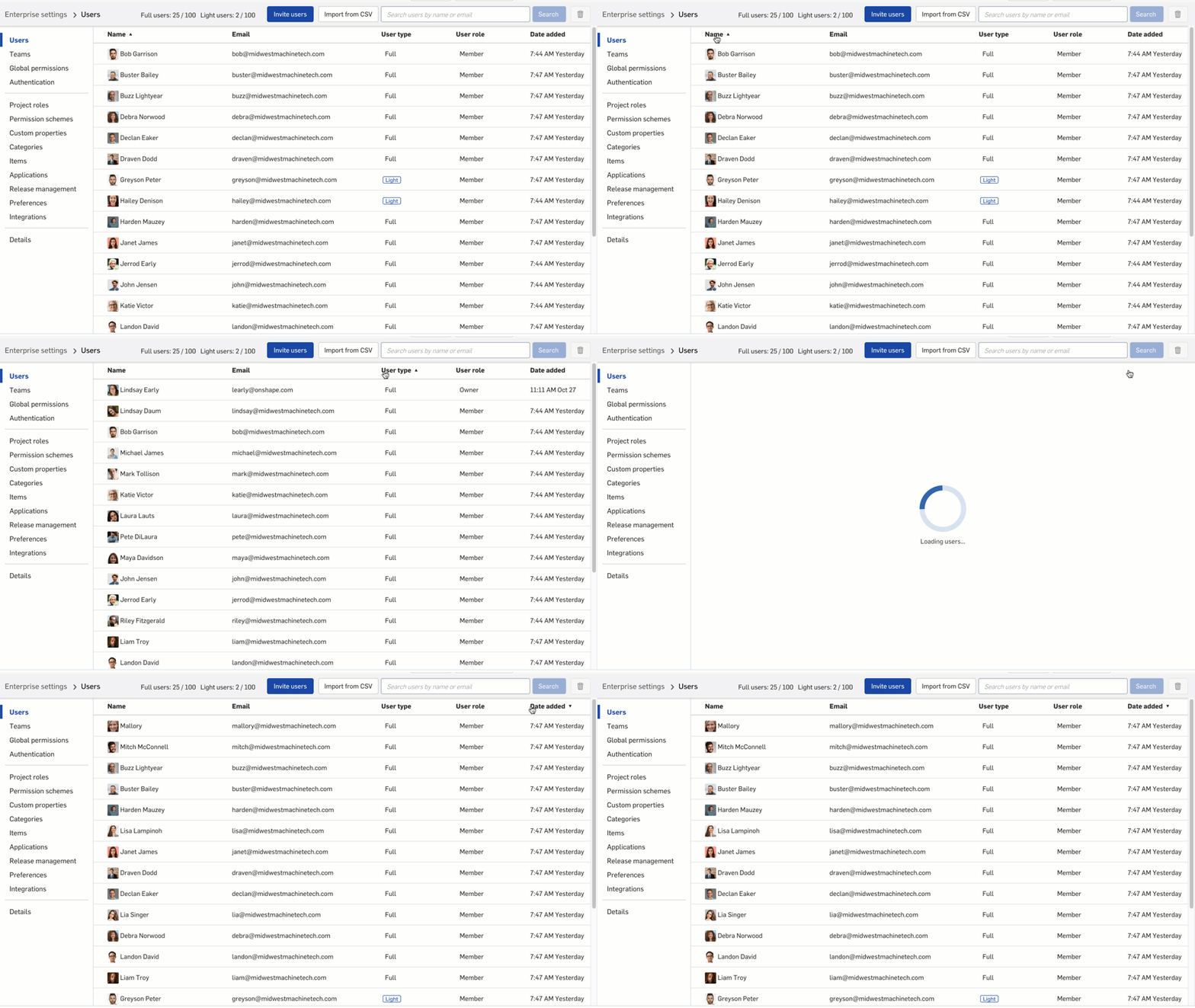
In Enterprise settings, you can sort the Users interface by Name, User Type, and Date added.
Remember: The updates listed here are now live for all users when creating new Documents and over the next few days these features will also be available in Documents created before the date of this update.
4
Comments
-
Just noticed the logo change when I opened a part in a new tab. Went to forum and saw this update. On the fly variables are very cool.
1 -
The new logo is ok, not a huge fan of it though.9
-
Why did they have to go with that drab PTC green for the logo? They could have kept the OnShape blue.14
-
Sweet! On the fly variables.
I like the restore descriptions 2
2 -
Please bring old logo back :'(15
-
Huge fan of variables on the fly! but not very sure about the new logo. It's nice but lacks something.6
-
I'm super excited for the on the fly variables. The restore times are also going to be really useful. Thanks team!0
-
Maybe it's too much greenGuizmo said:Huge fan of variables on the fly! but not very sure about the new logo. It's nice but lacks something.
4 -
All the drawing improvements are awesome! Any drawing improvement is very high on the needed scale as at the end of the day, that is how most of us ( I think ) communicate with manufacturing, clients etc.
love the variable creation on the fly.
I wonder if that is it for the year or is there going to be a Christmas present? 1
 -
On the fly variables, this will save some time. So many improvements! Thank you Onshape team!
(┛◉Д◉)┛彡┻━┻ New logo, not good. The old color and logo were clean, bold, and inviting. Subconsciously, this will affect everyone's first impression of Onshape.
RENDERCAD
rendercad.ai - Photorealistic product rendering.
▚▞▚▞▚▞▚▞▚
________________________________________________________________________8 -
On the fly variables are huge! I know I'll find myself using them more now just because. However I'm definitely tired of the use of an isometric cube / hexagon for 3D companies...there must be 1,000 companies with something similar and the previous type was unique.5
-
The new logo is way worse, but the "on the fly variable naming" is the sugar that makes the medicine go down. I can't wait until we also get variable display options in sketches which will really make using variables easier and more valuable.4
-
Fantastic! I am going to love the new variables improvements. Thanks so much.Notice a sneaky change of logo too overnight???0
-
That’s it for this year - see you in January 😀Ben_Tek_Pac said:
I wonder if that is it for the year or is there going to be a Christmas present? Senior Director, Technical Services, EMEA0 -
Saw the new logo and immediately thought "Meh!" A definite step back from the original10
-
I still prefer the original logo

8 -
I'm not complaining about the logo, since I'm a huge fan of Creo. The Variable on the Fly thing looks really useful.
0 -
Liking the updates. Really like the on the fly variables!!! Super nice.1
-
Sweet updates! On-the-fly variables are a nice quality of life addition. But the PDF transparency is great. I suggested this some months back and I'm happy to see it included!1
-
really not a fan of the new logo, wouldn't mind a different new one, this one just doesn't fit.6
-
Please vote-up if you fell off your chair too when you saw the new logo

https://forum.onshape.com/discussion/15092/new-onshape-logo
12 -
On the fly vars are GENIUS!1
-
As usual every Onshape update is full of effective features and improvements. Thank you very much.About the new logo... I think that there was a precise idea behind the blue color and the unique font. They contributed to make Onshape very recognizable. Also the current green homepage, I find it very common and too much PTC. But that's because I hoped that Onshape would have mantained his own path. However... everything changes. I hope that PTC enhance Onshape respecting his uniqueness.6
-
Couldn't agree more.
MichaelPascoe said:On the fly variables, this will save some time. So many improvements! Thank you Onshape team!
(┛◉Д◉)┛彡┻━┻ New logo, not good. The old color and logo were clean, bold, and inviting. Subconsciously, this will affect everyone's first impression of Onshape.
3 -
PLEASE get rid of the blue and green colour scheme. I really can't believe that is a thing.
commit one way or the other.
6 -
Glad to see support for PDF transparency; I was on that improvement request too. Will it be useful for anything other than the water-mark?
On-the-fly variables look great! I tend to use only config variables but should try to use the parametric type more often.
https://learn.onshape.com/learn/article/parametric-variables-vs-configuration-variables0 -
cool0
-
10
-
Yesssss! On-the-fly variables!(...too bad the time it saves is taken up by searching for the little blue Onshape logo in my tabs for a couple days... Will miss the old logo, but I'm sure the new one will become familiar quick enough )2
-
Loving all these improvements. Each of these has in the past, caused me to think "I wish ..... was better". Not any more!Not sure I'm going to learn Japanese though.Well done the lads and lasses at Onshape!0










 https://www.youtube.com/watch?v=rRZ-IxZ46ng