Welcome to the Onshape forum! Ask questions and join in the discussions about everything Onshape.
First time visiting? Here are some places to start:- Looking for a certain topic? Check out the categories filter or use Search (upper right).
- Need support? Ask a question to our Community Support category.
- Please submit support tickets for bugs but you can request improvements in the Product Feedback category.
- Be respectful, on topic and if you see a problem, Flag it.
If you would like to contact our Community Manager personally, feel free to send a private message or an email.
Why isn't it possible to pattern a spline?

Best Answers
-
How do you pattern a feature when you can only pattern parts, it seems.0
-
In the pattern feature, select feature pattern instead of part.Senior Director, Technical Services, EMEA1


Answers
-
Always.Senior Director, Technical Services, EMEA0
-
How do you pattern a feature when you can only pattern parts, it seems.0
-
In the pattern feature, select feature pattern instead of part.Senior Director, Technical Services, EMEA1
-
linear pattern in sketch doesn't seem to have a feature pattern option (or any options). and yet it cannot linear pattern a spline
0 -
I think that's also the case with SolidWorks, so it's probably a Parasolid Kernel limitation. Using '3D Fit Spline' you can convert your spline into a 'curve' and that then can be patterned.
Unemployed Onshaper- Operating on European time - More of me here ➤➤ https://linktr.ee/Liam.G0 -
@CADNurd I would use Composite Curve instead to avoid any issues with approximations from 3D fit spline.
Ramon Yip | glassboard.com
0 -
I'm sad to report that you can pattern style splines in SolidWorks (I checked in 2025). You can also pattern regular splines, but not parametrically.
Edit: Sad because it means it's not a Parasolid kernel problem.
Ramon Yip | glassboard.com
0 -
You can also pattern the sketch feature itself. Not the sketch pattern tool, the pattern feature (set to "feature") and picking the sketch containing the spline.
0 -
Useful. Will try to remember that. Have you always known this workaround, or did you just discover it today? None of the LLMs seem to know about it.
Unemployed Onshaper- Operating on European time - More of me here ➤➤ https://linktr.ee/Liam.G0 -
It works, I've also used that to create brake discs in the past. Many times, creating a solid and then patterning that is the better approach, but there may be times where we don't want that.
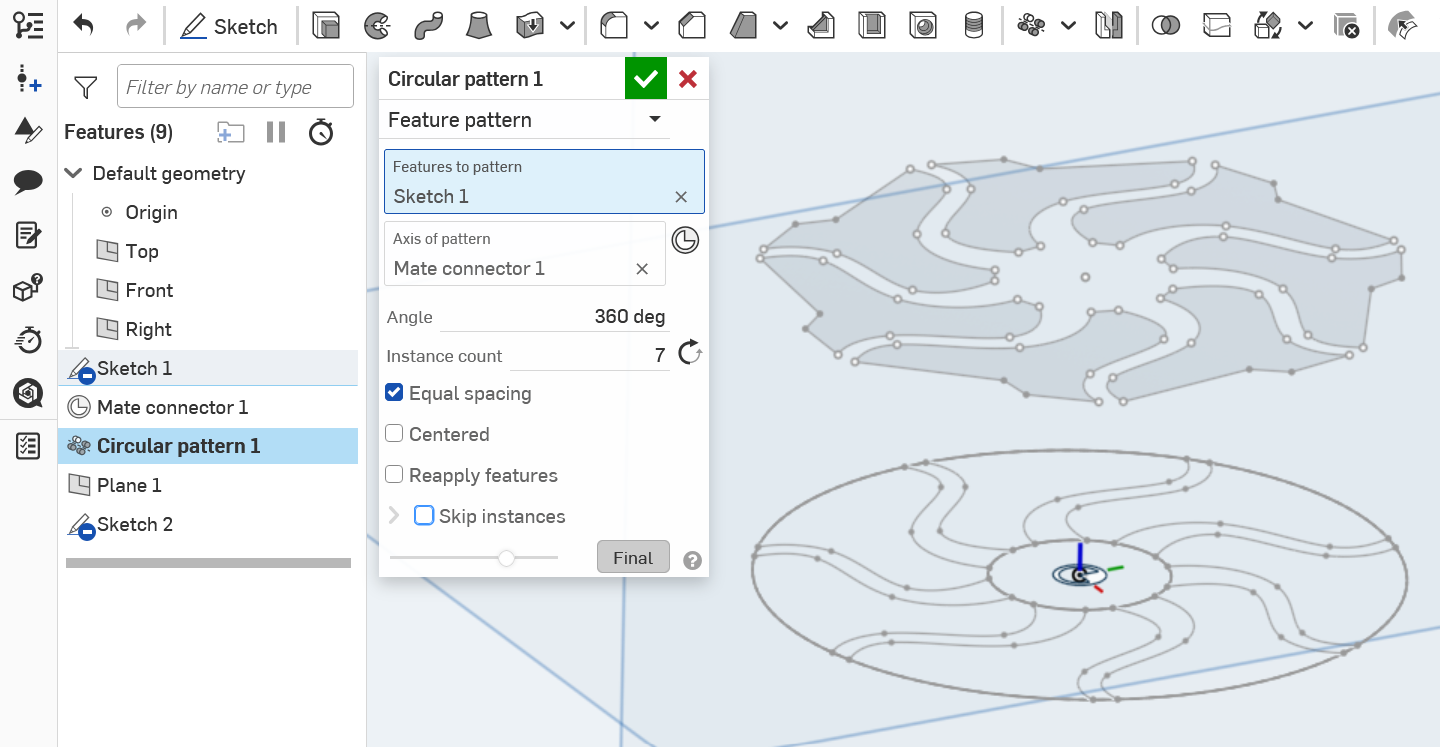
Don't forget this is a feature pattern. Else it won't let you select a sketch.
0



