Welcome to the Onshape forum! Ask questions and join in the discussions about everything Onshape.
First time visiting? Here are some places to start:- Looking for a certain topic? Check out the categories filter or use Search (upper right).
- Need support? Ask a question to our Community Support category.
- Please submit support tickets for bugs but you can request improvements in the Product Feedback category.
- Be respectful, on topic and if you see a problem, Flag it.
If you would like to contact our Community Manager personally, feel free to send a private message or an email.
Improvements to Onshape - August 20th, 2021


We’re celebrating August with another great Onshape release! This update features a highly requested improvement to assemblies, along with many other improvements across the platform. Let's jump in.
GENERAL IMPROVEMENTS
ITALIAN LOCALIZATION
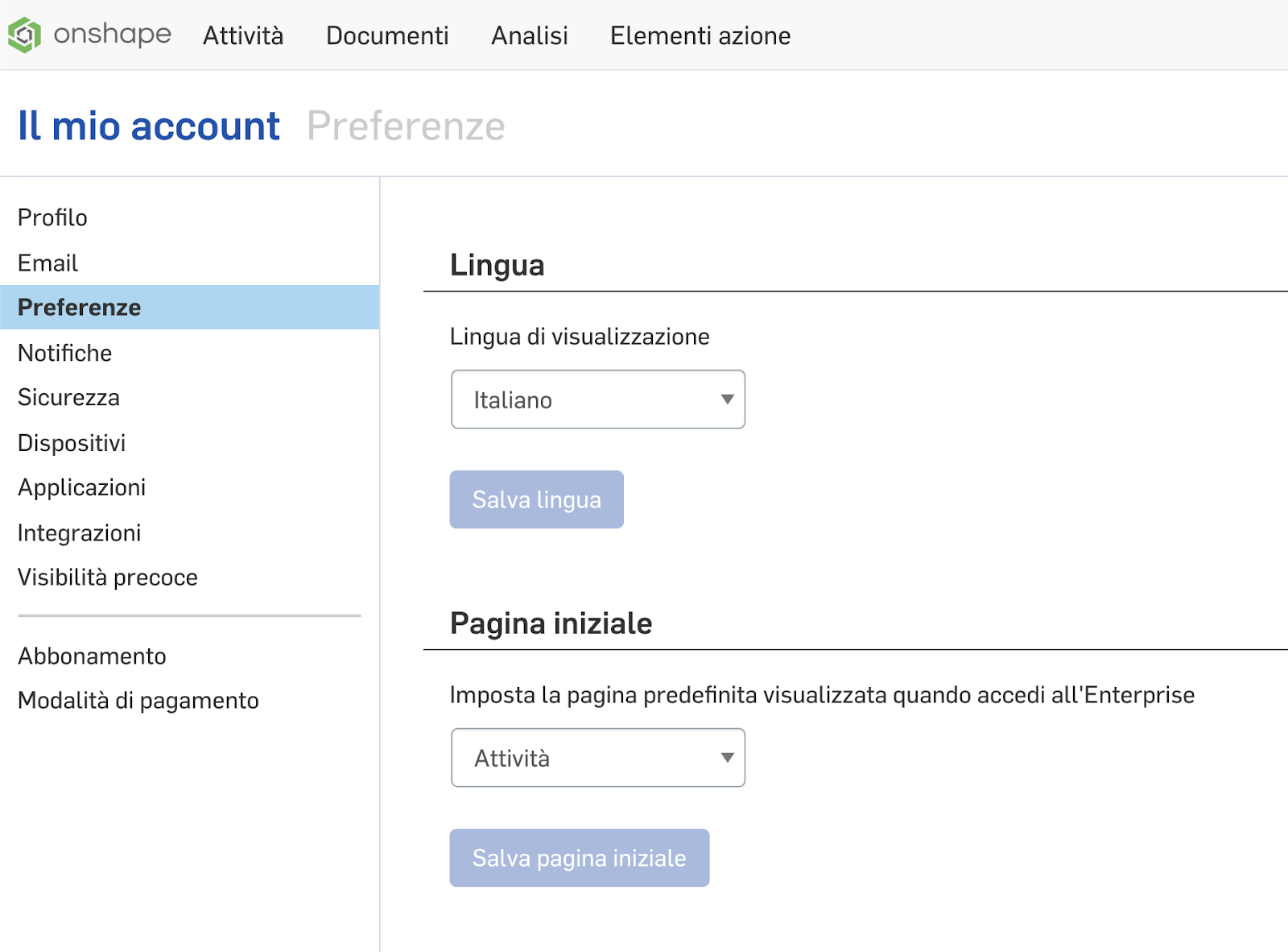
The User Interface can now be displayed in Italian. Go to “My Account > Preferences > Display Language” to change languages for individual users.
ABILITY TO FILTER FEATURE LIST FOR ERRORS
The filter capabilities in Onshape Part Studios have been extended with this release. It is now easy to find any features with errors or warnings by using the “:errors” filter.

CAD IMPROVEMENTS
PARAMETRIC REPLICATE TOOL IN ASSEMBLIES
Until now, the Replicate command in assemblies would repeat entities and mates onto matching geometry in a one-time manner. This made it difficult to visualize which components were associated with Replicate, and didn’t allow for modification of the Replicate parameters after the fact. With this release, Replicate will now behave as a parametric entity much like assembly patterns.
APPLY LIMITS TO BALL MATE ROTATION IN ASSEMBLIES
With this latest update, you can now add rotational limits to ball mates in assemblies. The limit is defined as the maximum angle created between the Z-axes of the two mate connectors, defining a cone of rotation for your ball joint.
ABILITY TO FLIP ORIENTATION OF SHEET METAL FLAT PATTERN
With this release, Onshape now gives you the ability to determine the up-direction of your sheet metal flat patterns. This allows for increased control over appearance and bend notes in drawings.
SUPPORT FOR PVZ EXPORT
With this update, Onshape now supports the export of parts and assemblies to the PVZ format. This capability makes it easy to exchange data with a range of other PTC applications.
SPLIT CURVE OPERATION
With this release, the Split command has been improved to now be able to split curve components. This can be particularly useful for working with a portion of a projected curve.
SELECT CONICAL SURFACE FOR SECTION VIEW
The Section View tool can now accept conical faces as its input. It will automatically bring the section plane to the center of the conical surface. This is particularly useful when working with drafted components and screw bosses.
DRAWING IMPROVEMENTS
PROFILE VIEWS OF TOROIDAL EDGES NOW SEEN AS ARCS
When creating drawings of springs and other toroidal components, Onshape’s drawings will now see the profile view as an arc, allowing for radial dimensions to be applied. This makes it simple to call out the inner and outer radii of springs.

IMPROVED CONTEXT MENUS FOR DRAWING VIEWS
In this latest release, we have improved the context menus for drawing views. You will find the options are now grouped logically by functionality and include sub-menus to prevent the dialog from getting too long.
ENTERPRISE IMPROVEMENTS
ANALYTICS REPORTING FOR FAILED SIGN-IN ATTEMPTS
This update includes additional security and IP visibility within Onshape Enterprise. Now, any failed sign-in attempt, classified as the correct email with the incorrect password, will be tracked and reported within Enterprise Analytics.
MOBILE IMPROVEMENTS
IOS READ-ONLY FEATURE DIALOGS
iOS users with View and Copy permissions can now open feature dialogs to interrogate feature inputs.
Please take a moment to try out these new features and improvements and leave your comments below. For a detailed list of all the changes in this update, please see the changelog.
Remember: The updates listed here are now live for all users when creating new Onshape Documents and over the next few days these features will also be available in Documents created before the date of this update.
Comments
-
Awesome list of updates. Both the replicate and ball mate limits are going to be very useful. I haven't tried it yet but hopefully replicated mates are not added to the mate list but kept grouped in the tree to reduce the massive list of mates that accumulate. Also great to see the drawing improvement. Thanks Onshape team!5
-
Excellent, this is one of the best improvements. my favourites: 1. Flip sheetmetal flat pattern, wow! finally! 2. Replicate as a feature, awesome! will make my assembly tree so much smaller. 3. Toroidal Edges are seen as arcs, Excellent! 4. Ball mate limits, could have used this the other day to save some frustration. :-)6
-
YES! Parametric Replicate! This is HUGE! Also Flip flat patterns will make the shop drawing a little more intuitive being in part position.
Definitely appreciate sorting the context menus!!
Awesome work5 -
Thanks Onshape team!
RENDERCAD
rendercad.ai - Photorealistic product rendering.
▚▞▚▞▚▞▚▞▚
________________________________________________________________________2 -
-
Wow, this is a huge group of updates. A lot in here that is going to improve my workflow.2
-
brucebartlett said:Awesome list of updates. Both the replicate and ball mate limits are going to be very useful. I haven't tried it yet but hopefully replicated mates are not added to the mate list but kept grouped in the tree to reduce the massive list of mates that accumulate. Also great to see the drawing improvement. Thanks Onshape team!
Indeed Bruce, the Mate Features list will only show the original mate. The replicated instances (and their appropriately replicated mates) will be listed as a "Replicate" item which can be expanded or collapsed in the tree. The parametric aspect of this comes into effect when the underlying geometry you chose (e.g. Match Faces in Part) is changed...
3 -
Very good, lots of goodies
 1
1 -
Great batch of updates! Thank you.1
-
Splitting wires used to be such a pain, nice to have it now.
1 -
After testing out replicate. You all did a better job than I thought. Well done!
All I need now is for replicate to recognize more advanced selections, like bolt slot centers, or multiple mates1 -
Great! Split curve is a big deal. Section on cones is very helpful and much easier in assemblies. I had not realized cylinders (or portions like straight fillets) are selectable for section. Very versatile!
www.accuratepattern.com1 -
The replicate update is great! turns replicate into more of a sketch driven pattern on steroids. Sketch driven pattern has defiantly been missed by myself. Glad to see flip sheet metal. I will be able to start using drawing bend lines in a functional way now instead of just hiding them.2
-
Love the replicate! Lots of good stuff in this one!1
-
Love the flip flat pattern, Now I just need the ability to have the bend note read the inside bend for press brake purposes. Would like to see an option on the properties menu to toggle between inside and outside bend.


2 -
Parametric replicate
 //rami3
 -
I like and dislike the change with parametric replicate. It gives me a form of pattern driven component pattern, but my copy with mates function has now been taken away. What I mean is if I suppress the original components the Replicate feature breaks. Maybe a check box can be added to accommodate both applications.
3 -
Very excited about the replicate improvement; a feature I use heavily. That it will now work with configurations offers a new superpower.1
-
Useful updates. Nice. Still need True Type fonts in drawings though.
2 -
PARAMETRIC REPLICATE TOOL IN ASSEMBLIES:::::: AWESOME!
MEK2 -
Impressed with the updates so far, just need time to apply some of them.1
-
The new drawing right click menus are very nice. I've been using them all day, clean and quick.
RENDERCAD
rendercad.ai - Photorealistic product rendering.
▚▞▚▞▚▞▚▞▚
________________________________________________________________________2 -
Bravo - this is a solid update. Thank you!1
-
This update actually contains a hidden gem that's pretty great - "Improved plane selection while dimensioning sketch lines".
Before this update, selecting an edge with the dimension tool had two undesirable side effects - it disabled plane selection from the feature tree, and it shrunk the selection zone around planes to a 1 pixel wide zone near the edge of the plane. This made dimensioning edges to planes particularly difficult.
I accordingly reported both of these behaviors as bugs a little while ago, and now they've both been fixed. So shoutout to the Onshape team for listening to user feedback and making Onshape better!
Here's a GIF demonstrating the old behavior:
GIF Credit - Lou Gallo
Software Developer at Epic Systems
FRC Design Mentor - Team 1306 BadgerBots8 -
The ball limits and replicate function is a great update to make. I still wish that shapes can collide in assembly. That would mean a lot more mechanisms could be made, like Geneva wheels, which I spent almost a whole year trying to make, only to learn that it was impossible. But pretty solid update, and so props to devs for making such a great cad0
-
This is beautiful, even on small sub assemblies replicate makes a big difference in assembly time (My time spent mating), performance, and tree organization.

4 -
Feels like Christmas! Thanks Onshape team!0
-
I was looking in the new sub menu for hide bend lines and bend notes, looks like those are still in the main list.
Could those be moved over to the hide/show menu also?
1 -
I have created a ticket and filed a bug for this. Thanks @john_mcclaryjohn_mcclary said:I was looking in the new sub menu for hide bend lines and bend notes, looks like those are still in the main list.
Could those be moved over to the hide/show menu also?1 -
When will Reality Server be available again?0