Welcome to the Onshape forum! Ask questions and join in the discussions about everything Onshape.
First time visiting? Here are some places to start:- Looking for a certain topic? Check out the categories filter or use Search (upper right).
- Need support? Ask a question to our Community Support category.
- Please submit support tickets for bugs but you can request improvements in the Product Feedback category.
- Be respectful, on topic and if you see a problem, Flag it.
If you would like to contact our Community Manager personally, feel free to send a private message or an email.
Improvements to Onshape - December 15th, 2021


This is the largest update we have ever done. Settle in, let's get started, and remember to keep scrolling down the page.
GENERAL IMPROVEMENTS
CHANGE MEASURE UNITS
You can now change the units that are displayed when measuring in Onshape.MAX DISTANCE MEASURE TYPE
You can now get maximum distance dimensions with any combination of selections. In the past this was limited to only certain geometry."N" KEY TWICE TO FLIP NORMAL VIEW
You can now hit the "N" key on your keyboard a second time to flip the normal view.FOLDER LOCATION
Your Document's folder location will now appears in the Document toolbar. Clicking the location opens that folder in a new browser tab.SKETCH IMPROVEMENTS
SCALE SKETCH
You can now scale a sketch in Onshape.CURVATURE VISUALIZATION IMPROVEMENTS
There have been multiple improvements to visualizing sketch curvature in Onshape.SKETCH TESSELLATION QUALITY
Sketch tessellation quality has been dramatically improved in this update.ALIGNED RECTANGLE
You will find a new Aligned Rectangle feature in the sketch toolbar. This new feature is useful when you need a rectangle that is not horizontally and vertically constrained.FEATURE IMPROVEMENTS
SHOW DEPENDENCIES
You can now view the dependencies of any feature in the Feature List. Simply right-click the feature and choose "Show dependencies."SHOW ISO CURVES IN LOFT
You can now turn iso Curves on and off in the Loft feature. These curves can be useful for understanding the quality of your surface.KEEP TOOLS IN THICKEN
By default, when thickening a surface, the underlying surface will be deleted as part of the feature. You can keep the surface by checking "Keep tools" in the Thicken dialog. In the past, thickened surfaces had to be deleted as a separate step.REMEMBER SOLID/SURFACE SELECTION
Features that have a "Solid" and "Surface" option will remember your previous selection and default to that for subsequent features.REMEMBER LAST LOCATION IN INSERT DIALOG
The last location you browsed to insert will be the default location for subsequent insert operations.REMEMBER PREVIOUS VALUES
Features like Plane, Fillet, Chamfer, Delete Face, Offset Surface and more will now remember your key selections and make them the default for subsequent features.MISSING SELECTIONS
You will now see a special warning indicator for missing selections. If you hover over the feature with the warning it will tell you the number of missing selections.
DRAWING IMPROVEMENTS
CHANGE BOM TEMPLATE IN ONSHAPE DRAWINGS
You can now change the BOM template used when inserting a BOM table into an Onshape Drawing.UNDERLINE OVERRIDDEN DIMENSIONS
By default, any manually altered drawing dimension will be underlined to indicate it has been changed. With this update you now have an option to remove that underline by unchecking the new "Underline overridden dimensions" option in the Drawing Properties.ADDITIONAL HATCH OPTIONS
You now have many additional hatch options. Hatch can be edited by right-clicking and choosing "Edit hatch" or from the Drawing Properties flyout.LEARNING CENTER UPDATES
LOCALIZATION UPDATES
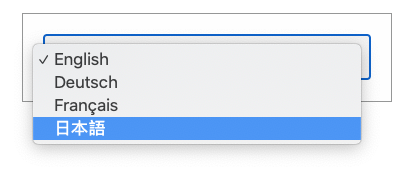
All of the technical briefings in the Onshape Learning Center are now available in Japanese. Change the language by navigating to the article and selecting the language in the pulldown.
VIDEO UPDATES
There have been several additional video updates to existing courses in the Onshape Learning Center, including a new video on creating general tasks in the Sharing and Collaboration course, a new video teaching how to make aligned section views in the Detailed Drawings course, and updates to the videos on the Draft feature and the pattern type option in the Part Design Using Part Studios course.
Please take a moment to try out these new features and improvements and leave your comments on the Onshape Forum. For a detailed list of all the changes in this update, please see the changelog.
Remember: The updates listed here are now live for all users when creating new Onshape Documents and over the next few days these features will also be available in Documents created before the date of this update.
Comments
-
Huuuge update! what a great way to end the year5
-
WOW ! ! ! Those are some Fantastic changes!Now add the use of TrueType fonts, and it will be a fantastic end to the year!5
-
Max Distance! Curvature! Sketch Tesselation Quality! Aligned Rectangle! Show Dependencies! Remember Remember Remember (so cool, all three!)! Change BOM Template! Additional Hatch Options! Video Updates (thank you!) and especially this one:
- Fixed an issue where graphics performance is reduced for Safari browsersI am running out of exclamation points here.. great update! 😀 it’s an early Christmas present…4 -
Early Christmas for sure! Thanks team!!
RENDERCAD
rendercad.ai - Photorealistic product rendering.
▚▞▚▞▚▞▚▞▚
________________________________________________________________________3 -
Wow indeed.
There is so many quality-of-life improvements here that it's making my head spin.
I'm so glad you focused on useability this time around rather that adding a few niche features. I'm sure most users will find several reasons to love this update.
Well done, Onshape/PTC team
Looking forward to what 2022 will bring.
Happy Holliday's / New Year everyone
critique: I love how you can change units in the measure tool now, but it would still be best if both units could be presented simultaneously.
There are jobs I do, we call it 'soft metric' where there are mixed units throughout a single part.
For example:
Stock thickness (inches)
Stock Width (Inches)
Stock Length (MM)
Hole center (inch when mounting purchased parts based off inch values, mm everywhere else)
Hole diameter (MM)
Finding which unit was the "nominal unit" can often lead to a lot of back and forth changing of units. In SW we always have the measure tool set to display alternate units, and it is invaluable and sorely missed.
7 -
Wow - great list of enhancements. Well done.
3 -
Wow !!! That is huge!!! The team must have been working overtime!!!
I was hoping to get rendering or simulation this year but I'll wait
Thanks for all the great updates this year!3 -
Very nice updates!
Enjoy the holidays! 3
3 -
As a special today, we are going to do a livestream on YouTube at 3pm Boston, USA time today to celebrate the 1.140 release, Richard Doyle (The User Group Guy) and Mike LaFleche (The Professor) will be riffing on the new features and we will also have a comments feed where we can take questions live.To simply watch the stream or comment live with us and ask questions, go to
 https://www.youtube.com/watch?v=SdT_JC7nbgY.
When the stream ends, it will be available at the same link to view.Regards,Mike LaFleche @mlaflecheCAD7 -
Thanks to the Onshape team!
There are a bunch of improvements and or bugs that I've written up that were addressed with this update (e.g. more persistent curvature visualization, better tessellation for large radii curves) as well as many improvement tickets that I've voted up.
It feels great when so many of these sometimes small but nagging issues are addressed. It also feels great how interactive the development process is with Onshape. Even when other more established tools can check off so many more features, it feels so much more refreshing to be so directly involved in the shaping of the development.Simon Gatrall | Product Development, Engineering, Design, Onshape | Ex- IDEO, PCH, Unagi, Carbon | LinkedIn
7 -
-
So much good stuff! I love being able to change the measurement units. It does need dual units. Maybe evem three units! Currently doing a shop layout in feet, but most items inside are measured in inches or mm.
3 -
Great Job Onshape Team. Awesome Stuff and a lot of it!1
-
Good job folks1
-
"Show Dependencies..."Finally! Thank you, thank you, thank you. This will make life so much easier when restructuring features that may not have been sketched and applied in the most ideal way or with the most ideal dependencies.4
-
Wow great job guys! Its amazing to see this program evolve into what it is now. Using only OnShape, i'm slowly becomming the engineer/designer/3d printer i've always wanted to be. Thankyou for that3
-
Awesome update, keep them coming!!!1
-
Aligned rectangle!! Thank you!4
-
This is such an amazing update.1
-
WOW... Thank you guys.
Very useful updates!1 -
Great update Onshape!!!!!
Show Dependencies is great. Wouldn't it be nice if you could suppress / unsuppressed from the selection or edit.....hmmm, maybe one more improvement request!
Love the Loft surface Iso curves!!!!!!1 -
A big thank you to the Onshape team!1
-
Thanks for all the hard work Onshape. I really like the 'link direct to folder' in the top ribbon. Your focus on every day usability shines through
2 -
Thank you Onshape! Some great improvements there, especially the hatch patterns. So happy I've got wood!
 5
5 -
Great list of new features. Looking forward to making use of these.2
-
Great job, team! These are all valuable updates.2
-
Wow! Super update for lots of little, yet important, features. Thanks! Will use over half of these in my day to day.
2 -
Great updates!! As always I really like how drawings keep improving.2
-
'Twas the week before Christmas,
when all through the design world
engineers everywhere were stirring,
from Onshape's killer release just unfurled!
An amazing number of great updates and additions. Thank you Onshape team. Have a wonderful holiday.
4 -
Great work & kudos to you guys. You have transformed the way we teach engineering to the next generations. This update had a lot more of improvements. Still waiting for the exclusion of parts/features from sectional views.
I am educator & need to use animate command a lot.
Mostly i require revolve animation on loop with more than default speed. sometimes i require 720 degree for special inversions of some mechanisms.
I have to change the values everytime & that takes up a lot of time making students distracted while I am at it.
remembering the values or better allowing to change default values everywhere would be heavenly for educators like me.
Hope you remember this for your next update.
2