Improvements to Onshape - April 5th, 2022


GENERAL IMPROVEMENTS
BREADCRUMBS
Navigating nested folders and moving Documents between them is now much easier.CAD IMPROVEMENTS
FILLET IMPROVEMENTS
The Fillet feature has two new options, "Edges to keep" and "Smooth fillet corners", providing more control and flexibility over fillet geometry.DRAWING IMPROVEMENTS
HOLE CALLOUT OVERRIDES
Hole callouts can now be edited to change precision and tolerance values. Changes to these values affect all instances of the same hole in the drawing and are updated on hole tables.BREAK EXTENSION LINES
When dimensions overlap, Onshape now automatically breaks extension lines to make Drawings clearer and easier to read. Breaks can be overridden from the context menu or the Styles panel.INDEPENDENT ARROWHEAD CONTROL
In the Drawing Styles panel, you can now adjust both arrowheads of the selected dimension(s) independently.TABLE ROW AND COLUMN SIZE
When resizing a row or column of a Drawing table, a tooltip appears showing you the width and height as you adjust it. You can also set a precise value for the size of a cell.CUT LIST TABLE PROPERTIES
Cut list table properties can now be edited like any other tables in Drawings.ENTERPRISE IMPROVEMENTS
UPDATED DASHBOARD UI
Analytics in Onshape Enterprise now comes with a fresh new look for better usability.
FEATURESCRIPT IMPROVEMENTS
TABLE PARAMETER GROUPS AND CONDITIONAL VISIBILITY
Custom tables can now include parameter groups for added usability. The visibility of parameters can now also be controlled based upon the condition of another parameter.
MOBILE IMPROVEMENTS
EXTERNAL KEYBOARD SUPPORT (iOS)
The iOS mobile app now supports external/magic keyboards. Enter text and numbers faster and use your favorite keyboard shortcuts!LEARNING CENTER IMPROVEMENTS
ALL THE WAYS TO USE MATE CONNECTORS
We have released a new technical briefing focusing on all the different ways to use Mate connectors in Onshape Assemblies and Part Studios. This article is available to all Onshape users here.
VIDEO UPDATES
Check out the updated Section View video in the Navigating Onshape course to learn how to use the new include and exclude options. The Lines and Rectangle video in the Introduction to Sketching course now has a new section focused on Aligned rectangle. The Tab manager video in the Document Management course now includes how to batch export tabs. There is also a new video in the Linked Documents course explaining how to pin references and a new video in the Document Management course describing how to add properties to objects.
Remember: The updates listed here are now live for all users when creating new Documents. Over the next few days, these features will also be available in Documents created before this update.
Comments
-
Join the User Group Guy, Richard Doyle and the Professor, Mike LaFleche for our first live reactions to What's New in Onshape 1.145 at noon Eastern US time. Youtube: https://www.youtube.com/watch?v=dPlRP7Ngw90
Regards,Mike LaFleche @mlaflecheCAD6 -
This is great! Love the fillets update!5
-
Nice work Onshape. Keep it up!2
-
-
Watching it live!1
-
The new fillet options are really good. I don't remember having that kind of selective control for edge overflow and corners in other CAD systems. I'm pretty sure it's an all or nothing choice.The dimension break seems pretty intuitive and clean too.I will say I'm still looking for a face-face fillet, especially with an option to make a new surface...
Simon Gatrall | Product Development, Engineering, Design, Onshape | Ex- IDEO, PCH, Unagi, Carbon | LinkedIn
2 -
It would be cool if each of these improvement posts referenced the completed improvement requests, and those requests were closed. (e.g. I'm pretty sure this one should now be marked closed)Seems like a great opportunity to tally up the progress that's being made.
Simon Gatrall | Product Development, Engineering, Design, Onshape | Ex- IDEO, PCH, Unagi, Carbon | LinkedIn
2 -
The explicit column width and row height control is very helpful in making drawing templates with title block and rev tables consistent and to pixel precision.0
-
Outstanding Onshape team! The addition of automatic extension line breaks is a welcomed feature!0
-
S1mon said:It would be cool if each of these improvement posts referenced the completed improvement requests, and those requests were closed. (e.g. I'm pretty sure this one should now be marked closed)Seems like a great opportunity to tally up the progress that's being made.They do get closed eventually and everyone attached to an improvement or support ticket gets notified. That’s @lougallo ’s job 😀Senior Director, Technical Services, EMEA1
-
"Hole Callout Overrides"
When will it be possible to translate or delete the word "thru"? We've been asking you for years.
2 -
Thanks for the improvements. Always great to get another update.0
-
I just learned 27 new ways to use Mate Connectors.Christian Petty - Mech. Design Engineer, Radian R&D5
-
Woohoo, table parameter groups! Thanks Onshape

Design Engineer | Anerdgy AG2 -
Hi Neil,
again some great improvements!
In the fillet improvements video, you are selecting hidden edges. How can this be done? Any trick or keyboard shortcut?
Thanks!1 -
I really like the drawings updates! Thank you!1
-
Hi Thomas - I shot the video that way to see if anybody would askthomas_gruenwald said:Hi Neil,
again some great improvements!
In the fillet improvements video, you are selecting hidden edges. How can this be done? Any trick or keyboard shortcut?
Thanks!
It's just the select other tool, which can be activated (on most keyboards) by pressing the button above the TAB key.Senior Director, Technical Services, EMEA0 -
Drawings team putting in OVERTIME! Great set of improvements, especially those fillet changes

4 -
Un saludo,
Eduardo Magdalena C2i Change 2 improve ☑ ¿Por qué no organizamos una reunión online?
Partner de PTC - Onshape Averigua a quién conocemos en común0 -
It is the Ñ key in a Spanish keyboardNeilCooke said:
Hi Thomas - I shot the video that way to see if anybody would askthomas_gruenwald said:Hi Neil,
again some great improvements!
In the fillet improvements video, you are selecting hidden edges. How can this be done? Any trick or keyboard shortcut?
Thanks!
It's just the select other tool, which can be activated (on most keyboards) by pressing the button above the TAB key.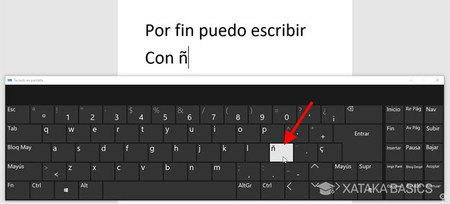
Un saludo,
Eduardo Magdalena C2i Change 2 improve ☑ ¿Por qué no organizamos una reunión online?
Partner de PTC - Onshape Averigua a quién conocemos en común1 -
Another great set of updates. The drawing ones especially are always welcome.
1 -
And the ö-key on german layout (same location than your Ñ key. Not realy comfortable. Hope Onshape will soon support other keyboard layouts than the US.emagdalenaC2i schrieb:
It is the Ñ key in a Spanish keyboardNeilCooke said:
Hi Thomas - I shot the video that way to see if anybody would askthomas_gruenwald said:Hi Neil,
again some great improvements!
In the fillet improvements video, you are selecting hidden edges. How can this be done? Any trick or keyboard shortcut?
Thanks!
It's just the select other tool, which can be activated (on most keyboards) by pressing the button above the TAB key.2 -
I'm glad to see we are making progress in drawings. Great update!1
-
NeilCooke said:This latest release includes a number of highly requested Drawing improvements and a continued focus on usability and core modeling tools. Enjoy.
GENERAL IMPROVEMENTS
BREADCRUMBS
Navigating nested folders and moving Documents between them is now much easier.And as we were reminded again in yesterday's German Onshape User Group, you can use emojis within Onshape, not only within document names, but also in folder names, to help with nesting:
7 -
absolutely LOVE the improvement to the fillet tool!2
-
Thanks for adding the break feature in extension lines, it will make sheets look more cleaner and professional. Liked the smooth corner feature in fillets too!1
-
Awesome! Onshape getting better and better and better.
1 -
No matter how challenging my work day is, it is always one day closer to the next release 5











 https://youtu.be/_8Z0gA9LAXk


