Welcome to the Onshape forum! Ask questions and join in the discussions about everything Onshape.
First time visiting? Here are some places to start:- Looking for a certain topic? Check out the categories filter or use Search (upper right).
- Need support? Ask a question to our Community Support category.
- Please submit support tickets for bugs but you can request improvements in the Product Feedback category.
- Be respectful, on topic and if you see a problem, Flag it.
If you would like to contact our Community Manager personally, feel free to send a private message or an email.
How i can make whirpool lines on a donut shape?
 hemikolv
Member Posts: 7 ✭
hemikolv
Member Posts: 7 ✭
Hello. i want to make lines as in picture on a donut as in picture. I tried wrap method and it not working.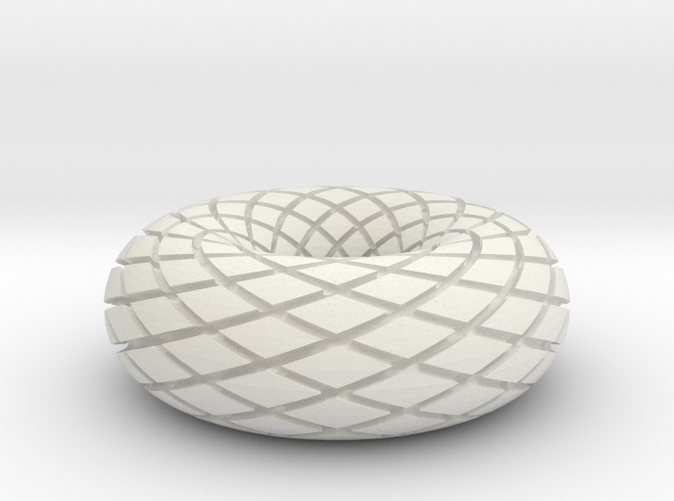
0
Comments
https://cad.onshape.com/documents/9a0794b42ff77463273f2264/w/111329a3b65157440b5a55c1/e/6a47bc73af683ee17cabdd85
EDITED SEE THE POST AFTER ERICS —
This was a tricky thing to model
I could be mistaken but I think @Evan_Reese has done something like this before, But I wouldn't know where to look
Hi @hemikolv, here is another similar approach to Steve's::
- Sketch the profile of the donut
- Sketch the helix path
- Use 3D Spiral by @Konstantin_Sh to get the donut helix spline
- Revolve the donut
- Split the donut in half so that it can have a face split
- Circular pattern the spline or transform rotate copy a small rotation
- Split the face of the donut halves with the splines normal to the faces
- Merge the two donut halves together
- Thicken new the thin split portion of the donut face
- Mirror the thickened part
- Circular pattern remove the new mirrored shape
https://cad.onshape.com/documents/37d85214d16d00c81182ecea/w/2ced79bbca6732ddafb80370/e/22545e4708bd6fc89f6a918dRENDERCAD
rendercad.ai - Photorealistic product rendering.
▚▞▚▞▚▞▚▞▚
________________________________________________________________________
I like Michael’s approach. One face at the bottom of all the grooves !
I don’t know why in the world I didn’t think of 3D spiral. It’s not as if I haven’t used it a bunch of times and it was just in a post the other day
Really nice model Michael
Very clean
Here's my take on it, the merge at end is very slow... You could also not merge it and just make it a composite instead depending what you want to do with the part!
https://cad.onshape.com/documents/61d4f085836044970cb7006e/w/69a57c1c57e15b24c941af68/e/1c44356688ac395a07c5cad5
OK it bugged me that I couldn’t get one face at the bottom of all grooves. See part studio named Multi-face. Wrong way to make the grooves
So I stole sn idea from Michael
In Multi-face, I was thickening a loft that went from one side of a circular groove to the other side of a circular groove. And being as that loft was flat when looking at a cross section, well that’s why I had problems where I ended up with many faces at the bottom
In Michael’s case, he made a split or splits to come up with a strip composed of the contour of the torus. And as the original torus had no divisions, so this strip also had no division. As such, when he thickened that strip, he ended up with one unbroken face for the bottom of all the grooves
So I used that idea to modify and came up with part studio called 1 Face
https://cad.onshape.com/documents/9a0794b42ff77463273f2264/w/111329a3b65157440b5a55c1/e/6a47bc73af683ee17cabdd85
So I fixed what was bugging me. LOL
But it still doesn’t come close to Michael’s 11 feature torus with the grooves !!!
The Onsherpa | Reach peak Onshape productivity
www.theonsherpa.com
RENDERCAD
rendercad.ai - Photorealistic product rendering.
▚▞▚▞▚▞▚▞▚
________________________________________________________________________
That was a very interesting way of going about it
Kind of blows my mind all the different ways a person could go about modeling something
It worked but wasn't efficient... The merge at the end is a total killer and there is a lot of manual selection.
The way Michael did it is what I was trying to do I think, I figured thickening a surface would get the normals right (compared to sweeping).
My problem was staying in "surface land" too long rather than going back to solids.
I did discover along the way that a ruled surface from the initial angled split did produce something useful as well (radiating out from the surface) so thickening that might be a pretty good alternate way to generate a solid to remove:
I was looking for what you show up above. But again — just didn’t pop up into my mind
thanks Eric
I need to keep reading things in this forum to keep them in the forefront of my mind. LOL
EDITED - I've added in the Ruled Surface
https://cad.onshape.com/documents/9a0794b42ff77463273f2264/w/111329a3b65157440b5a55c1/e/6a47bc73af683ee17cabdd85