Welcome to the Onshape forum! Ask questions and join in the discussions about everything Onshape.
First time visiting? Here are some places to start:- Looking for a certain topic? Check out the categories filter or use Search (upper right).
- Need support? Ask a question to our Community Support category.
- Please submit support tickets for bugs but you can request improvements in the Product Feedback category.
- Be respectful, on topic and if you see a problem, Flag it.
If you would like to contact our Community Manager personally, feel free to send a private message or an email.
Best Of
Re: How to turn off automatic transition from sketch line to sketch arc
I hate it when I am trying to draw lines and an arc shows up out of nowhere. If I wanted an arc, I would use the arc tool. If you want a 'line-then-arc' feature, give it its own button.
Please let the line feature draw lines, and only lines!
Re: Creating a feature script to mark bends
I made a feature like this last year and is up for sale on fs.place https://fs.place/Listings/DV4I2TLAR6ZU61QH37M6IZAW30VY7CJD
Its only $20, you can see a demo of it here: https://cad.onshape.com/documents/a74c45e865d1f5b41a5e6c6e/w/cb6fbcc5186057491e42639a/e/fc13fdba9d4759c7bd509f65

New Feature: Edit Curve Plus - BETA
So this is even more experimental than Bridging Curve Plus, but it seems to do some things that I've wanted for a while.
Onshape doesn't have great ways to manipulate multiple points in a feature at once, and the most natural thing to want to do with a control point "circle" is move the points symmetrically. Once again I worked with ChatGPT to whip this up. I'm sure this is not the most efficient way to do this, and it probably has a bunch of bugs, but I wanted to get it out there for people to play with. Expect this to change or break in future versions, but please do try it.
In order for the Mirror options to show up, the input needs to be a circle. I find Approximate with degree 4 or 5 to be best for G3 curves. You may need to tighten the tolerance and play with the max number of control points to get a good number of control points. You'll want to have an even number of visible points for things to work well (this can be an odd number of CPs when the degree is odd, due to the way periodic curves wrap around).
So Degree 4, max points 12/14/16, or degree 5, max points 13/15/17 all work well. You may need to dial the tolerance down to 1e-5 mm to get some of these to work.
(I definitely want to add the ability to work on non-periodic/non-circular curves across a mirror plane, but this was my first step)
When mirroring is on, the manipulators work radial, tangent and normal to the circle. You can also edit the weights and have all the appropriate mirrored weights update as well.
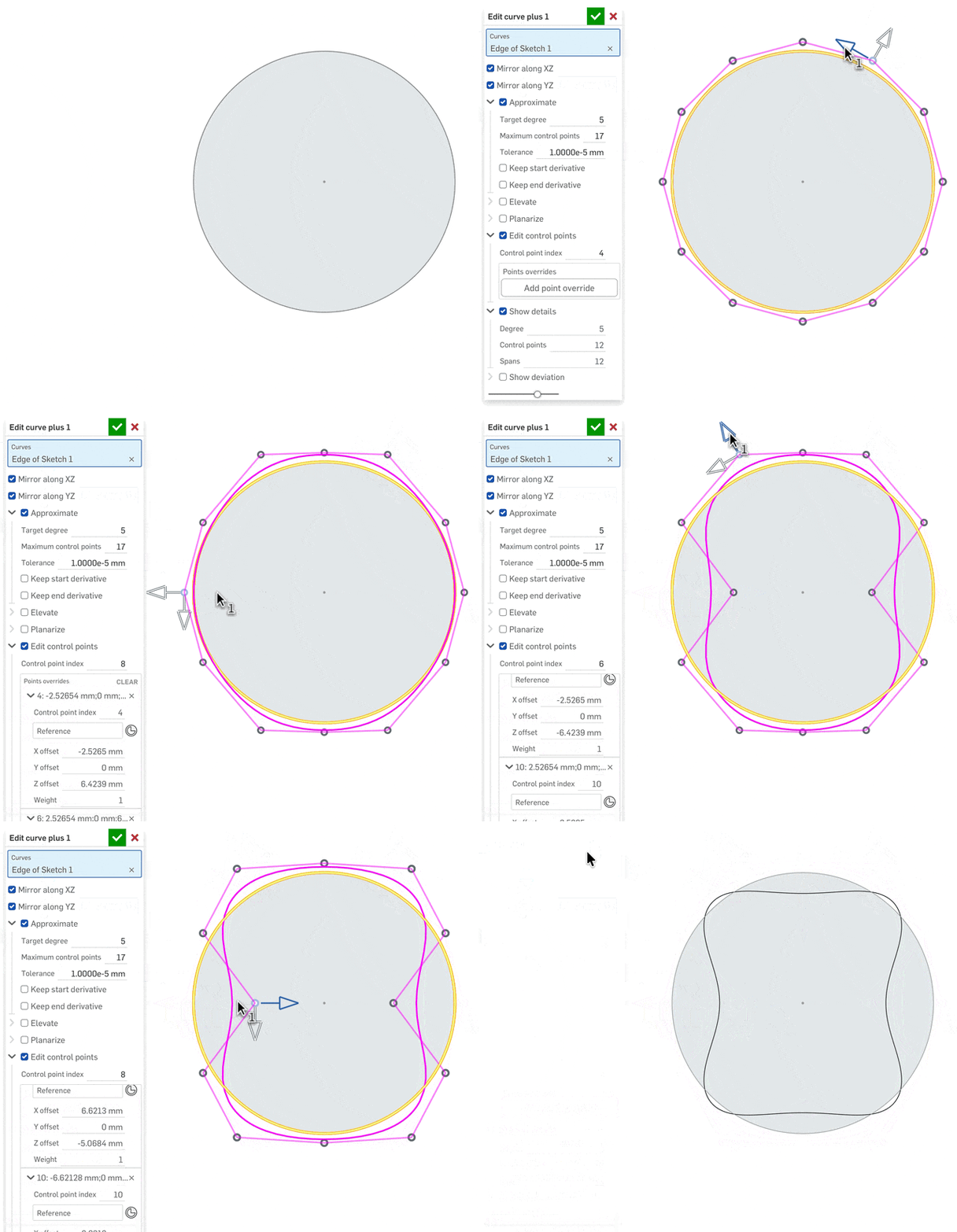
[this feature took a lot more back and forth with ChatGPT, but it is way beyond what I could do by myself]
 S1mon
S1mon
New FeatureScript: 3D nesting
Hi everyone,
I wanted to share a new small FeatureScript tool-chain, mainly targeting powder bed fusion AM. It’s specifically focusing on the workflow around build preparation and 3D nesting. Although originally designed with powder bed AM in mind, 3D nesting could be useful in other domains too.
This whole project was started on Saturday, and wrapped up Sunday night. Finally got around to send it today. I used some basic ‘vibe-coding’ with ChatGPT to get the basics of the 3D nesting algorithms implemented. All the supporting tooling, and AI-slop-cleanup is done by me.
This is not intended to produce the most space efficient, high-density nest, and will be wasteful with space in some cases. There are way more capable tools out there. But, all such production tools are hidden behind a fairly high cost, and when I needed this functionality, I couldn’t find a single one that was free. So I set out to make my own free open source version, natively in Onshape FeatureScript. Why do it anywhere else than where the part geometries already are?
In real projects, parts intended for printing are often:
- Spread across multiple Part Studios and documents
- Present as both parts and composite parts (e.g. print-in-place designs)
- Defined once in design, but instanced multiple times in assemblies
- Designed with a preferred print direction in mind, but not aligned to Z
- Prepared for printing outside the CAD system
This tool-chain aims to make build preparation an in-CAD workflow, without requiring heavyweight optimization or external nesting software.
The tools provide a workflow and are designed to be used together, but each is useful on its own. Please don’t hesitate to use any subset for other use cases. I could have pulled most of the separate tools together into a fewer set, but that would have meant the GUI would have been way too cumbersome to use. I opted for this.
- Multi Derive
Often, the parts you want to nest are not designed in the same Part Studio, but are instead scattered across multiple Part Studios and documents.
Unlike many other derive functions, this is a single feature that allows multiple sources of parts to be brought into the same location. It filters for solid and composite parts only, so no other construction geometry is included. It's also bare-bone by design, for instance parts come at their default location, since the nesting don't care where a part is located. Optionally, it filters for parts tagged as “AM.” And, it outputs a query variable for all parts to nest. - Tag for AM
Print-in-place workflows require the design to exist as both parts and composite parts within the same Part Studio, but which one should be printed? The same issue applies to Part Studios that contain additional parts not intended for additive manufacturing.
This feature is used in the source Part Studios to pre-tag parts or composite parts as designated for printing, making the Multi Derive tool significantly easier to use. - Reorient parts
When a part is designed, the DfM printing direction is often considered, but it is rarely designed with the print direction already aligned to the Z axis.
This FeatureScript aligns parts so that the desired print direction is aligned with the Z direction in the Part Studio. - Duplicate in Part Studio
It is often desirable to have more than one instance of most parts, but the Part Studio don't contains these duplicates, the assembly does.
This feature creates duplicates within the Part Studio so that the desired part quantities are met, enabling accurate nesting, build-volume utilization, and additive manufacturing preparation. And, it adds to the query variable for all parts to nest. - Nesting (shelf-based with optional Z-interlocking)
And finally, the nesting tool itself.
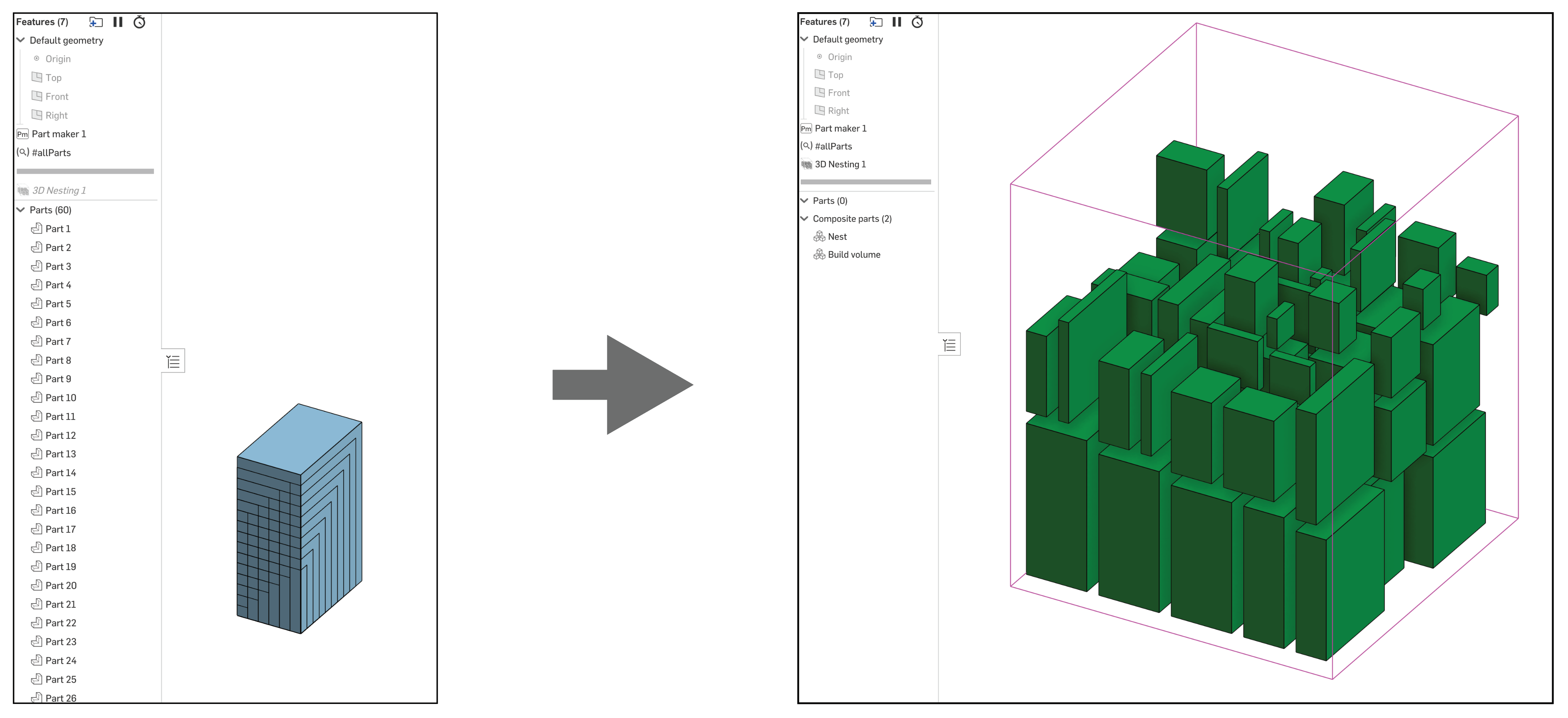
This feature arranges all selected parts and composite parts within a user-defined build volume according to specified nesting parameters, such as spacing, height bucketing, and optional Z interlocking.
Parts that cannot be placed within the volume are explicitly reported, and the resulting arrangement is generated as a single closed composite to support efficient single-file export for downstream operations such as slicing, simulation, and build preparation.
Performance notes
Onshape recommends limiting Part Studios to no more than 10 parts. However, many use cases for this tooling may exceed that recommendation by an order of magnitude or more. Below are my recommendations; please review Onshape’s best practices to ensure acceptable performance and to avoid potential issues.
Increasing the number of parts in a Part Studio can impact regeneration time, graphics performance, and overall model responsiveness. Users are encouraged to minimize source complexity and suppress unnecessary features where possible. Same with reducing tessellation quality to coarse.
It is recommended to use these tools only for downstream workflows, such as nesting, build preparation, or analysis, rather than for active design iteration, in order to limit performance impact. I.e. don’t insert parts from this into assemblies or derive further.
Furthermore, it is recommended to perform nesting using these tools in a standalone document, rather than within the same document where the design is created. This both preserves performance in design-focused documents and encourages the use of more performant version-based derives.
I have had a prior dive into FeatureScript caching, and I do consider if that could be useful for this. Especially the overlapping computations for Z interlocking are the most resource intensive. I might implement caching if I find it too cumbersome in my usage.
Let me know if you find any bugs or such.
 wille_j
Re: Can I use AR viewer on android mobile phone ?
Currently we do not support AR view on Android however we are actively working on adding that functionality to the Android mobile app.

Re: Is that anyway I can make drawings work on Win7?
While Onshape claims to run on anything, the caveat is that it's up to date. Some elements of Onshape rely on browser technology which is only available in later builds, so it is likely your Win7 version of Chrome is not fully compatible. A cheap Windows laptop or Chromebook might be your best bet.




Re: New Feature: Bridging Curve Plus
Nice, great work! So the moment we get the sheet metal loft custom feature, we know that AGI was achieved 😁

Re: New Feature: Bridging Curve Plus
Lets ask chatGPT to create a sheet metal loft featurescript…jk…. maybe LOL
 MDesign