Welcome to the Onshape forum! Ask questions and join in the discussions about everything Onshape.
First time visiting? Here are some places to start:- Looking for a certain topic? Check out the categories filter or use Search (upper right).
- Need support? Ask a question to our Community Support category.
- Please submit support tickets for bugs but you can request improvements in the Product Feedback category.
- Be respectful, on topic and if you see a problem, Flag it.
If you would like to contact our Community Manager personally, feel free to send a private message or an email.
Best Of
Re: sectional views in Rendering studio
You need to enable "Caps" in the section view dialog.
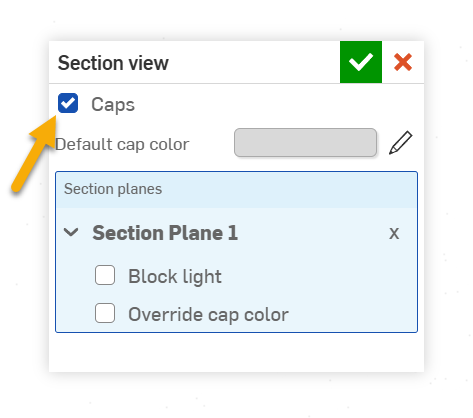
A few notes when using this.
Caps use a fixed diffuse appearance of the specified colour (you can have one colour for all caps, the default, or change per cap). You cannot use a specific appearance on the caps.
If your geometry sits on the ground and you have the ground turned on then you'll want to adjust the ground height a little or the model height a little so they are not perfectly aligned since this will interfere with the section plane.
Coplanar geometry will confuse the capping mechanism and potentially make it looks like you can see into the model still. In those case very slightly overlapping the geometry will usually fix the problem (you can apply transforms in Render Studio so that you don't need to change the Part Studio or Assembly.

Re: Multiple variable tables in a Single Variable Studio?
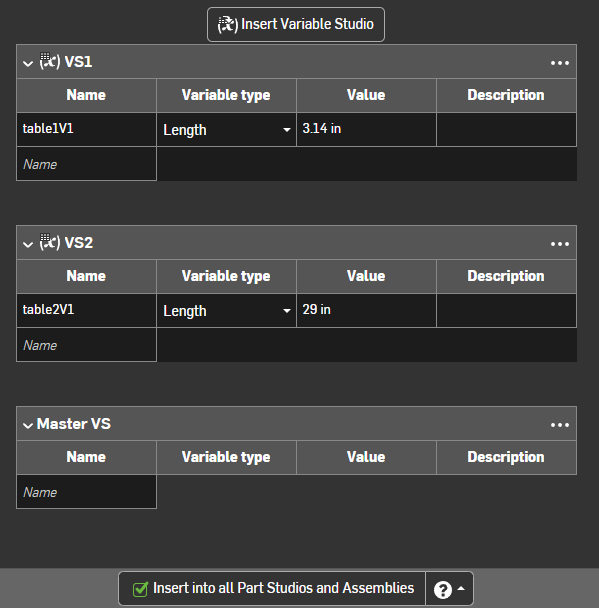
One thing you could do is to move it a different variable studio (i.e. duplicate the variable studio and delete what you don't need) but "insert" it in this variable studio. This way you don't edit them here but you can use them from inserting just this one variable studio in your parts/assemblies.
Basically you can create a bunch of separate variable studios and insert them all into a "master" variable studio that you insert where you need it.



Re: In 2026, What Is the Best Sketch Blocks Workaround in Onshape?
It would help to understand what you are trying to do as there might be different workarounds depending on the application…
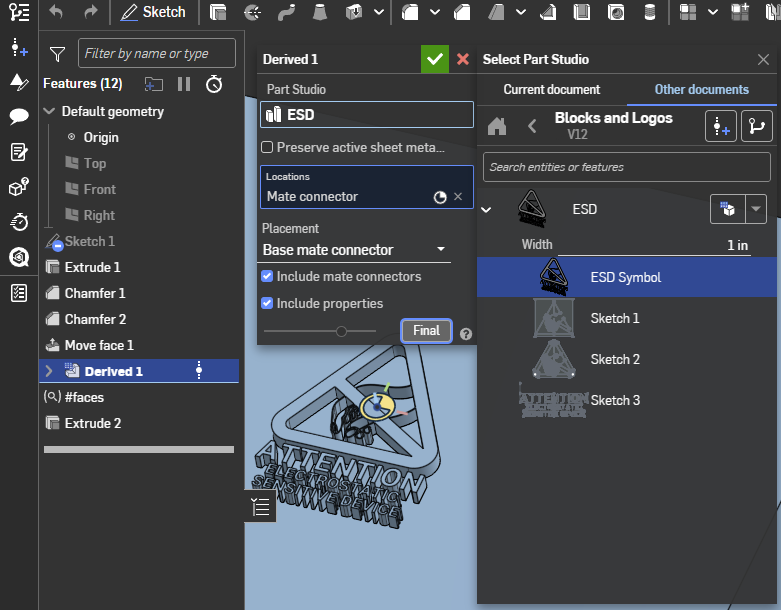
For logos, my preferred workflow is to create "zero offset" surface(s) and create a closed composite of that. I typically include a configuration variable to scale it to the desired size. Then you can derive it in at the desired size and extrude or whatever the faces of the composite. If the logo has a lot of separate elements, using a query variable might be worth it to use for an extrude. (and the "Query variable +" FS allows importing query variables so I would definitely do that going forward!)
If you are looking for moving things around at the conceptual level, you can create assemblies of sketches and use mates on these.
Here's an example:
Re: Ternary Formula for Global Variable
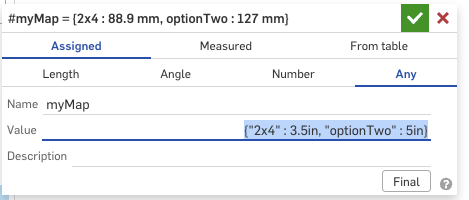
dot notation will work for strings as keys, but something in my liminal conscious was saying that a string starting with a number would mess it up. I just checked and that seems right. In this map #myMap.optionTwo works and #myMap.2x4 fails, but the bracket notation works for both.

Re: 📸 RenderCAD (One-Click Photorealistic Renders!)
.
Another big update! 📢
LinkedIn post:
things are getting serious @ RenderCAD, dope new features:
■ Viewport: New dedicated viewport panel
■ Popout: Opens studio in a sleek browser window
■ Advanced Settings: New expandable panel for cleaner control
■ Condition: Tons of new condition settings
■ (Video) Engine: Tuned to better follow your inputs
■ (Video) End Frame: Control the ending (Loop | Upload, and more)
■ (Video) Motion Settings: Controls the targets motion
■ (Video) Camera Presets: Way more camera presets
■ (Video) Style Toggle: Choose Exact for strictness or Creative for flair
■ API Access: Added Auto-approve toggle for new overlay devices
■ Persistence: Hit refresh? Workspace now saves automatically
■ Comparison: Original vs Render now scales for closer 1:1 view
This video only shows some of the new features, video changes will be posted in upcoming vids.
Onshape mobile is missing a drawing tool
Hi. Onshape mobile and Onshape for iOS are missing a drawing ing tool. Conic is nowhere to be found. This is not fair to Conic. Can you please add Conic in a future update so he stops complaining? Thanks!
Sincerely,
-Conics friend

Re: Fillelt works on one part of the model, but doesnt in its exact copy but mirrored.
If it is mirrored: Roll back and make the fillet before the mirror. Easy. :0)

Re: Ternary Formula for Global Variable
You should be able to get this working, and I suspect an units mismatch. For example, if #frame_material_width is a length not a number then your formula would result in an area because you multiply it by "in" at the end. You could check by trying your exact same formula in a Variable feature set to "Any", which will allow you to run any expression that evaluates to something, even if it's not the kind of thing you wanted (i.e. area, not length). If that fails too, then you know it's a syntax error, not a units mismatch. This kind of thing is why I actually prefer to always keep the units with any values I'm working with instead of working with raw numbers and adding units after. It's a bit more cumbersome, but when done right it should let you know when you've made an error.
Btw you could declare all of the width's in a single map variable if you want. Something like:
#widthMap = {
"2x4" : 3.5 * inch,
"2x6" : 5.5 * inch,
};
Then later you can get them like #widthMap["2x4"]
Re: Auto align view when opening sketch
While we're at is discussing the behaviour of the sketch plane:
What I would really like to see isn't necessarily the view locked to the sketch plane (for I could easily do that if ever needed) but to have the section plane locked to the sketch plane. That would actually help me much more. Ideally with everything in front of the section plane going a light shaded transparent at the time.