Welcome to the Onshape forum! Ask questions and join in the discussions about everything Onshape.
First time visiting? Here are some places to start:- Looking for a certain topic? Check out the categories filter or use Search (upper right).
- Need support? Ask a question to our Community Support category.
- Please submit support tickets for bugs but you can request improvements in the Product Feedback category.
- Be respectful, on topic and if you see a problem, Flag it.
If you would like to contact our Community Manager personally, feel free to send a private message or an email.
Best Of
Re: Improvements to Onshape - July 18th, 2025
For those who want a long-form look into the panoramic rendering option now offered, I made a video:

Re: New Custom feature: Publish geometry
- you can’t include sketches in a regular composite part, or mate connectors.
- The feature creates a single composite part of all the references and automates a couple of other handy steps for the workflow
Basically #2 adds convenience and encourages a good workflow. #1 is not doable in any other way. Unless you write your own custom feature.
Re: who do I group a set of scketch entities
Good idea, while it doesn't fix the issue it's a…useable enough Band-Aid for now. I should have thought of that since I use that for other things, thanks.

Re: Custom Feature: Cable/Wire Routing
Changelog for release 1.201
⭐ Added per-segment reset. Select a segment to edit first, then click the reset button.
⭐ Add route point UX has been improved for clarity and consistency.
⭐ Addition and removal of clips keeps route edits intact.
⭐ New "nudge" option provides mechanism for moving edit points between route segments.
Note: this update does not guarantee backwards compatibility - please see video for details.

Re: who do I group a set of scketch entities
There's a workaround if you are going to do this a lot: import your dxf with your text in a sketch, create a zero offset surface of all the faces and create a composite out of it.
Then you can derive this into your "design" part studio (either directly onto a reference mate connector, or you can use a transform feature to locate it).

Re: Changing line color of exported DXF
Thanks for the feedback. This is certainly in discussion with our development team. Please submit an Improvement request and we'll add yours to our list.

Re: Sweep along split line
I edited the initial post and corrected a syntax error on the sweep.
The code shown now works.

Re: Improvements to Onshape - July 18th, 2025
As others already said, please let us set a default unit for the DXF exports in the company settings or set it to the workspace units of length as default.
Re: Changing line color of exported DXF
Adding to @sebastianMaklary.
To change the color of bend lines you need to search "bend_line" and then you will need to go to result as shown in the image ( only two instances, one instance of SHEETMETAL_BEND_LINES_UP and one instance of SHEETMETAL_BEND_LINES_DOWN ) and then change 4th line which has indented 7 to 1. (1 will give you red color. Again refer to this link for color code standard
)
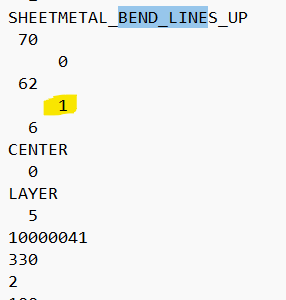
.
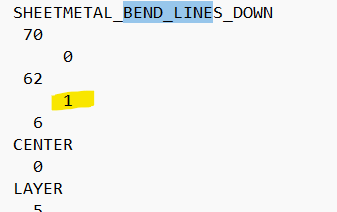
Save the file and then you are good to go.
Open the saved .dxf file in laser cutting software and assign the layer of white lines to cutting and red lines to Mark.

Re: Feature Request - Merging in Assemblies
Autoboolean:
https://cad.onshape.com/documents/8430fb350d753c30baca955d/v/5bc0f2a19e99306ee9eeb469/e/70b6ccbd425d478fbc478b5c
Also has autocomposite in the same doc