Welcome to the Onshape forum! Ask questions and join in the discussions about everything Onshape.
First time visiting? Here are some places to start:- Looking for a certain topic? Check out the categories filter or use Search (upper right).
- Need support? Ask a question to our Community Support category.
- Please submit support tickets for bugs but you can request improvements in the Product Feedback category.
- Be respectful, on topic and if you see a problem, Flag it.
If you would like to contact our Community Manager personally, feel free to send a private message or an email.
Best Of
Re: Rotating letters in circular path
Use @jnewth 's Text feature.
https://cad.onshape.com/documents/4e187c2b2f7f4974f4e2b612/v/4446c75baffebee73f367acc/e/e8c85370413ae1136b63f9df
 S1mon
S1mon
Re: Improvements to Onshape - August 29th, 2025
Excellent updates! The include properties checkbox is something we have been wanting to help keep our library clean. Is there a way to change the default to leave that box unchecked? That is typically what we want in our workflows.

Re: Trouble Creating an Angled Face
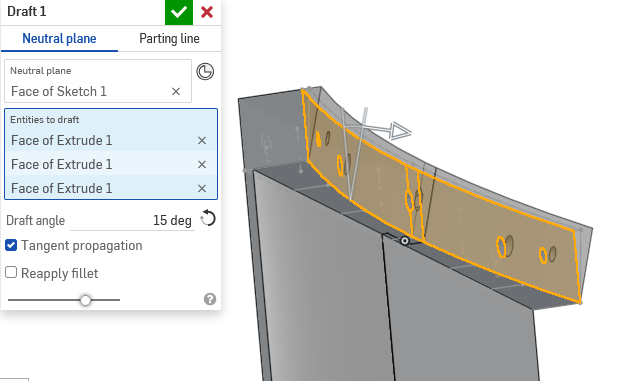
Pretty sure a simple draft will get you what you need in this situation.
 MDesign
Re: F2 for rename
Strange.lougallo said:@Malcolm in the browser it is not a shortcut we can use.
F2 is not reserved see :https://www.w3schools.com/tags/ref_keyboardshortcuts.asp
or https://css-tricks.com/snippets/javascript/javascript-keycodes/

Re: PLEASE explain "externally disambiguated" / "transient" / "robust" / "tracked" / "unstable" ID's etc
Thanks for the tag @EvanReese! I had some free time today, so I went ahead and threw together a video on Queries and Ids specifically. Hopefully this hits the level of detail desired without being too over-the-top technically. I'm also happy to answer any additional questions and/or give additional explanation as needed.
Onshape FeatureScript Queries and Ids Deep Dive

Re: Improvements to Onshape - August 29th, 2025
I know it's probably un-fun as an Onshape dev to give everyone the gift of new functionality only to get feedback on it, but I'm just too pumped about Query Variable to help myself. First off, this implementation is amazing, and I find myself using it frequently already, which is why I've got a few thoughts.
- I'm with @S1mon that doing them on the fly inside of a feature would be awesome. I'd do them that way more often than not
- Along with the above idea, I think there's room for two kinds. One that's this feature in the tree, and another that's just for a one-off query. As I'm using them more, I find myself making them to only be used once by the very next feature, and I'd love to not clutter up the autocomplete with these. I'd love to make them and edit them like implicit mate connectors, and have them live inside the parent feature instead of the feature tree. Ideally there'd be a way to pop it out to a feature later if needed.
- I found myself wanting it in the curvature analysis tool earlier for surfacing workflows.
Food for thought. All-in-all I can't overstate how great of a functionality it already is. Thanks, Product Team!

Re: Modelling a Knurl
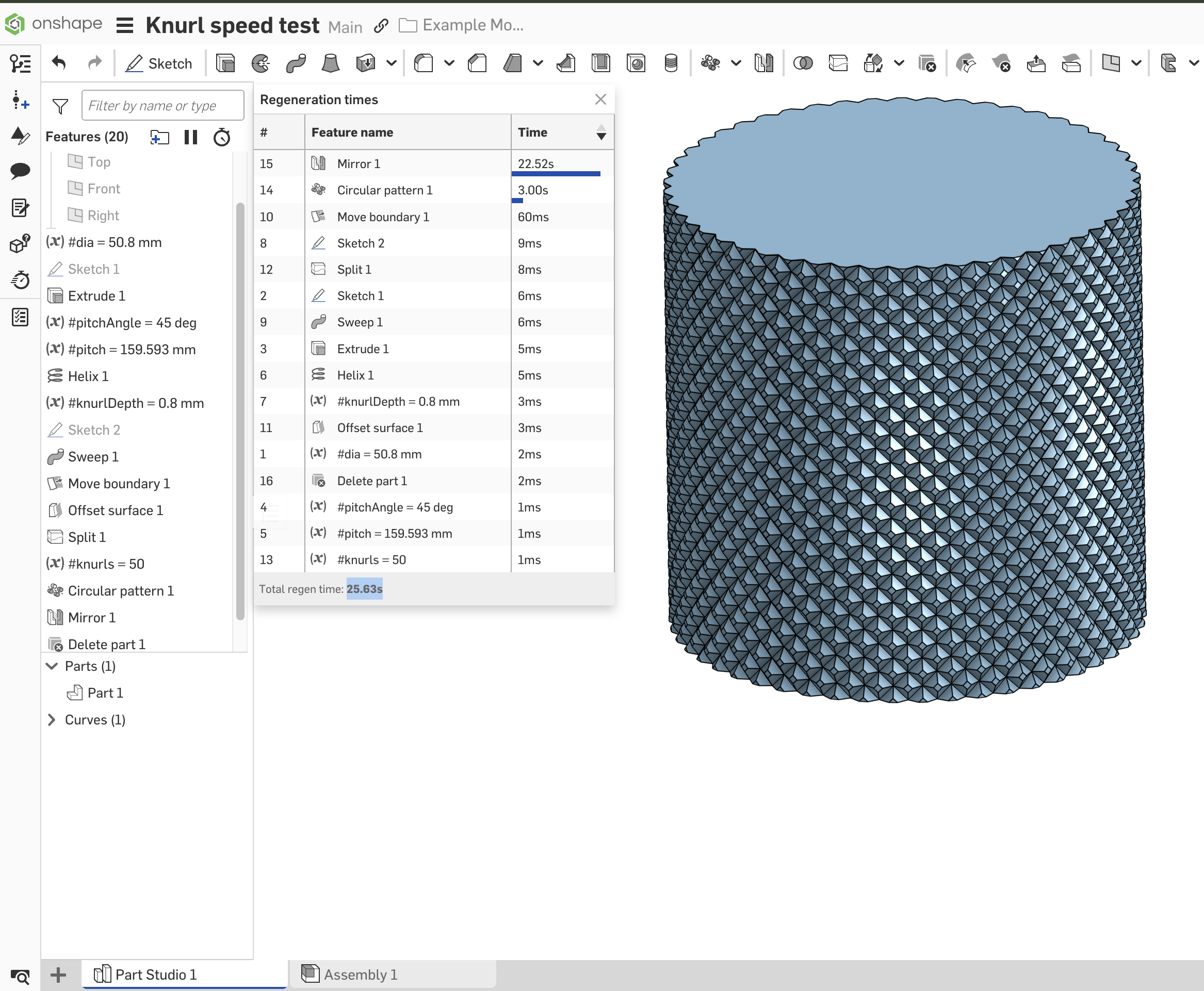
The best way to handle knurl is to not need it. If you can get away with just a drawing callout on a smooth surface, do that. This is similar to how threads are handled standard in Onshape, and for good reason. Even if you could get the regen time down, the triangles needed to render it will bog down any assembly it's in. This is why it's worth the effort to actually remove knurl from imported models.
But if you understand all of that and deem your case one of the exceptions (maybe you're 3D printing or doing high-end renderings), then use a workflow of Splits instead of Boolean operations (Add, Remove, Intersect in features). I did an example knurled knob this way and got 50 knurls in 25 seconds. I think this workflow is a bit better than my previous post in this thread. https://cad.onshape.com/documents/ffed96b8ba6f07be89628b16/w/6b20bab0a3a27defb6324ccf/e/0d31ae5675abfb1430e8dc72
Re: First project challenge — bending irregular geometry in Onshape
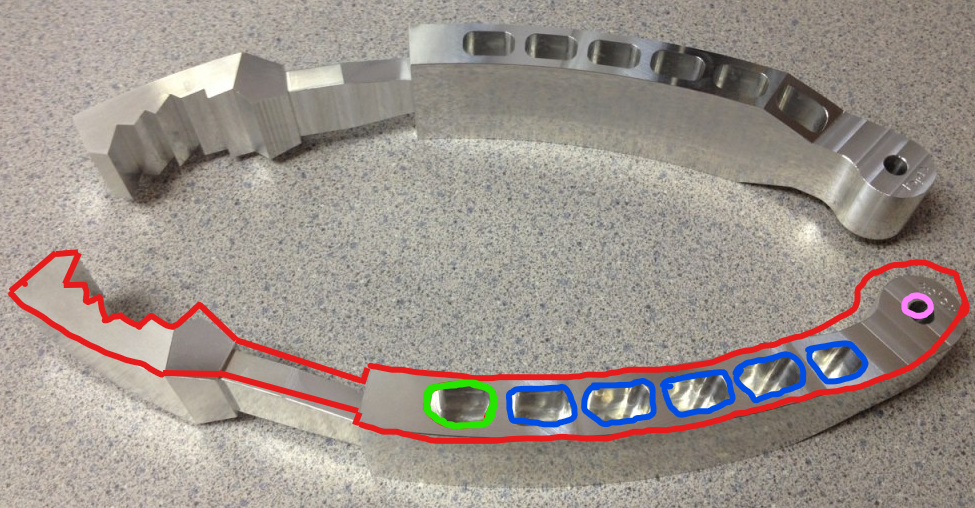
Based on this image in your document…It looks like a simple extrude will capture most all of the curved features. Then you'd just need to work out the opposing cuts/angles to get the rest of it. Red represents what might be the first extrude feature., pink a hole feature. and blue a circular pattern feature.
MDesign
Re: Create and edit an object using a DXF file
Should be able to open now.

Re: Improvements to Onshape - August 29th, 2025
Besides the Query variables, the Document notes are also awesome. Now you don't necessarily need the Link Tab Utilities app anymore because URLs are recognized in Notes and therefore active (sorry @lougallo ). However... a Link Tab is always visible and therefore indicates a URL, whereas Notes doesn't. As long as you don't press the Note button, you won't see that a note exists. That's why I posted an IR requesting an indicator.

This is the link to the IR: