Welcome to the Onshape forum! Ask questions and join in the discussions about everything Onshape.
First time visiting? Here are some places to start:- Looking for a certain topic? Check out the categories filter or use Search (upper right).
- Need support? Ask a question to our Community Support category.
- Please submit support tickets for bugs but you can request improvements in the Product Feedback category.
- Be respectful, on topic and if you see a problem, Flag it.
If you would like to contact our Community Manager personally, feel free to send a private message or an email.
New Custom Feature: Selection Fillet

Comments
-
www.accuratepattern.com1
-
Ah, I used Link Tab to add it, but I guess it only works for other people with that app. Here's a link to the video.bruce_williams said:1 -
That's pretty great, @Evan_Reese! I can see it taking some time to enter all the additions/subtractions, but this is about as close to CAD reading my mind that I can reasonably expect. Nice job!0
-
Thanks @mahir! Means a lot. Ideally, you only have to take the time to enter it all once. The real dream for me would be a Selection feature that you can reference in any feature, instead of making Selection Fillet, Selection Draft, and Selection Move Face. Pretty sure it's not possible.3
-
Nice work. I will try it out.0
-
@Evan_Reese
This is truly great! What a helpful feature. I really like the algorithmic approach to building selections...I have many many "working" bodies in my models where "apply a fillet to every convex edge of this body except this face" is the perfect way to approach the fillet selections, and is something I redo the selections on OVER and OVER as the design evolves. I can see this saving so much time...
Really nice work.0 -
This is amazing! Thanks for making and sharing the feature! It's another "infinity stone" added to Onshape's "CAD infinity gauntlet" to make it the most powerful CAD program ever. I'm looking forward to using it!Get in touch: contact@alnis.dev | My personal site: https://alnis.dev
@alnis is my personal account. @alnis_ptc is my official PTC account.2 -
Do you mean set up a selection set ahead of time, then fillet/draft/move after? You could do that with attributes.Evan_Reese said:Thanks @mahir! Means a lot. Ideally, you only have to take the time to enter it all once. The real dream for me would be a Selection feature that you can reference in any feature, instead of making Selection Fillet, Selection Draft, and Selection Move Face. Pretty sure it's not possible.
Anyway, pretty awesome feature - well done!Senior Director, Technical Services, EMEA1 -
@NeilCooke Thanks!Do you mean set up a selection set ahead of time, then fillet/draft/move after? You could do that with attributes.yes, but I'm saying it would be awesome to call that selection in any feature, especially non-custom ones. I'd want to use the standard Fillet, and Draft, and Move Face.
I like the idea of doing it with attributes and have read a few threads (with you in them) about doing that. I'll have to think more about whether that makes any more sense than just writing it per featurescript with a single use-case in mind. The selection criteria for a Selection Move face would probably be different enough to warrant a different selection UI (would have qCapEntities, but no edge options, for example). Also, the way I've done this one, even face selections get converted to edge selections as they are made so the queries can combine correctly, which wouldn't work for something like Move Face.
I'd be curious to hear other people's thoughts on this. Would it be preferable to:- have one "Selection" feature, that you can then feed into a subsequent "Selection fillet" or "Selection draft"?
- keep the selection tool inside the feature editing geometry (like this Selection fillet implementation)?
1 -
I love this about Onshape! so many cool custom ones out there.alnis_smidchens said:This is amazing! Thanks for making and sharing the feature! It's another "infinity stone" added to Onshape's "CAD infinity gauntlet" to make it the most powerful CAD program ever. I'm looking forward to using it!0 -
Thanks! If you run into a scenario you find it particularly handy I'd love to see it (assuming it's not classified). I honestly haven't had enough time really using the feature professionally yet to know how I'll use it most commonly. I wish there were some way for me to collect info on how it actually gets used (which will probably be different than what I imagine)romeograham said:@Evan_Reese
This is truly great! What a helpful feature. I really like the algorithmic approach to building selections...I have many many "working" bodies in my models where "apply a fillet to every convex edge of this body except this face" is the perfect way to approach the fillet selections, and is something I redo the selections on OVER and OVER as the design evolves. I can see this saving so much time...
Really nice work.0 -
@Evan_Reese
Option 1 would be easier to develop, but it would leave it up to the user to make selections that are compatible with the intended feature type. Option 1 would also make it easy to quickly switch between fillets and chamfers. I don't do this often, but it's a nice-to-have.
Option 2 is likely a better user experience since everything is in one interface and doesn't require multiple features. You can customize the selection filters/interface per feature. But it's more development time up front. Plus any bug fixes to the selection algorithm would need to be repeated over each separate FS.0 -
mahir said:@Evan_Reese
Option 1 would be easier to develop, but it would leave it up to the user to make selections that are compatible with the intended feature type. Option 1 would also make it easy to quickly switch between fillets and chamfers. I don't do this option, but it's a nice-to-have.
Option 2 is likely a better user experience since everything is in one interface and doesn't require multiple features. You can customize the selection filters/interface per feature. But it's more development time up front. Plus any bug fixes to the selection algorithm would need to be repeated over each separate FS.
I'm definitely leaning toward option 2 for now. I'm in less of a rush to get any of these other ideas actually done (if at all) can be worked out in this feature first anyway.0 -
To others who want these parametric created selections built into Onshape, the improvement request to upvote is here!Evan_Reese said:I'm saying it would be awesome to call that selection in any feature, especially non-custom ones. I'd want to use the standard Fillet, and Draft, and Move Face.0 -
Selecting is everything in CAD.
@Evan_Reese this is great idea and I just voted it up.
My mind is spinning trying to figure out all the parametric created selections I'd want.
0 -
Right!? I could also see it becoming the stuff of nightmares if used sloppily though. Maybe Onshape could require 1000+ hours of use before allowing access to that feature 😆billy2 said:Selecting is everything in CAD.
@Evan_Reese this is great idea and I just voted it up.
My mind is spinning trying to figure out all the parametric created selections I'd want.1 -
What scares the hell out of me is the idea that one day I'll have to explain your new selection scheme to someone. How can you make it easy?
The one selection that keeps popping up in my head is all edges normal to a plane within a tolerance.
Pick the bottom face of the pocket and ask for all edges normal to within 20 degrees. This common selection in the world of injection molding can be time consuming. Not the 4 edges above, but on a real part where there are 100's.
You have an interesting concept.
0 -
I doubt I'll get around to doing it, but maybe the new custom tables could help it read in plain English somehow. It would be awesome to have a "Selection report" kind of thing. I think for use on a team it would also become important to have a good pre-release checklist which involves some kind of fillet check since it's easy to miss some. I guess that's pretty much equally important whether or not Selection Fillet is used.billy2 said:What scares the hell out of me is the idea that one day I'll have to explain your new selection scheme to someone. How can you make it easy?
The one selection that keeps popping up in my head is all edges normal to a plane within a tolerance.
Pick the bottom face of the pocket and ask for all edges normal to within 20 degrees. This common selection in the world of injection molding can be time consuming. Not the 4 edges above, but on a real part where there are 100's.
You have an interesting concept.
When working on the feature I listed all of my functionality and labeled it either "MVP", "Beta", or "Icing" and tolerance ones made it on the icing list. I was thinking parallel within tolerance, but I like your idea of "normal" within tolerance, so you can just pick a plane that defines your pull direction.
I also want to explore how to add tolerance to "Matching". I've mocked it up, but the best I've got is to compare the length, radius, and curveType, which works for lines and arcs, but could produce funny results with a spline or ellipse if two different ones just happened to be similar in length. I need to think more, and fiddle more on it.0 -
@billy2
I added a "direction" input to the body selection and it has an angular tolerance. Does that do what you need? One unintuitive thing about it is that edges of drafted faces are actually angled more than the draft angle because they are the result of two intersecting draft faces. So if you use 3° draft everywhere, your tolerance will have to be a bit higher to find those edges. 2
2 -
This is sweet.
RENDERCAD
rendercad.ai - Photorealistic product rendering.
▚▞▚▞▚▞▚▞▚
________________________________________________________________________0 -
One small request... is it possible to name the feature "selection chamfer 1" instead of "selection fillet 1" when I use the chamfer option?
Overall this is still one of the most essential custom features. I would be so happy if this kind of logic was built in...
https://forum.onshape.com/discussion/18616/implement-selection-filters-like-evan-reeses-selection-fillet-or-selection-draft-everywhere
Simon Gatrall | Product Development, Engineering, Design, Onshape | Ex- IDEO, PCH, Unagi, Carbon | LinkedIn
1 -
It's possible, but a lot less straightforward than leaving it. I'd need to use editing logic, and I don't think they'd auto-number anymore (i.e. "Selection fillet 1" and the next one "Selection fillet 2")0
-
That's too bad. It's interesting that the names of built in features are getting localized somehow, so there's some ability to swap out the words, but perhaps not easily accessible based on the choices.Evan_Reese said:It's possible, but a lot less straightforward than leaving it. I'd need to use editing logic, and I don't think they'd auto-number anymore (i.e. "Selection fillet 1" and the next one "Selection fillet 2")Simon Gatrall | Product Development, Engineering, Design, Onshape | Ex- IDEO, PCH, Unagi, Carbon | LinkedIn
0 -
Hi @Evan_Reese! I'm having trouble getting this working, it's missing the selection areas and then it seems to crash onshape so that no new dialogs work until the page is refreshed.
Any ideas? Here's a screenshot:
0 -
Thanks. But it seems to not be able to deal with fillets that are more than half the size of a side.
For instance, I have a box shape of 20x20 with a height of 5. I want to filet the top edges so they are fully rounded to the bottom. So a filet of 5. This is no problem with the standard filet.:
But with this "Selection filet" feature I cannot get it to work with a filet higher than 2.5.
When selecting just the top face, it will filet the sides on both sides (top AND bottom). And will not filet the corners.
If I select the full body, and subtract the bottom face, it will only filet the corners, and not filet the top edges.

So it all seems to work a bit buggy and not how I would expect it to work.
0 -
Here another example:
Selected the part under 'Body'. And subtracted the bottom face.
For some reason the side and top edges on the right are also ignored. 0
0 -
Hey @tim_o and @peter_van_westen sorry I missed your messages. I think you may have mentioned my old username so I didn't get notified. I came here today to declare this feature deprecated with the new release of Query Variables! Very happy to see the implementation of that one. I won't have to totally re-work my brain to use it.
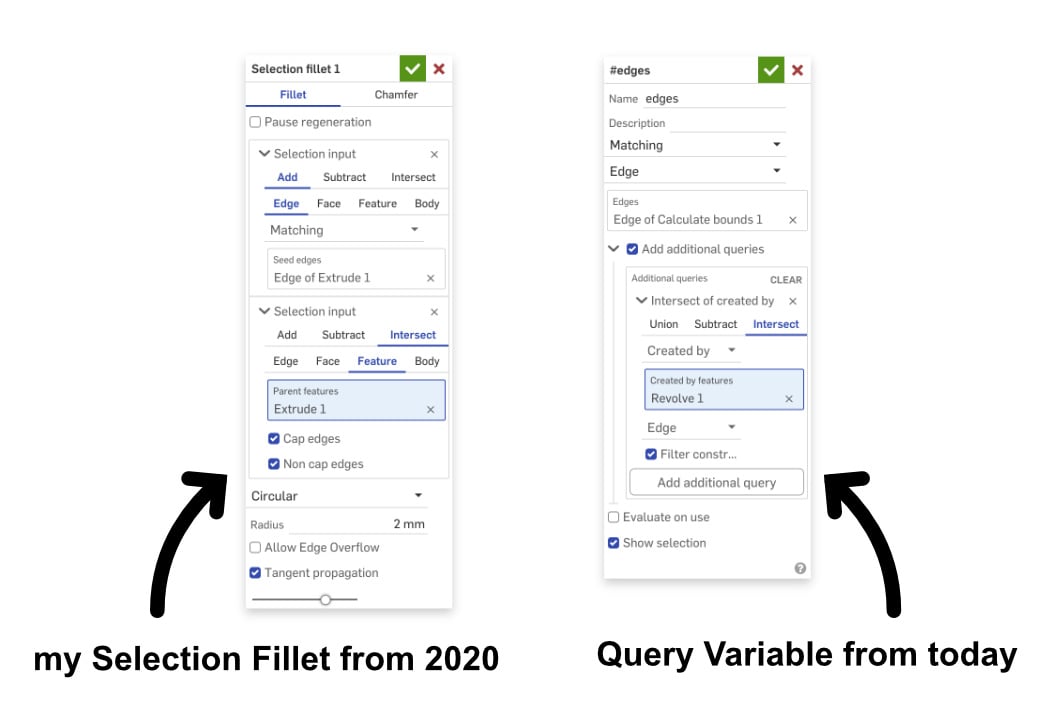 1
1












