Welcome to the Onshape forum! Ask questions and join in the discussions about everything Onshape.
First time visiting? Here are some places to start:- Looking for a certain topic? Check out the categories filter or use Search (upper right).
- Need support? Ask a question to our Community Support category.
- Please submit support tickets for bugs but you can request improvements in the Product Feedback category.
- Be respectful, on topic and if you see a problem, Flag it.
If you would like to contact our Community Manager personally, feel free to send a private message or an email.
Notes, The Least Loved Part of Onshape

I have to say, putting in standard drawing notes that don't look terrible, is one of the hardest and least rewarding parts of Onshape. The formatting tools are slow, buggy and clearly only tested with limited scripted interactions. The preview (before you close editing) is completely different than the real note display. Flag notes completely blow up the line spacing, especially a default sized triangle note. And trying to manage bulleted lists under a numbered note is extremely twitchy.
We want this:
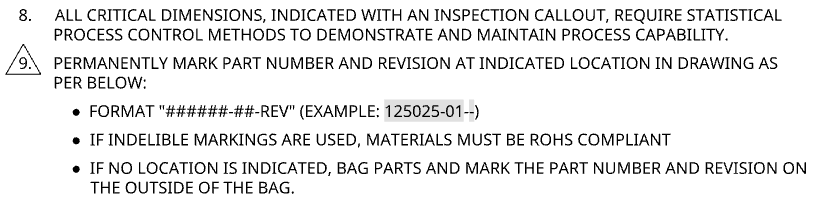
When we create a drawing template, we can carefully noodle around with the formatting tools and set the triangle flag to "tight" spacing to get this. When we export to a DWT, the triangle gets converted to lines which are pasted behind the text, so it's no longer parametric and linked. WTF!?!
If we're being more accurate, flag notes shouldn't have periods in them. Creo, Inventor, etc can do this. This isn't rocket science.
Simon Gatrall | Product Development, Engineering, Design, Onshape | Ex- IDEO, PCH, Unagi, Carbon | LinkedIn
Comments
While I'm ranting about drawings, why are leaders for dimensions formatted differently from bend notes? Why would anyone want the leader to touch the text for bend notes?
Simon Gatrall | Product Development, Engineering, Design, Onshape | Ex- IDEO, PCH, Unagi, Carbon | LinkedIn
Another fundamental issue is there's no way to put GD&T in a note, which is something that I've seen as a standard at multiple companies over my career. In order to do this, we're manually dragging a separate GD&T callout separately from the note, and the note text has a bunch of spaces to make a hole for this.
Simon Gatrall | Product Development, Engineering, Design, Onshape | Ex- IDEO, PCH, Unagi, Carbon | LinkedIn
I had to do this shit exactly a few months ago. It hurt my soul...
Ramon Yip | glassboard.com
I wonder why there is not just the usual well learned standard text editor interface available in the notes, or any text, EG in the title block. There must be tons of sample codes around. Also, in tables, there should be a standard spread sheet interface like we all know it. Why reinvent the wheel yet another time?
Part of the challenge is that while the adoption of Unicode has made it a lot easier to add all kinds of specialized symbols to regular word processing and text editing applications, most of the symbols in mechanical drawings are still a bunch of roll-your-own problems. Unicode has a series of circled numbers, but nothing for other styles of flags, and GD&T has a lot of special symbols which aren't in Unicode at all.
I haven't used Pro/E (now Creo) for ages, but at least when I was using it, the notes editor was all ASCII based and all the special symbols and formatting was encoded by some sort of escape characters. A little convoluted and not WYSIWYG, but it did work smoothly. I don't want to go back to that method, but it was a lot less twitchy and painful. To be fair, there was one fixed width font (made to be used on pen-plotters), and that was it.
When you see what they can do with custom symbols and precise formatting and layout in Figma (also web based), it's clear that it's possible to do well.
Simon Gatrall | Product Development, Engineering, Design, Onshape | Ex- IDEO, PCH, Unagi, Carbon | LinkedIn
Speaking for annoying things with notes: wanna mention there is still no spellcheck in there? This one kills me considering we have spellcheck for feature names and virtually everything, except for the most important place!
Agreed. Currently fairly painful.
The Onsherpa | Reach peak Onshape productivity
www.theonsherpa.com
I'm waiting 5 seconds minimum for what I type to appear once the note block gets large enough. I see you made the post from a few years back talking about this issue and nothing seems to have changed.
Agreed, drawing notes always fills me with dread. I have to steel myself for a slow and frustrating time when putting in notes on a drawing, the formatting really sucks
Notes are so important for communicating manufacturing information, that making them super readable is critical. In addition to what's already been written here, the notes block can be tagged as an Inspection Item. but this is for the whole block. I often put a numbered list of manufacturing instructions of which, say, number 3 and 9, I want checking and recording. But I can't add more than one inspection item to a block of notes and the one I do add applies to everything in the note box. If I split the block in two, I then can't set the numbered list to carry on from the first block - so I have to number it manually with all the editorial risk that entails.
In my work, engineering drawings are a critical tool. Low volume, mechanical engineering in the UK still relies on them. They are always printed and in machine shops: posted on the milling machine door, laid on the inspection table and written on during first-off inspection, used to identify parts on racks, on the desk of the purchaser. These same companies still require the 3D model for programming, but the job is the drawing.
If I was starting up a small metal fabrication workshop tomorrow morning, I'd definitely go paperless. Small, cheap, ruggedized chromebooks in little curtained booths to protect them from grinding sparks and weld splatter.
CADNurd's Linktree - find me everywhere else - https://linktr.ee/Liam.G
That's how we do ours. One mistake from paper documentation being out of date pays for the full cost of a new computer in the shop. There's really zero reason to be a paper based company in 2026 unless you have specific government requirements that you keep paper documentation, but those laws and industries are fewer and further between every year.
Derek Van Allen | Engineering Consultant | MeddlerI was trying to go paperless over the past decade or more, mostly, but not fully successful, though. Now, attempting a new business, I hoped I could finally make it there, but I still see a use case for drawings, even if the 'paper' is digital these days. Drawings, be they printed or in the form of a PDF, still provide a hard- and software-agnostic means of communication and documentation.
We recently had a bunch of parts coming in from a supplier and they were just scrap. Unusable. The supplier had the same data to work with as another supplier who had successfully done the same parts before, but was temporarily unavailable. We sent the parts back, had him rework and/or do it over, he failed again. We didn't feel very much like paying for unsuable parts that came available only after the project deadline. Things escalated. It all came down to the question of "What exactly was ordered and could he know it?". A drawing would have been so much cheaper, compared to the time and money wasted.
So, for critical parts, I still attach a drawing, that has all the details and the version on it, to the order. Notes are a very important element in this scenario.
Talking about notes: I observed that horizontal text alignent (left/center/right) in notes is sometimes off. It appears it is automatically set during note creation and will then not adapt when repositioning the note, and also will the aligment option in the notes properties not be available (greyed) to set a new alignment, especially when numbered or bullet lists are involved.
This is part of a PCB assembly instruction:
Note how the lower note is properly alined left, while the top note isn't. There is also no means of adjusting it:
Do I miss sometning or might this be a case for the bug tracker?
I had a note block with 20 notes. Nothing unusual. In SolidWorks they update instantly. In Onshape… I type the entire sentence before any of the words show up. I timed it (multiple times). It was taking literally 20 seconds to show up.
For all the updates coming out, maybe stop all of them and fix this first.
Also… ASCII / Unicode Characters.
The symbols library in Onhsape notes is sorely limited. I tried adding some Unicode characters to match what was on our legacy drawings from another CAD package. Some of the Unicode characters show up in Onshape drawing notes. And some do not!
The one I wanted did not.
The flip side of this is that as far as I can tell, there are a bunch of ASME and ISO standard symbols which are not in Unicode. Given all the other crazy stuff that's in Unicode, I don't know why engineers don't get any love here. Of course this is a bigger problem, but you'd think that PTC might be big enough to dedicate some resources to influencing solutions to this.
Simon Gatrall | Product Development, Engineering, Design, Onshape | Ex- IDEO, PCH, Unagi, Carbon | LinkedIn