Welcome to the Onshape forum! Ask questions and join in the discussions about everything Onshape.
First time visiting? Here are some places to start:- Looking for a certain topic? Check out the categories filter or use Search (upper right).
- Need support? Ask a question to our Community Support category.
- Please submit support tickets for bugs but you can request improvements in the Product Feedback category.
- Be respectful, on topic and if you see a problem, Flag it.
If you would like to contact our Community Manager personally, feel free to send a private message or an email.
Showing part names in the instance list
 lee_peacock
Member Posts: 7 ✭✭
lee_peacock
Member Posts: 7 ✭✭
Hi,
Still a newbie!
In an assembly it would be useful to see the name of the parts in the instance list. At the moment all I see is Part 1 <9>, Part 1 <10>, etc when it would be useful to see the actual name I gave it in the part (i.e. the names I see in the tabs along the bottom).
Any help to get on how to display the name in the instance list would be great.
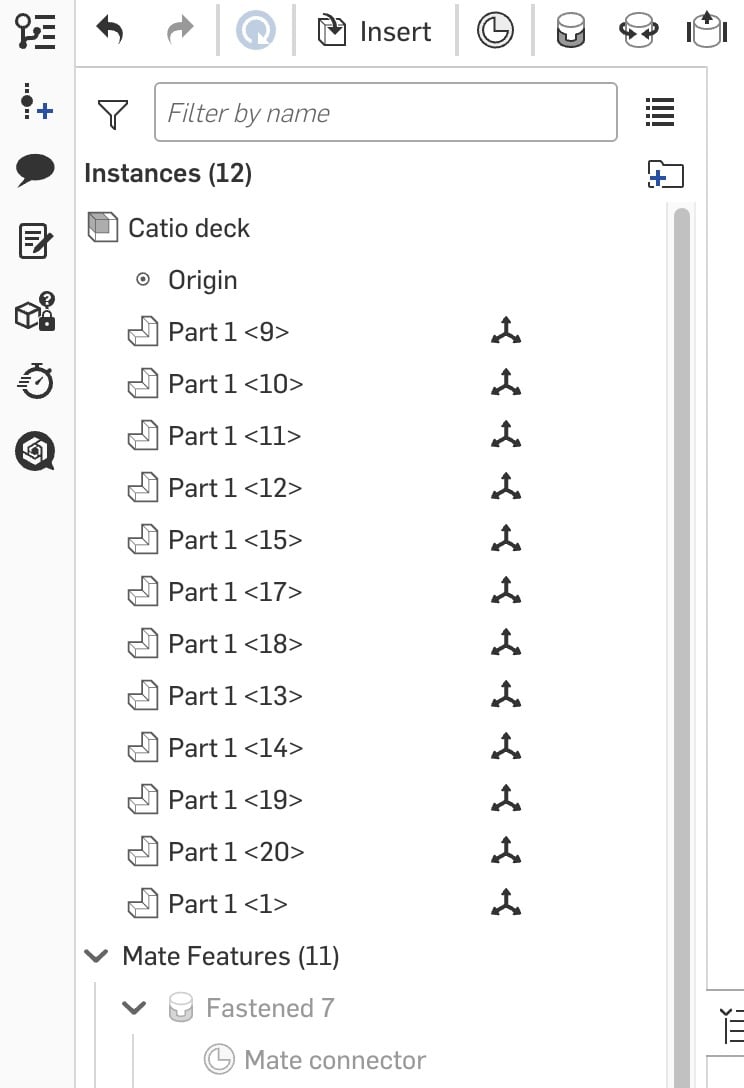
Many thanks.
Tagged:
0
Answers
The tabs along the bottom are the name of the Part Studios, not the part. You can create many parts in a single studio, which is one of the fundamental features of Onshape.
Simon Gatrall | Product Development, Engineering, Design, Onshape | Ex- IDEO, PCH, Unagi, Carbon | LinkedIn
Thanks @S1mon, I'm still getting my head around the nomenclature!
Anyway, back to the question in hand. How can I show the name of a "part" in the instance list?
Thanks,
Lee
The most direct way is to rename part1 to what ever you need it to be. Right click on part.
This can be done from assembly as well using the BOM.