Welcome to the Onshape forum! Ask questions and join in the discussions about everything Onshape.
First time visiting? Here are some places to start:- Looking for a certain topic? Check out the categories filter or use Search (upper right).
- Need support? Ask a question to our Community Support category.
- Please submit support tickets for bugs but you can request improvements in the Product Feedback category.
- Be respectful, on topic and if you see a problem, Flag it.
If you would like to contact our Community Manager personally, feel free to send a private message or an email.
Query Variable - amazing but also mystifying
 romeograham
Member, csevp Posts: 748 PRO
romeograham
Member, csevp Posts: 748 PRO
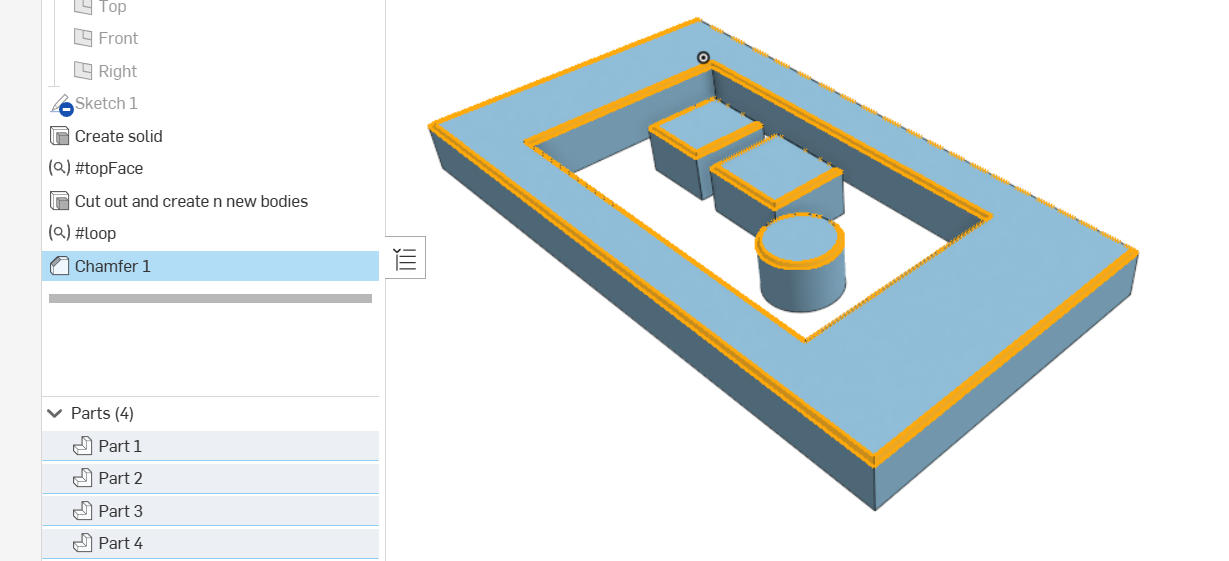
I have a situation where there could be an abritrary number of bodies - and I'd like to use Query Variables to help me apply, say, a chamfer to all of the edges on the top face of all bodies like this (Example 1 tab):
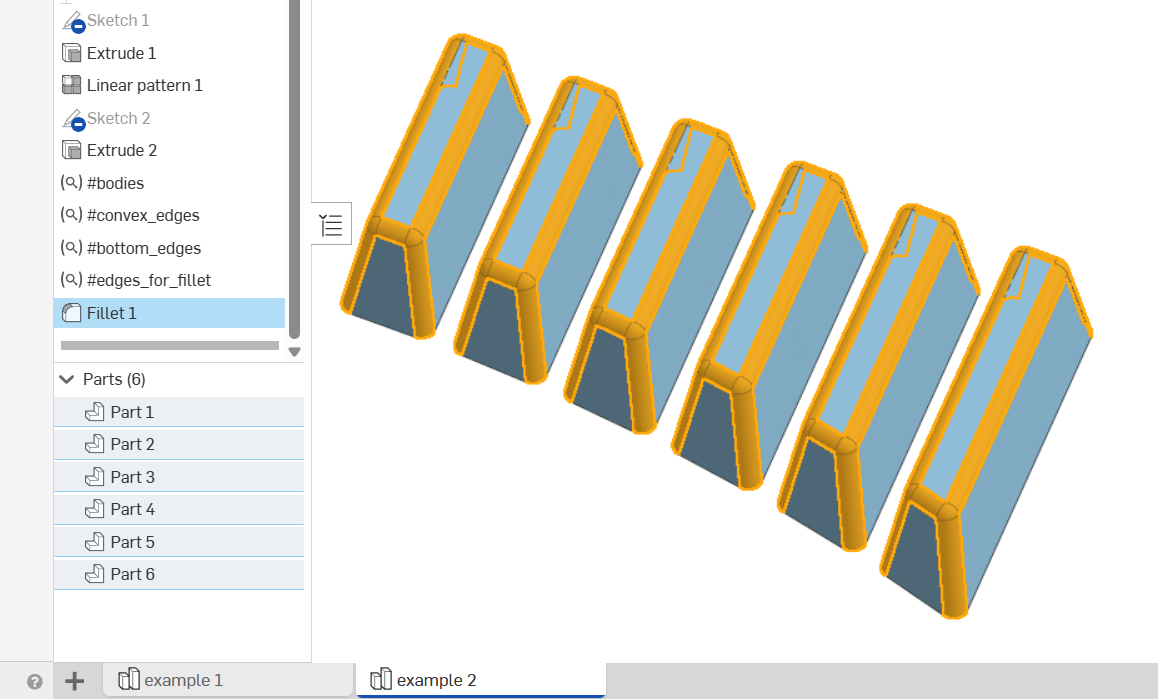
Or, apply fillets to all faces of an arbitrary number of bodies EXCEPT one face, like this (example 2 tab):
I would like to understand better how the stock Query Variable can be used to create the right selections for this, without using Adjacent (like is available on Query Variable+).
Does anyone have any suggestions / tricks? I find that I can't propagate a selection across bodies the way I'd like (for instance, the "#bottom_edges" QV in example 2 just selects all the bottom faces - which I don't want to do).
Thanks!
Comments
Yeah these kinds of scenarios are part of the reason I jumped into developing QV+ because there are gonna be situations where stock QV just can't simulate an adjacency check with the available queries. Even just selecting the "top" faces of parts is something I don't think can be strictly defined by stock QV because it came with no directional checks.
Derek Van Allen | Engineering Consultant | MeddlerYep - that's the problem I'm finding. I sure like your QV+ though!
In case you haven't seen it, @EvanReese 's video about query variables is pretty helpful:
https://www.youtube.com/watch?v=yGTHOXKgngE
Simon Gatrall | Product Development, Engineering, Design, Onshape | Ex- IDEO, PCH, Unagi, Carbon | LinkedIn
"loop chain connected" can sometimes be used instead of "adjacent" to exclude entities belonging to a face but I agree the stock QV is missing a few things…
QV+ is just invaluable in cases like these. also qCapEntities or qNonCapEntities would work very well for these examples.
My next video on the topic is going to cover cases where writing a few lines of code can solve it. These are great example cases!
The Onsherpa | Reach peak Onshape productivity
www.theonsherpa.com
Awesome - can't wait. I did watch your Query Variable video a couple of times…and your use of Query Variable+ made it clear that some selections just can't be done with the stock Feature. As I try to incorporate new functionality to the team, I try (at first, anyway) to stick to stock tools, However, in this case, the work by @jelte_steur_info and @Derek_Van_Allen_BD to collaborate on a great "plus" feature was clearly needed!
For this case, I think I'll just use the QV+ for now (since it does such a great job).
Please add more examples here or submit support tickets so we can collect your ideas and incorporate them into the standard QV feature.
@NeilCooke do you need application examples on parts where expanded queries would be useful or just general improvement requests? I could probably pull up some situations that spawned the development of QV+ to cover weird power selections that QV itself couldn't handle.
Honestly the dream is 1:1 parity between everything in the standard query library and an option in QV+ that exposes that query to the user. It's such a benefit for feature development to be able to bash out a part studio with a stack of QVs and either not need to develop the feature in the first place or have a perfect roadmap for how to integrate the concept studio into a custom feature.
Derek Van Allen | Engineering Consultant | Meddler@NeilCooke I can work up illustrations at some point, but I'm tight on time today. Some examples that come to mind are:
I know I've run into many others too. I'll keep thinking about it.
The Onsherpa | Reach peak Onshape productivity
www.theonsherpa.com
I'll add a link to this IR:
https://forum.onshape.com/discussion/28802/pre-defined-query-variables-like-for-sheet-metal-corners
Part of what's tricky about a really great implementation of something like that would be to ignore edges that are tangent or close to it, or edges that are too close to outer corners (especially ones created by bend relief). I could describe in words what I'd like, and I suspect that an experienced sheet metal manufacturing expert would have some intuition/rules-of-thumb around this.
Simon Gatrall | Product Development, Engineering, Design, Onshape | Ex- IDEO, PCH, Unagi, Carbon | LinkedIn
@NeilCooke
I was working on a custom feature the other day, and perplexity was advising me and hallucinated a function called qAffectedBy (i.s.o. qCreatedBy).
This does come to mind as a great query to add wich we couldn't just use the current standard functions for.
this might satisfy some of the cases @EvanReese just mentioned. Imagine a draft feature was already somewhere in the feature tree creating all these non-planar faces. a qAffected by could query all the faces that the draft was applied to? Maybe we should call it qApplied to though, because the faces/edges opposite the parting line will stretch/move as the draft is applied, and are therefore affected, but not implied.
I have some examples in mind where I struggled with QV and even QV+, but that work was confidential.
Also if drafts are applied on a curved extrude, the corner edges will become curved. So I've already been thinking about a tolerant parallel query function that allows non-straight edges. an evBox3d would be required and some algorithms/evaluations around the max xy vs z ratio and if the edge ends are on the furthest xy planes etc. But so far I've been able to get these done through qNonCapEntities, so I won't bother for now…
@Rhett_Robinson just created another IR for Query Variables which I strongly support. While in the middle of any feature which supports Query Variables, one should be able to define a new QV that gets added to the feature list.
Reposting it here for visibility:
Simon Gatrall | Product Development, Engineering, Design, Onshape | Ex- IDEO, PCH, Unagi, Carbon | LinkedIn