Welcome to the Onshape forum! Ask questions and join in the discussions about everything Onshape.
First time visiting? Here are some places to start:- Looking for a certain topic? Check out the categories filter or use Search (upper right).
- Need support? Ask a question to our Community Support category.
- Please submit support tickets for bugs but you can request improvements in the Product Feedback category.
- Be respectful, on topic and if you see a problem, Flag it.
If you would like to contact our Community Manager personally, feel free to send a private message or an email.
CAD Battle #1 - January 2026 (Best of the Worst Competition)
 Derek_Van_Allen_BD
Member Posts: 761 PRO
Derek_Van_Allen_BD
Member Posts: 761 PRO
Inspired by @MichaelPascoe's render battle threads and some of the forum discussions around modeling practices I'd like to take a turn hosting one of my own competitions for a change this new year, but focused a little more on CAD theory and in a format that's a little more open to the non-pro users of Onshape that don't have Render Studio at their disposal. If this goes well I might do more of them as a regularly irregular thing. For the first battle in this hopefully series of threads, we're going to borrow a little page from the official Onshape CAD Challenges app
Specifically this page
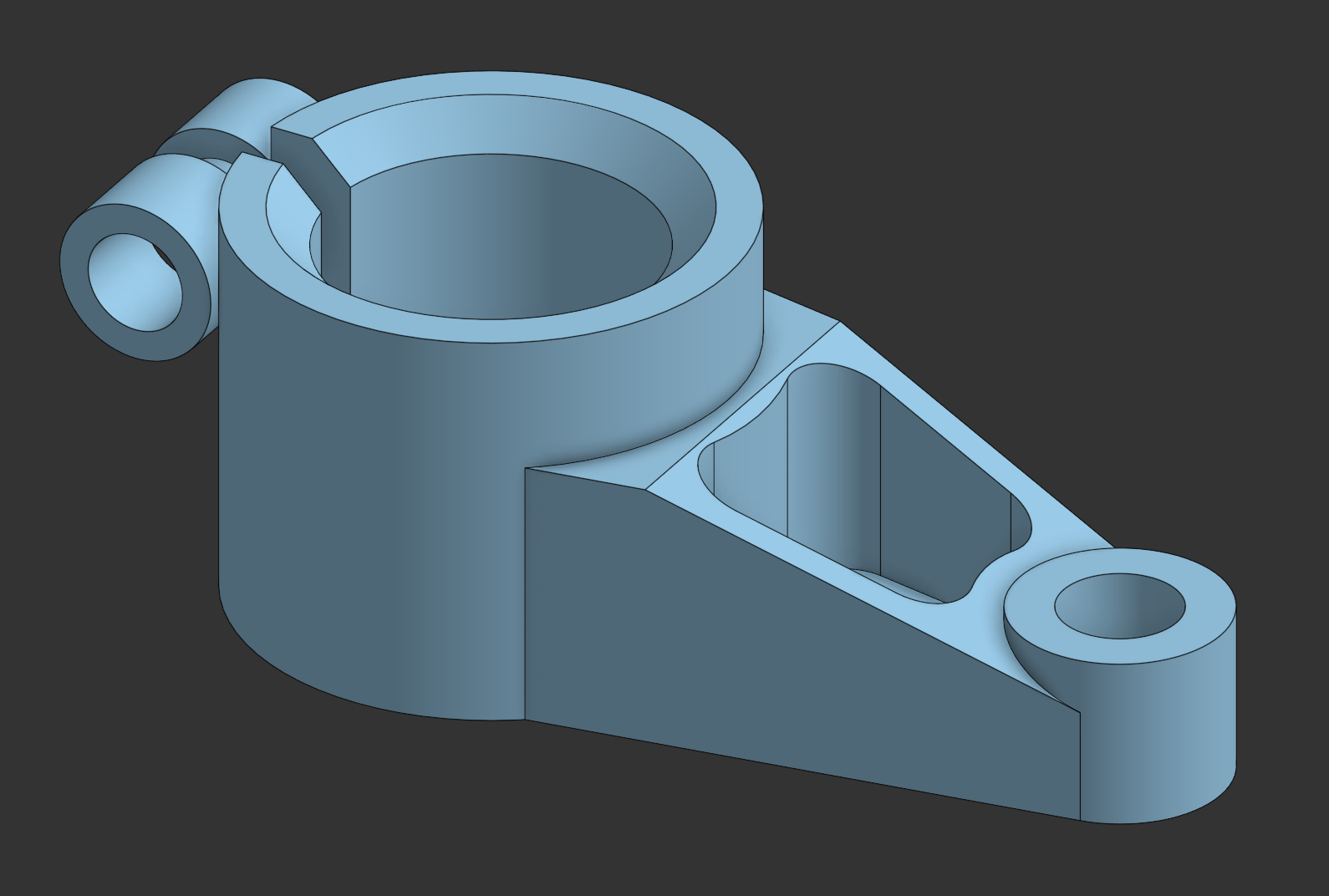
I recently submitted an entry to the official app for the lifter bracket part linked above. I used logical tools (extrudes, holes, fillets, chamfers, the "correct" way to do things) and I got a middling time with a middling feature count. It got the job done. But we've all seen CAD speedruns and minimum features challenges before, and the challenges app is a great place to flex those muscles if that's what you're into. I'm looking to flex your imagination instead.
For this challenge, I want you to recreate that exact same part, but I want you to use the most illogical, inefficient, and disgustingly bad modeling practices possible. I want to see a feature tree that makes professional engineers weep. All of the features used in this studio are pretty reasonable tools to use to produce the sample geometry. This competition is looking for unreasonable solutions, so these cannot be used in your submission. Except for Sketch. Sketch can stay.
this time
🚫 The "Sanity" Ban List
To force you away from your good habits, the following features (which I used in my original model) are strictly forbidden:
- Extrude & Hole: Too straightforward. Find a more difficult way to generate volume.
- Fillet & Chamfer: If you want a rounded edge, you’d better find a way to "carve" it or loft it manually.
- Shell: This geometry is what shell lives for, so it's gonna have to sit this one out too.
- Mirror: If the part has repeating features, I want to see them modeled one... by painful... one. Differently if you're feeling spicy.
- Boolean: I debated about this one for a minute but boolean operations are baked into most of the standard library tools, so banning the boolean feature explicitly should lead to some gross workarounds.
Custom features are allowed but clear derivatives of these core features will be just as off limits as the features themselves. We'll all be much more impressed if you can somehow shoehorn the Airfoil Generator into a usable workflow than if you just found and used "Plus" versions of all of the features in the ban list.
🏆 Criteria for the "Winner"
We aren't looking at the stopwatch here. We are looking for:
- Creative Abuse of Tools: Using a feature for something it was never intended for (e.g., using a Sheet Metal workflow to make a solid machined block).
- The "Why?" Factor: When I open your feature tree, it should look like a crime scene.
- Dimensional Accuracy: Despite the intended chaos, your final geometry must match the target part perfectly. Professionals gotta have standards.
Submissions will be open for the month of January and then the first week of February we'll take a forum poll of submissions for whichever feature tree offends us the most. The worst (best) one will get mailed a Shapey.
Comments
Do I get bonus points for using Triad Transform? Anyway, I'm sure people will come up with worse because I still did things in a straightforward manner (loosely speaking). Here's my attempt: Most likely NOT the worst offender.
At some point, I just got lazy because I didn't want to keep creating the a cylinder over and over again, i.e. if the geometry was created once with a method, that's more than enough to prove the point. I sprinkled in a little extras at the end as well.
Lastly, all the sketches are fully defined because we're not heathens here.
Ramon Yip | glassboard.com
hahaha this challenge is silly…. but I had to try. Highlights:
✅ No sketches used
✅ Over reliance on my Cone and Cube custom features
✅ Some trigonometry to get the angled face right
✅ Replace face which keeps the original corner rounds.
✅ More than double the rebuild time of the original
https://cad.onshape.com/documents/70f550586b27aa6e3bf80866/w/87953cc4b98976f216b607f2/e/9600d3bea10a053065570a7c
The Onsherpa | Reach peak Onshape productivity
www.theonsherpa.com
@ry_gb Those sweeps for cylinders are absolutely disgusting 🤮
The Onsherpa | Reach peak Onshape productivity
www.theonsherpa.com
Horrendous first submission @ry_gb. Helix wasn't even on the list of features I expected people to use, which in hindsight it should have been since I once attempted to use it as a 3d circular arc tool. Fun fact about opHelix is that it allows you to specify a spiral with zero helical pitch, and zero flat spiral pitch, but NOT both at the same time which would just be a flat circular arc. Had to write my own 3d arc utilities for that.
Derek Van Allen | Engineering Consultant | MeddlerI wish I had the time to contribute, but can somebody please make one that is entirely made from offset faces nit together from standard content in an in-context part studio.
Experts in Onshape Automation - Custom Features and Integrated Applications
Let me have a whiskey or two first. ;0)
I had the idea of absolutely neglecting the parametric nature of everyting and only draw single unconnected curves.
This is awful. The only worse thing I can think of would be to model each face in a different document, and solidify them via an assembly and in-context edits.
The Onsherpa | Reach peak Onshape productivity
www.theonsherpa.com
This might be entirely possible with just routing curve and fill/loft
Experts in Onshape Automation - Custom Features and Integrated Applications
I approve! 🤣 this is an amazing idea @Derek_Van_Allen_BD. Ty for hosting!
.
Learn more about the Gospel of Christ ( Here )
CADSharp - We make custom features and integrated Onshape apps! Learn How to FeatureScript Here 🔴
@EvanReese what's funny is that this feature tree is pretty much intended workflow in other non-parametric software. I just had someone in the office ask if Onshape had primitive generator tools since he comes from a more artistic background.
Derek Van Allen | Engineering Consultant | MeddlerAs requested, the making of the Shapey for this competition has begun.
Twitter: @BryanLAGdesign
@bryan_lagrange Amazing! But are you going to throw your egregious model into the arena?!
The Onsherpa | Reach peak Onshape productivity
www.theonsherpa.com
I might have to test my sanity on this one. Maybe @TooTallToby could give this one a go as well.
Twitter: @BryanLAGdesign
Here is my entry, No extrudes, holes, radius, chamfer, boolean, mirror, or shells. Mostly Revolves, sweeps, deletes, and moves.
https://cad.onshape.com/documents/03dcc414b04356024f2a6d3c/w/d2bb674ba07e264c3c38c12c/e/0a527e79d5443029ad543446
Twitter: @BryanLAGdesign
@bryan_lagrange That sweep for the pocket hole was a nice touch
The Onsherpa | Reach peak Onshape productivity
www.theonsherpa.com
Good to see more entries trickling in. The more the merrier. I will say that I've been noticing the undefined sketches and while I approve, in this competition your guys' trees are allowed to be much more colorful than just blue and white. For example, my self submission.
Derek Van Allen | Engineering Consultant | MeddlerThanks for the comment @EvanReese The competition allows to think of using standard features in different/ unconventional ways.
Twitter: @BryanLAGdesign
Oh how I love to use all sketch entities from a sketch on an offset plane.
Here's my entry: "The Lofty Lifter"
I'm impressed!
Tempted to cheat by just modeling it correctly in SolidWorks or Inventor…
Just 2 features ;-)
Eduardo Magdalena C2i Change 2 improve ☑ ¿Por qué no organizamos una reunión online?
Partner de PTC - Onshape Averigua a quién conocemos en común
@jelte_steur_info I figured you would be, considering the existence of this new feature is kind of your fault. I was actually planning on not submitting an entry myself until your ping in the other thread about countersunk slots let the intrusive thoughts in. I'll probably polish it up and publish it later for general public misuse.
I do spy a few Booleans in your tree there that you might want to find an alternative for before the deadline, that is one of the ban-list features. But otherwise a solid entry.
@john_mcclary I suppose I didn't specify that the feature tree HAD to be done in Onshape, and if I'm gonna be the holder of a Shapey on the basis of a gap in language specificity I can't exactly be the first to throw a stone when someone does the same in my competition. If you do use another software platform as an entry though, the same ban-list would apply for features in that software.
@emagdalenaC2i Intersect Views is one of those features I think of every time I see one of these sample part modeling exercises. I think that just about every part I've seen used as a test could be done in one feature just using this. It's also a feature I would never deploy in a real world workflow because in my industry with custom parts the 3 view drawing doesn't exist until after all the work is done (but usually not at all).
Derek Van Allen | Engineering Consultant | Meddler@Derek_Van_Allen_BD that gif actually made me laugh out loud 😆 I was not sure where it was going, but was waiting for the punchline and you delivered beautifully. I'm struggling to think of a more heinous workflow.
The Onsherpa | Reach peak Onshape productivity
www.theonsherpa.com
@Derek_Van_Allen_BD Lol, that was just a joke.
The joke was, it is bad practice to use CAD other than Onshape… even when modeled correctly 😅
How about using the sketching tools in the drawing environment to create the part????😀
https://cad.onshape.com/documents/6fecec3389017282f27c0ce0/w/82586ca1af72ecfce7f9767d/e/fa37c75eea7228431b762c43
Twitter: @BryanLAGdesign
@bryan_lagrange lol, have all your sketches in different drawing tabs, that are then exported to dxf, then imported into the part studio… for use
@john_mcclary It was a bit of a pain using the native 2D sketch tools in drawing environment to construct 3 views in line. One little slip and they all move. The tools are not as intuitive as in the part studio but with some patience you can do it.
Twitter: @BryanLAGdesign
That is the entire point of this exercise as I understand it 😏
Just like Clubber Lang's prediction for Rocky in Rocky 3……..My prediction PAIN!
Twitter: @BryanLAGdesign
@Derek_Van_Allen_BD what's this I see? Are we smuggling banned boolean operations into here now?
Ramon Yip | glassboard.com