Welcome to the Onshape forum! Ask questions and join in the discussions about everything Onshape.
First time visiting? Here are some places to start:- Looking for a certain topic? Check out the categories filter or use Search (upper right).
- Need support? Ask a question to our Community Support category.
- Please submit support tickets for bugs but you can request improvements in the Product Feedback category.
- Be respectful, on topic and if you see a problem, Flag it.
If you would like to contact our Community Manager personally, feel free to send a private message or an email.
Drawing BOM Questions
 andre_kvaternik
Member Posts: 13 ✭
andre_kvaternik
Member Posts: 13 ✭
Two Questions Relating to BOMs and Drawings:
- I have a multi-level BOM I want to display on a drawing that overflows the 8x11 page I'm using as my drawing template. Is there a way to paginate this BOM so I can break it up into 2 drawings? Or a way to filter just certain levels? See below:
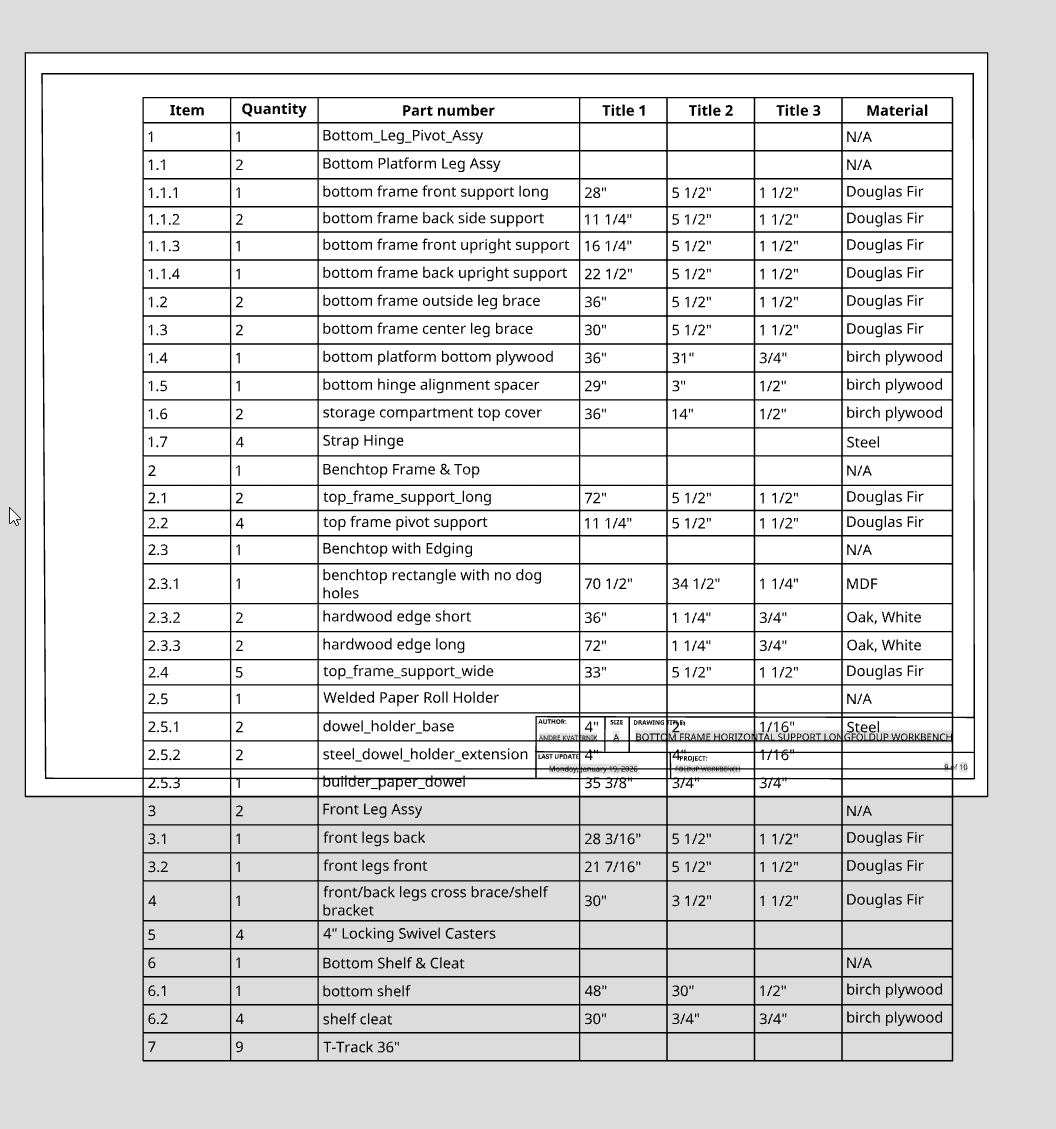
- If I create a drawing of a top level assembly, is there way to insert a BOM table that consists of just one of the subassemblies? I have a drawing of a top level assembly with mutiple sheets, each which shows the details about a subassembly. But when I go to insert a BOM table, it always inserts the BOM for the top level assembly (shown above) rather than the BOM for the subassembly on the page. Do I have to create a separate drawing for each subassembly in order for its BOM to be displayed? I was trying to have just one drawing with 10 or so sheets in it, rather than 4 or 5 drawings with 2 sheets each. Hope this makes sense.
Tagged:
0
Answers
Your only alternate option is to have you main BOM be "Top Level" only and then add the sub-BOMs (for the sub-assemblies) on other sheets.
For that you have to "insert" the sub-assembly in order to get a specific BOM:
If I pick "assembly2" in there, then I can select what BOM to use:
Note that in the view properties of the assembly view, you have to make sure it's pointing to the correct BOM as well:
Add another sheet.
Right click over where you want the split.
Right click over lower portion of BOM and move to sheet.
Locate 2nd half of BOM.
You can slit BOM more than once. Create additional sheets first or the split option does not show.
Thanks so much for that tip on the subassys - didn't pick that up in the menu dropdown.