Welcome to the Onshape forum! Ask questions and join in the discussions about everything Onshape.
First time visiting? Here are some places to start:- Looking for a certain topic? Check out the categories filter or use Search (upper right).
- Need support? Ask a question to our Community Support category.
- Please submit support tickets for bugs but you can request improvements in the Product Feedback category.
- Be respectful, on topic and if you see a problem, Flag it.
If you would like to contact our Community Manager personally, feel free to send a private message or an email.

Comments
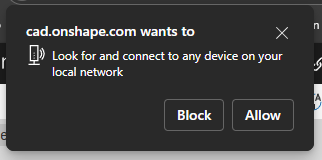
This was a recent update to Chromium based browsers (Chrome, Edge, etc.) and has nothing to do with Onshape. I'm not sure exactly what it is for, but if you block, certain things don't work. Somebody more knowledgable may have a better answer, but to be sure, it is not coming from us.
For Chrome, I could see it being necessary to find Bluetooth 3DConnexion Spacemice.
Simon Gatrall | Product Development, Engineering, Design, Onshape | Ex- IDEO, PCH, Unagi, Carbon | LinkedIn
This was something that affected some of our extensions with Chrome v142. There's some more in depth information here: https://developer.chrome.com/blog/local-network-access.
chadstoltzfus@premiercb.com
This feels like you give way too much permission to an app. Its kind of broad to say its ok to search the whole corporate network more or less. I think Onshape need to fix this as soon as possible.
Agreed this is unusual. I get that it's chrome related but what is it that onshape is doing that is triggering this? onshape is the only browser app I use that has this problem. Can you stop doing whatever it is? At least by default. Or perhaps let users know the effects of denying access.
FWIW, I don't have any bluetooth devices connected to my windows laptop. I
This feature in chrome is called Local Network Access if you want to read about it. It's triggered by Onshape trying to connect to a 3dconnexion mouse. There is nothing Onshape can do about this prompt other than make 3dconnexion support require the user to explicitly opt-in. Chromium kind of half baked this feature. There is no way to request a specific local service, there is no way to check if it exists beforehand, there is no telling the user what you are trying to access, etc etc. Also there is no way for 3dconnexion to say that onshape.com is allowed to access it's local service. A feature like local network access has been needed for a long time. It's just unfortunate that after all these years chrome pushed this which doesn't even provide full coverage, for example, web sockets aren't covered by this.
Bluetooth has nothing to do with it. 3dconnexion hosts a local server that Onshape is connecting to in order to support it.
Edit:
It looks like chromium did finally add LNA to the permissions API so it would be possible for Onshape to first check that and provide an in app warning first before resorting to the chrome prompt. However again they can't actually tell if you have the mouse without triggering that browser prompt so really all they could do is provide an in app "Would you like us to check for a 3dconnexion mouse?" prompt. https://docs.google.com/document/d/1QQkqehw8umtAgz5z0um7THx-aoU251p705FbIQjDuGs/edit?tab=t.0#heading=h.8ecj1sjc4asx
The correct approach is to do nothing by default, then when the user goes to Settings, Enable 3DConnexion Mouse Support, pop up a window saying "Your browser may ask for local network access. Grant OnShape this permission to enable 3DConnexion support.", they click "OK" on that, then trigger the permission request.
I've been hitting block, haven't noticed anything that stopped working