Welcome to the Onshape forum! Ask questions and join in the discussions about everything Onshape.
First time visiting? Here are some places to start:- Looking for a certain topic? Check out the categories filter or use Search (upper right).
- Need support? Ask a question to our Community Support category.
- Please submit support tickets for bugs but you can request improvements in the Product Feedback category.
- Be respectful, on topic and if you see a problem, Flag it.
If you would like to contact our Community Manager personally, feel free to send a private message or an email.
Extrude BoundingType Problems
 S1mon
Member Posts: 4,091 PRO
S1mon
Member Posts: 4,091 PRO
I'm working on an injection molded boss custom feature. I'm trying to get the bosses to extrude to the part with or without draft reliably. In doing so, I'm discovering weird things about UP_TO_NEXT or UP_TO_PART which are causing issues.
Here's a manual feature based version of this issue - if I use up to next or up to part, I get this weird face at the base of the boss where it's joining a complex wall. It doesn't matter if I add the draft in the feature or after, with this edge case, it always adds this surface where I don't want it. Is this a Parasolid bug?
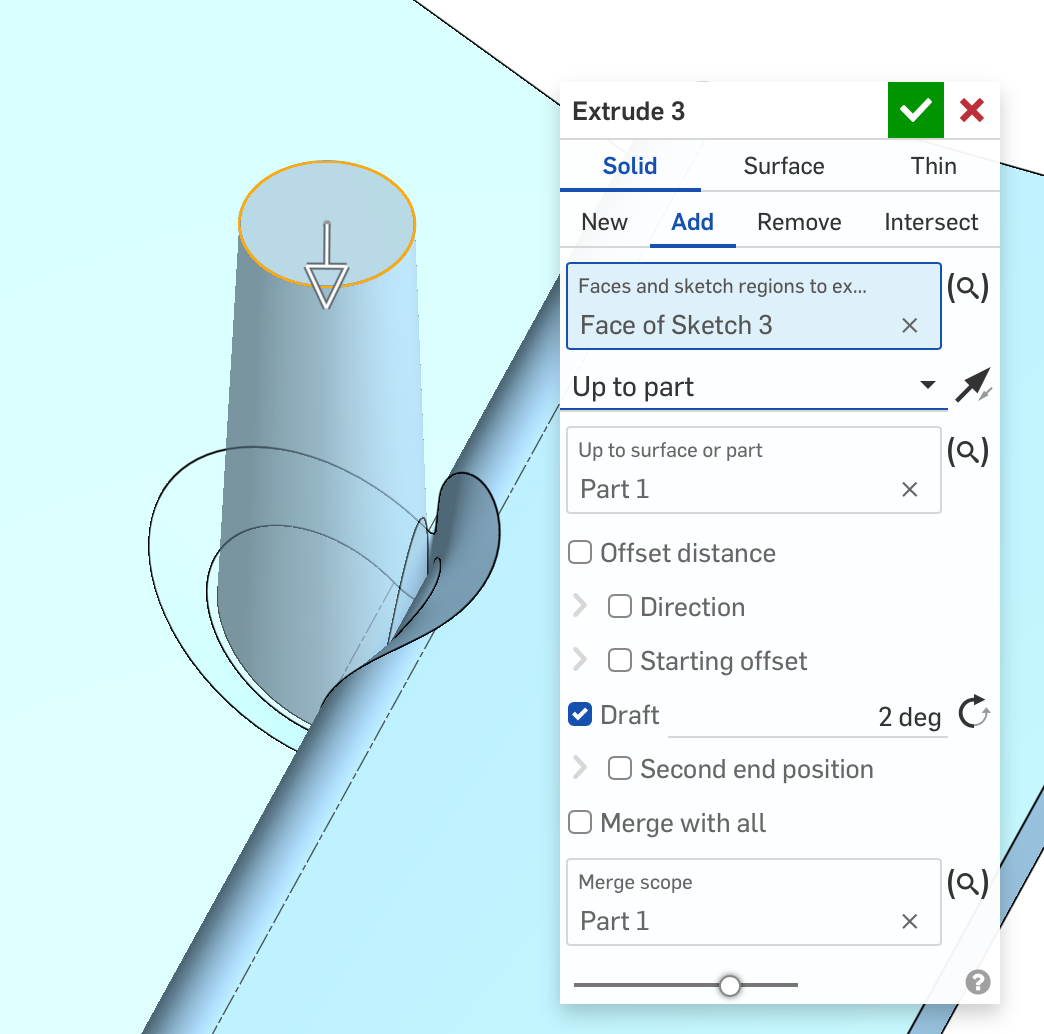
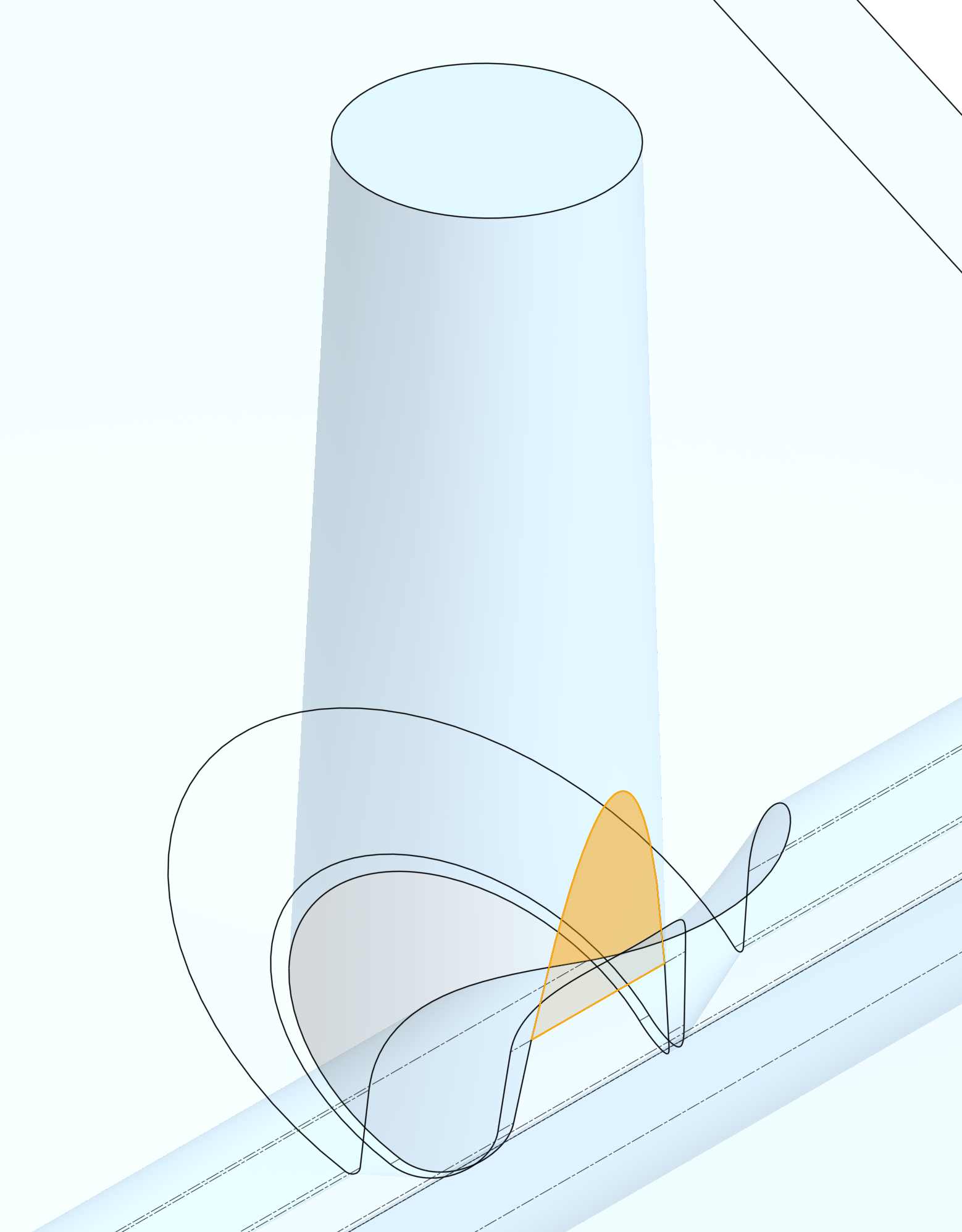
If I use Through all, it does the right thing:
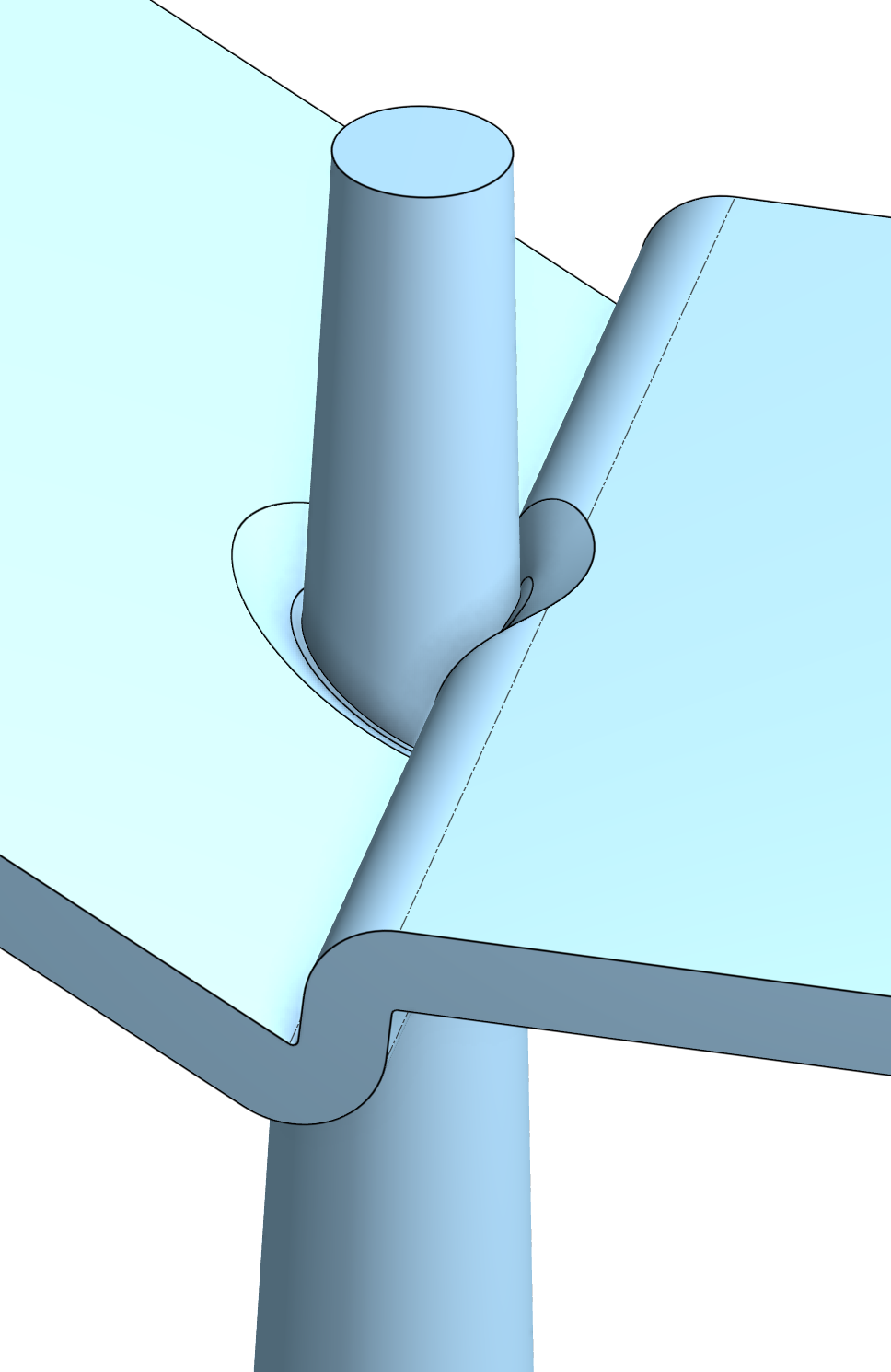
Obviously I don't want the extra bit on the outside of the part, and I can use delete face with heal to solve this, but I will need to be clever with queries to grab all the right faces, and then hope that heal doesn't do anything stupid.
I feel like I saw something similar in how some (all)? of the rib features are implemented. Is this a normal way to work? Is it more robust than up to next or up to part?
Simon Gatrall | Product Development, Engineering, Design, Onshape | Ex- IDEO, PCH, Unagi, Carbon | LinkedIn
Comments
That's definitely behavior I would've never expected…
What happens when you try the Mounting Boss featurescript? Looking at the code, specifically at the extrudeBase function, they're just using Up to Body as the end condition.
Ramon Yip | glassboard.com
@ry_gb
Very interesting. On further experimentation in regular Onshape, New vs Add both with Up to part, gives different results (besides the obvious boolean). With New, and Up to part, draft is treated differently. It seems like the most robust sequence is to extrude with add, then add draft after. I would have thought that adding draft while extruding would be better for topology challenges. It seems like the mounting boss feature is doing exactly that - so I'm really baffled.
However when I try that in Onshape CAD with test cases where the undrafted cylinder doesn't overlap a tangent connected face, it does stuff like this (leaves a defect at the base of the boss on the left in this image):
Is there something I'm missing?
Here's the setup in @NeilCooke 's Mounting boss feature for the main boss (which behaves well):
var extrudeDefinition = {Simon Gatrall | Product Development, Engineering, Design, Onshape | Ex- IDEO, PCH, Unagi, Carbon | LinkedIn
I wrote the Mounting Boss featurescript that @ry_gb mentioned.
I believe I based it on a script that Neil wrote, but added some additional options so it would be more like the version in SolidWorks.
I wrote that quite a while ago, but I do remember having issues with the up-to-next end condition, which is why I used up-to-body in the script. That seemed to be a bit more reliable.
When adding a draft to parts, I have seen it either fail or do some weird things when the drafted surface crosses over onto a new face, like what you are showing. Have you tried extruding up to part as New, with a slight offset into the part, then adding the draft, before using a boolean to join them?
@robert_morris
Sorry to misattribute that FS.
After I followed your code (or more accurately, after I told Codex to review your code and try doing it that way) I'm getting better results. The thing that really confuses me is it seems like the behavior of up_to_next when calling extrude.fs is very different in these edge cases than the user feature Extrude.
Simon Gatrall | Product Development, Engineering, Design, Onshape | Ex- IDEO, PCH, Unagi, Carbon | LinkedIn
Have you looked at the source code for the document in the user feature Extrude? I wonder if any of the inputs is different. I doubt it, but I sometimes check that to make sure I'm on the right path. It's a bit of a jumbly mess because each feature is written out onto a single line of code with lots of "try" statements and maps, but I'm sure Codex could parse through it pretty easily.
Ramon Yip | glassboard.com
Thanks. I seem to have solved these issues with opExtrude and draft. Definitely running into other fun ones with opFillet.
Thanks also to @Derek_Van_Allen_BD for the ideas around pointing an AI coding tool at a GitHub clone of the standard source. That’s been helpful for telling Codex to go review how various issues are handled by the first party features.
Simon Gatrall | Product Development, Engineering, Design, Onshape | Ex- IDEO, PCH, Unagi, Carbon | LinkedIn
It's been especially useful lately as I've been getting into more sheet metal scripts. Every function in some of those features is labeled as For Internal Onshape Use and doesn't come with a readme. I would have taken that label as an invitation anyway but it's helpful to vibe out a tester script to build my own documentation while I go grab a cup of coffee.
Derek Van Allen | Engineering Consultant | MeddlerAs an update, I want to show some of the progress I've been making on my Screw Boss feature. Almost 1700 lines of code, and I "wrote" 3 to get the include references correct.
I only have the screw boss side of this working (planing on clearance boss, gusset ribs, etc), but it basically just needs a location to start with, and some choices about screw type/style/size and the material. This drives the boss geometry (OD, ID, etc) based on industry guidelines. Much like the first part hole feature, it finds the targets per location, and does the right things - magically.
The hardest part is what is often called a "moat" - the local thinning of the boss where it joins the wall. I'm still trying to dial the method for this in, but I also managed to get a spherical end which is tangent to a fit plane (and the drafted core pin) at the moat depth. This keeps the core pin radially symmetric and improves boss strength.
If anyone has some time to help beta test, or wants to look at the code, reply or DM me.
Simon Gatrall | Product Development, Engineering, Design, Onshape | Ex- IDEO, PCH, Unagi, Carbon | LinkedIn