Welcome to the Onshape forum! Ask questions and join in the discussions about everything Onshape.
First time visiting? Here are some places to start:- Looking for a certain topic? Check out the categories filter or use Search (upper right).
- Need support? Ask a question to our Community Support category.
- Please submit support tickets for bugs but you can request improvements in the Product Feedback category.
- Be respectful, on topic and if you see a problem, Flag it.
If you would like to contact our Community Manager personally, feel free to send a private message or an email.
How to extrude a feature horizontally from an inclined surface without it following the face normal?

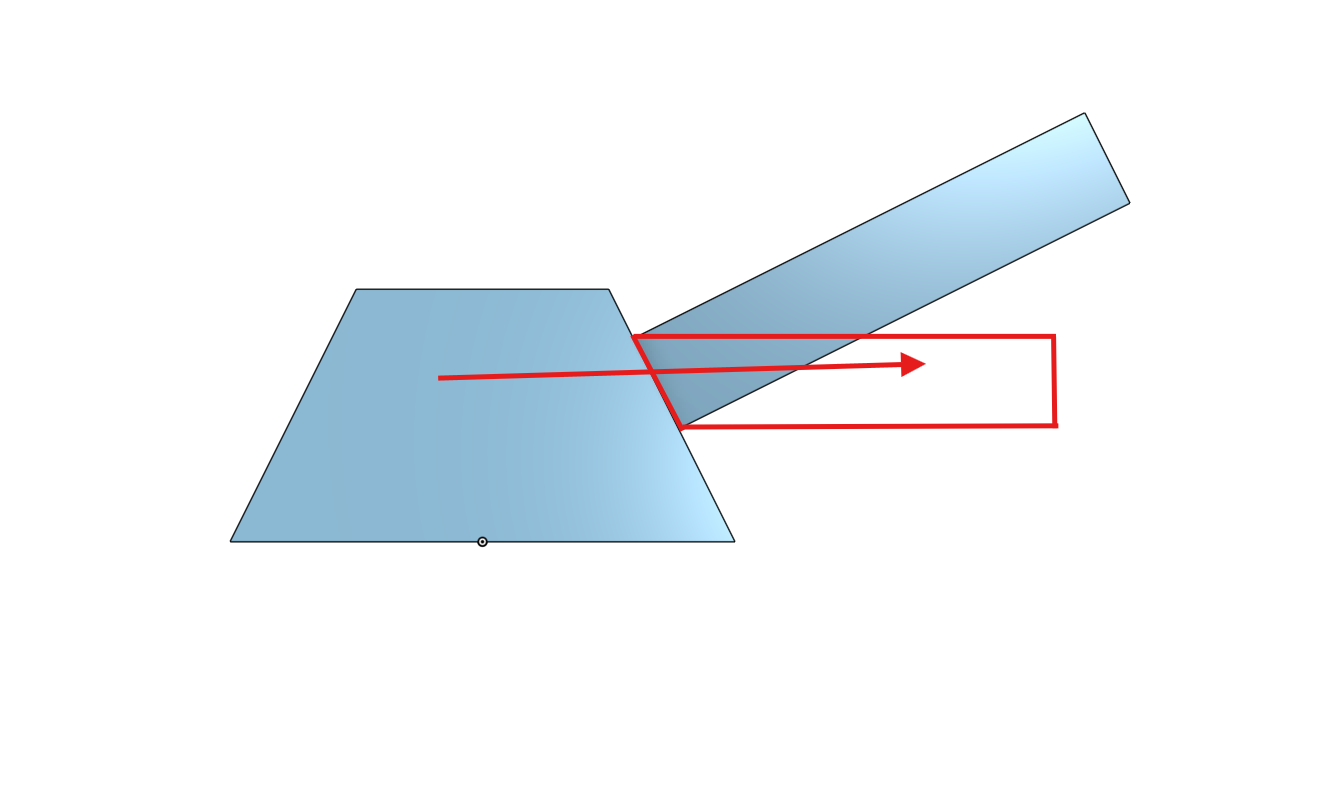
Hi everyone,
I am designing a model with an inclined (angled) surface. I want to project/extrude a feature (like a cylinder) horizontally (parallel to the Top/Global plane) starting from this angled face.Currently, when I use Loft or Extrude, the software either forces the extrusion along the face normal (90 degrees to the incline), or the shape deforms and leaves a triangular gap (sagging) where it connects to the slope.Like in SolidWorks, how do I force an extrusion to go straight horizontal from an inclined sketch plane, while automatically filling the gap between the feature and the angled wall? What is the best workaround for this in Onshape or other freeware?Thanks in advance!
Comments
-
Hello. It appears you've created the pyramid from a sketch, the center of which is on the origin. That's a good start. Since you did, you have other readily available planes (right, front) that are perpendicular to the plane of your previous sketch. Use one of those to create a new sketch for the arm projecting from the pyramid. An extrude of that sketch can be used to create the arm. The Extrude tool has selections within it to manipulate the extrude. - Scotty
0 -
Use the direction function in the extrude feature. and pick a plane perpendicular or edge in the direction you want to extrude
0
