Welcome to the Onshape forum! Ask questions and join in the discussions about everything Onshape.
First time visiting? Here are some places to start:- Looking for a certain topic? Check out the categories filter or use Search (upper right).
- Need support? Ask a question to our Community Support category.
- Please submit support tickets for bugs but you can request improvements in the Product Feedback category.
- Be respectful, on topic and if you see a problem, Flag it.
If you would like to contact our Community Manager personally, feel free to send a private message or an email.
Improvements to Onshape - December 4th, 2018


It's December already and while we may be nearing the end of the year, we are not slowing down! This update includes some features that have been very highly requested. Let's dive in.
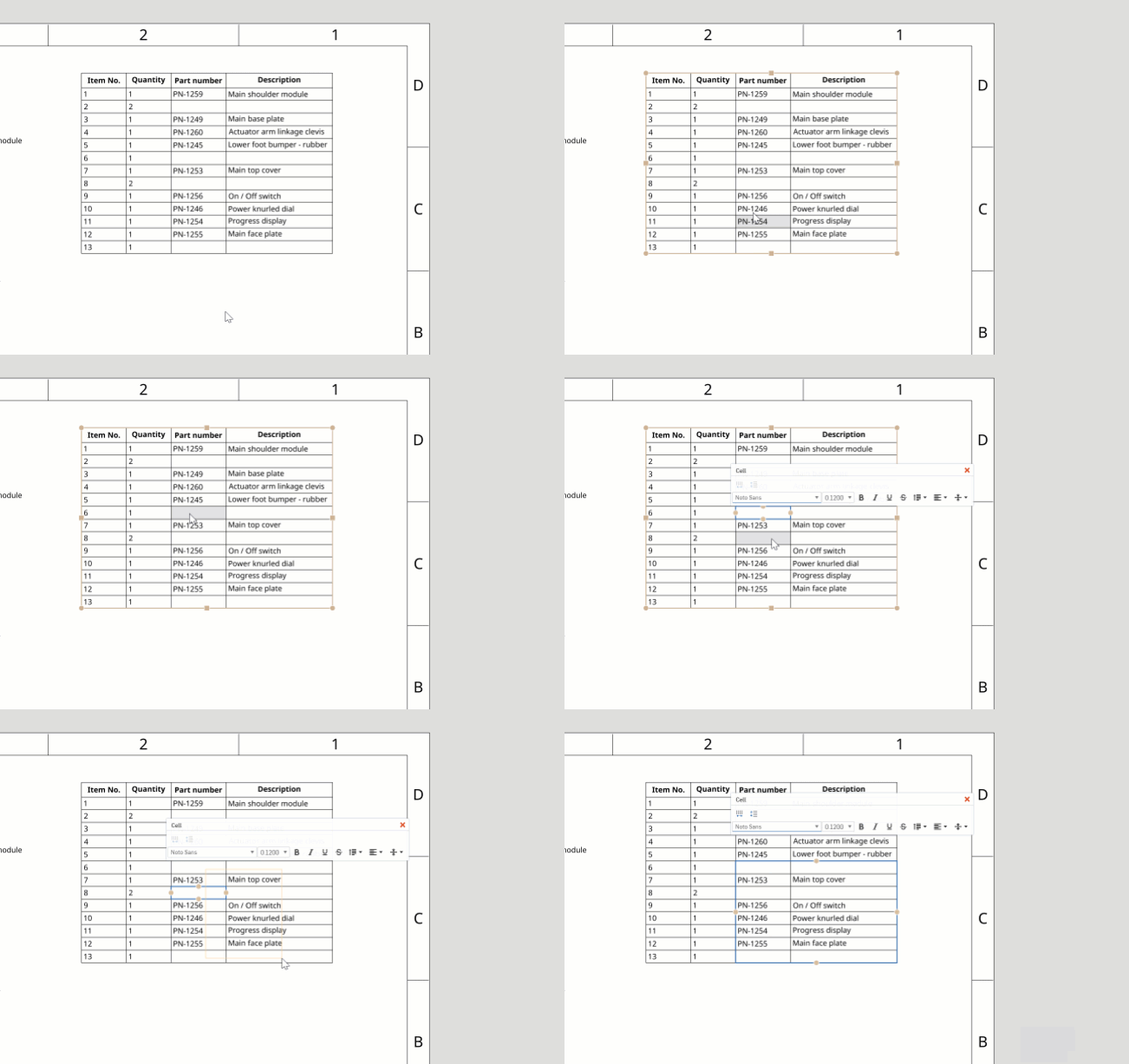
You will now see better behavior when hovering over or selecting cells in a table in Onshape Drawings.
Please take a moment to try out these new features and improvements and leave your comments below. For a detailed list of all the changes in this update, please see the changelog.
Remember: The updates listed here are now live for all users when creating new Documents and over the next few days these features will also be available in Documents created before the date of this update.
CAD IMPROVEMENTS
FEATURE LIST FOLDERS
You can now create folders in the Feature list.INSERT DISPLAY STATES INTO ONSHAPE DRAWINGS
You can now insert assembly display states into Onshape Drawings.MATE CONNECTOR IMPROVEMENTS
Mate connector and offset value visibility has been improved with this update. This improvement makes it easier to understand the mate connector orientation and offset while creating or editing a mate.IMPROVED USER INTERFACE FOR IMPORTED FILES
The user interface for imported file tabs has been improved with this update.IMPROVED TABLE BEHAVIOR IN ONSHAPE DRAWINGS
You will now see better behavior when hovering over or selecting cells in a table in Onshape Drawings.
RHINO 6 IMPORT SUPPORT
You can now import rhino files created using Rhino 6.ENTERPRISE FEATURES
ALLOW GUEST USERS TO BE GIVEN GLOBAL PERMISSIONS
Administrators of an Enterprise in Onshape can now add Guest users to Global permissions (except for the "Company administrator" permission). This is useful if you want to allow Guest users to create or approve release candidates, or manage other permissions.Please take a moment to try out these new features and improvements and leave your comments below. For a detailed list of all the changes in this update, please see the changelog.
Remember: The updates listed here are now live for all users when creating new Documents and over the next few days these features will also be available in Documents created before the date of this update.
7
Comments
-
Fantastic, thanks folks
 Owen S.
Business Systems and Configuration Controller
HWM-Water Ltd2 -
Oooh, those mate limit and offset indicators are wonderful. If you had a hand in this please accept my thanks, and possibly run around the office a bit making whooping noises
 Business Systems and Configuration Controller
HWM-Water Ltd6 -
Awesome update!
I especially like the implementation of the feature tree folders. I can see some issue with the 'delete' & 'unpack' option of the folder getting confused and someone accidentally deleting many features. I think you should have to select all the features in the folder to delete them to ensure that the wrong selection isn't chosen. Also, the difference between the words may be confusing for non-native English speakers leading to extra confusion.
Beyond that concern, many of us have been waiting for feature tree folders!3 -
These are some useful updates. Thank you Onshape team!
We wish every company would be like Onshape.5 -
I was thinking the same thing. I like having both options, but they could be named better. Maybe "Delete Folder & Contents" and "Dissolve Folder" or "Unpack Folder Contents". Nice enhancements, though.michael_mcclain said:Awesome update!
I especially like the implementation of the feature tree folders. I can see some issue with the 'delete' & 'unpack' option of the folder getting confused and someone accidentally deleting many features. I think you should have to select all the features in the folder to delete them to ensure that the wrong selection isn't chosen. Also, the difference between the words may be confusing for non-native English speakers leading to extra confusion.
Beyond that concern, many of us have been waiting for feature tree folders!0 -
Wow, Christmas came early!
All of these Improvements are great.
Thank you for Display states in drawings Now I have a reason to use them
can't wait to start using all these and especially feature folders (next up assembly folders right?)
Didn't mind the original mate connector, but this in definitely a huge improvement, I'll take it!2 -
Stoked about those feature folders!
Thanks for the mate improvement as well, that's something I encountered but didn't realize could be improved. As always - one step ahead.
Display states in drawings, another great addition to the line up. Thanks!1 -
Ok, first "can you just". Love the new mate connector info, it's hugely useful when creating a mate, but less so afterwards, as you have to find which mate we're after and show it. Perhaps from a long list of possible mates.I'd like to propose that the "J" key behavior be extended.Currently it toggles between:-show no mates / show all matesI'd like three states:-show no mates / show all mates / show all mates and their offset and limit infoI think this implementation would be intuitive and would lead users to discover the new mode without even seeing a training video.Cheers,Owen S.
Business Systems and Configuration Controller
HWM-Water Ltd4 -
Great update! Any chance you can expand the RMB options on folders? I'd love to be able to suppress an entire folder using the configuration manager, or just from a RMB option.
9 -
Regarding feature folders: can we place related features together in a folder and then use the folder to create a feature pattern? In other words, can we treat the folder of features as a single feature to create other features?2
-
@brian_brady I see where you are heading with this. Would be an interesting thing to experiment with.
Loving folders btw, now I know what config these suppressed mates are for
Too bad we can't nest folders (not so important in FS as it will be in ASM afaict)
0 -
@michael_mcclain @mahir
We appreciate the input about the naming here! Rest assured that if a user accidentally selects the wrong option, the undo button will work as expected, and all work will be preserved.Jake Rosenfeld - Modeling Team2 -
Nice update! Thanks for improving tables in drawings!
This is also very useful, thanks!- Improved hide ‘---’ from Drawing title blocks while exporting to PDF and printing
2 -
Great updates, Thankyou!!!
The folders look good, but I do like the idea of a single folder suppress and folder selection for features and configurations.
Looking forward to trying the MC improvements.
Drawing views with display states will come handy.
Also, a big thanks for the '---' removal, haven't tried it yet but hopefully, now I'll be able to have multiple properties per cell on a title block and be able to mix and match properties.2 -
Great improvements. Thanks! Display states is great news!2
-
I just realised I can now rename default features.
Did this get changed in this update?
PS: I really like the feature tree folders
0 -
The improved user interface for imported files is a nice improvement for this humble modeler for 3D printing purposes.0
-
Great update! Thanks Onshape!
Still waiting for better alignment features in drawing mode. But well done!0 -
Great improvements!!
@mbartlett21 you can change the name of a feature in the feature list and you can also set the name of the feature you are creating in the title of their formUn saludo,
Eduardo Magdalena C2i Change 2 improve ☑ ¿Por qué no organizamos una reunión online?
Partner de PTC - Onshape Averigua a quién conocemos en común2 -
Hi mbartlett21,mbartlett21 said:I just realised I can now rename default features.
Did this get changed in this update?
This has been possible since sometime in beta.Jake RamsleyDirector of Quality Engineering & Release Manager onshape.com1 -
-
Awesome feature!Thanks,
Effendi H.0 -
Great stuff and some good points how to make further improvements.
For me naming is consistent since also tab folders have 'unpack' and we have undo & history, so no work can get lost.
I like the idea of using folder to select, especially with configurations.
Display states in drawings is huge, no more making copies of assy for drawings.
Mate connector improvement is something that is so obvious, one would think it has always been there
In Finland we actually decided to have national holiday tomorrow to really test these updates (and celebrate 101 years of independence). //rami4
 -
Is there any way to get feature folders with the API?0
-
@mbartlett21 I think not yetUn saludo,
Eduardo Magdalena C2i Change 2 improve ☑ ¿Por qué no organizamos una reunión online?
Partner de PTC - Onshape Averigua a quién conocemos en común0 -
If you update an imported file, would it be possible to update the existing translated Part Studio instead of making a new one?
This would be in the case of, for example, somewhere where I imported an external part, inserted the translated part into several assemblies, but then need to update the initial part. Currently the new geometry goes into a new translated part studio and all the assembly references need to be updated and re-mated.
Of course, the answer to this may well be "that's infeasible, because a geometry-matching heuristic cannot be made good enough."Arul Suresh
PhD, Mechanical Engineering, Stanford University3 -
If to speak about assemblies geometry itself doesn't play a significant role in OS, all you may need - to repair several unique mate connectors in each assembly, where the part is used.lemon1324 said:Of course, the answer to this may well be "that's infeasible, because a geometry-matching heuristic cannot be made good enough."1 -
The Feature List folders are awesome, cleans up my long lists of features! just need folders in assemblies. The display states in drawings are great as well, will have many uses for this. The tables have come a long way, love this new update, much easier to work with now! great update.0
-
samuel_holland said:I'd love to be able to suppress an entire folder using the configuration managerThis. Configs are great but adding and removing things to them can be tedious. I've had fingers crossed for using configs to suppress an entire folder of features ever since they were announced. Just dragging a feature into a folder to have it in a configuration would be awesome.Cheers,Owen S.Business Systems and Configuration Controller
HWM-Water Ltd4 -
En este enlace podéis ver las Novedades de Onshape en español
 https://www.youtube.com/watch?v=wumON0t3Edk
Un saludo,
Eduardo Magdalena C2i Change 2 improve ☑ ¿Por qué no organizamos una reunión online?
Partner de PTC - Onshape Averigua a quién conocemos en común4



















![[Deleted User]](https://w8.vanillicon.com/89b191becbe1bfbd78efe4619fd4f554_100.png)