Welcome to the Onshape forum! Ask questions and join in the discussions about everything Onshape.
First time visiting? Here are some places to start:- Looking for a certain topic? Check out the categories filter or use Search (upper right).
- Need support? Ask a question to our Community Support category.
- Please submit support tickets for bugs but you can request improvements in the Product Feedback category.
- Be respectful, on topic and if you see a problem, Flag it.
If you would like to contact our Community Manager personally, feel free to send a private message or an email.
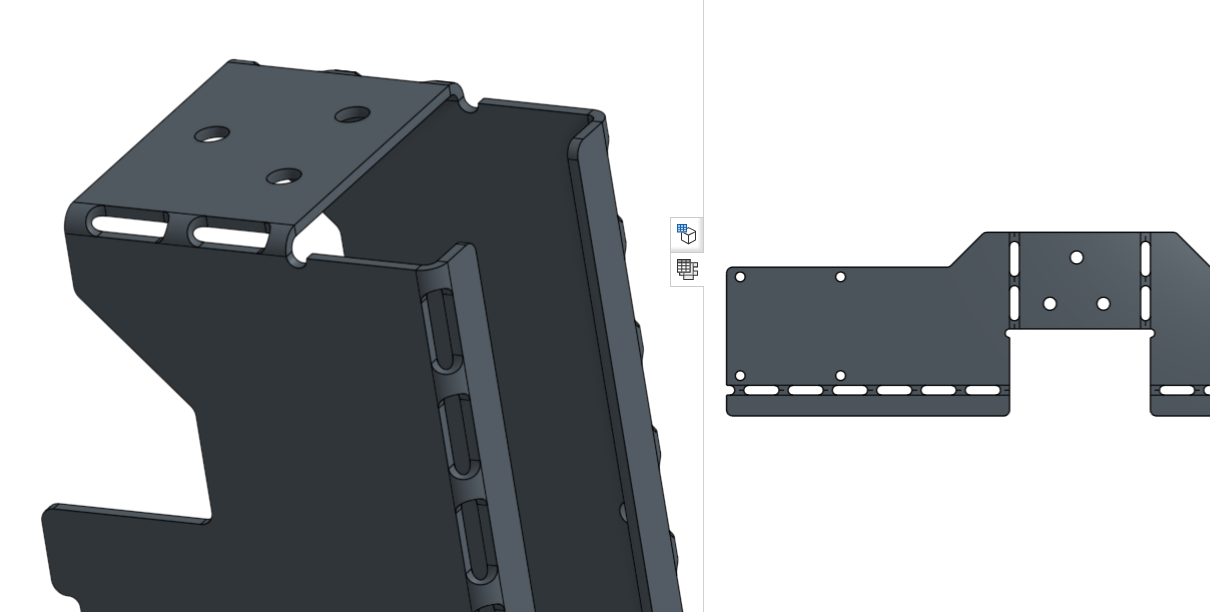
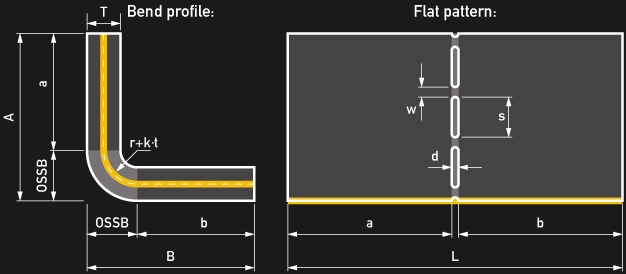
Anyone already wrote a feature script for "slotted bending" (sheet metal)?



Jonas Kühling
Best Answer
-
@MBartlett21 @lanaAwesome, thanks a lot for your input!I've come a long way in the meanwhile and had to dive a little into sparsely documented feature script terrain with regards to sheet metal functionality it seems - nonetheless, learned a ton, the feature script is done and does everything I would have hoped for.I decided to make the document public in case anybody would like to just use it, build on top of it or get inspiration for similar feature script projects. The feature is called "smPerforateBend" or "Perforate sheet metal bend" and can also be found via the link here:While I tried to comment the code where possible, it might not be the most elegant solution in every way, but it's the solution I made to work In case anyone has suggestions on how to improve the feature, I'd love to hear.Regards,
JonasTags: Sheet metal, Perforation, Slotted bending, hand bending, manual bending5
Answers
-
@MBartlett21 is the master at sheet metal FS he might be able to help if he hasn't already got one.0
-
brucebartlett said:@MBartlett21 is the master at sheet metal FS he might be able to help if he hasn't already got one.Bruce, thanks for the hint, now I'm very curious about @MBartlett21 thoughts on thisRegards,
Jonas
0 -
If any-one decides to work on it, I'd recommend making a perforate feature which generates a pattern for multiple bends and make cuts simultaneously. Doing this as a part of each bend would make the part too slow.0
-
lana said:If any-one decides to work on it, I'd recommend making a perforate feature which generates a pattern for multiple bends and make cuts simultaneously. Doing this as a part of each bend would make the part too slow.Thanks for the recommendation, you're right, I already noticed some performance issues during my manual workflow for this, which lead me to do only one single sketch on the flat pattern for all bends I'd like to be perforated within the sheet metal part.For the feature script I am wondering, if this would be easily possible, since each bend allowance in the flat view (space between the two tangential lines) may not be equally wide depending on the bend angle and potentially individual bend radius. So I thought about selecting the dashed bend centerline to determine the position and length of the perforation, and selecting one of the tangent lines to determine the actual width of this particular bend. I guess it might be difficult to select multiple centerlines and then assign a specific corresponding tangent line to each of them - in terms of, how would I set up the feature selection dialog for this problem...The alternative would be to at least be able to perforate each and every bend of one sheet metal part by just selecting the whole part itself as an input. In this case I'd need to somehow query all the bend lines within a sheet metal flat pattern kind of around the back automatically.. And their individual bend allowance width.. Not sure if this can be done?Makes me think that it might be possible to at least query the corresponding bend parameters of a selected bend centerline? In the worst cast, I'd need to calculate the bend allowance width within the feature script from the underlying k-factor, bend radius, sheet thickness etc. Would indeed be nice to only having to select the desired bend centerlines in order to perforate those selected bends.Open for any hint or code snippet or some kind of similar script that may work as a starting point
 Regards,
Jonas0 -
@jonaskuehling
Here is a quick example of navigating from bend centerline to its geometry in flat https://cad.onshape.com/documents/31a6fe1973cd763943f93411/w/e4d5dc964f4b13c1c43380f5/e/464e02f4cf38942dbd62a644
1 -
@lana Oh awesome, that's already half the job done, thank you very much! Should be pretty much a piece of cake from there, looks totally doable to me now. NICE.Will post my results when I got something working (or run into issues) Thanks a bunch again!1
-
@lana I'm working my way through step by step, but running into issues when trying to create a sketch on the flat pattern. Debugging shows, that the created plane potentially is located in the "normal" 3D space and not in the flat view area.. I couldn't yet figure out how to actually create a sketch on the flat geometry - do you have a quick hint for me what I'm missing here?What I got so far: https://cad.onshape.com/documents/674208a5595b7aabcc344693/w/7b6d29b27c6d34d9b9aad07f/e/20aa685d343bc475da4c6145Any input would be very much appreciated
0 -
There is some trickery to creating sketch on a flat. You need to give it a face of flat pattern as a reference, not just a Plane. Use
const sketch = newSketch(context, id + "cutPattern", {`sketchPlane` : faceInFlatQ});to create sketch. You could use the flattened bend face as faceInFlatQ.0 -
@jonaskuehling
When you sketch on the flat, you need to usenewSketch, rather thannewSketchOnPlane, like @lana said above.
To get the plane that you need to have you sketch coordinates relative to, use anevPlaneon the face that you passed tonewSketch
An example of sketching on the flat is in the Calculate Bounds feature by @Jake_Rosenfeld here. The flat option on it sketches a rectangle on the flat pattern and optionally highlights it usingdebug.
You could possibly look through the extrude.fs sheet metal flat code here to see how it doessmFlatOperations.0 -
@MBartlett21 @lanaAwesome, thanks a lot for your input!I've come a long way in the meanwhile and had to dive a little into sparsely documented feature script terrain with regards to sheet metal functionality it seems - nonetheless, learned a ton, the feature script is done and does everything I would have hoped for.I decided to make the document public in case anybody would like to just use it, build on top of it or get inspiration for similar feature script projects. The feature is called "smPerforateBend" or "Perforate sheet metal bend" and can also be found via the link here:While I tried to comment the code where possible, it might not be the most elegant solution in every way, but it's the solution I made to work In case anyone has suggestions on how to improve the feature, I'd love to hear.Regards,
JonasTags: Sheet metal, Perforation, Slotted bending, hand bending, manual bending5 -
@jonaskuehling
That looks great!
Couple notes:
1. @NeilCooke pointed out that in order to be robust flatFaces query needs to be wrapped into qSheetMetalFlatFilter.</code> qSheetMetalFlatFilter(qParallelPlanes(qUnion(attributeQueries), vector(0, 0, 1)), SMFlatType.YES);</pre> <br>2. The way you set up sketch ids you should not need to collect region and created bodies queries qCreatedBy(id + "sketch", EntityType.BODY) will pick up all bodies, same for regions.<br>3. I'd recommend using `id + "sketches" + unstableIdComponent(i)` for sketches in combination with <pre class="CodeBlock"><code>setExternalDisambiguation(context, id + "sketches" + unstableIdComponent(i), evaluatedCenterlines[i]);
to ensure robustness of downstream references to perforation geometry.
4. If you look at extrude feature definition, you'll see that it has whole bunch of default parameters{ endBound : BoundingType.BLIND, oppositeDirection : false, bodyType : ToolBodyType.SOLID, operationType : NewBodyOperationType.NEW, secondDirectionBound : SecondDirectionBoundingType.BLIND, secondDirectionOppositeDirection : true, hasSecondDirection : false, hasOffset: false, hasSecondDirectionOffset: false, offsetOppositeDirection: false, secondDirectionOffsetOppositeDirection: false, hasDraft: false, hasSecondDirectionDraft: false, draftPullDirection : false, secondDirectionDraftPullDirection : false, surfaceOperationType : NewSurfaceOperationType.NEW, defaultSurfaceScope : true, domain : OperationDomain.MODEL, flatOperationType : FlatOperationType.REMOVE }that you don't need to specify when calling feature programmatically.
5. You don't need to make both body and centerlines parameters of the feature. You can find the body as qOwnerBody(topFace). There is a way to find all centerlines of sheet metal body as well ( if you want to have a simple ui to perforate all bends of sheet metal bodies, handling bodies from different models should be possible as well and will be an optimization). Let me know if you are interested in this option - I'll write something for you.
1 -
Great feedback, much appreciated, I will try to implement your suggestions with regards to robustness soon.I tried finding the body via one of the selected centerlines, e.g. with qOwnerBody as you suggested, but unfortunately I didn't manage to restructure the code for finding the flatFaces without having access to the body already. topFace is currently defined after flatFaces and thus not yet available where I would put the qOwnerBody(topFace). Do you have an idea how this could be done with some elegance?And yes, at least the option to be able to just select the sheet metal body and automatically perforate all the bends at once would be very nice. I'd definitely love to see your approach on this!Btw. I ran into some restrictions when cutting on the bends in terms of being too close to the edge with a slot. From what I found it seems to be somewhat related to half of the bend allowance (= radius of my slots) as the limit. When cutting closer to the end, the extrude throws errors. I discovered this behaviour already when doing the perforations manually without the feature script. My solution for the moment is to force the tab width to be no smaller than "slotRadius+0.02mm" just to be safe, which works reliably for all standard bends with square edges like this:
 For diagonal edges, though, the minimum required distance from the centerline endpoint to regenerate properly needs to be larger:
 Which makes sense I guess, as the minimum distance between first slot and edge is effectively reduced. I might actively move the start point for the slot pattern further inside according to the length of the shortest result in "alignedEdges" in the future - for the moment manually increasing the tab width through my "force minimum tab width" option does it as well, but a fail-proof solution is of course always preferred..
I couldn't finally figure out why it is a problem being close to the edge with a cutout, though. Any thoughts on this?
0 -
Ok, not quite sure about this one.. I kind of get the point, and I think I implemented it correctly - at least it doesn't complainlana said:1. @NeilCooke pointed out that in order to be robust flatFaces query needs to be wrapped into qSheetMetalFlatFilter.</code> qSheetMetalFlatFilter(qParallelPlanes(qUnion(attributeQueries), vector(0, 0, 1)), SMFlatType.YES);</pre></div></blockquote><div>Done.</div><div><blockquote class="Quote"> <div><a rel="nofollow" href="https://forum.onshape.com/profile/lana">lana</a> said:<br></div> <div>2. The way you set up sketch ids you should not need to collect region and created bodies queries qCreatedBy(id + "sketch", EntityType.BODY) will pick up all bodies, same for regions.<br></div> </blockquote> Yeah, nice, so much cleaner. Done.<br><blockquote class="Quote"> <div><a rel="nofollow" href="https://forum.onshape.com/profile/lana">lana</a> said:<br></div> <div>3. I'd recommend using `id + "sketches" + unstableIdComponent(i)` for sketches in combination with <pre class="CodeBlock"><code>setExternalDisambiguation(context, id + "sketches" + unstableIdComponent(i), evaluatedCenterlines[i]);
to ensure robustness of downstream references to perforation geometry. Would you mind having a look if I got it right?
Ah, I see, cleaned it up a little! Thankslana said:
4. If you look at extrude feature definition, you'll see that it has whole bunch of default parameters{ endBound : BoundingType.BLIND, oppositeDirection : false, bodyType : ToolBodyType.SOLID, operationType : NewBodyOperationType.NEW, secondDirectionBound : SecondDirectionBoundingType.BLIND, secondDirectionOppositeDirection : true, hasSecondDirection : false, hasOffset: false, hasSecondDirectionOffset: false, offsetOppositeDirection: false, secondDirectionOffsetOppositeDirection: false, hasDraft: false, hasSecondDirectionDraft: false, draftPullDirection : false, secondDirectionDraftPullDirection : false, surfaceOperationType : NewSurfaceOperationType.NEW, defaultSurfaceScope : true, domain : OperationDomain.MODEL, flatOperationType : FlatOperationType.REMOVE }that you don't need to specify when calling feature programmatically.
0 -
jonaskuehling said:@MBartlett21 @lana
Awesome, thanks a lot for your input!
I've come a long way in the meanwhile and had to dive a little into sparsely documented feature script terrain with regards to sheet metal functionality it seems - nonetheless, learned a ton, the feature script is done and does everything I would have hoped for.
I decided to make the document public in case anybody would like to just use it, build on top of it or get inspiration for similar feature script projects. The feature is called "smPerforateBend" or "Perforate sheet metal bend" and can also be found via the link here:
https://cad.onshape.com/documents/674208a5595b7aabcc344693/w/7b6d29b27c6d34d9b9aad07f/e/ebc0a97c902d811562402e8d
While I tried to comment the code where possible, it might not be the most elegant solution in every way, but it's the solution I made to work In case anyone has suggestions on how to improve the feature, I'd love to hear.
Regards,
Jonas
Tags: Sheet metal, Perforation, Slotted bending, hand bending, manual bending
Cool!
Would you be able to try adding the code below to the precondition? It will generate a better error when either of the queries are emptyverifyNonemptyQuery(context, definition, "bendLines", ErrorStringEnum.CANNOT_RESOLVE_ENTITIES); verifyNonemptyQuery(context, definition, "body", ErrorStringEnum.CANNOT_RESOLVE_ENTITIES);
0 -
MBartlett21 said:
Would you be able to try adding the code below to the precondition? It will generate a better error when either of the queries are emptyverifyNonemptyQuery(context, definition, "bendLines", ErrorStringEnum.CANNOT_RESOLVE_ENTITIES); verifyNonemptyQuery(context, definition, "body", ErrorStringEnum.CANNOT_RESOLVE_ENTITIES);
Just tried, but doesn't seem to work as intended - given I placed it correctly (within the precondition)...?
0 -
@jonaskuehling
Sorry. I meant to place it directly after, just before you declaration forvar smattributes...0 -
Got it - yes, this changes the error message from "Array index 0 out of bounds." to "throw CANNOT_RESOLVE_ENTITIES" in the feature script notices, which I guess is kind of a good (better) thingNot much changed from the user perspective, though.EDIT: I was wrong - when no sheet metal body is selected, the bend lines selection field now turns red and gives a "Cannot resolve entities." error message on hover..
0 -
From the user perspective, the box that they have not selected anything into will now be highlighted in red, and hovering the feature will now say "Cannot resolve entities" instead of "Error regenerating".
Although the slightly more correct thing to do here is actually:if (evaluateQuery(context, definition.bendLines) == []) { throw regenError("Select bend lines", ["bendLines"]); }So that on hover, the errored feature reports to the user "Select bend lines" (which is the common grammar we use when there is a box that needs a selection).
@MBartlett21
I have just written a note internally to add a `verifyNonemptyQuery` overload that takes a raw string to throw instead of an ErrorStringEnum, to make it possible to do this. I think it would be useful in custom features.Jake Rosenfeld - Modeling Team1 -
Ok, cool. Should I place this into the precondition or below? And should I add the same for the body selection?Jake_Rosenfeld said:if (evaluateQuery(context, definition.bendLines) == []) { throw regenError("Select bend lines", ["bendLines"]); }0 -
Thankyou.Jake_Rosenfeld said:@MBartlett21
I have just written a note internally to add a `verifyNonemptyQuery` overload that takes a raw string to throw instead of an ErrorStringEnum, to make it possible to do this. I think it would be useful in custom features.
I often have used this function in my custom features. Could you also add an overload that does not take an error parameter and instead just throwsErrorStringEnum.CANNOT_RESOLVE_ENTITIES?
0 -
@jonaskuehling
My proposal is to use that code to replace the calls to `verifyNonemptyQuery`, and yes you would want a copy of it for each query that you want to verify.
@MBartlett21
Probably will not do that because it would be considered bad UX to throw CANNOT_RESOLVE_ENTITIES from a feature, instead of giving a specific string of what the user needs to select.Jake Rosenfeld - Modeling Team0 -
0
-
Great work! I'll look forward to trying this feature as I do occasionally use slotted bends and this should be much quicker than manually drawing the cuts.0
-
@jonaskuehling
External disambiguation is exactly the way I'd expect it to be. I don't think you need sketchIds and sketches arrays any longer either, you can use a local variable inside the loop. It might be easier to read if you setconst sketchGroupId = id + "sketch"
outside of the loop and use it everywhere.
I'll need to investigate the failure close to bend end. If you can share an example of such failure with me, it'll be great.
Here I've improved flat face query by wrapping it into qSheetMetalFlatFilter() and written allModelCenterlineEdges()
0 -
Absolutely, thanks for the hint, just cleaned that up.lana said:I don't think you need sketchIds and sketches arrays any longer either, you can use a local variable inside the loop. It might be easier to read if you setconst sketchGroupId = id + "sketch"
outside of the loop and use it everywhere.
I've created an edge case to demonstrate the failure behavior - please have a look at the newly created Part Studio called "Edge case failure demonstration" in my feature script document.lana said:I'll need to investigate the failure close to bend end. If you can share an example of such failure with me, it'll be great.
Awesome, thanks a lot for this one. I just tried to briefly implement that into my script, but was running into some trouble there.. Guess I need to invest a few more focussed minutes to figure that out properlylana said:Here I've improved flat face query by wrapping it into qSheetMetalFlatFilter() and written allModelCenterlineEdges() 0
0 -
I don't think this was the failure you've meant

0 -
Pardon, I accidentially broke my own demo...Please try again, should look like this now
 0
0 -
lanalana said:@jonaskuehling
External disambiguation is exactly the way I'd expect it to be. I don't think you need sketchIds and sketches arrays any longer either, you can use a local variable inside the loop. It might be easier to read if you setconst sketchGroupId = id + "sketch"
outside of the loop and use it everywhere.
I'll need to investigate the failure close to bend end. If you can share an example of such failure with me, it'll be great.
Here I've improved flat face query by wrapping it into qSheetMetalFlatFilter() and written allModelCenterlineEdges()
For the allModelCenterlineEdges() function.... When I'm using it to get the centerlines of a body like in the below image, it's giving me the the bendlines for all the other bodies as well.. I'm trying to use your function for a script that I'm writing so I'm hoping to get help on how to modify the function so that it gives me just the centerlines in the actual body that I select.. Thanks in advance
0 -
Hello, this is great feature. I do not understand feature script jet that much, but, I would like ask, if I am doing something wrong. Feature works when i make sheet metal with extrude, but thicken or convert doesn't make slots (can't regenerate properly). Am I missing something or it just work only with extruded sheet metal model? And I don't know, what should I set in Perforation grade.
Thanks:)
0 -
@karel_works this featurescript was written in a much older verison of Onshape and has some oddities to it that you're running into that I also ran into prompting me to make a more modern attempt at a perforated sheet metal bending script. The way my new one works should cover any method of sheet metal generation since it uses the same framework as the Modify Joint internal feature from Onshape. Try it out and let me know if it works for you or if you run into any bug cases that need fixed and I can address them.
1







