Welcome to the Onshape forum! Ask questions and join in the discussions about everything Onshape.
First time visiting? Here are some places to start:- Looking for a certain topic? Check out the categories filter or use Search (upper right).
- Need support? Ask a question to our Community Support category.
- Please submit support tickets for bugs but you can request improvements in the Product Feedback category.
- Be respectful, on topic and if you see a problem, Flag it.
If you would like to contact our Community Manager personally, feel free to send a private message or an email.
Improvements to Onshape - June 24th, 2020

cody_armstrong
Moderator, Onshape Employees, Developers, csevp Posts: 228 
We are excited to bring you our second update this month. This update focuses on new features and usability improvements in both assemblies and drawings. Let's dig in.


Please take a moment to try out these new features and improvements and leave your comments below. For a detailed list of all the changes in this update, please see the changelog.
CAD IMPROVEMENTS
SHOW MATES MODE
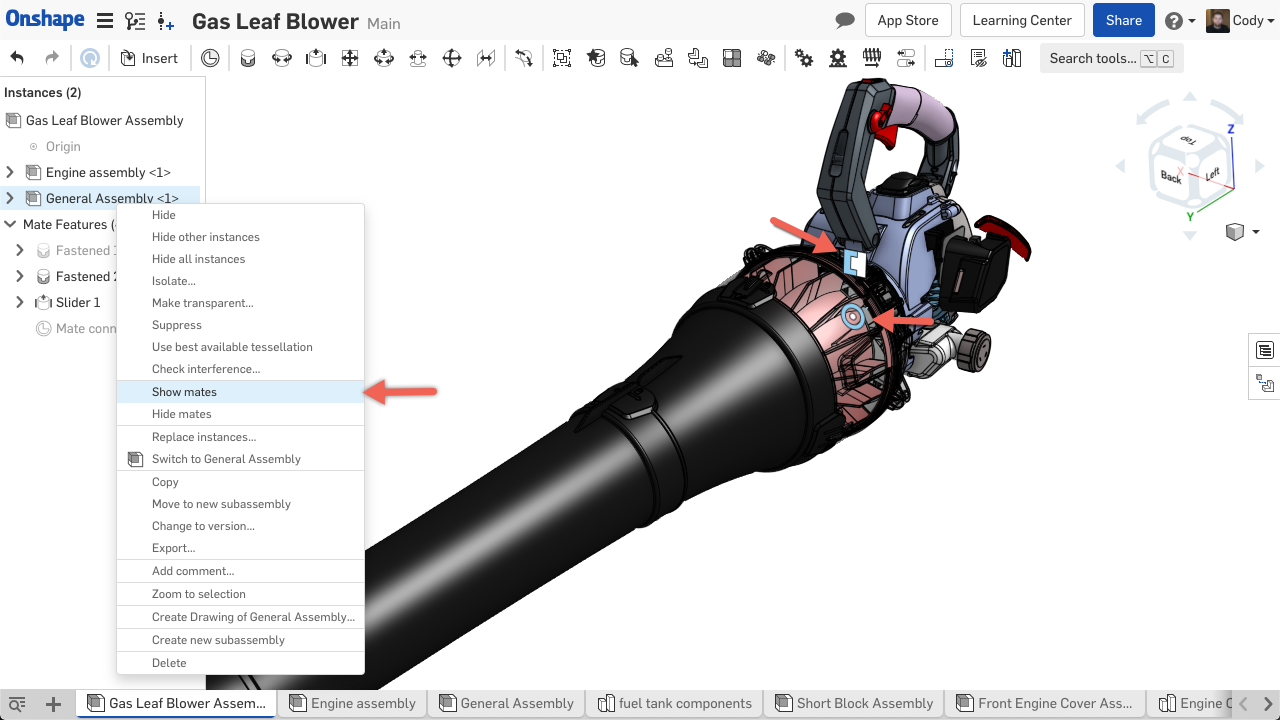
You will find a new "Show Mates Mode" feature in the assembly toolbar. This new mode allows you to mouse over parts in the assembly and dynamically see the mates highlight.SHOW MATES IMPROVEMENT
Now, when right-clicking a subassembly and choosing the option to "Show mates" you will only see the mates that constrain the subassembly to the top-level. In the past, all the mates within the subassembly would also be shown.LARGE ASSEMBLY PERFORMANCE IMPROVEMENTS
Improvements have been made to the assembly architecture in Onshape to improve performance of large assemblies. These improvements will result in faster load times and less memory consumption when working with large assemblies.DRAFT ANALYSIS IMPROVEMENTS
Improvements have been made to the Draft Analysis feature to better illustrate positive and negative degrees of draft.VIEW CUBE IMPROVEMENTS
Clicking the arrows around the view cube now rotates the model in 15 degree increments. Previously, each click rotated the model 45 degrees. You can also now hold down the "Shift" key when clicking the arrows around the view cube to make precise 5 degree movements as opposed to the default 15 degree movements. You can use the keyboard shortcut "Shift" + arrow keys to rotate in 5 degree increments. This can be especially useful when trying to get just the right angle for a Named view.STANDARD CONTENT IMPROVEMENTS
ISO Standard 8734 Parallel Pins have been added to the library of Onshape Standard Content.SHEETS FLYOUT IMPROVEMENTS
The Sheet Flyout in Onshape Drawings now displays Part Number, Version or Revision, and State of the sheet reference.CREATE PROJECTED VIEW REFERENCING SECTION VIEW
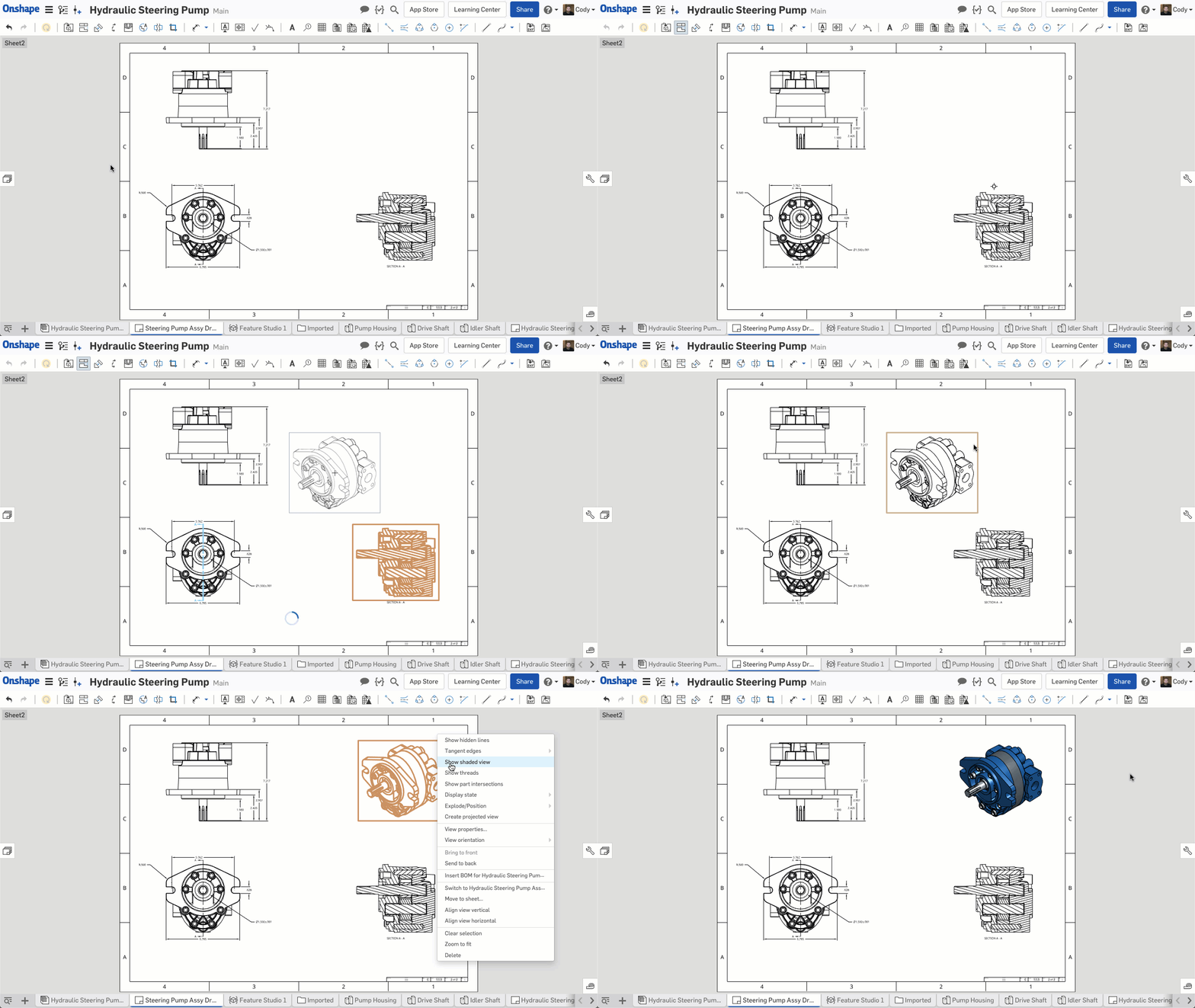
You can now create a projected view that references a section view. The projected view is not sectioned.SHOW SKETCH POINTS IN ONSHAPE DRAWINGS
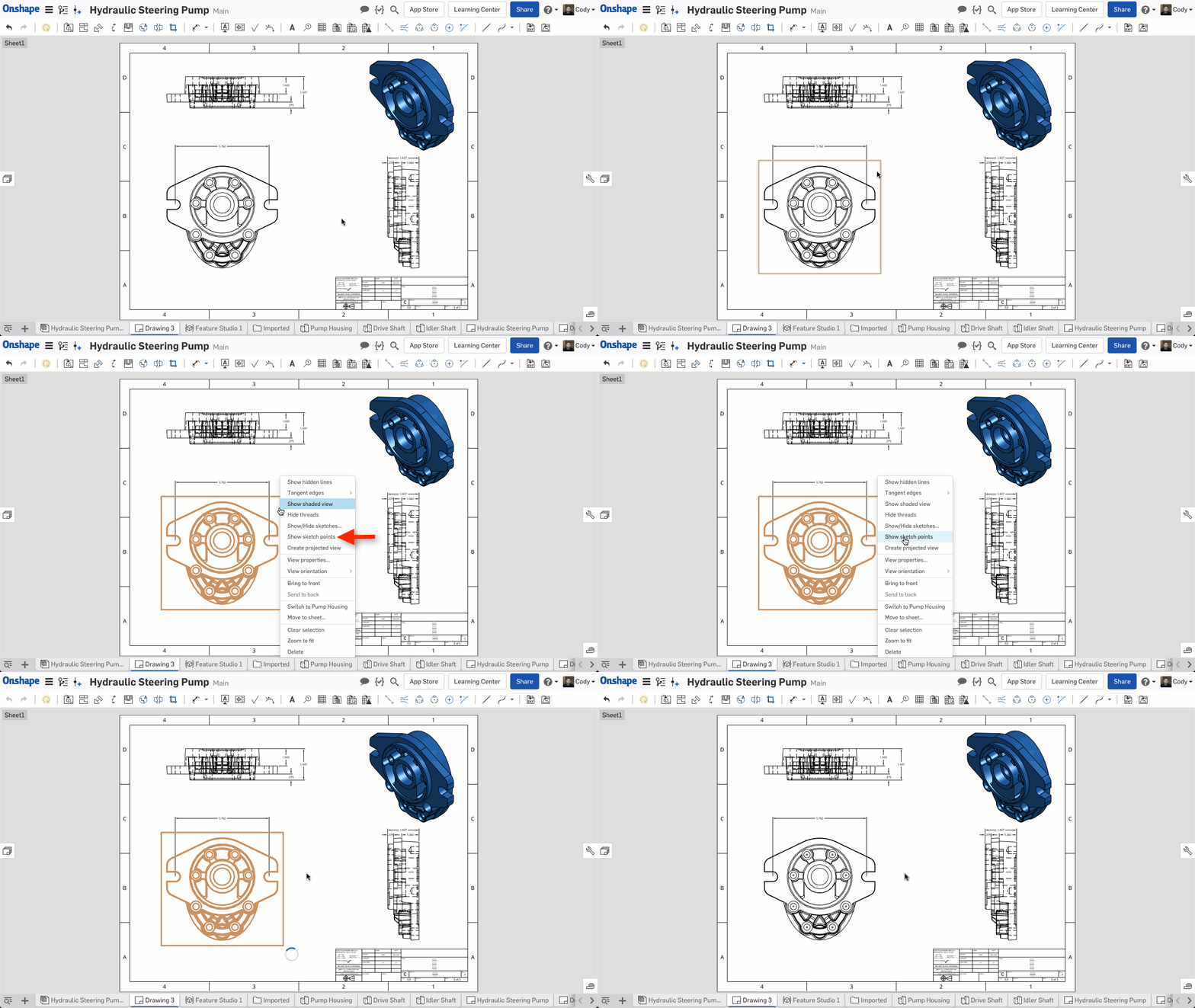
You can now show sketch points in a drawing view in Onshape. Simply right-click a view with a sketch showing and you will see the option to "Show sketch points." You can also right-click the view and "Hide sketch points." You can control how the sketch points are displayed and their size in the Drawing properties flyout, under "Construction geometry."CONDITIONAL VISIBILITY OF ARRAY PARAMETERS IN FEATURESCRIPT
You can now control the visibility of parameters within an array parameter with logic. This means it is now possible to create custom features with array parameters that are only shown to the user when certain conditions are met.Please take a moment to try out these new features and improvements and leave your comments below. For a detailed list of all the changes in this update, please see the changelog.
Remember: The updates listed here are now live for all users when creating new Documents and over the next few days these features will also be available in Documents created before the date of this update.
4
Comments
-
Sweet, show mates and show only assembly mates! Can't wait to see if this helps troubleshoot assblies. That was always a royal pain.
Logical feature parameters, show sketch points in drawings.. Nice
2 -
Alright! Mate improvements. I use the show all mates, then find the top level mate I'm looking for, then "hide other mates" on a daily basis. Looking forward to using this change. Also the Mate View Mode? I'll use that everyday.Always happy to see more standard content to. Saves me from making my own and building own ISO/ANSI/... references.Great!1
-
Thanks, this FeatureScript improvement looks great.
Un saludo,
Eduardo Magdalena C2i Change 2 improve ☑ ¿Por qué no organizamos una reunión online?
Partner de PTC - Onshape Averigua a quién conocemos en común1 -
Fantastic! Thank you Onshape team!Could this new feature script ability allow one to make a feature where the suppression is controlled by logic? @cody_armstrong1
-
I like the projected view from a x-sectioned view. I couldn't do that before and thought it was me

Good Job!1 -
Show mates & Show mates mode, View Cube & Sheets Flyout are very helpful to us. Thank you!1
-
And draft view improvements - excellent!
www.accuratepattern.com4 -
I was just daydreaming wistfully the other day about conditional visibility in Array parameters. Awesome!3
-
Nice that you starting to pay attention to assemblies and mates. Hope on the farther progress in this, especially in mate regeneration stability for multilevel assemblies.
2 -
nice updates! Would love aligment in drawings (like in ppt, ilustrator, corel, etc) and also export a named view to other documents parts studio3
-
Onshape makes CAD greater every 3 weeks!#idontwanttouseoldcadsystemever8
-
Wow, great improvements with the Mate diagnosis tools. Also, sketch points in drawings!2
-
Un saludo,
Eduardo Magdalena C2i Change 2 improve ☑ ¿Por qué no organizamos una reunión online?
Partner de PTC - Onshape Averigua a quién conocemos en común2 -
All wonderful updates!! Keep um comin'! 0
-
Yes! Thanks for the improved panning!0
-
Awesome work! Been waiting for this one, show mates improvement will make working with assemblies much, much, easier. No longer will we have to do the time-consuming task of showing all then search sub assy to hide unwanted mates.0
-
Yes super excited by the show mates. Works perfectly. THANKYOU. Just about every time I use assemblies I had wished for this.
But... now I have another wish which I constantly look for and that is an assembly search tool. 2
2 -
Very good - thank you 0
-
Some very nice improvements in this release.
That said, the "View Cube" movement is better than it was, and somewhat okay... but not exactly what I was looking for when I asked for the ability to adjust the views in micro steps.
It's limited to using the XYZ cube coordinate system to make the movements, as opposed to "screen" position. For tweaking a view for exploded views, often times you really want to be able to tweak the angles to get a better view of the objects and the exploded parts, with a better perspective. You can't do that with 5° increments of the XYZ coordinate system. You need to be able to do it to the screen position.
0 -
@don_williams909 - I may be wrong, but it does look to me like it's rotating around the cube center (aka screen center). For exploded view rotation, I usually get it roughly where I want it on screen, then right-click an edge and select "Align view with vertical axis" to straighten it up.
Senior Director, Technical Services, EMEA2 -
NeilCooke said:@don_williams909 - I may be wrong, but it does look to me like it's rotating around the cube center (aka screen center). For exploded view rotation, I usually get it roughly where I want it on screen, then right-click an edge and select "Align view with vertical axis" to straighten it up.
Yes, I know this, but I would like to be able to save some views that are precise rotations of existing views that I create. You can't do that with this setup.See your pals at PTC/Creo...0












 https://youtu.be/L4kKHP_CmZo



